In version 3.1, we focused on three key areas: GrowthBook is now easier to use with Auto Fact Tables, more powerful with Impact Analysis, and faster thanks to deep optimizations made under the hood. In addition to these highlights, we've introduced several other exciting features and enhancements. Read on to discover everything new in this release.
Auto Fact Tables UI showing one-click generation of fact tables from GA4, Segment, RudderStack, or Amplitude event data
Fact Tables are the new and preferred way to define metrics within GrowthBook, but creating them for all of your analytics events can be a tedious process. With Auto Fact Tables, GrowthBook can now auto-generate these for you with the click of a button! Once these fact tables are created, you can easily define a whole library of metrics on top of them without needing to write any SQL.
Auto Fact Tables are supported by any SQL data source in GrowthBook that is being populated by Google Analytics 4, Segment, Rudderstack, or Amplitude event trackers.
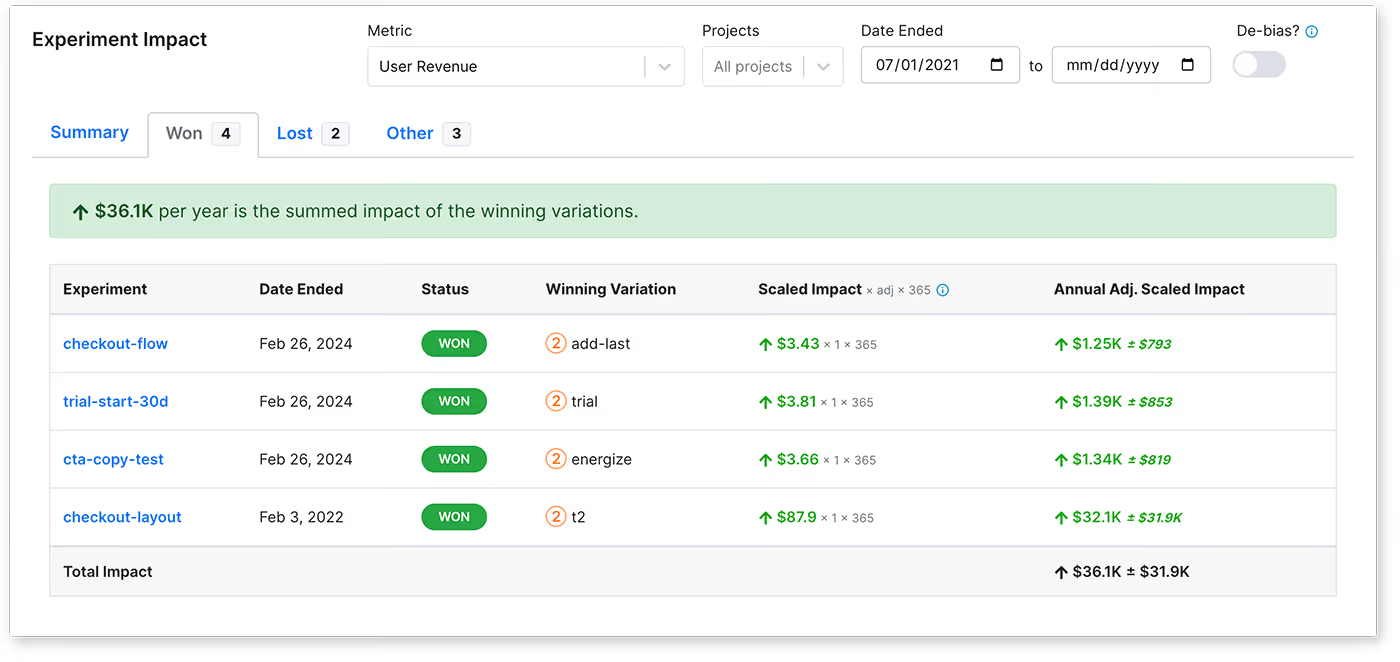
Impact Analysis dashboard showing cumulative experiment impact on revenue filtered by project and quarter
You can now view the cumulative impact of multiple experiments on your metrics. For example, let’s say you ran 50 experiments last quarter. You can now view the total combined impact those experiments had on your revenue. You can also filter by project to see the impact each team’s experiments had in isolation.
This Impact Analysis is a great way to demonstrate the value of experimentation to leadership. It highlights not only your wins, but also all of the money saved by NOT shipping something that was worse for your users.
Impact Analysis is available on the Management → Dashboard page and requires a valid Enterprise license.
New REST endpoints for projects, environments, and SDK connections
You can now programmatically create projects, environments, and SDK Connections via the REST API. This is especially useful for those who want to integrate GrowthBook deeply into their CI/CD pipelines.
For example, whenever a PR is opened, create an ephemeral Environment for it, along with a dedicated SDK Connection. Now, every PR can have its own set of feature flag rules that can get cleaned up automatically when the PR is closed.
We’ve made significant behind-the-scenes improvements to deliver a faster, more responsive experience when using GrowthBook. These changes include reducing network calls, optimizing database queries, caching frequently accessed data, and more.
These improvements are most noticeable for large enterprises with hundreds of users and thousands of experiments. We have a lot more planned here in the future, so stay tuned!
Advanced search filter syntax
Searching within GrowthBook just got a lot more powerful. Here are some example searches you can use now for experiments:
Large enterprises that have enabled GrowthBook’s “Multi-Org Mode” now have a new option for user provisioning.
Previously, all users had to be manually invited to the relevant organizations within GrowthBook. This was very tedious to maintain at scale.
Now, you can let users self-select organizations during sign-up. When a user authenticates via SSO and visits GrowthBook for the very first time, they will be shown a list of all organizations and can pick one or more to join. After joining, they can easily switch between organizations and join additional ones at any time.
Of course, this behavior is completely customizable. Each organization can decide if it wants to enable auto-joining or not. If disabled, users can still self-select the organization, but they will be blocked from joining until an administrator approves their request.