

Build vs Buy: Should You Build Your Own Feature Flag Tool?
.avif)
When it comes to feature flagging, it’s easy to build a simple server-side, on/off feature flagging system, but that simple project can quickly grow into a full platform as your requirement list grows. Use this checklist to assess your mid-term needs.
What will you need in the next two years?
- Number of developers
- Number of features requiring flags per release
- Number of SDKs required
- Flag controls: simple on/off or the ability to control feature behavior through configs
- Ability to target users by browser, device, location, plan, etc
- Gradual feature roll-outs
- Automatic roll-backs if key metrics dip
- Audit logs - know who changed a feature and when
- Governance - ensure all new features/updates are reviewed and approved
- Debugging tools
- Integrations with other tools
- Flag clean-up capabilities
- Support for A/B testing
- Uptime/reliability requirements
- Performance requirements
- Time to market
- Better uses of your dev team’s time
Engineers are builders by nature. In fact, a DORA report found that 89% of organizations use an internal developer tool. So it’s not surprising that when you’re faced with the decision to build or buy a feature flag tool, you’ll err on the side of building one.
For some teams, it makes sense. But for others, it might not be the right choice.
For instance, Dropbox’s engineering team did the exact thing you’re considering right now. They built an in-house feature flagging tool, and for years, it worked. But as the product grew, so did the tools, and eventually they had six separate systems with overlapping roles. Even simple experimental analysis took days because of the time it took to wrangle the system.
If you’ve ever added a config toggle or database flag and watched it become the infrastructure your team relies on, you’ll recognize the problem here.
In this article, we’ll dig into why engineering teams build or buy a feature flagging tool so that you can decide which direction is the right one for you.
Why it might make sense to build your own feature flagging tool
Let’s face it. It’s a perfectly reasonable decision to build your own feature flagging system. DORA found that teams that use their own internal platforms tend to show 8% higher individual productivity and 10% higher performance. It makes sense because you’ve literally built it for yourself.
But beyond that, there are other reasons why it’s the right choice:
You get full control over your architecture
When you build your own flagging tool, you own every decision related to it. How it’s built, who can access and use it, and even how you set the governance system up. Every layer in the tool maps to what you need, not to what a vendor recommends.
For example, if your deployment pipeline manages environment changes/promotions, then your flagging system can hook into it. You’re not forced to work around a tool you’ve bought because a home grown system is purpose-built for your infrastructure.
You can integrate it with your existing stack
Even in our experience, we’ve seen that many teams have a very specific tech stack. But if it doesn't integrate with your stack, it takes significant time to build a workaround.
For example, think about the difference between importing a library versus using an external API. The former lives within your existing process, while the latter adds a dependency you can’t always control.
A homegrown flag system works like the library. It deploys alongside your services but also shares the same points of failure as your application code. If something goes wrong, you’re debugging one system instead of two.
Your use cases are fairly simple
Not every engineering team needs advanced targeting or multi-environment management. They’re just looking for a simple Boolean toggle to flip features on or off. In fact, a Reddit user built one using AWS Lambda to get and set feature flag states and flip flags.
Here are a few use cases where building a tool might be the right call:
- Fewer than 20 flags across a single service
- Boolean on/off toggles, which are server-side only
- One language with one deployment target only
- Engineers are the only ones changing the flag state
In these cases, it doesn’t make sense to buy a full-blown platform as it adds more complexity.
You don’t have to depend on another vendor
Vendor lock-in is one of the biggest problems in the SaaS industry. And it’s not any different in the feature flagging space either. Platforms that cater to mid-market and enterprise companies are known to be opaque with their pricing policies. In fact, several Reddit threads document cases where vendors changed their pricing models with little warning. In one example, a feature flagging vendor moved from user-based to per-service-connection pricing, and customers saw costs jump 5X because of their Kubernetes pod count rather than any change in actual usage.
When you build your own platform, you control its uptime and the costs of building and maintaining it. The costs increase only when your team decides it needs to.
You might prefer building in general
Sometimes you might just prefer building something for reasons beyond “investing” in your growth. Too often, buyers have a mental block when it comes to shopping for a new tool, especially with the number of options with limited differentiation these days and the ability to use AI coding assistants.
If it’s easier and faster just to build the tool, it makes sense to do so. In fact, even behemoths like Google and Meta built their own feature flagging systems. But it comes with a caveat. These companies also dedicated hundreds of engineers to the task and treat the tool internally as another product rather than another project. It’s part of the reason it continues to work for them.
In other cases, if the vendor’s not responsive or doesn’t improve the platform regularly, you’d be right to switch or build your own tool.
Where do homegrown feature flagging systems start breaking down?
Here are a few reasons why it might make sense to buy a feature flagging platform instead:
1. Ballooning costs of building a feature flag tool
The more you use feature flags, the more likely you are to be running your app on it. When your feature flag system goes down, or something breaks, your team is responsible for carrying the SLAs and on-call rotations associated with it. And many teams realize this before building their own tools.
For instance, Upstart, a lending marketplace, had evaluated this option. It realized that it would’ve required four engineers in the first year and at least two after that. Those engineers “would be building tests instead of building a product.”
The math looks like this, if we assume the salary of a junior developer in the United States:
- Year 1: 4 engineers × $87,519 = $350,076
- Year 2+: 2 engineers × $87,519 = $175,038 per year
If you’re going with a more experienced team, the costs can easily reach more than $500,000 just in salaries. And this doesn’t account for additional costs like:
- Server costs and maintenance
- Costs associated with an outage
- Time lost building a platform
- Technical debt and flag debt
- Security and compliance incidents
- Building advanced features (audit logs, support for multiple languages)
Every engineer you dedicate to this project is an engineer who could’ve been improving your core product or service. The long-term costs may not be worth the hassle, especially with the options available today.
Even developers know this. In a Hacker News thread, one user estimated that a $100K engineering salary balloons to $400K fully loaded, meaning each engineer needs to generate at least $600K in annual value to justify the investment. At the same time, others pointed out that maintenance costs for internal tooling almost always exceed the initial build. And this is especially true once you factor in on-call rotations, documentation, and onboarding new team members onto a system that they’re not familiar with.
2. Targeting and rollout complexity
It might take 30 minutes to build a Boolean flag in a config file. But if your product manager asks you to roll out a new feature to 10% of enterprise customers, the config file can’t do that.
You need the ability to run percentage rollouts using deterministic hashing so that your users see the same variant every time they visit the app. This is usually the moment engineering teams realize that their config system won’t cut it for this purpose. In fact, a 2020 study confirmed that although feature flags and configurations are similar on the surface, they are used for different purposes.
A config value controls how your app behaves. A feature flag controls who sees what, and when. Once you need targeting, rollout logic, and per-user evaluation, you’ve outgrown your config system and you’re building something new whether you planned to or not. And the config toggle becomes an evaluation engine which needs ongoing maintenance in the long run.
Note: GrowthBook includes advanced targeting and rollout capabilities that enable granular targeting and deterministic hashing. It’s available on every plan, including the free tier.
3. SDK maintenance across multiple languages
Your first flag evaluation is probably in one language. But products grow, and within months, you’ll add a few more languages, especially if you’re launching mobile apps with it.
You need to ensure users get a consistent experience regardless of the device they use. If your Python SDK evaluates a targeting rule differently from the React SDK, users see different behavior depending on the device they’re using. It’ll be hard to debug in those cases and pull your team away from working on your actual product.
And engineering teams like Treatwell’s marketplace have already faced this. Because they integrate through Java, React, Swift, and Kotlin SDKs, building a homegrown system would mean building and maintaining four separate SDKs with four separate test suites, all while building their own product. On the flipside, GrowthBook ships and maintains 24+ SDKs across every major runtime, so SDK maintenance was moot once they switched to it.
So, if you’re using multiple languages and a feature flagging platform supports it, consider paying for one.
4. Governance, compliance, and access control
These days engineering teams are shipping features a lot faster and updating features even faster than that. When you’re running a development team that’s responsible for all these changes, you need new levels of governance to keep up with their pace. For instance, you need review processes before changes go live, especially when you’re modifying features running behind a feature flag. And you need a log of what changed and when to maintain quality and to pinpoint when new bugs may have been introduced. As your flag tool matures and becomes an important part of your infrastructure, your team will have to keep building more. For example:
- If a product manager needs to toggle a flag, you need a self-service UI.
- If something breaks in production, you need an audit log.
- If a regulated customer asks about change management, you need approval workflows in place.
- If your security team asks who can change the production state, you need role-based access control.
Also, if you’re handling sensitive data, you also need to ensure you don’t send data to a third-party tool. If you’re using a platform that comes with a self-hosting option, you can avoid this hassle.
“The fact that we could retain ownership of our data [with Growthbook] was very, very important. We have data from children stored in our servers, and that's something that we have to really protect.”
— John Resig, Chief Software Architect, Khan Academy
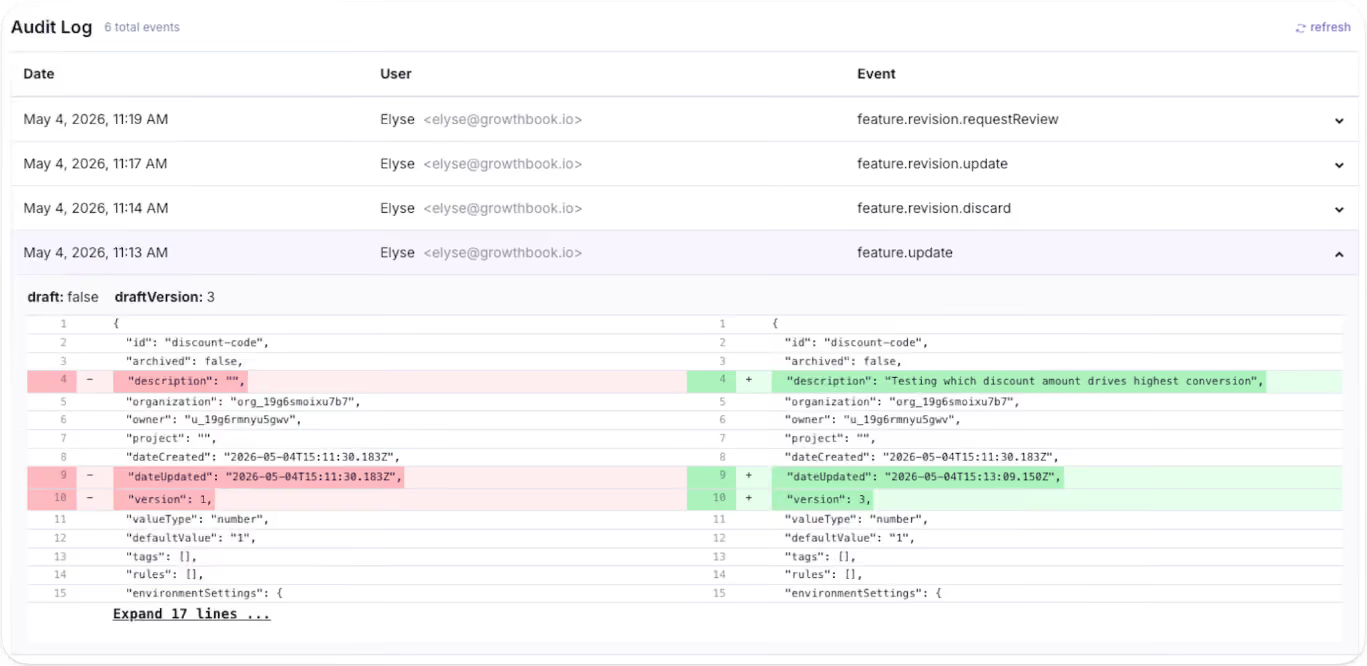
The question is: is it worth the hassle to continue building the tool? In most cases, the answer becomes clear once you add up the features you’d need to build and maintain just to keep pace with your team's growth.
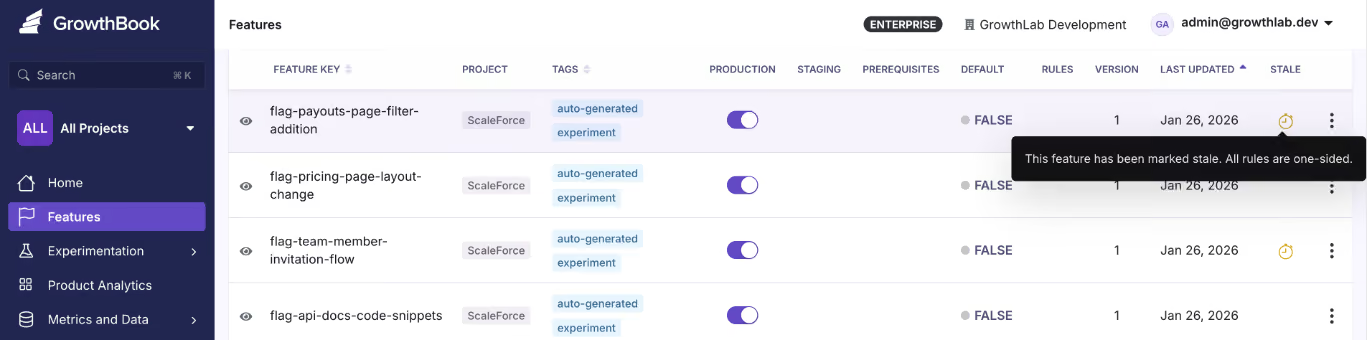
5. Stale flag and technical debt
Stale flags clutter your codebase and make it dangerous to modify. That’s because every flag that stays beyond its expiry date is a conditional branch your team might see in a remediation plan one day. If you remove the wrong one, you could also break production.
In short: it’s too many what-ifs to leave to chance. It’s such a huge problem that companies like Uber had to build their own automated refactoring tool, Piranha, to clean up 1,381 flags and remove 71,000 lines of code.
6. Risk reduction can become risk accumulation
Feature flags exist to make releases safer by decoupling deployments from releases. That’s a fact. But without proper lifecycle management, they can also become the very tool that increases risk over time.
Every stale flag is a conditional branch your team has to reason about during code reviews and incident response. If you remove the wrong one, you may break production but if you leave it in, you’re carrying dead code that makes debugging harder and in turn, makes every release riskier. That’s why you need to also build an automated stale flag management system within your homegrown tool.
If you don’t have the time or resources to build an accompanying tool, you should consider buying a feature flag tool.
7. AI coding doesn’t change the math of building a tool
The dawn of AI coding assistants has also brought another question into play: “I can generate a feature flag service in an afternoon with Cursor or Claude Code. Why would I buy one?”
At the outset, it sounds great. You use a $20 tool to build a functional toggle platform in a day. But considering the hidden costs and regulatory environment you’re in, the answer’s different.
A 2026 study found that the “SaaScopalyse” is wildly overstated. AI lets you build tools for a nominal cost if you know exactly what you want and the problem is simple to solve.
But if you’re in a regulated industry or are considering mission-critical systems (like a full-blown feature flagging platform), that’s not the case. These tools don’t take responsibility for when the systems malfunction or go down. Long-standing vendors in the market have already spent years solving your problem and building the reps (and certifications) to remain a contender in the space.
How do you decide whether to build or buy a feature flagging tool?
A 2026 study found that a majority of software build vs. buy decisions are made through fragmented expertise and informal reasoning rather than a proper systematic evaluation. That’s why you need a proper framework to decide what the right choice is here.
Use this framework to do so:
If most of your answers lean on the left side of this table, you’re better off building a tool internally. If not, you’ve either outgrown the homegrown system or should just buy a feature flagging tool.
Note: Just because you’re buying a platform doesn’t mean you have to give up transparency or get locked into a single platform for years. There are open-source options you can self-host on your own infrastructure.
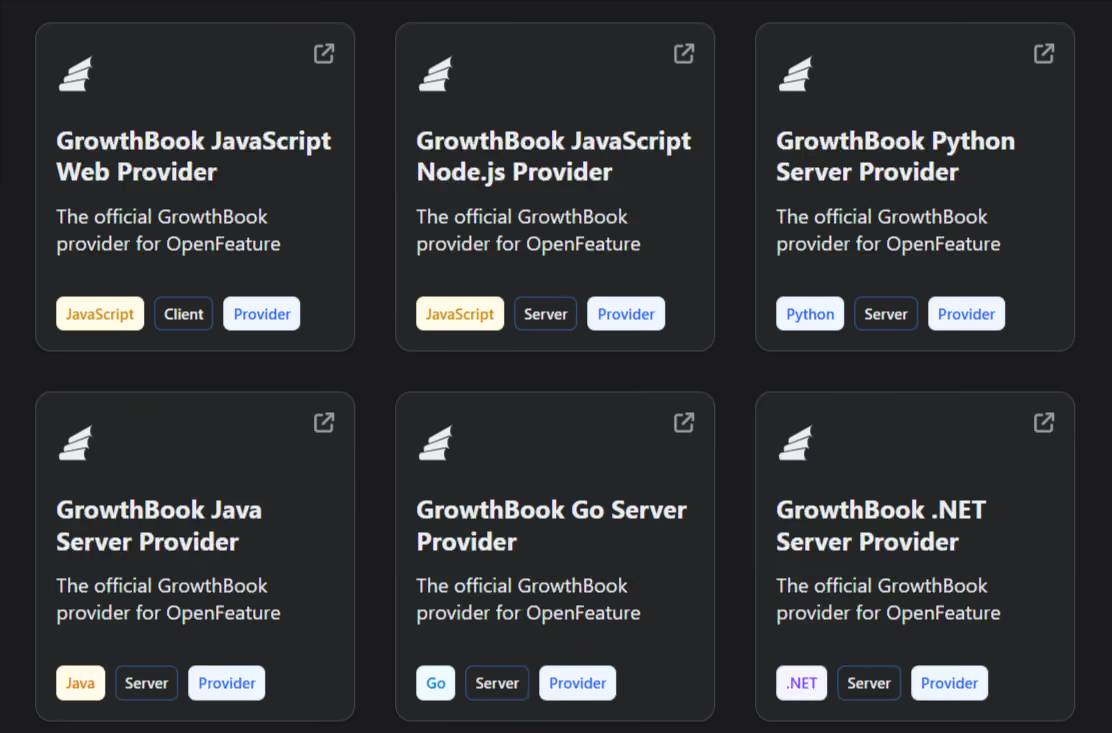
Plus, many feature flagging platforms (including GrowthBook) support the OpenFeature standard, a CNCF specification that offers vendor-agnostic APIs. It’ll help you use any supported platform and switch without a painful migration.
What should you look for in a feature flag platform?
If you’ve decided to buy a feature flagging platform, evaluate it based on these factors:
- SDK coverage for every language in your stack: You need to check two things here: how many SDKs does the platform support, and how many of those include the ones you actually need or might in the future? For instance, GrowthBook ships 24+ SDKs covering server-side (Go, Python, Java, Ruby, PHP, .NET, Elixir, Rust), client-side (React, Vue, Angular, vanilla JS), mobile (iOS, Android, React Native, Flutter), and edge runtimes. Other platforms may have a smaller support system.
- Local evaluation with no per-request latency: Your flag checks shouldn’t depend on a network call. GrowthBook SDKs download flag rules as a cached JSON payload and evaluate every check-in-process. So each call happens in sub-milliseconds and doesn’t have an external API in your critical path. If the platform’s servers go down, your application keeps working.
- Governance and access control: You shouldn’t have to build approval workflows or audit logging yourself. Make sure the platform has configurable approval workflows that require reviewers before any changes hit production. And it should be controlled based on specific roles in the organization.
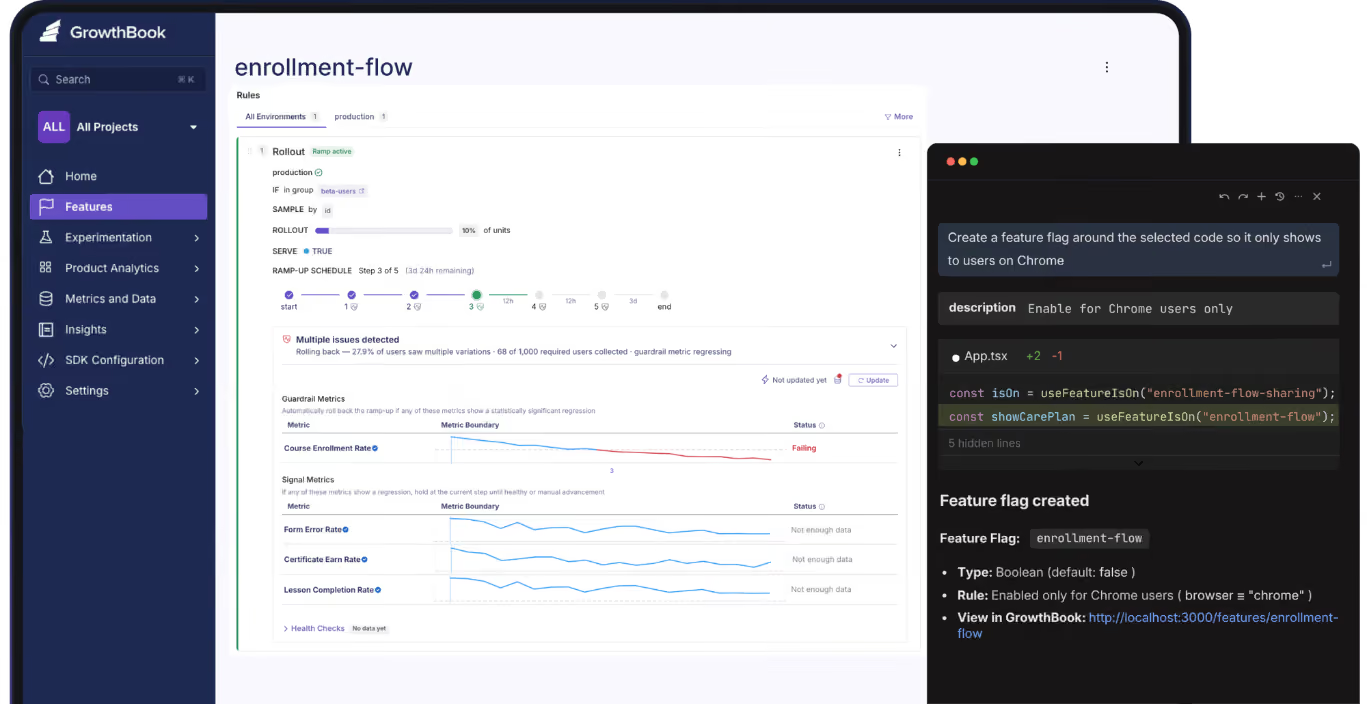
- Stale flag detection and lifecycle management: Feature flags clean technical debt but can also accumulate technical debt over time. That’s why you need a way to automatically identify flags that aren’t active anymore or are not needed. Platforms like GrowthBook offer a Stale Detection feature to help you with this, and Code References tells you where it sits in your codebase.
- Ramp Schedules with automated guardrail monitoring: Even though gradual or percentage rollouts are relatively easy to set up in a homegrown system, it’s hard to build monitoring or observability alongside them. You need the ability to attach guardrail metrics to a rollout so you can detect when it degrades performance and roll it back immediately.
- Feature Evaluation Diagnostics: When a flag evaluates unexpectedly in production, you need to know what went wrong and where to fix the issue. Platforms like GrowthBook give you the capability to see a rule-by-rule trace with attribute values. So, you know exactly why a flag returned what it did for a given user.
- Prerequisite flags and typed payloads: Beyond boolean on/off, look for JSON flag values with schema validation and flag dependencies that prevent invalid state combinations. GrowthBook Enterprise supports prerequisite flags and JSON Schema validation that auto-generates a form UI so non-technical users can safely edit complex configuration values.
- Warehouse-native analytics: Your feature flag data should live alongside the metrics your team already uses for decision-making instead of within multiple analytics platforms. Look for a platform that integrates directly with your existing data warehouse (Snowflake, BigQuery, Redshift, Databricks) so you can analyze flag performance against your business data without building custom pipelines. Platforms like GrowthBook are warehouse-native by design so it queries your data from existing data sources directly and nothing leaves your infrastructure.
- Self-hosted option with real data residency: If you work in an industry with strict data residency requirements, make sure the feature flagging platform offers self-hosting. GrowthBook self-hosted runs via Docker or Kubernetes with no end-user PII, leaving your environment.
- Open-source codebase: If transparency and auditability are a concern, especially if you work in a regulated industry, you should be able to read every line of code in the platform you depend on. GrowthBook is open source under the MIT license.
Should you build or buy a feature flagging tool?
The answer comes down to three things:
- Is your use case fairly simple?
- Is the workflow recurring and painful enough to solve?
- Is it worth redirecting resources to a product that’s not your main source of revenue?
Even Dropbox’s engineering team built its feature flagging systems in-house, and it worked for years. But when the maintenance cost outgrew the value they were getting, switching to GrowthBook was an easy decision. Now, they’ve consolidated six tools and run 3 billion feature evaluations every single day on their own infrastructure.
You might be biased towards building a solution as a virtue of being an engineer, but you might be better off buying one instead.
If you’d like to test-drive a feature flagging solution to make a better decision, why not try GrowthBook for free? Or book a demo to let us show you the ropes.
Related articles

Ready to ship faster?
No credit card required. Start with feature flags, experimentation, and product analytics — free.

