

How to Build a Feature Flagging Governance Framework
.avif)
Feature flags are one of the few tools you can use to change production behavior in seconds, without deploying code. As powerful as that sounds, it also comes with its own risks.
Your team could have dozens of engineers on board who create flags across multiple environments. The same flexibility that sped up your deployment process now becomes the liability that works against you. The reason for that is that if anyone ships a change without approval or leaves an ungoverned flag in the codebase, that’s a potential point of failure that could cost you thousands, and potentially millions, of dollars.
The 2012 Knight Capital incident is one example of this. The company lost $460 million in 45 minutes after a deployment activated dead code on its production servers. When the SEC finished its investigation, it said that the lack of governance controls was one of the contributors to the incident.
That’s why you need a governance framework for feature flagging. In this guide, we’ll explain what it is, what you need to create one, and how to create one for your organization.
What is feature flag governance?
Feature flag governance is the organizational layer of policy and automation that controls how your team manages feature flags across their lifecycle. It covers who can modify a flag in each environment and what review a production change requires before it ships.
It goes beyond being just a best practice for software development. Rather, it's about enforcing a strict process with the right tools and frameworks to determine how your team uses flags. That’s because if you don’t account for this while using feature flags at scale, you could end up with:
- Flag-related technical debt that multiplies quickly.
- Changes in production that have no audit trail.
- Production incidents that could result in unnecessary audits.
- Massive penalties from regulatory institutions for lack of compliance.
The 6 pillars of a feature flag governance framework
Before you even think about implementing a governance framework for feature flags, you need to know what controls it stands on first. Here’s a list of the most important pillars to start with:
1. Flag categories and lifecycle
Every feature flag you create needs a purpose, a designated owner, and a lifespan. This helps you categorize its type and document it properly. If you don’t have this recorded, you won’t be able to tell whether a release flag needs to be deleted or an operation flag (like a kill switch) lives forever.
You can classify feature flags along four axes:
- Purpose: What the flag does (release, experiment, operational, permission)
- Lifespan: How long it should exist in your codebase (short-lived vs. long-lived)
- Scope: Whether it applies uniformly to all users (system-level) or varies per user based on attributes like plan, geography, or device (user-level)
- Value type: The data the flag carries (boolean, string, number, or JSON)
Purpose determines who owns the flag and which lifecycle policy applies to it, whereas the lifespan determines when to clean it up.
If you’re using a feature flagging platform for this, they may not have a built-in category field, as it varies based on how you define it. So you can build a taxonomy by creating the required fields that enforce classification and, as a result, its categorization. For example, an enum for a subscription status.
2. Naming conventions and metadata
A flag’s name should tell you what team owns it and what it does. If you can’t answer both questions from the key, that’s a discoverability issue that scales with every flag you create.
Consider defining your own naming convention to avoid this problem. You can use a structure like team.scope.feature.type and enforce it with a regex validator. You can pair it with the required metadata so every flag has a dedicated owner and review or expiry date.
For a new trading UI, it could look like this:
- Name: tradingUI.redesign.release
- Owner: Matt Hodges, Engineering
- Review date: 10/10/2026
To control flag sprawl, make it mandatory to assign every flag to a project. So nobody can create one without assigning it to a team, which makes ownership a default requirement.
Tip: Some feature flagging platforms enforce naming rules only in the UI, not in the API. If your team or AI agents create flags programmatically, ensure your naming validation runs on every write path.
3. Role-based access control (RBAC)
Depending on the environment the flag is in, the unit of risk changes completely. For example, a flag in staging just means your engineers can see the effects of the changes, but in production, a negative impact could trigger a full-blown incident.
In fact, the OWASP Top 10 found that broken access controls are among the top reasons for application security risks. That’s why you should scope permissions by environment, so there are more restrictions where needed.
The same flag change carries different risks depending on the environment, and your permissions should reflect that. Also, the ability to draft or edit a flag should be separate from the ability to publish that change to your SDKs. It’s recommended because developers can iterate on changes in staging, but that doesn’t mean they have the authority to push them to production. If your platform doesn't separate these natively, enforce the split at the CI/CD layer by requiring a different deployment token for production-related changes.
4. Approval workflows and change control
Any production change you make using a feature flag reaches your entire user base in seconds. If it results in an incident, you won’t have any record of who did it, who approved it, or why.
That’s why it’s better to gate flag changes behind specific approval layers so that everything requires approval before your SDKs see it.
A good rule of thumb to use is the four-eyes principle. Here, the person who requests a change shouldn’t be the one to approve it. To avoid applying the same unit of risk to all changes, ensure that lower environments require approval only for changes with drastic consequences. Otherwise, limit layered approval to production only.
In fact, in the Knight Capital incident, the SEC noted that the company lacked written procedures requiring review for critical deployments. The missing control was a second pair of eyes to validate the change.
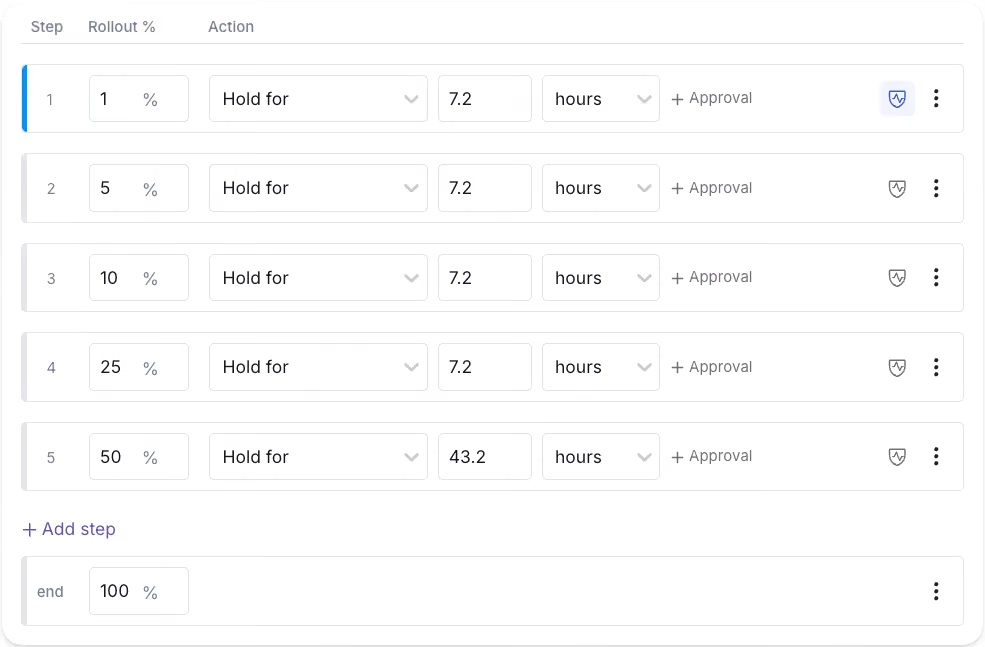
Tip: If you’re conducting high-risk rollouts, embed approval gates directly into the rollout itself. For instance, a staged Ramp Schedule can require sign-off before moving on to the next rollout percentage if all the guardrail and signal metrics look like they’re regressing.
5. Automated validation and guardrails
In July 2024, CrowdStrike experienced a global outage that took down 8.5 million Windows devices due to a configuration update that caused the validator to check against the wrong input count. Validation only works when the schema the validator enforces matches the schema the runtime consumes.
This is why you need automated validation that works with guardrails like human review. The former asks questions like “Is the configuration valid?” while the latter asks questions like “Should you even make this change?”
If you’re building a homegrown tool or using a feature flagging platform, check if it has capabilities like:
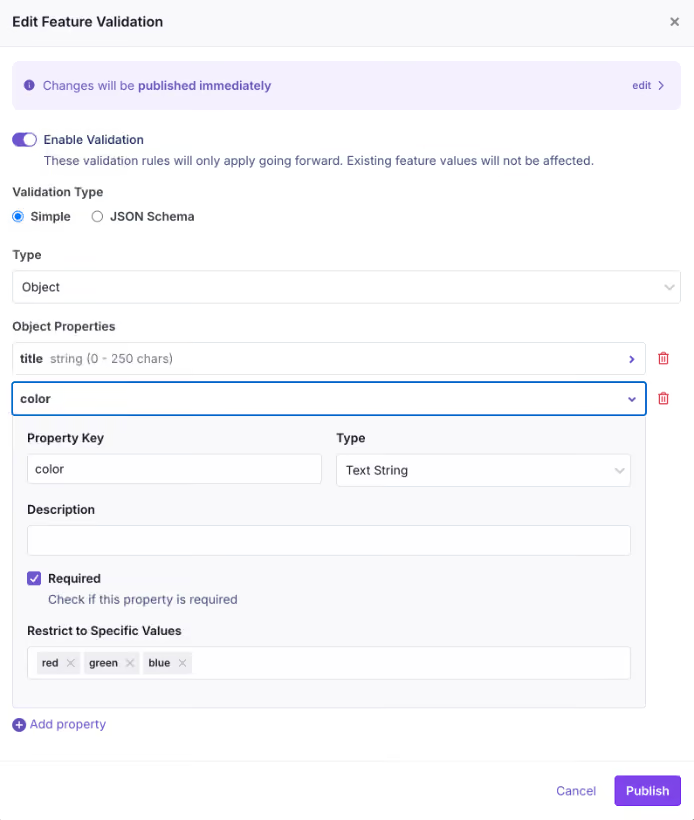
- JSON schema validation for non-boolean flag values, so nobody can save a configuration that violates the expected shape.
- Unreachable rule detection to warn you during editing when a targeting rule will never fire because a higher-priority rule already covers the same population.
- Attribute hygiene that rejects unregistered targeting attributes. It prevents typo’d attribute names from creating rules that appear correct but match no users.
- Publish gates that collect every active validation check at the time of publishing and return them in a single response. As a result, the audit trail records which policies a change bypassed.
6. Lifecycle cleanup and audit trails
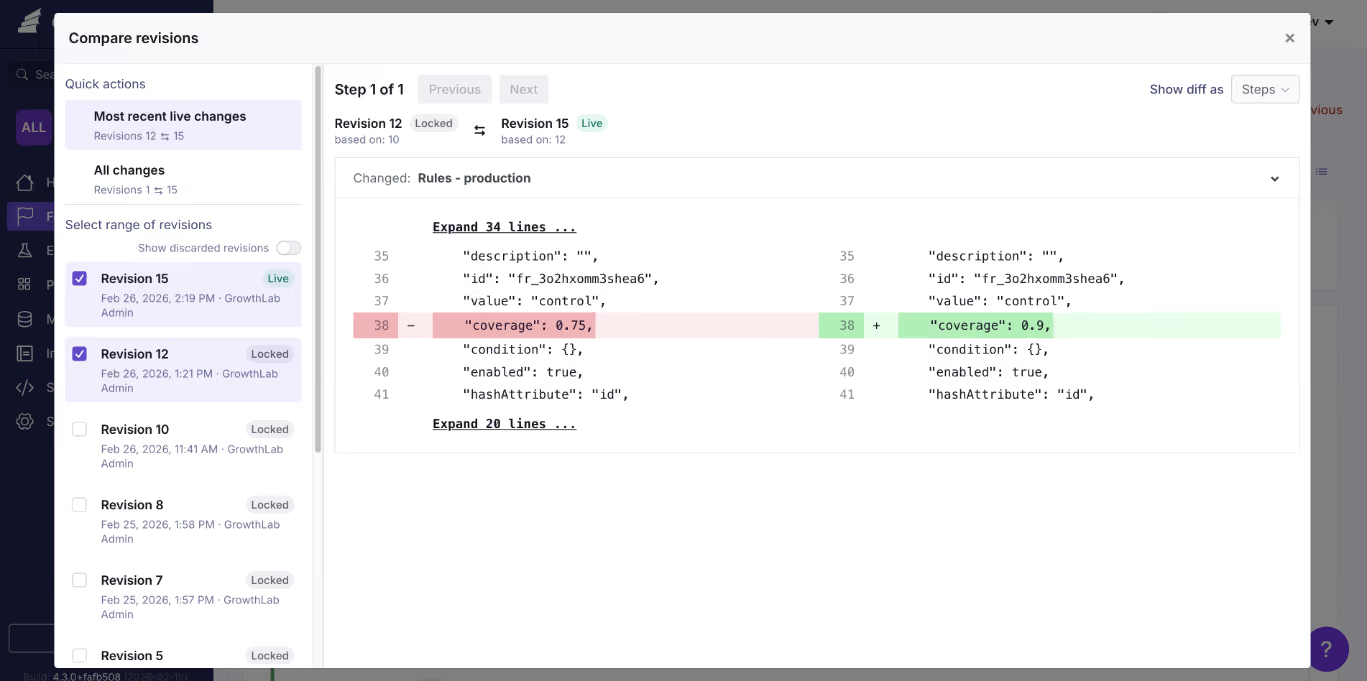
Any flag that outlives its purpose is considered technical debt. Your governance system should surface them proactively rather than relying on someone to clean them up.
You can either set up reminders in Jira or similar tools to notify you when it’s time to review the flag. Or use a platform with automated stale flag detection to flag stale flags. You can pair this with Code References, a CLI that scans the codebase and where the stale flag lives. So you can pinpoint the exact line and delete or archive the flag.
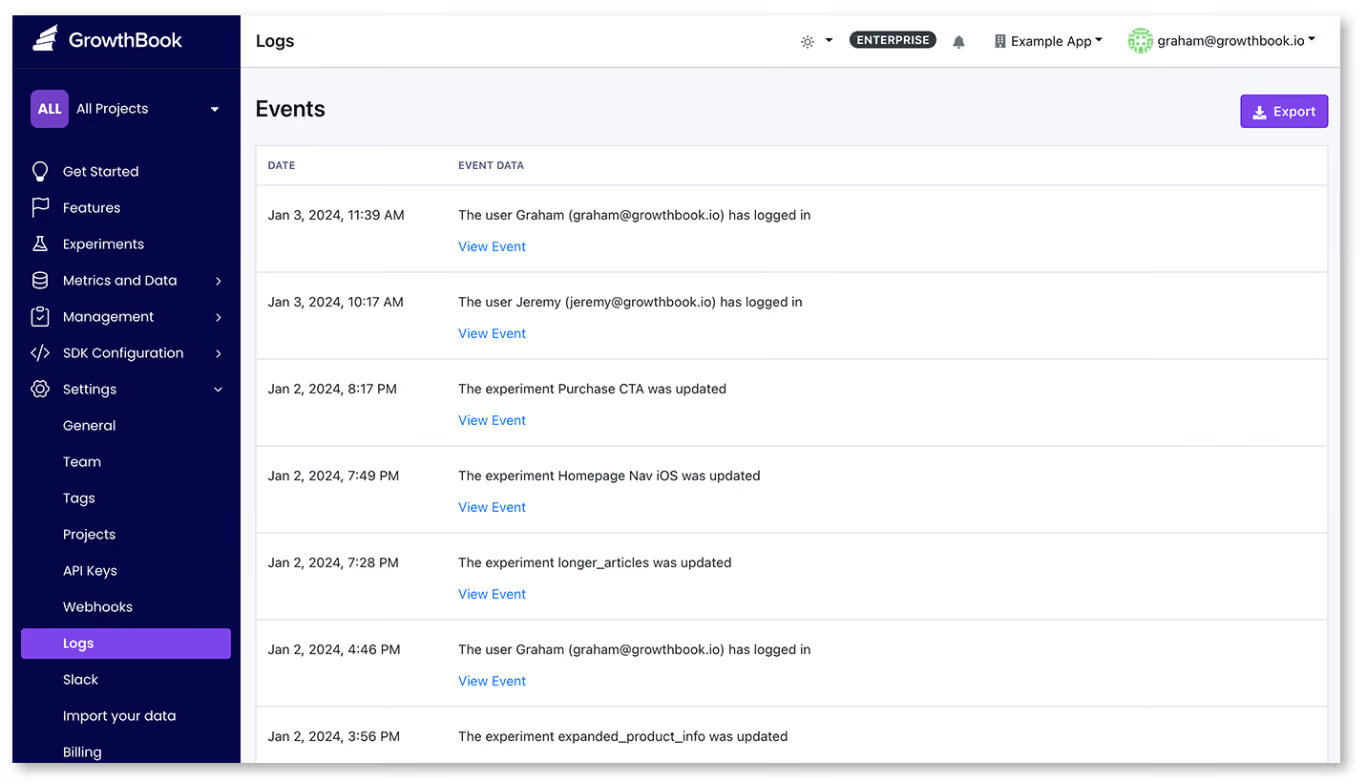
All of these changes should be recorded in a clear audit log, including a description of who made the change and what it was. Platforms like GrowthBook even differentiate between human-made changes and automated ones. Typically, automated ones show an API badge, but human-made ones show the user based on their Personal Access Token (PAT).
How governance works in the agentic era of development
We’re living in a time where AI coding agents can create and modify feature flags on your behalf. As wonderful as it sounds, it comes with its own risk.
A recent DORA report found that even though AI adoption improves software delivery throughput, it also increases the instability of these releases. As engineering teams ship faster, it has become harder to enforce governance at scale—especially as 30% of respondents report little to no trust in AI-generated code.
Here’s how each AI-driven change maps to a governance control:
That’s one of the reasons we’ve built agent governance into GrowthBook, too. Since users can connect agents like Claude Code and Cursor to GrowthBook using Agent Skills and the MCP server, they hit the same REST API that powers the dashboard. So every agent-initiated change runs through the same governance controls as a human-made one would.
Note: You can see how GrowthBook has evolved its governance controls to keep up with the agentic era.
How to implement feature flagging governance in your organization
You don’t need to implement every single pillar at once. Start with the controls that take the least effort but offer the most value. You can use the following progression as well:
Step 1: Lock down naming and ownership
Make it mandatory for every new flag to belong to a project and enforce a naming convention through your flag creation flow.
In GrowthBook, you can enable the require-project setting in your organization settings and configure a regex validator with an example key format under Settings → General → Features.
It takes two minutes and immediately prevents unowned flags from entering the system.
Step 2: Scope permissions by environment
Assign roles so that developers can toggle flags in development and staging, while only release managers or project leads can publish changes to production.
In a platform like GrowthBook, the permissions for drafting a change and publishing it to SDKs are separate. So you can scope each permission to specific environments and projects.
Step 3: Turn on approval requirements for production
Enable review requirements for production flag changes so every change goes through a review cycle before it reaches your users.
In GrowthBook, you configure approval rules scoped by environment and project. Plus, you can block self-approval and reset reviews when a draft changes after approval. RBAC for flags looks like this in GrowthBook:
Step 4: Add validation guardrails
Attach JSON schemas to your non-boolean flag values and enable attribute hygiene to reject unregistered targeting attributes.
GrowthBook supports JSON Schema validation and Custom Hooks, which run server-side on every write path to enforce organization-specific policies. For example, if you want to make sure your team adds description or other types of metadata while creating flags, you can do so using Custom Hooks.
Example of an approval policy that requires a service-account approval from at least one human being:
if (revision) {
  const approvals = (revision.reviews || []).filter(
    (r) => r.decision === "approve" && !r.stale
  );
  if (!approvals.some((r) => r.userId === "key_abc123")) {
    throw new Error("Publishing requires approval from the release-bot service account.");
  }
  if (!approvals.some((r) => r.userId !== "key_abc123")) {
    throw new Error("Publishing requires at least one human approval.");
  }
}
Step 5: Schedule cleanup from day one
As you create flags, add an expiry date and owner. If it’s manual, you can add a ticket with specifics in your platform of choice. If you’re using a platform like GrowthBook, you get stakeholder detection and code references in one place.
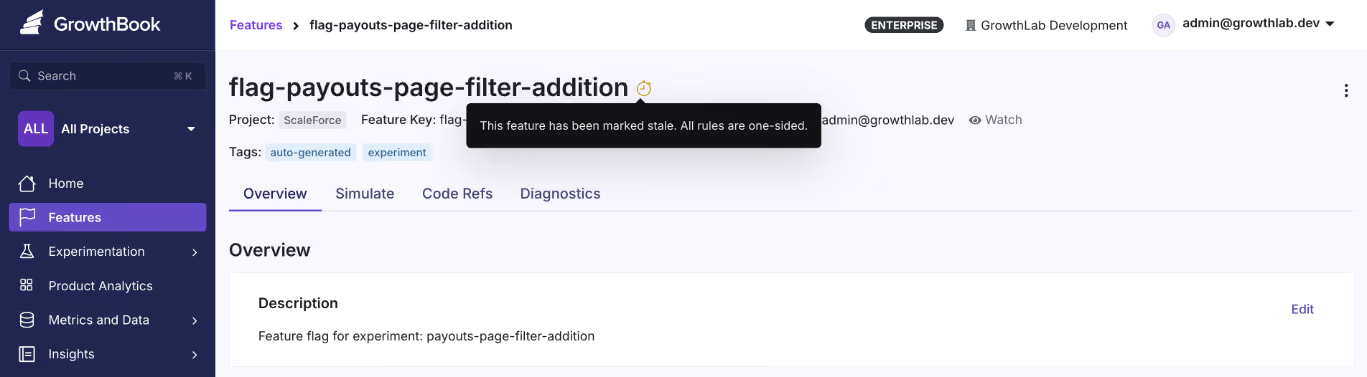
Here, it scans the codebase and surfaces dead flags whenever the enabled environment yields a one-sided result, and it has been more than 2 weeks since it has been untouched. And Code References connect each flag to its call sites in your codebase via a GitHub Action or CLI.
Step 6: Make governance enforceable
There are process elements to the entire feature flag lifecycle too. Uptime Institute’s 2025 Annual Outage analysis found that 85% of human-error-related outages occur because staff don’t follow procedures or because procedures themselves are flawed.
Even if you have a governance policy, it doesn’t mean everyone follows it. While the platform can enforce it by virtue of its capabilities, you still need to build enforcement into your workflows. For instance:
- Add flag ownership checks to your code review process. If a pull request is created without an owner, it shouldn’t pass review.
- Schedule a recurring flag audit (monthly or quarterly) to review stale flags and verify ownership is up to date.
- Wire governance alerts into your team’s existing channels, such as Slack or Teams, to make them visible.
- Assign a governance owner who holds the team accountable when certain rules or frameworks are bypassed.
Build governance you trust to truly reduce organizational risk
Feature flags give your team the power to change production behavior without redeploying code, but if you don’t use them correctly, they become a liability.
The Knight Capital incident began with a flag no one thought to remove from the codebase. But it only got pushed into production because nobody reviewed that change or bothered to cross-check if there was a dependency that could trigger a glitch.
It’s the reason governance has become the focus for engineering teams today and why feature flagging platforms choose to build these features in. GrowthBook offers the tools you need to implement every pillar of this framework:
And since GrowthBook is open-source and can be self-hosted with a warehouse-native architecture, your audit data goes to your own data warehouse, and nothing leaves your environment. If you’re in a regulated industry that mandates SOC 2 or HIPAA compliance, the governance system itself is under your control.
Try GrowthBook for free or book a demo to see how the governance system could work for your organization.
Related articles
Ready to ship faster?
No credit card required. Start with feature flags, experimentation, and product analytics — free.

