

How to Use Feature Flags for Trunk-Based Development
DORA’s research identifies trunk-based development as a capability that drives software delivery performance. It’s not just a habit that high performers happen to share. Here, they work in small batches and merge into a shared “trunk” at least once a day to deploy continuously.
This only works if you’re building something that can be done in a day.
For instance, if you’re replacing a rules-based fraud detection system with an AI-powered risk scorer, it can take weeks. And trunk-based development becomes complicated as you see more merge conflicts.
That’s the exact problem feature flags solve by decoupling deployment from release.
In this guide, we’ll walk you through how trunk-based development works—and how feature flags make it possible for complex development pipelines.
What is trunk-based development, and why do you need to pair feature flags with it?
In trunk-based development, you maintain a single main branch and merge your work into it frequently—maybe daily, or even multiple times a day. The trunk stays deployable at all times.
If you’ve worked in a Gitflow model, you know what the alternative looks like. You typically have branches for development, and release can run for weeks. When the branches finally converge, the process of merging them takes longer than building the feature itself.
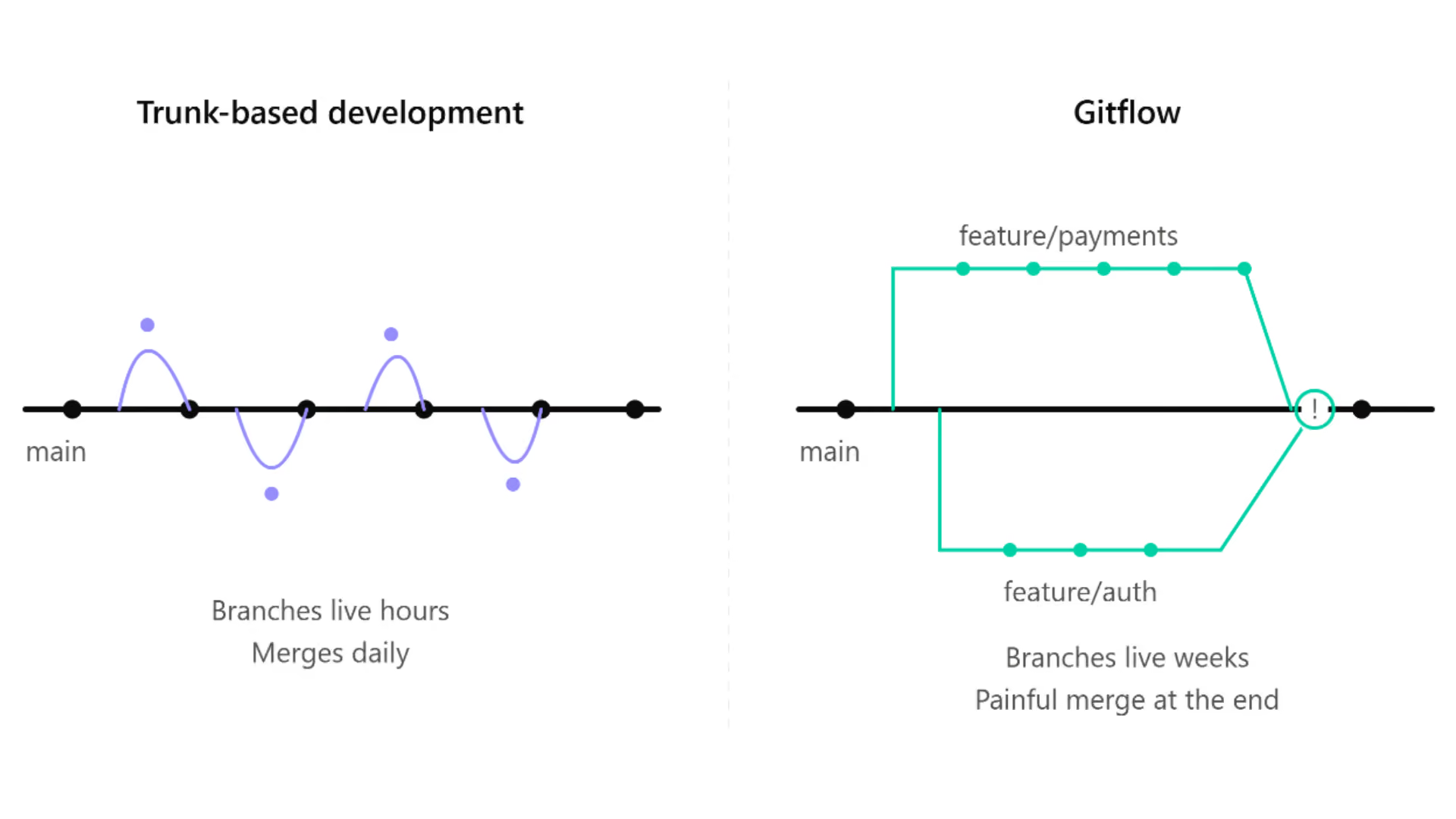
A 2025 analysis of 21 large-scale repositories found that merge-conflict potential grows with both the number and age of concurrent branches. So the longer your branch lives, the worse the merge gets.
That’s why even enterprises like Spotify run trunk-based development processes with feature flags. This lets their developers collaborate on the same codebase without needing to isolate themselves. They commit to main every day and catch any issues in hours instead of finding them during deployment.
That said, trunk-based development does require your main branch to be releasable. As a result, you have to find a way to hide unfinished code from users while you’re still building it.
Feature flags give you that capability.
You wrap new functionality in a flag from the very first commit and deploy it to production in a dormant state. But you only flip it on when you’re ready. So, you can keep merging without exposing the functionality to users. This makes feature flags a prerequisite for trunk-based development and without them, the model breaks the minute a feature takes more than a day to build.
How does flag-first trunk-based development work?
Let’s assume you’re building a new risk scoring model for your AI platform. Here’s how trunk-based development would work with feature flags within GrowthBook:
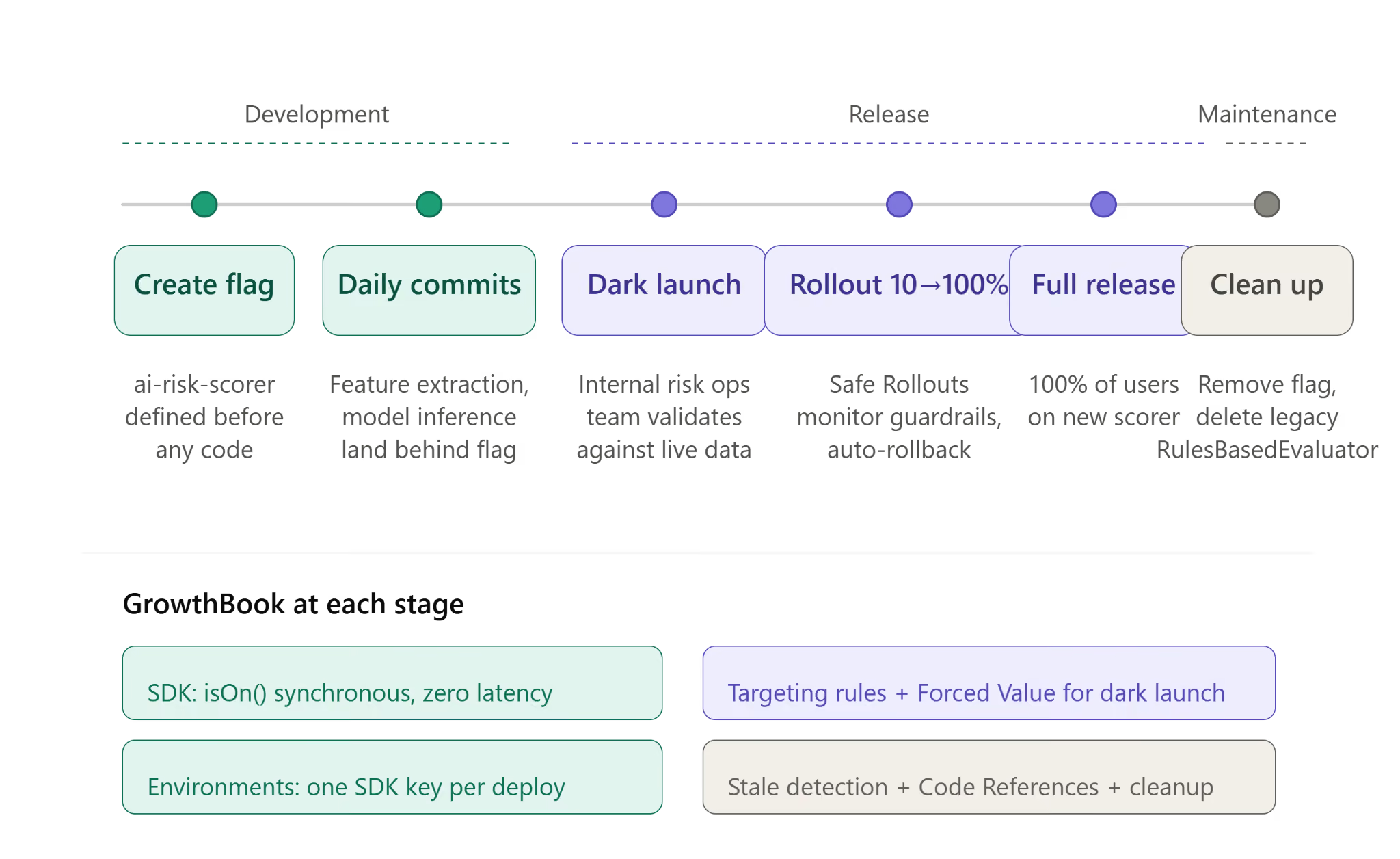
Step 1: Define the flag before you write any code
Before your team writes a single line of code for the new risk scorer, create a feature flag named ai-risk-scorer. So, every commit after that, such as the extraction logic or the model inference call, lands behind that flag.
In GrowthBook, it can look like this:
import { GrowthBookClient, UserContext } from "@growthbook/growthbook";

// Module scope -- initialized once at startup, shared across all requests
const gbClient = new GrowthBookClient({
  clientKey: process.env.GROWTHBOOK_CLIENT_KEY,
});

// Waits up to 3s for the flag payload; on timeout or network failure it
// resolves anyway and every flag evaluates to its fallback (off)
await gbClient.init({ timeout: 3000 });

// Per request -- user identity flows into every flag check
async function scoreTransaction(transaction: Transaction, user: User) {
  const userContext: UserContext = {
    attributes: {
      id: user.id,
      email: user.email,
      role: user.role,
    },
  };

  if (gbClient.isOn("ai-risk-scorer", userContext)) {
    return await mlRiskScorer.evaluate(transaction);
  }

  // Legacy rules engine continues running
  return rulesEngine.evaluate(transaction);
}
The isOn() call is synchronous. The SDK evaluates flags locally from a cached payload, so there’s no network call per check. You can wrap every commit in a flag without adding latency.
This changes what it means for code to be “in production.” The new scorer deploys and passes CI, but it doesn’t execute for any user. The feature flags keep it in an “off” state by default until you toggle it on. And your production environment will just carry the code without running it, so the main stays releasable even with half-built features inside it.
As a result of this process, your code reviews have changed. Instead of asking, “Is this ready to ship?” reviewers will start asking, “Is this safe to merge behind the flag?”
You’ll have a lower bar for review but a faster feedback loop during development.
Step 2: Commit daily and merge to main
Because the flag hides incomplete work from users, you can merge partial implementations into main every day.
For instance, if you’re conducting a 6-week migration, you’ll ship the risk scorer incrementally:
- Weeks 1–2: The feature extraction pipeline and model inference layer are launched behind the flag.
- Weeks 3–4: Response formatting and normalization of scores follow.
- Weeks 5–6: Shadow comparison against the legacy engine, plus performance tuning under production load.
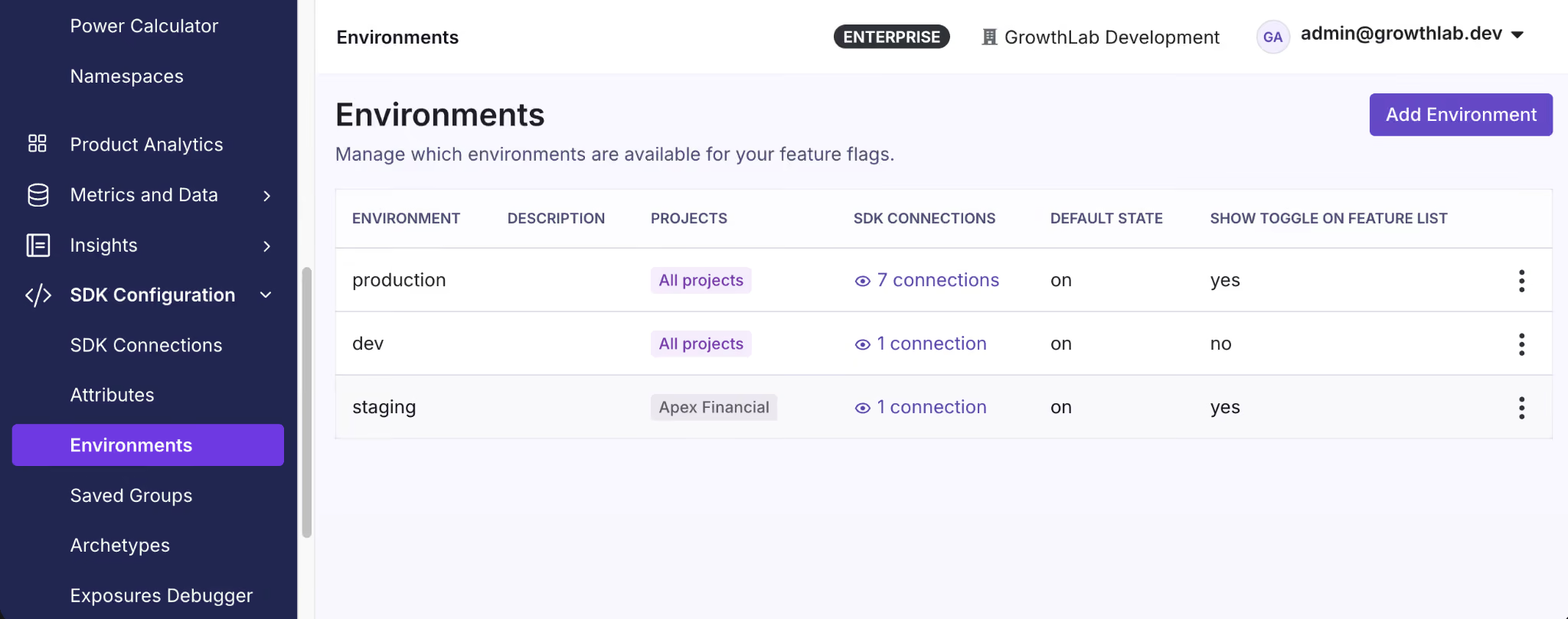
Within GrowthBook, you can define how the flag behaves in different environments. So the flag stays off in production while you can test it in staging. There’s no “big bang” merge at the end of it. You just review and integrate each commit immediately, catching issues before they happen.
One thing you need to note is that when you’re merging code daily, it also changes how your CI/CD pipeline works. Since every commit runs the full build and test suite, the build time itself becomes a constraint. You’re adopting trunk-based development to avoid batching commits but if you use the same CI/CD process, you’re more likely to fall back into old processes. Avoid this by keeping pre-merge checks under 10 minutes and move slower ones to a post-merge state.
Also, your tests need to cover both flag states because main runs with ai-risk-scorer off, so the new code path merges and passes CI without executing. Make sure you force the flag to be on in your test setup to see how it works before deployment. In GrowthBook, SDKs accept feature values directly so CI evaluates flags from a local object instead of calling the API.
Step 3: Dark launch in production before you release
Once you’ve tested the feature and want to roll it out, you can conduct a dark launch. Here, you enable it for your risk operations or internal testing team first.
In GrowthBook, you can set this up with targeting rules and enable the flag for a specific segment. Define this segment based on attributes such as the internal email domain or member role. The Forced Value rule locks the flag for those users without changing the rollout state for anyone else.
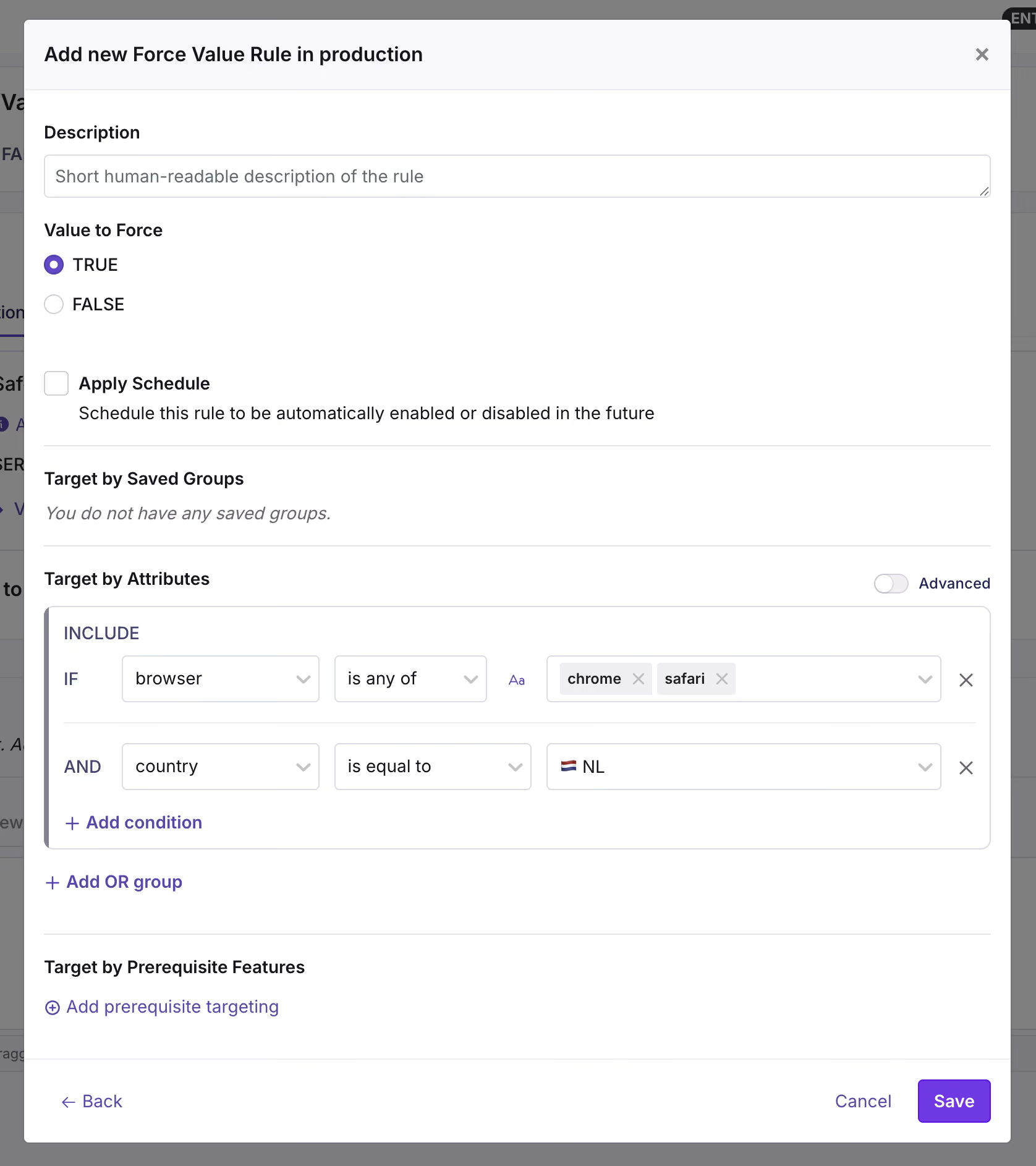
Now the new model runs in production against real transactions at real traffic volumes—but only for the segment you chose. Your team then compares its output against the legacy engine on that live traffic and decides whether to widen the rollout.
The goal is to test the feature/model with real users and traffic volumes to see if the new change makes a meaningful (and positive) difference.
Best practices for feature flags in trunk-based development
Here are a few things you should keep in mind while using feature flags for trunk-based development:
1. Use branch by abstraction for large-scale refactors
There might be cases where your changes don’t fit in a simple on/off flag. For instance, if you’re replacing a fraud detection system, you’re not adding a new feature. Instead, you’re replacing the entire code path for another and both of these paths need to live in main while you continue to build.
Branching by abstraction solves this issue. Here, you define a single contract that says what the component does but without explicitly saying how it does it.
Let’s say you’re migrating a risk scorer. The contract will be “take a transaction and return a risk score.” Both the versions of this risk scorer can do this but every part of your application calls the contract instead of the implementation directly. The factory (function) decides which ones to hand back at runtime based on the flag’s value. So, you can swap systems through a simple flag change instead of changing the entire code.
Here’s what that looks like for our risk scorer migration:
interface RiskEvaluator {
  evaluate(transaction: Transaction): Promise<RiskScore>;
}

class RulesBasedEvaluator implements RiskEvaluator {
  async evaluate(transaction: Transaction): Promise<RiskScore> {
    // Legacy rules-based scoring
    // ...
  }
}

class MLRiskScorer implements RiskEvaluator {
  async evaluate(transaction: Transaction): Promise<RiskScore> {
    // New AI model inference
    // ...
  }
}

// gbClient is the initialized GrowthBookClient from Step 1.
// Call this per request -- not once at startup -- so flag changes,
// targeting rules, and percentage ramps take effect immediately.
function createRiskEvaluator(userContext: UserContext): RiskEvaluator {
  if (gbClient.isOn("ai-risk-scorer", userContext)) {
    return new MLRiskScorer();
  }
  return new RulesBasedEvaluator();
}
isOn() is synchronous. The SDK evaluates locally from a cached payload, so the abstraction doesn’t cost anything at runtime. You can wire every factory function through a flag check without worrying about performance.
However, there’s also a degradation benefit. Until init() resolves, and if GrowthBook is unreachable entirely, the SDK has no flag definitions to read. isOn() returns false and your fallback path runs.
For the risk scorer, it could mean the legacy RulesBasedEvaluator will continue to process transactions.
2. Manage flag states across environments
In trunk-based development, the same code deploys everywhere. Your feature flag’s states need to respect the environment’s boundaries, or the new code could activate in production while you’re still validating in staging.
Avoid this by defining behavior at the environment level.
For instance, GrowthBook handles this with one SDK connection per environment and each SDK carries its own key. GrowthBook generates the key so you can point the same variable at a different key per deploy:
# Staging
GROWTHBOOK_CLIENT_KEY='sdk-K2p9mXvQ4wRt'
# Production
GROWTHBOOK_CLIENT_KEY='sdk-8Hn3bZfL6yTc'
If you’re debugging unexpected behavior, disabling the flag won’t return false. The platform completely removes the flag from the payload, so the SDK finds nothing there and isOn() returns false. Your fallback path runs.
3. Plan for the full flag lifecycle to avoid debt
The typical feature flag lifecycle looks like this:
- You create a feature flag.
- Ship the feature wrapped in the flag.
- Release the feature by enabling the flag.
- Monitor guardrail metrics while traffic increases, and roll back if they degrade.
- Delete or archive the flag after releasing the feature and it holds up in production.
The problem is that it’s easy to forget about the cleanup step when you’re moving onto your next sprint. In fact, a 2026 study across Kubernetes and GitLab found that toggle removals lag behind additions by 35% and 13%, respectively. And this creates technical debt.
Let’s say you’re releasing the new AI risk scoring model. You create a flag called ai-risk-scorer with a clear owner and removal date (8 weeks from now). When the feature is ready, you can use GrowthBook’s Ramp Schedules to ramp traffic from 10% to 100% in increments instead of flipping it all at once. You can use Safe Rollouts which is a targeting rule with a Ramp Schedule and monitoring attached to it so that the platform runs sequential tests against the guardrail metrics you’ve defined. If the metrics look fine, you can keep proceeding to the next step until you’ve rolled the feature out completely.
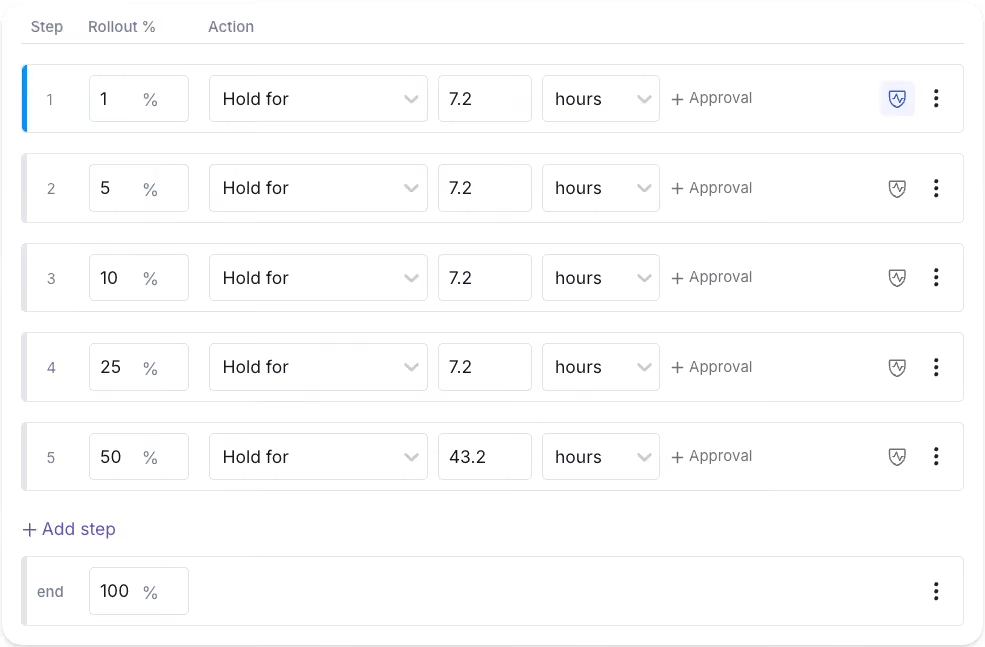
But you have to remember to remove the feature flag after the rollout is complete. If you forget to remove the ai-risk-scorer flag, three months later, you can use the Stale Detection tool to surface it and pinpoint where it is using Code References. From there the cleanup is two steps: delete the conditional in your codebase, then archive the flag in GrowthBook.
You can also use GrowthBook’s GitHub skills to walk an AI agent through this process. Once you do, archive it first to confirm nothing broke and then remove it from your codebase.
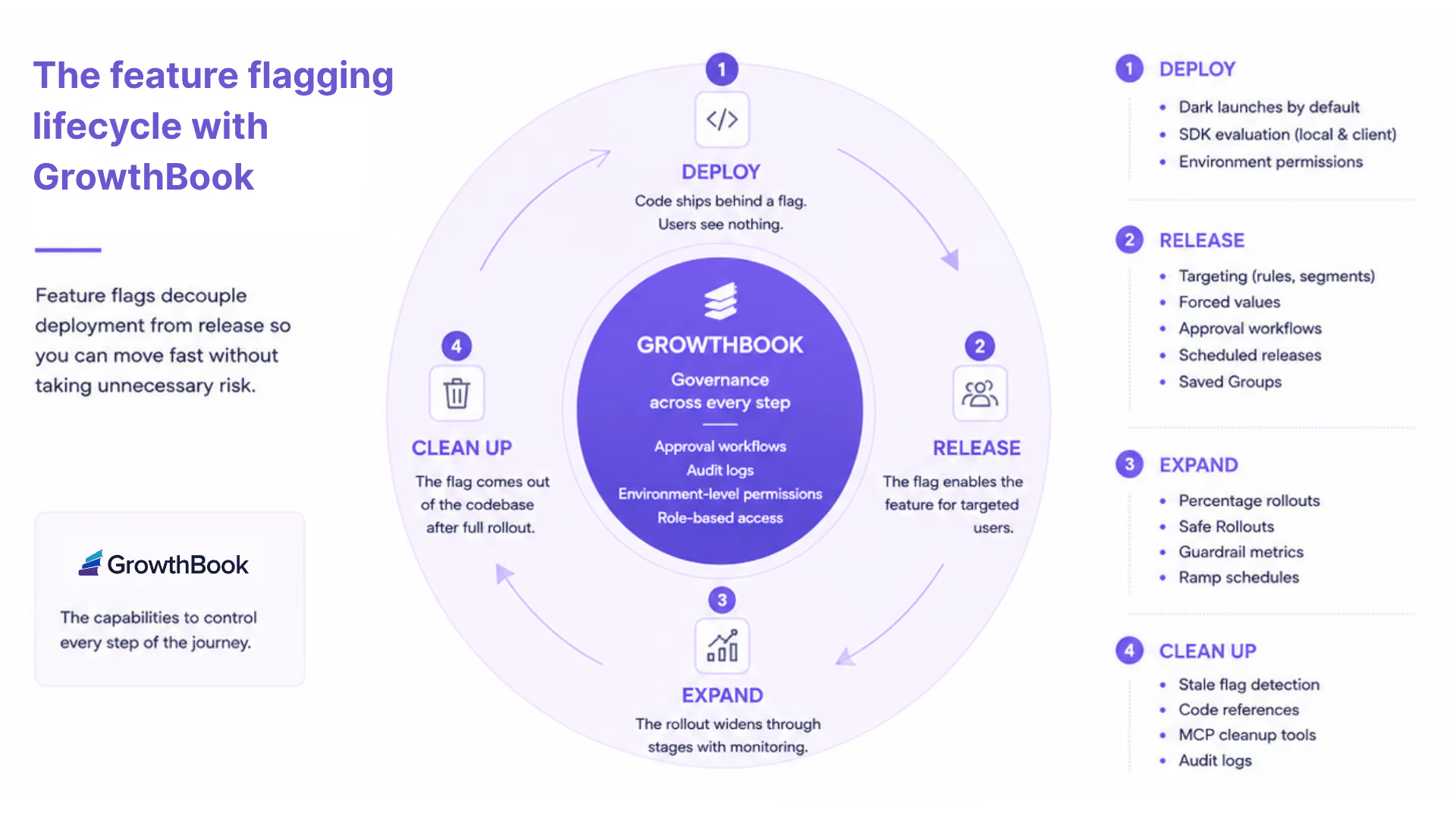
That’s how you can keep technical debt low while taking advantage of feature flags.
3 mistakes that break trunk-based development with feature flags
Here are a few concerns you should keep in mind while working with feature flags:
- Adding the feature flag after the code: If a developer merges the code to main and creates a flag later, you’re essentially rewriting live logic under pressure. A simple misstep can expose unfinished features/code to real users. That’s why it’s best to create the flag before you write any new code and wrap everything inside it from the first commit.
- Long-lived branches with a flag bolted on at the end: This issue usually happens when a team adopts trunk-based development in name but still isolates work on a branch for weeks. It’s the inability to let go of old habits. But the problem is that as the branch accumulates more merge conflicts, the flag shows up as a release mechanism. It’ll mask a failed branching strategy instead of enabling trunk-based development. So, use the flag as a development mechanism from the beginning to avoid any kind of drift.
- Flags that never get cleaned up: Every new flag you add to your codebase adds a conditional branch. For example, a single flag can create two possible code paths. But 10 feature flags create 1,024 code paths. When you don’t remove these stale flags from your codebase, they’ll accumulate into technical debt that slows you down and causes outages. So, assign an owner to each flag and target a removal date for temporary flags. Some platforms, like GrowthBook, automatically surface stale flags after two weeks of inactivity with no active targeting rules to help with cleanup—so that’s an option too.
How GrowthBook supports trunk-based development
Every new feature or model launch starts with a constraint we know too well. It takes weeks to build a feature, but the main still needs to stay releasable. Even though trunk-based development makes the build easy, you can only keep the main releasable without risk when you couple it with feature flags.
For example, in the ai-risk-scorer example we used, the code shipped daily and the internal team validated it against live transactions. But it was only possible using feature flags as it prevented us from adding too many merge conflicts as we added more code.
The feature flag acts as the release interface and the delivery mechanism to make this possible.
Platforms like GrowthBook give you the exact infrastructure to run this workflow:
- SDKs evaluate flags locally from a cached payload. The isOn() path is synchronous, so when you wrap every commit in a flag, there’s no performance overhead.
- You get unlimited environments with every plan, each with one SDK key.
- You can roll out features using Ramp Schedules, and opt into auto-rollback if any key metric degrades during the rollout.
- The revision system handles merge conflicts similar to Git. So you’re using the same mental model your team already uses for code.
- Features like Stale detection and Code References surface inactive flags and map them to your codebase. As a result, flag cleanup is the norm.
If you’re ready to explore how feature flags support trunk-based development, try GrowthBook for free today.
Related articles

Ready to ship faster?
No credit card required. Start with feature flags, experimentation, and product analytics — free.

