

6 alternatives to Unleash for feature flags (2026)
Unleash is one of the most established open-source feature flag platforms in production today. It was founded in 2015 with 13,300+ GitHub stars and earned its reputation by doing one thing reliably: giving engineering teams a self-hosted, API-first way to toggle features in production. That’s why companies like Visa, Wayfair, and Deutsche Telekom trust it.
However, feature flagging in general has outgrown the toggle. Your team now expects flags to connect to metrics, trigger rollbacks when something degrades, and feed directly into experimentation workflows. Unleash was built before those expectations existed, and its architecture reflects that.
As teams scale, a few limitations surface repeatedly:
- The burden of self-hosting increases as your architecture grows, and now it will be the default, as the OSS Edge version will depreciate in December 2026, after which you'll need Enterprise Edge (paid) for edge-based flag evaluation.
- It uses a polling-based architecture by default, but Unleash Edge now offers streaming as a real-time alternative (in beta).
- It doesn’t offer server-side identity or trait storage, meaning every flag evaluation requires full user context at runtime.
- There are no native AI or agentic workflows for flag management—so if you’re moving to more AI-led development processes, it’s not the right platform for you.
- There’s no built-in experimentation or statistical engine, so you need a separate tool to measure whether a flagged feature made a difference.
If you’re currently moving away from Unleash or exploring friendlier and more flexible options for feature flagging, this guide walks through six Unleash alternatives for the same.
What is Unleash?
Unleash is an open-source feature flag management platform focused on enterprise engineering teams and release workflows. It was originally Apache 2.0 licensed (source code moved to AGPLv3 from v8.0.0; official Docker images remain Apache 2.0) and self-hostable.
The platform lets you do the following:
- Toggle features on or off for specific users or groups
- Roll out features gradually by percentage
- Define custom activation strategies based on user IDs, constraints, or environment
- Manage flags across multiple projects and environments
At the moment, Unleash’s positioning leans into “FeatureOps,” where it treats flag changes as formal change events. You get governance workflows, such as change request approvals with 4-eyes review, granular RBAC, and full audit logs. And if you’re in a regulated industry, the platform offers FedRAMP-ready infrastructure, ServiceNow integration, and air-gapped deployments right out of the box.
You can deploy Unleash using its open-source self-hosted version (limited to 1 project and 2 environments) or its managed cloud offering. The open-source version of Unleash Edge reaches end-of-life on December 31, 2026—after which you'll need Enterprise Edge for edge-based flag evaluation.
Here’s what the pricing structure looks like:
- Open source (self-hosted): Free, but limited to 1 project and 2 environments.
- Pay-as-you-go (cloud): $75/seat/month with a 5-seat minimum.
- Enterprise: Custom annual pricing for self-hosted, cloud, or hybrid. Includes SSO, SCIM, and advanced governance.
There’s no viewer-only seat option for read-only users, which means costs scale quickly once non-engineering teammates need access.
Unleash holds a 4.7/5 rating on G2 across 123 reviews, and most users compliment its flexible rollout capabilities and the ability for both developers and product managers to manage flags without any issues. So, it’s ideal for enterprise platform engineering teams in regulated industries that need self-hosting at a large scale and mature governance features.
Why engineering and product teams look for alternatives to Unleash
Unleash does feature flags well. The reasons teams look elsewhere almost always trace back to what happens after the flag goes live—and what Unleash can’t do at the flag level itself.
Here are some of the most common reasons users switch:
- Client-side SDKs may require a separate proxy server: Unleash’s browser and mobile SDKs are thin clients as they don’t contain targeting logic, hashing, or bucketing. Frontend SDKs don't evalaute flags locally. That said, in production, Unleash recommends deploying Unleash Edge as a separate server to handle client-side evaluation. The built-in Frontend API is an alternative but it can't be scaled horizontally as it's not designed to handle such large volumes.
- By default, Unleash uses a polling-based architecture. Your SDKs periodically fetch the latest configuration rather than receiving changes via streaming. However, Enterprise Edge now offers streaming via Server-Sent Events as a beta feature (as of June 9th, 2026), but streaming is not available in the OSS edition.
- No identity or trait storage server-side: Unleash doesn’t store user attributes. Every flag evaluation requires you to pass the full user context at runtime. If you’re using a microservice architecture where this data spans multiple services, each service either fetches context from a shared store or passes it through the request chain.
- 5-segment limit per activation strategy: On cloud and paid plans, you’re capped at five segments per strategy. If your targeting logic is more complex—say, you’re rolling out to enterprise customers in three regions while excluding a specific account tier, you’ll hit this ceiling. This is a soft limit that can be adjusted by the customer; customers can map multiple activation strategies (each with up to 5 segments) to the same flag.
- Safeguards offers automated rollback but not to a known-good state: Unleash launched Impact Metrics with safeguards in V8 and is out of beta as of July 2026. Safeguards can automatically pause rollouts or disable the flag in that environment when a metric crosses a threshold. But it requires instrumenting metrics via the SDK or connecting Prometheus. This is only available on Unleash Enterprise. If the rollout is paused, you have to manually resume or revert it. If a rollout is disabled completely, it reverts to its fallback path and you have to manually re-enable or reconfigure the rollout state. There's no option to automatically revert to a previous rollout configuration.
- No dedicated edge SDK packages: Unleash Edge is a standalone Rust binary that you compile and deploy separately. There are no lightweight npm packages for Cloudflare Workers, Fastly Compute, or Lambda@Edge. And the open-source version of Edge reaches end-of-life on December 31, 2026—after which you’ll need Enterprise Edge (a paid dependency) for the same functionality.
- Limited AI-native flag workflows: Unleash recently added an MCP server, but the platform doesn’t ship opinionated agentic workflows. You can use its tools to create, roll out or clean up feature flags. But it doesn't offer robust advanced agentic workflows like GitHub skills or similar.
- OSS Edge deprecation forces you to switch to Enterprise Edge: Unleash OSS Edge reached LTS in December 2025 and hits end-of-life on December 31, 2026. If you’re running Edge in production for edge-based flag evaluation, you’re facing a forced migration to Enterprise Edge or switch platforms (which could be why you’re here!).
- Per-seat pricing gets expensive quickly: The paid plan starts at $75/month per user with a 5-seat minimum. Even though there's a viewer-only seat for product managers or stakeholders who just need read access, it's a licensed seat. So, the costs can scale quickly without any increase in value.
What to look for in an Unleash alternative
Before you start comparing platforms, decide what actually matters for your team’s use case. Here are a few factors you can consider while making that decision:
- Open-source availability and license: Do you prefer MIT, Apache 2.0, or BSD-3? The license determines how freely you can fork, redistribute, and modify. Also, check whether the self-hosted version has feature parity with the cloud, as some vendors gate key capabilities behind paid tiers even when the codebase is technically open.
- Self-hosting viability: “Self-hostable” means different things across vendors. Some platforms require Kafka, ClickHouse, Postgres, and Redis running together. Others deploy as a single Docker container. Assess the operational overhead realistically. Ask yourself: How much engineering time goes into maintaining the deployment? And is a managed cloud option available at a reasonable cost if you outgrow self-hosting?
- Real-time flag propagation: Streaming vs. polling architecture matters when you need a kill switch to take effect in seconds. If the platform uses polling, understand the default polling interval and whether you can push changes more frequently when something breaks in production.
- Identity and trait storage: Does the platform store user context server-side, reducing per-evaluation overhead? In microservice architectures, passing full user context with every flag check introduces latency and coupling that increase as you scale.
- AI and agent readiness: If your team uses AI coding tools like Cursor, Claude Code, or Codex, check whether the platform integrates with the MCP server or via a REST API. Can an agent create flags and manage rollouts from your IDE? As more teams move towards an AI-native development process, it’s becoming table stakes.
- Warehouse-native analytics: If your data already lives in Snowflake, BigQuery, or Redshift, a warehouse-native platform can query it directly for experiment analysis and guardrail metrics. This keeps your metrics consistent across teams and eliminates duplicate data pipelines.
- Pricing model predictability: Per-seat pricing is predictable, but if you have a large team or read-only seats, the costs can get out of hand. However, per-MAU or per-event pricing scales with your success—which sounds fine until a traffic spike doubles your bill. Understand what you’re paying for, and at what point costs become unpredictable.
- Governance depth: For many teams in regulated industries, approval workflows, RBAC, audit logs, and scheduling workflows are critical. But many platforms gate these behind enterprise contracts. So, cross-check what’s available at each pricing tier before you sign up.
- SDK coverage and evaluation architecture: Choose a platform with SDKs for every language in your stack. But also evaluate how the SDK works. For example, does it evaluate flags locally (no network call per check) or does it phone home on every evaluation? This decides how quickly your flags evaluate and whether your users will experience latency.
- Built-in experimentation and stats engine: Can the platform run A/B tests with statistical analysis, or does it require you to wire up a third-party tool? Look for methods like Bayesian inference, frequentist testing, CUPED variance reduction, and sequential analysis. If your team ships features and wants to know whether they moved a metric, it’s a non-negotiable.
Quick comparison of the best Unleash alternatives
Here’s a quick overview of the six best alternatives to Unleash for feature flagging:
Best alternatives to Unleash for feature flagging
Let’s look at how each of these platforms stacks up against Unleash and why you should consider it:
1. GrowthBook
GrowthBook is an open-source feature flagging and experimentation platform that connects directly to your data warehouse. You can think of GrowthBook as three products inside one MIT-licensed codebase:
- A feature flag engine with 24 SDKs and sub-millisecond local evaluation.
- A production-grade experimentation platform with Bayesian, frequentist, sequential testing, and CUPED variance reduction built in.
- A strong product analytics product that acts as a managed warehouse for your product data.
All these products share the same flag and the same warehouse-defined metrics, so you never need to reconcile data between systems. Your application doesn’t depend on GrowthBook being available, because feature flags are evaluated from a locally cached payload. As a result, if GrowthBook’s cloud goes down (and it rarely does!), your app keeps running with the last known configuration. It’s the architectural equivalent of building a circuit breaker into the foundation rather than bolting one on later.
With its latest 4.4 release, the feature flagging product has gotten a serious upgrade as it enables forward-thinking development teams to centralize the workflows around AI.
That’s why teams like Dropbox (3 billion+ daily flag evaluations on self-hosted GrowthBook), Khan Academy, Sony, Pepsi, Wikipedia, Mistral, and Upstart run GrowthBook in production at scale.
“What I like best about GrowthBook is that it gives teams a practical way to manage feature flags and experiments without making the workflow overly heavy. The interface is generally clear, and it is useful to have experimentation, rollout control, and analysis connected in the same environment. That makes it easier to move from idea to test to decision with more structure and less back-and-forth between teams. I also appreciate the flexibility on the integration side, because it can fit into an existing data stack rather than forcing a completely closed setup. From an ROI perspective, that matters a lot, since it allows teams to get value from experimentation and progressive delivery without necessarily committing to a much larger platform than they need.” — Arthur H., G2 user.
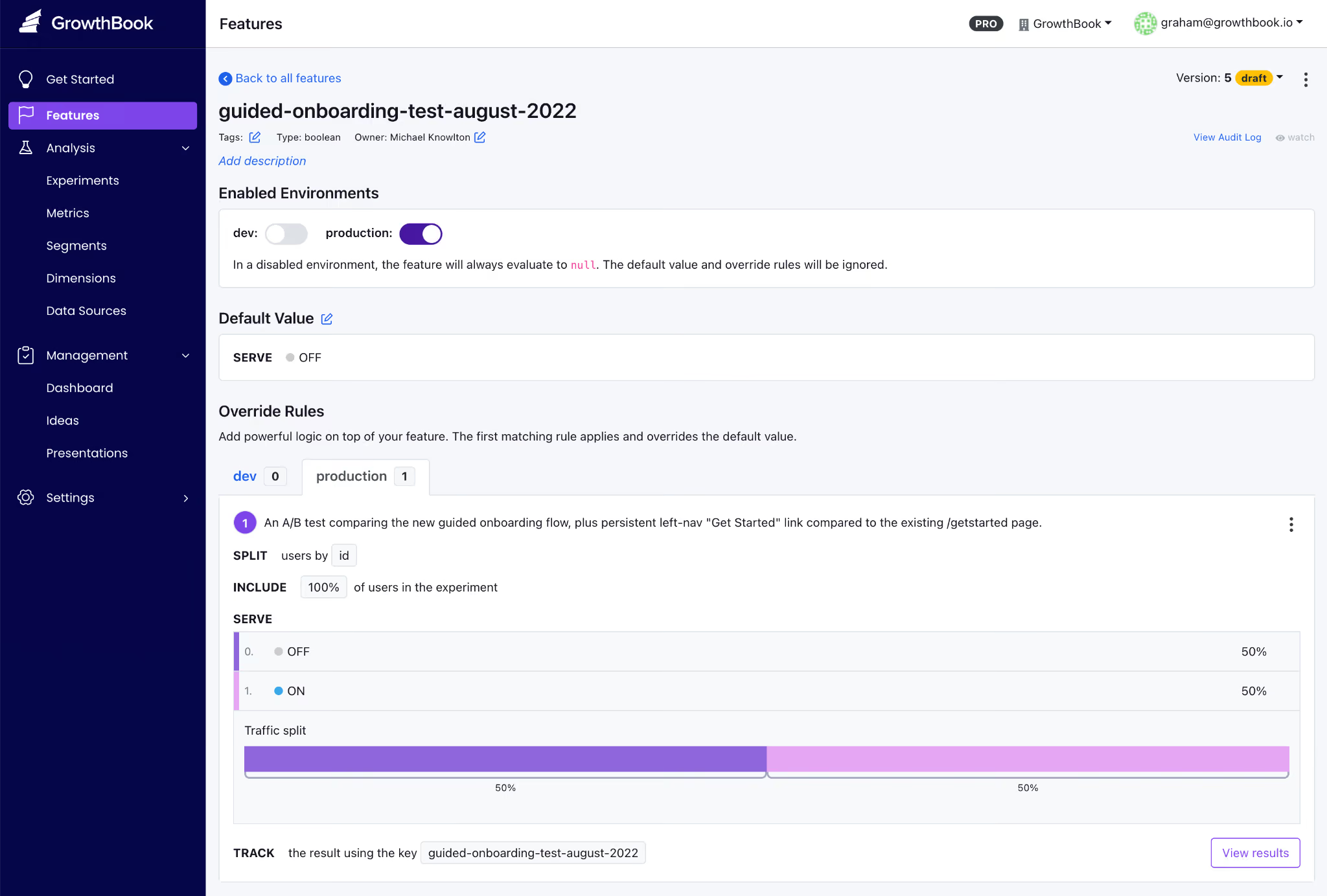
GrowthBook key features
Pros of GrowthBook
- Rich control over feature flag creation, deployment, and cleanup right from your AI coding tool of choice. You can create flags, set targeting rules, configure rollout plans, and remove stale flags without leaving your IDE.
- You can use smart feature flags to tie feature flags to any metric in your data warehouse. And then use Ramp schedules with guardrails to monitor performance at each stage and auto-rollback if a metric degrades.
- The platform enables AI-led development with its new MCP server and lets you bring AI agents into the process without friction. You can automate release plans and even clean up stale flags without leaving your agent.
- You can see the SQL queries under the hood, and audit the stats engine on GitHub when your data team wants to verify the math.
- The platform is well-known for its responsive, technically adept customer support.
- Since the platform is open source, you can contribute to the project, and some users have said the new feature request was merged within weeks.
- Flags and experimentation live on a single platform. You don’t have to reconcile data across multiple vendors, and you can load experimental data from another platform into GrowthBook to run more advanced tests.
Drawbacks of GrowthBook
- You’ll get the most out of experimentation features if you already have a data warehouse. GrowthBook Cloud offers a Managed Warehouse, but self-hosters still need to set one up if they don’t have one.
- There’s some onboarding time to learn advanced feature flag capabilities—particularly JSON payloads, advanced targeting rules, and experiment configuration.
- You’ll need an Enterprise license for SSO/SAML, SCIM, holdout experiments, and cross-experiment insights, though the core flagging and experimentation capabilities remain free in the OSS edition.
- The UI can be complex for less-technical team members—particularly non-engineering stakeholders who are navigating experiment results.
How GrowthBook compares to Unleash
Even though both platforms support self-hosting and prioritize the developer experience, the main difference shows up when your feature flags go live.
GrowthBook provides a full local SDK evaluation and doesn’t require a proxy. So, all the targeting, hashing, and bucketing all happen inside the SDK with zero network calls. But Unleash’s client-side SDKs are thin proxies that require a separate Unleash Proxy or Frontend API server, which adds a potential point of failure.
So, choose the following because:
- GrowthBook wins for engineering and data teams who need strong feature flagging capabilities for traditional or AI-native development alongside statistically rigorous A/B testing, a single open-source platform, and don’t want to send data to a vendor or run a separate proxy.
- Unleash wins for data-conscious teams that want flags only (no experimentation), value the larger community and 11-year track record, or specifically need FedRAMP-ready infrastructure and ServiceNow integration.
Who is GrowthBook best for?
Engineering and data science teams at growth-stage or enterprise companies who already have a data warehouse and want feature flag management plus real experimentation in one open-source platform. This is especially true if you don’t want to pay for separate experimentation tools or send data to another vendor.
It’s also a strong option for companies in regulated industries like fintech, healthtech, edtech, and AI software, where data sovereignty is non-negotiable. And for smaller engineering teams or solo developers looking for a robust feature flagging platform that can grow with them as they mature into experimentation.
2. LaunchDarkly
LaunchDarkly is the category-defining enterprise feature management platform—the incumbent that every alternatives article is measured against. It was founded in 2014, and now LaunchDarkly serves over 5,500 organizations, including roughly a quarter of the Fortune 500 (Hulu, IBM, Atlassian, iCIMS).
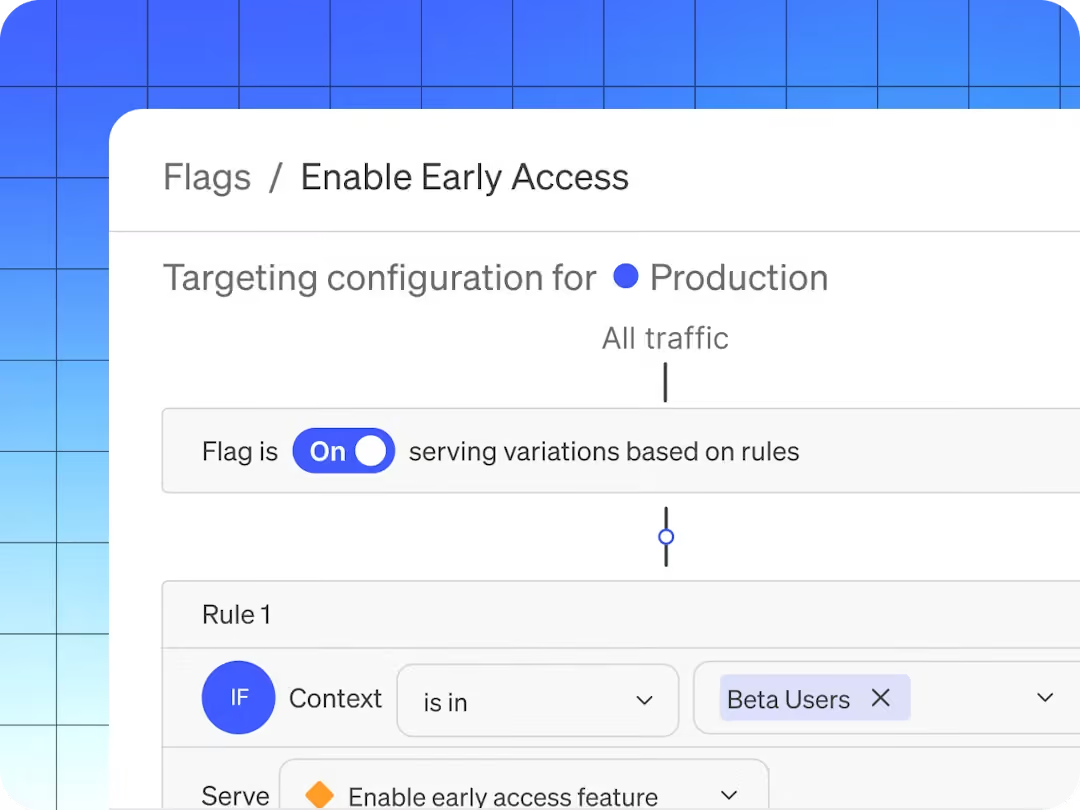
The earlier version of its product was focused on decoupling deployment from release. So, the code ships to production in the dark, and the feature gets switched on independently and gradually. But as of 2026, it has moved to bring the “runtime control for AI-era software.” The platform now bundles feature flags, Guarded Releases (progressive rollout with observability), experimentation, and AI Configurations for managing LLM prompts and models at runtime.
If your evaluation criteria require support for specialty platforms like Apex, Erlang, and Haskell, or enterprise governance depth, LaunchDarkly is usually the safest default.
The platform holds a 4.5/5 on G2 across 700+ reviews, but most users consistently flag two negative things: cost and the feeling that valuable features keep getting gated behind higher tiers.
LaunchDarkly key features
Here’s a list of features LaunchDarkly offers:
Pros of LaunchDarkly
- The platform offers robust observability features, including qualitative data such as session replays. So, you can see what goes wrong during a feature rollout.
- The platform’s targeting engine is strong because it offers context-based rules, reusable segments, and percentage rollouts with high-level granularity.
- Flag propagation is real-time via streaming, which means changes reach every environment in seconds instead of the next polling interval.
- SDK coverage is among the broadest available (25+ official SDKs), including specialty platforms like Apex, Erlang, and Haskell.
- It also has Guarded Releases, which bring observability directly into the feature rollout workflow, so you can see error rates spike and roll back before users notice.
Drawbacks of LaunchDarkly
- Pricing is the most common complaint across all review platforms. The consumption model (service connections + client-side MAU + experimentation MAU + add-ons) scales unpredictably, and many users report contract costs nearly doubling at renewal.
- Experimentation is a paid add-on at $3 per 1,000 MAUs—on top of the base tier’s cost. If experimentation is your primary use case, it gets expensive quickly.
- There’s no self-hosted or on-prem option. For teams currently on Unleash because of data sovereignty requirements, or for those in a regulated industry, it’s a huge drawback.
- The free Developer tier caps at 3 environments, 5 service connections, and 1,000 client-side MAU, which is easy to outgrow these days.
- The platform still lacks robust flag lifecycle management, as it lacks service- or team-based grouping, so you have to rely on naming conventions.
- Multiple reviewers describe a steep learning curve and a UI that “becomes overwhelming when managing large numbers of flags.”
- The AI features are still quite underdeveloped because they don’t take advantage of all the feature data they pull right now to help with rollout-related decisions.
How LaunchDarkly compares to Unleash
Both platforms target enterprise engineering teams, but they sit on opposite sides of the build-vs-buy spectrum. Unleash gives you open-source control and self-hosting, while LaunchDarkly gives you managed reliability and deeper governance automation. But it comes at the cost of vendor lock-in and expensive contracts. Here’s where they win:
- LaunchDarkly wins for large enterprises that need the deepest governance, widest SDK breadth, and Guarded Releases with observability. And they should have the budget to cover annual contracts of $20,000–$200,000+.
- Unleash wins for teams that require self-hosting, open-source transparency, or predictable per-seat economics. Unleash also supports FedRAMP-ready infrastructure, which LaunchDarkly does not.
Who is LaunchDarkly best for?
Large enterprises and Fortune 500 engineering organizations that need maximum governance depth and a fully managed release-safety layer. But only if they’re comfortable with a cloud-only and consumption-based pricing model.
It’s also particularly strong if you’re shipping AI features and want runtime model control via AI Configurations—but it still doesn’t offer compliance-aware model routing to prevent data from moving through disallowed regions. If you’re in a regulated industry, it could cause compliance issues.
3. Flagsmith
Flagsmith is an open-source feature flag and remote configuration platform, which is BSD-3-Clause licensed and bootstrapped. The platform pairs two things engineers usually wire together themselves: feature flags and remote configuration. You can toggle features, push key-value config changes, and target by user segment without redeploying code.
The platform serves customers like Pfizer, BP, and Komerční Banka. Most users consistently praise the ease of setup, responsive support, and value for money, but since it was purpose-built for feature flagging, that’s all it does well.

Flagsmith key features
Pros of Flagsmith
- Multiple users say the platform is easy to get started with. And both developers and non-technical team members can navigate the UI without a training session.
- It provides identity and trait storage, which reduces per-evaluation overhead in microservices.
- You get real-time flag propagation via the Edge API, so you don’t have to wait for a polling interval when something needs to change immediately.
- The company provides responsive, engineering-led support—even on lower-priced tiers. Many users point this out and say it’s one of the biggest differentiators.
- By providing remote configuration alongside flags, it lets you manage feature behavior and visibility in one place, without maintaining a separate config service.
Drawbacks of Flagsmith
- There’s no built-in statistical engine. Flagsmith handles bucketing (splitting users into variants), but the actual analysis happens elsewhere, so you need to either integrate an analytics tool or conduct the analysis there.
- It’s not a warehouse-native platform. Your experiment data flows through third-party analytics integrations rather than being queried directly from your data warehouse. So, reproducing flag-related data depends on the integrations sitting between your tools.
- Some reviewers note that the UI can be “hard to explain to non-developers,” particularly around segmentation and per-environment value management.
- As of June 2026, there are only 16 native integrations. Anything beyond Segment, Amplitude, Datadog, and a few others requires webhooks. One of the most limited sets of integrations compared to other feature flagging providers.
- As the platform uses request-based pricing on paid tiers, it can scale unpredictably. The free tier covers 50,000 requests/month, and overages cost $7 per additional 100,000 requests. The costs can rise quickly for high-traffic applications.
- On-premises deployment is only available on the Enterprise plan, which may be cost-prohibitive for smaller teams that need self-hosting for compliance.
How Flagsmith compares to Unleash
Both are open-source feature flag platforms with strong self-host options. At its core, Flagsmith addresses Unleash’s two most commonly cited architectural gaps: it stores identities/traits server-side (reducing per-evaluation context overhead) and uses real-time propagation instead of polling. But it does just feature flagging well.
- Flagsmith wins for teams that need real-time flag updates, identity-aware targeting, remote configuration as a primary use case, or native integrations with their existing analytics stack (Amplitude, Segment, Mixpanel).
- Unleash wins for enterprise platform teams that need FedRAMP-ready compliance, air-gapped deployments, and the governance depth that comes with a decade-plus track record in regulated environments.
Who is Flagsmith best for?
Mid-market engineering teams and enterprises that want feature flags and remote configuration in a single open-source platform. But it’s also particularly strong for teams in regulated industries that need self-hosting with SOC 2 compliance and that don’t require built-in experimentation.
4. Statsig
Statsig is an experimentation-first platform that bundles feature flags, A/B testing, product analytics, and session replay into a single product. It was founded around 2020 by Vijaye Raji (formerly an engineer at Facebook), so Statsig grew on the strength of warehouse-native experimentation and a famously generous free tier.

There’s an elephant in the room, though. In September 2025, OpenAI acquired Statsig for $1.1B, and founder Vijaye Raji became OpenAI’s CTO of Applications. Then in May 2026, Amplitude announced it would take over the Statsig brand, customers, and codebase—while the original engineering team stayed at OpenAI. The product now has Amplitude’s brand backing but none of its original builders. If you’ve made or are planning to make a multi-year platform commitment, the roadmap remains quite unstable over the next few months.
Statsig key features
Pros of Statsig
- The free tier is quite generous in this category, as you get unlimited feature flags across all usage levels, and the platform charges only for analytics events.
- The statistical engine is included on every paid plan with advanced capabilities: CUPED, sequential testing, contextual bandits, and SRM detection. Also, many users praise the speed of experimentation setup and the clarity of the Pulse results interface.
- You can get feature flags, experiments, analytics, and session replay in one tool, so it reduces integration overhead for teams consolidating their stack.
- The platform detects experiment bias, runs sanity checks, provides guardrail metrics, and delivers confidence intervals. As a result, you can get robust experiment results without needing in-house expertise for interpretation.
Drawbacks of Statsig
- The platform is in a mid-acquisition transition. With the engineering team at OpenAI and the brand at Amplitude, the product’s stability and roadmap are open questions. At this point, only existing Amplitude customers are likely to take on this risk for new deployments.
- No self-hosted option because Statsig is cloud-first. Also, warehouse-native analytics is an enterprise-only option, and even then, the control plane is hosted—not a fully in-your-infrastructure deployment.
- Multiple reviewers cite a steep learning curve and insufficient documentation, especially for less-technical users or teams new to experimentation.
- Some users report that SDKs automatically capture a wide range of metrics, which can dramatically inflate subscription costs beyond the free tier.
- If you want to backfill metrics mid-experiment, it requires workarounds that limit flexibility when goal definitions shift after an experiment has started.
- It’s not open source. You can’t audit the stats engine, fork the codebase, or run it fully on your own infrastructure.
How Statsig compares to Unleash
Unleash is a dedicated flag-management tool with no analytics. However, Statsig is an experimentation platform that includes flags. If you’re switching between both, you’d be making a huge jump because of the differences between the platforms:
- Statsig wins for teams that want flags and experimentation in a single product and are comfortable with cloud-only deployment and the uncertainty around the acquisition. Even though it offers warehouse-native analytics, it’s only available on the Enterprise tier.
- Unleash wins for teams that need open-source self-hosting, FedRAMP-ready compliance, and a stable, independently governed roadmap. Unleash is also the safer bet for teams that can’t accept a platform whose engineering team no longer maintains it.
Who is Statsig best for?
Teams that want a unified cloud platform spanning feature flags, experimentation, and analytics—and are comfortable with the Amplitude ownership transition. Existing Amplitude customers will especially have the smoothest path. But if you need self-hosting, open source, or a stable long-term roadmap, you need to look elsewhere.
5. PostHog
PostHog is an open-source, all-in-one developer platform that bundles product analytics, feature flags, session replay, A/B testing, surveys, error tracking, and an AI assistant into one MIT-licensed product. It was founded in 2020 and now serves 190,000+ customers. The platform’s pitch is consolidation, where you replace five or six separate tools with a single SDK and a single billing relationship.

For an Unleash user, PostHog represents a different kind of upgrade. You’re not just getting better flags; you’re getting the entire analytics and experimentation stack you’d otherwise assemble from parts. The trade-off is that feature flags are just one of many features in PostHog, not the platform’s core focus. If you need deep, sophisticated flag management at enterprise scale, PostHog won’t match Unleash’s governance depth.
PostHog key features
Pros of PostHog
- Many reviewers say that having qualitative and quantitative tools on a single platform helps them get a complete picture without switching between tools.
- The free tier is the most generous, given its breadth. You get 1M events, 1M flag requests, and 5K session replays without even offering your credit card. For early-stage teams, their traffic/event numbers are quite low.
- A single SDK handles flags, analytics, session replay, and experiments. You don’t need separate instrumentation per tool.
- The platform offers transparent, usage-based pricing with no gatekeeping. You can evaluate and adopt the product by signing up for yourself.
Drawbacks of PostHog
- Feature flags are not PostHog’s primary offering. The platform isn’t built for sophisticated flag management at enterprise scale, and it lacks approval workflows, advanced RBAC, and the governance depth you’d expect from a dedicated flag tool.
- PostHog is cloud-first. The self-hosted edition is unsupported at scale and recommended only for ~300K events/month. In fact, Posthog’s team discourages its use at scale because of the costs of managing the infrastructure, and the product may not be as robust. If you’re leaving Unleash specifically to maintain self-hosted data sovereignty, PostHog doesn’t solve that problem.
- It also involves a steep learning curve because the breadth usually comes with complexity, and some teams report taking months to implement it fully.
- Since it offers only event-based pricing, the pricing can scale unpredictably at high volume. As your product grows, so does your bill, which is a concern if you’re processing millions of events monthly.
- It’s not warehouse-native either. PostHog ingests events into its own system. If your team has invested in a data warehouse as the source of truth, PostHog creates a second one.
- The experimentation engine doesn’t include CUPED variance reduction or sequential testing. For teams running experimentation as a core discipline, you’ll hit the ceiling quickly.
How PostHog compares to Unleash
PostHog and Unleash are very different, as Unleash is a dedicated, self-hosted flag platform that deliberately doesn’t try to be an analytics tool. On the other hand, PostHog is a broad analytics suite that includes flags as one of many capabilities.
It makes sense to switch if you’re a product team switching to more features. Here’s how they stack up:
- PostHog wins for early-stage product engineering teams and startups that want analytics, flags, session replay, and surveys in a single product, with a generous free tier. It’s particularly strong if you’re building consumer-facing software and want consolidation over specialization.
- Unleash wins for teams that need dedicated flag management with enterprise governance, self-hosting at production scale, and FedRAMP-ready compliance. Unleash is also the better fit if feature flags are your primary concern rather than one feature among many.
Who is PostHog best for?
Early-stage product engineering teams and startups that want analytics, feature flags, session replay, A/B testing, and surveys in one cloud product with a generous free tier—and don’t need deep flag governance or self-hosting at scale. Particularly strong for consumer-facing software, where you need a broader tool stack versus deep specialization.
6. Split (by Harness)
Split is now Harness Feature Management & Experimentation (FME), a feature flagging and experimentation module embedded in Harness’s full-stack, AI-powered software delivery suite. While it was an independent platform earlier, it was acquired by Harness in 2024, and feature flagging is just one part of a much broader CI/CD platform.
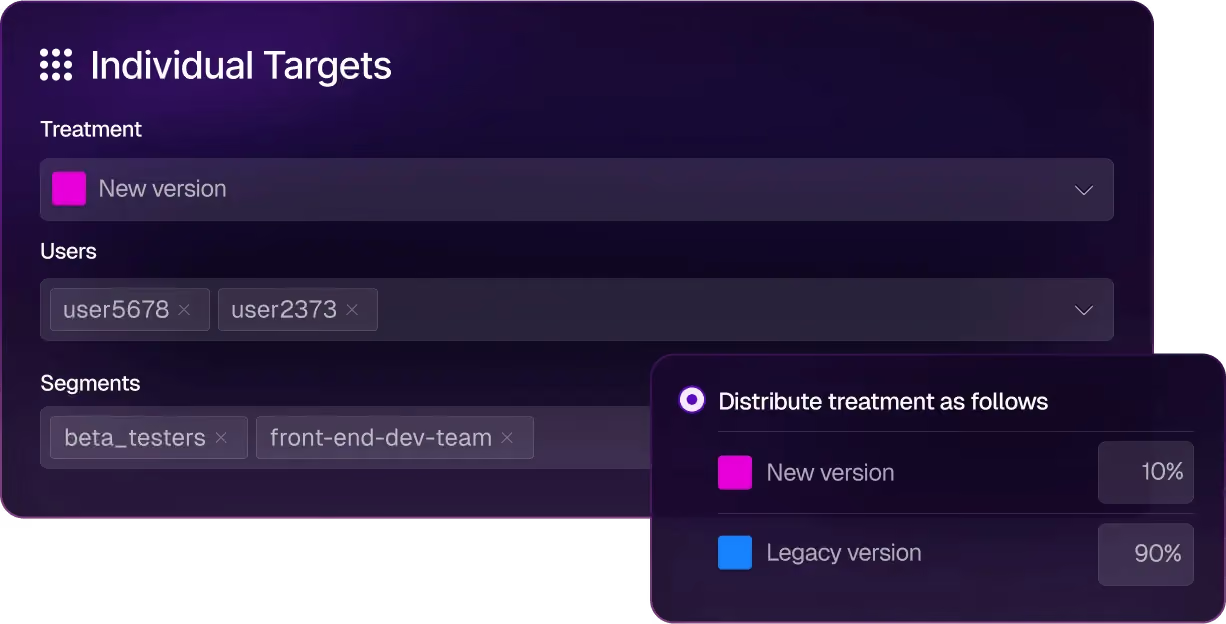
For an enterprise DevOps team that already lives in Harness, FME is a natural addition. But for an Unleash user motivated by open source needs or dedicated feature flagging functionality, it might not be the right choice.
Split key features
Pros of Split
- The experimentation engine is quite robust as it offers advanced features like sequential testing, dimensional analysis, and the flag-to-impact feedback loop.
- It offers deep CI/CD pipeline integration, so your feature rollouts can be automated based on experiment outcomes. You don’t have to do it manually.
- It uses real-time streaming and delivers sub-second flag evaluation, which matters for live experiments and progressive rollouts on consumer traffic.
- The AI Release Agent now adds an agentic layer that interprets results and recommends rollout decisions. As a result, it reduces the cognitive load on release engineers.
Drawbacks of Split
- It’s not an open-source platform, and it doesn’t offer a self-hosted deployment option. If you’re leaving Unleash to maintain data sovereignty and infrastructure control, Split moves you further from that goal.
- Many users say the platform’s UI is too complex to navigate, which also results in long implementation times. The learning curve is too steep because you need to get up to speed on everything else it offers.
- Harness doesn’t publish its pricing and usually bundles its offerings, so you might pay more than you expect. On average, teams pay $49,200 per year—and it can exceed $200,000.
- Users report that the product can be quite unstable and that internal transitions can even slow down their implementation process.
- You’re buying into a platform, so if you don’t use Harness for CI/CD, chaos engineering, or cloud cost management, you’re paying for a suite wrapper around the flag and experimentation capabilities you actually want.
- Some users find customer support less responsive than on other platforms they use.
How Split compares to Unleash
Even though Split offers a much better experimentation engine than Unleash, most Unleash users choose it for its openness and independence. That’s why:
- Split wins for large enterprises already standardized on Harness for CI/CD that want flags and experimentation integrated into their existing delivery pipeline.
- Unleash wins for teams that prioritize open source, self-hosting, transparent pricing, and vendor independence. Unleash is leaner, more focused, and doesn’t require commitment to a broader platform suite.
Who is Split best for?
It’s best for large enterprise DevOps and platform engineering teams already using Harness for CI/CD or chaos engineering. Especially if they want to add statistically rigorous feature flagging and experimentation inside the same delivery platform. It’s not a fit for teams that want an open source platform or standalone tooling for feature flagging without broader platform commitments.
So, which Unleash alternative is the right choice for your business?
All in all, Unleash has built a solid feature flagging tool. If your team needs open-source flag management with self-hosted deployment, it still does that well. But that’s where the buck stops.
If you need experimentation, real-time propagation, AI-native workflows, or flag lifecycle management beyond the toggle, you can consider choosing any of the following platforms:
- If you want strong feature flagging capabilities for AI-native development, GrowthBook is the best choice. It’s open source and has launched advanced feature flagging capabilities, including ramp schedules, automated stale flag cleanup, approval flows, AI MCP, and granular targeting. These features let you take full control of the traditional and AI-led development process, helping you ship features faster while reducing deployment risk.
- If experimentation is the gap, GrowthBook and Statsig are the strongest options. GrowthBook wins because it’s open source and offers warehouse-native experimentation from the get-go. Also, you can be sure that its roadmap is stable and governed independently, which is something Statsig can’t guarantee with its recent acquisitions.
- If you need the deepest enterprise-grade governance, LaunchDarkly is the safest default due to its feature set. However, GrowthBook is a close second, coming in at roughly half the price.
- If you’re already on Harness CI/CD, consider using Split (by Harness). You’ll benefit from the native pipeline integration and AI Release Agent without adding another vendor.
- If you’re a startup and want analytics, flags, and replay in one cloud product with a generous free tier, PostHog is a strong choice.
- If you want a feature-flagging product with built-in remote configuration, Flagsmith could be a good option. It offers the same open-source ethos and deployment model, but with real-time flag evaluation.
If you’re looking to try out an open-source feature flagging platform immediately, give GrowthBook a shot. Here are a few ways to get started:
- You can spin up GrowthBook for free.
- Run the self-hosted edition on your own infrastructure.
- Book a demo with our team to get a more tailored solution.
Related articles
.avif)
Ready to ship faster?
No credit card required. Start with feature flags, experimentation, and product analytics — free.

