

8 best open-source feature flagging tools compared [2026]
![8 best open-source feature flagging tools compared [2026]](https://cdn.prod.website-files.com/699d535399af6088dad49a5c/6a0b8c8a08f0bfb32df976f2_How%20Fanatics%20Made%20Experimentation%20a%20Strategic%20Growth%20Driver%20(3).avif)
If you’ve ever evaluated open-source feature flagging tools, it feels like picking a database. On paper, most options check similar boxes. In practice, the wrong choice costs you months in migration headaches and unexpected operational overhead.
Even though open-source software lets you take back control of your data, you still have to consider operational decisions around self-hosting and your specific use case. While some treat experimentation as a core capability, others stick to basic feature flagging only.
In this guide, we’ll take a look at eight open-source feature flagging tools and explain what they do so that you can make the right call when the time comes.
What is feature flagging?
A feature flag is a conditional wrapper around code that lets you control whether it runs without redeploying your application. At its simplest, you’re wrapping a feature in an if/else statement that checks a remote configuration instead of a hardcoded value.
Feature flags let you deploy code to production and then decide separately when, how, and to whom it becomes visible. In your day-to-day engineering work, it can translate to use cases like:
- Decoupling deployments from releases
- Percentage-based rollouts for gradual testing
- Targeted delivery for specific accounts
- Instant kill switches to revert when something breaks
In short, they’re the foundation of the modern software delivery infrastructure. And when you pair them with a statistical engine, you can focus on controlled experimentation to see if the changes you shipped actually make a difference.
Why choose an open-source feature flagging platform?
You could buy a SaaS feature flag tool and move on. Plenty of teams do. But there are real, specific reasons why engineering organizations, irrespective of their size, choose an open-source feature flagging tool.
Here’s why:
- Predictable costs: Most commercial feature flag platforms charge per seat, per event, or per monthly active user. The more successful your product is, the higher the costs of feature flagging and experimentation. In fact, the 2026 State of Open Source report found that 61.5% of organizations choose open-source software because there’s no licensing fee, or they can control the overall cost of using software.
- No vendor lock-in: The same report also found that 68% of organizations use open-source software to avoid being locked in to specific vendors — up from 55% last year. It has become a key driver of adoption, and the trend doesn’t seem to be going away. You own everything from your configurations to your migration path. If the tool stops being maintained or the company pivots, you fork it and keep going.
- Data sovereignty: When you self-host your feature flag platform, your user data, experiment assignments, flag state, and analytics stay on your infrastructure. Your personal data is safe, and you know where it’s stored and how it moves in your infrastructure.
- Improved transparency: Let’s say you’re using a proprietary tool for feature flagging and experimentation. In those cases, the stats engine is usually a black box. You trust the numbers because the vendor tells you they’re correct. With open source, you can read the code and audit the statistical methodology. For data teams that take experimental rigor seriously, that transparency matters. Platforms like GrowthBook show you the SQL so you don’t have to dig into the code to understand how it works or what’s happening.
Now, this doesn’t mean that open-source software is free of costs or the best option in every scenario.
If you’re self-hosting the software, it takes resources to manage the infrastructure and keep it up to date. But many feature flagging platforms offset this by offering managed cloud options and active developer communities to provide the support you need.
You just need to set clear expectations before choosing an open-source platform.
What to look for in an open-source feature flagging tool?
Before you start comparing tools, make sure you have a clear answer to these evaluation criteria:
Primary use case
First, ask yourself: Are you looking for simple on/off toggles and gradual rollouts to reduce deployment risk? Or do you need built-in A/B testing with statistical analysis to measure whether your changes actually moved the needle?
While some tools just help you create and manage feature flags, others, like GrowthBook, help you move into more advanced use cases, such as experimentation. You need to understand your long-term goals, so you only pay for the capabilities you’ll actually use.
Deployment model
Most feature flagging platforms support self-hosting, which is a major advantage over commercial-only platforms. But "self-hosting" means different things depending on the tool. Some tools also offer managed cloud if you want the control of open source without the infrastructure overhead.
Think about what your ops team can realistically support. If you’re a small team without dedicated DevOps, a single-binary deployment or a managed cloud option will save you from a lot of pain in the long run.
SDK support
Your feature flag tool is only useful if it works with your stack. Check for coverage across:
- Backend languages (Python, Java, Go, Node.js, C#)
- Frontend frameworks (JavaScript, React)
- Mobile platforms (Swift, Kotlin, Flutter)
- Edge environments (Cloudflare Workers, Lambda\@Edge)
If you’re running a polyglot microservices architecture, that difference matters on day one.
Note: Feature flagging platforms like GrowthBook offer 24+ ultralightweight SDKs that are 13.6 KB in size, which work with languages like Python, Typescript, and JavaScript.
Experimentation capabilities
If you care about measuring the impact of your feature rollouts, look closely at the experimentation layer. A percentage-based rollout is not the same thing as a controlled experiment. A “true” experiment requires sophisticated capabilities such as random assignment, metric tracking, statistical engines, and a clean analytics dashboard.
Most open-source flag tools don’t include this. The ones that do vary significantly in depth. For example, PostHog offers basic Bayesian and frequentist testing, but GrowthBook goes further with CUPED variance reduction and sequential testing.
Community and ecosystem
Open-source tools live or die by their communities. A large, active community means you can access better documentation and fix bugs faster by doing it yourself.
Use GitHub stars and contributor counts as a maintenance signal (check the most recent commit date alongside the count), but don’t overweight stars. Stars often reflect project age and developer marketing more than product quality, so be sure to assess each vendor’s customer base too. Customer base quality is a better viability indicator. Also, check the release cadence. Is the project shipping regularly, or has it gone quiet? Review recent discussions to see what kinds of issues you can expect before you start using it.
Vendor viability
Feature flag SDKs get scattered across every service in your codebase, making migration timelines measured in months common. Will this platform still be actively maintained in 3 years? Look at release cadence, funding stage, and customer base quality (production logos are a better signal than GitHub stars). Check the license type as fork insurance: MIT and Apache 2.0 give you the most freedom if the project direction changes. OpenFeature support provides additional vendor insurance by keeping your application code portable across flag evaluation backends.
Pricing model
Open source doesn’t always mean free at scale. Most tools offer a free self-hosted tier, but advanced features like SSO, RBAC, or dedicated support are available only in paid plans. Typically, you can expect a per-seat, per-request, per-product, or flat rate structure. The right pricing model for you depends on your use case and organizational scale.
Caching and infrastructure flexibility
Every company’s infrastructure is different, and there’s no single caching solution that works for everyone. Teams typically need caching at some combination of CDN, edge workers, SDK internal memory, distributed cache (Redis or Memcached), and self-hosted proxy layers.
The critical question is whether the platform integrates with the caching infrastructure you already run, or whether it pushes you toward a proprietary proxy. Also evaluate customization depth: can you attach custom metadata to flags, enforce organization-specific validation rules, and extend the platform with Terraform, OpenFeature providers, or an MCP Server?
Self-host or use the cloud
GrowthBook is open source with self-hosted and cloud options, so you can start free and keep your data in your own infrastructure.
Start Building Free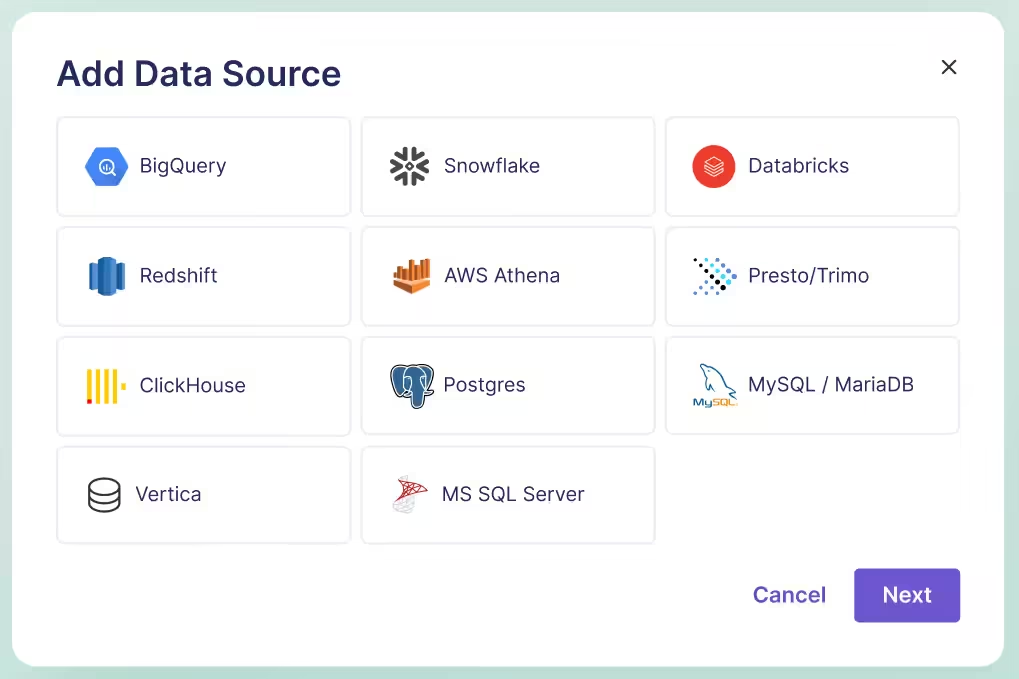
Best open-source feature flag platforms
Here are the 8 best open-source feature flagging platforms in 2026:
| Platform | Best for | License | Self-hosting | Experimentation | SDKs | Free plan | G2 rating |
| GrowthBook | Flags + built-in experimentation | MIT | Docker, K8S | Bayesian, frequentist, CUPED, sequential, bandits | 23 | Free (3 users, 3 envs) | 4.6/5 |
| Unleash | Enterprise governance and compliance | Apache 2.0 | Yes (2 env free) | None built-in | 30+ | Free self-hosted | 4.7/5 |
| Flagsmith | Flags + remote config, fast setup | BSD-3-Clause | Yes | Bucketing only (no stats) | Multi-language | Free (50K req/mo) | 4.8/5 |
| PostHog | All-in-one analytics, flags + experiments | MIT | Docker, K8S | Bayesian, frequentist | Multi-language | Generous free tier | 4.5/5 |
| Flipt | GitOps teams, flags as code | GPL-3.0 | Yes (single binary) | None | 7 (OpenFeature) | Free forever | N/A |
| FeatureHub | Cloud-native flags with streaming | Apache 2.0 | Docker, K8S | None | 10 | Free self-hosted | N/A |
| FeatBit | .NET teams, flags + basic A/B testing | MIT | Yes | Frequentist only | 9 | Free forever | N/A |
| Flipper | Rails developers, simple flags | MIT | Yes (gem) | None | Ruby only | Free gem | N/A |
1. GrowthBook

Source
What is GrowthBook?
GrowthBook is an open-source, enterprise-class, feature flagging platform designed around one principle: your application should never depend on GrowthBook being available. Both client and server SDKs evaluate flags locally from a cached payload, delivering sub-millisecond performance with zero network calls per flag check. The platform connects directly to your existing data warehouse for guardrail metrics and experiment analysis, so your data never leaves your infrastructure.
The platform is MIT-licensed and YC-backed, and 3,000+ organizations actively use it each month, including Dropbox (processing 3 billion+ daily evaluations on self-hosted GrowthBook), Khan Academy, Sony, Pepsi, Wikipedia, and Mistral. GrowthBook handles over 100 billion feature flag lookups daily, and the same codebase powers both the open-source self-hosted version and the managed cloud offering. GrowthBook Enterprise is SOC 2 Type II and ISO 27001 compliant, with GDPR, COPPA, and CCPA adherence and HIPAA BAA available.
The best part about the platform is that it treats feature flags and experimentation as two halves of the same workflow. You don’t ship a feature behind a flag and then switch to a different tool to figure out whether it worked. The flag, the experiment, and the analysis all live in one place — with your data warehouse as the single source of truth.
Supported SDKs
GrowthBook offers 24+ SDKs spanning backend, frontend, mobile, and edge environments:
- Backend: Node.js, Python, Ruby, PHP, Java, Go, C#, Elixir
- Frontend: JavaScript, React, Vue
- Mobile: Swift, Kotlin, Flutter, React Native
- Edge: Cloudflare Workers, Fastly Compute, Lambda\@Edge
- Other: Rust, Roku
All SDKs are ultra-lightweight and evaluate flags locally with zero network calls during evaluation. That means you can expect sub-millisecond response times, and a feature flag check doesn’t add latency to your requests.
Community and ecosystem
The GrowthBook community has grown steadily and has over 7,000 stars on GitHub as of early 2026. The project ships regular releases, maintains comprehensive documentation, and offers a DevTools Chrome extension for debugging flag evaluations in the browser.
GrowthBook also supports OpenFeature, the open standard for feature flag evaluation. If you’re building with OpenFeature providers to keep your codebase vendor-neutral, it has official providers for Java, Python, Go, .NET, and JavaScript that plug directly into the spec. This means you can adopt the platform today and swap to a different backend later without rewriting your application code.
Key capabilities
- Feature flags and remote config: Create boolean, string, numeric, and JSON feature flags with remote configuration support. You can manage flags across multiple environments and update targeting rules or config values without redeploying code.
- User targeting and segmentation: Target features by user attributes, device type, geography, or custom properties. You can define reusable segments and apply complex condition logic with granular precision.
- Built-in A/B testing and experimentation: Run experiments directly on top of your feature flags with support for both Bayesian and frequentist statistical engines. GrowthBook connects to your existing data warehouse to analyze results, so there’s no duplicate data pipeline or second source of truth. You can also access the stats engine source code on GitHub to see how it works.
- Warehouse-native analytics: Query metrics directly from Snowflake, BigQuery, Redshift, Databricks, ClickHouse, Athena, Postgres, MySQL, MS SQL, Presto/Trino, and Vertica (11 supported sources). You define metrics once in your warehouse, and GrowthBook uses them for both smart feature flags and experiment analysis, keeping your analytics stack as the single source of truth.
- Role-based access and audit logs: Define roles and permissions to control who can create, modify, or deploy flags across environments. Every flag and experiment change is logged with full audit history for compliance and accountability.
- MCP server for AI: Use GrowthBook from your IDE by connecting it with Cursor, Claude Code, and Codex. You can create feature flags and track rollouts without leaving your AI tool.
- Safe Rollouts with guardrail metrics: Staged rollouts progress from 10% to 25% to 50% to 75% to 100%, with one-sided sequential guardrails pulled directly from your warehouse. If a rollout degrades key metrics like error rates, latency, or revenue, the platform surfaces warnings and can auto-rollback. You see the problem before your finance team does.
- Ramp schedules and approval controls: Define automated rollout stages that ramp up traffic from 10% through to 100% on a schedule you configure. Also, you can make sure flag changes can require approval before going live, whether they originate from a teammate in the UI or an AI coding agent calling the API.
- Feature Evaluation Diagnostics: Shipped in v4.3 (February 2026), diagnostics show exactly why a flag evaluated the way it did for a given user in production, with a rule-by-rule trace and attribute values. Combined with OpenTelemetry integration for observability pipelines, this removes the guesswork from debugging targeting issues.
- Caching at every layer: GrowthBook supports caching across CDN, SDK internal memory with stale-while-revalidate, GrowthBook Proxy with Redis pub/sub for distributed invalidation, webhooks for custom cache invalidation, and edge workers (Cloudflare, Vercel, Lambda@Edge). The philosophy is composability: lean on Redis, Cloudflare, and the caching infrastructure you already trust rather than forcing a proprietary proxy.
Pros of GrowthBook
- You can go from flagging a feature to analyzing its impact without leaving the platform or stitching together a second tool. The built-in stats engine (CUPED, sequential testing, SRM detection, bandits) enables your team to understand whether features work in live environments.
- Your data stays in your warehouse, so you don’t have to deal with duplicate pipelines or worry about PII leaving your infrastructure. If you’re in a regulated industry, it makes sure you stay compliant.
- OpenFeature support means you’re not locked in. If you need to swap backends later, your application code stays the same.
- Many users say they’ve experienced great, timely customer support — especially for technical issues.
- You can also conduct experiments without being capped by website traffic limits, which are common in other tools. As a result, you get more statistically significant results and can iterate with confidence.
Cons of GrowthBook
- You need a data warehouse to use the experimentation features. GrowthBook Cloud now offers a managed warehouse option for teams that don’t have one yet, but if you’re self-hosting, setting up a warehouse is an additional infrastructure step before you can create smart feature flags or run experiments.
- If you are using your own data warehouse, GrowthBook requires more initial configuration than simpler flag-only tools. However, if you use the GrowthBook Managed Warehouse, most of this additional setup comes out of the box.
- The UI can be complex for less technical team members, especially when working with JSON payloads and advanced targeting rules.
Pricing
GrowthBook offers pricing plans tailored to your infrastructure.
Cloud:
- Starter: It’s free, and you get unlimited feature flags and experiments. But it’s limited to 3 users and 3 environments, with unlimited CDN requests up to 1M per month.
- Pro: It costs $40 per user per month for up to 50 users. You can access advanced experimentation capabilities and permissioning features.
- Enterprise: Contact sales for a quote if you need governance, advanced security features, and optimizations for large datasets.
Self-hosted:
- Open source edition: It’s free, and you get unlimited feature flags, environments, and experiments. It’s also warehouse-native and not capped on traffic.
- Enterprise: You need to request a quote if you require advanced access control, cross-experiment insights, data pipelines, or security/compliance features.
Who is GrowthBook best for?
GrowthBook is purpose-built for data science, product, and engineering teams that want a complete open source feature flagging platform with the option to grow into experimentation. If your organization already has a data warehouse and you want feature flags, warehouse-connected guardrail metrics, and built-in A/B testing in a single tool, it’s the strongest open-source option available.
You can query your data where it lives, and because there’s a self-hosted option, even organizations in regulated industries like fintech, healthtech, and edtech can use it. It’s also the right choice for data teams that want to inspect, extend, or validate the statistical methodology behind their experiment results.
Ratings and reviews
G2: 4.6/5 (25 reviews): Users praise the ease of technical implementation and its ability to connect to multiple data warehouses. Keeping that in mind, the built-in experimentation engine becomes even more powerful because you can run complex tests using feature flags as the delivery mechanism. That said, some users find the UI complex to navigate at first.
2. Unleash
Source
What is Unleash?
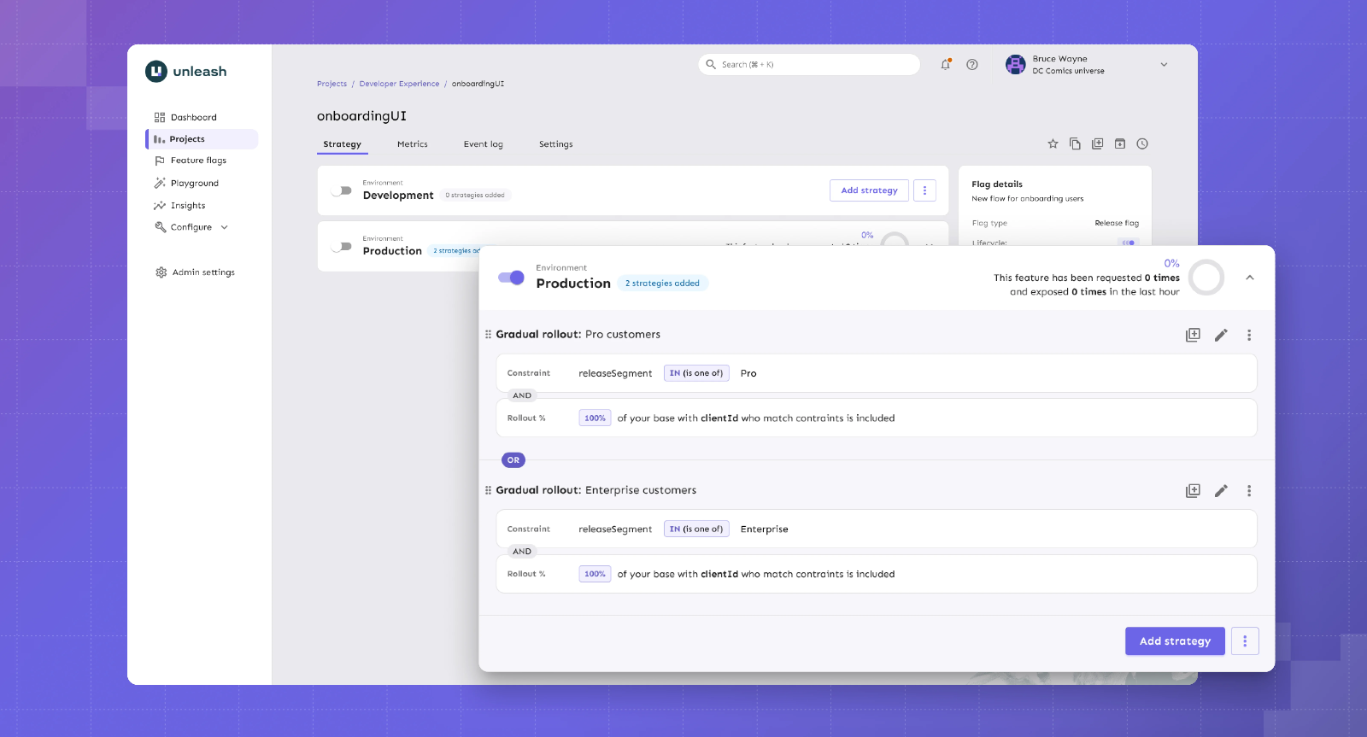
Unleash is the largest and longest-running open-source feature flag platform. With 13,300+ GitHub stars and 11 years of history, it’s an incumbent in this category, but the company built its reputation around enterprise governance.
GrowthBook combines experimentation with strong governance. However, Unleash has built its reputation specifically around compliance-first workflows. You can expect features like change request approvals with 4-eyes review and FedRAMP-ready infrastructure. If your feature flag changes need to go through the same compliance process as a production database migration, Unleash was designed for that workflow.
Supported SDKs
Unleash offers 17 official SDKs plus 15+ community-contributed SDKs. Official SDKs include the following:
Server-side SDKs:
- Go
- Java
- Node.js
- PHP
- Python
- Ruby
- Rust
- .NET
Client-side SDKs:
- Android
- Flutter (proxy)
- iOS (proxy)
- JavaScript (browser)
- React (proxy)
- Svelte (proxy)
- Vue (proxy)
Community SDKs:
- Angular - TypeScript
- Clojure
- C++
- ColdBox - CFML
- Dart
- Elixir
- Haskell
- Kotlin
- NestJS - Node.js
- PHP
- PHP - Symfony
- Solid
Unleash also supports OpenFeature providers, allowing you to adopt the vendor-neutral standard.
Key capabilities
- Feature flags with advanced targeting: Create feature flags with custom activation strategies to give your team precise control over which users or groups see a feature.
- Enterprise governance: Manage change requests with 4-eyes approval, granular role-based access control (RBAC), and full audit logging to ensure accountability and security.
- Compliance features: You get support for air-gapped deployments, FedRAMP compliance, and GDPR/Schrems II privacy-by-design, making Unleash suitable for regulated industries.
- Impact Metrics (Beta): It provides real-time visibility into metrics such as error rates, adoption, latency, and infrastructure costs. So, it allows teams to incorporate these metrics directly into rollout decisions.
- MCP Server: Integrates with AI coding assistants such as Claude Code, Cursor, and Windsurf, enabling developers to manage feature flags directly from their IDE.
Pros of Unleash
- The platform offers one of the largest sets of SDKs, making it convenient for engineers and developers.
- Users appreciate that the platform uses an API-first approach that lets them automate aspects like provisioning and configuration. As a result, they can also integrate with the tools they need to ship features safely and faster.
- Many users report that because the open-source version is available as a self-hosted option, they’ve been able to replace homegrown solutions without risking non-compliance.
Cons of Unleash
- You can deploy a feature behind a flag, but you can’t measure whether it worked, at least not without integrating a separate tool like GrowthBook. If your team expects to run experiments, this gap will slow you down from day one.
- You don’t get warehouse-native integrations and no native analytics connections (Amplitude, Mixpanel, Segment). For data-driven teams, the lack of any analytics layer is a real limitation because you can’t really tell which user saw the old or new version of a feature, making it harder to measure impact.
- $75/seat/month pricing with a 5-seat minimum can add up quickly. The lack of free viewer-only seats can result in an expensive bill over a period.
- The free self-hosted version is limited to 1 project and 2 environments, which restricts how far you can go before hitting the paywall.
- Unleash doesn’t store user identities or traits server-side. Every flag evaluation requires full context at runtime, which can increase latency in microservice architectures where trait data spans multiple services.
- Unleash’s OSS Edge is sunsetting on December 31, 2026. After that date, self-hosters at scale will need Enterprise Edge for the same edge evaluation architecture, which adds a paid dependency to what was previously a fully open-source deployment.
Pricing
- No free SaaS plan (self-hosted OSS is free with 1 project and 2 environment limits), but you can try the hosted version free for 14 days.
- Pay-as-you-go ($75/seat/month): No long-term commitment, and they do host Unleash Enterprise for you. But this option is only available on the cloud-based model.
- Enterprise Self-Hosted (Custom, annual): Billed annually, but you get a cloud, self-hosted, or hybrid option.
Ratings and reviews
G2: 4.7/5 (122 reviews): Unleash is rated the "Easiest Feature Management system to use" on G2. Most users praise its flexible rollout capabilities, ease of use, clear UI, and the ability for both developers and product managers to manage flags without friction. That said, the initial learning curve can be a barrier for non-technical teams.
Who is Unleash best for?
Unleash is a good option for large enterprises in regulated industries such as finance and AI, only if they need compliance-specific tooling like FedRAMP-ready deployments and ServiceNow integration.
It’s also a solid pick for teams that need pure feature flag management at scale and are comfortable integrating a separate tool for experimentation and analytics.
3. Flagsmith

Source
What is Flagsmith?
Flagsmith is an open-source feature flag and remote configuration platform that’s bootstrapped. That’s one of the reasons the platform is open source and caters to solo developers, mid-market companies, and enterprise organizations.
The software combines feature toggles with remote configurations to help engineering teams easily create, configure, and manage features for individual segments, users, and development environments. Additionally, Flagsmith supports phased rollouts through gradual feature deployments, canary deployments, A/B testing, and multivariate testing.
Supported SDKs
Flagsmith covers the major languages, such as:
Client-side SDKs:
- Javascript
- Android/Kotlin
- iOS/Swift
- React
- Next.js and SSR
- Flutter
Server-side SDKs:
- Python
- Java
- NET
- Node.js
- Ruby
- PHP
- Go
- Rust
- Elixir
Key capabilities
- Feature flags & remote config: Manage unlimited feature flags and key-value configurations across environments, allowing teams to control feature rollouts and dynamically adjust application behavior without redeploying.
- User targeting & segmentation: Target features to specific users, segments, or percentages of your audience, enabling controlled rollouts and safer experimentation.
- A/B and multivariate testing: Run experiments and test multiple feature variations, helping teams make data-driven decisions on feature impact.
- Role-based access and audit logs: Define user roles, manage permissions, and track all changes, ensuring security, compliance, and accountability across your team.
- Multi-platform SDKs and real-time updates: Support for multiple languages and frameworks with OpenFeature compatibility. Plus, you get instant flag updates via Edge API, so your app experiences consistent behavior across environments.
Pros of Flagsmith
- Multiple reviewers confirm that the platform is easy to get started with and use. And both developers and non-technical team members can navigate the UI without a training session.
- Remote configuration alongside flags lets you manage feature behavior and visibility in one place.
- The platform also received high ratings for customer support. Several users praise how responsive and knowledgeable the team is.
Cons of Flagsmith
- There’s no built-in experimentation stats engine. Flagsmith handles bucketing (splitting users into variants), but you need an analytics partner like Amplitude or Mixpanel to determine which variant actually won.
- It’s not warehouse-native by default, so your experiment data flows through third-party analytics integrations, not your data warehouse.
- Important features like on-premises deployment or SSO are behind steep enterprise pricing, which isn’t ideal for small teams.
- While Flagsmith has added integrations (including Datadog, Amplitude, Segment, Jira, and Slack, among 15+ total), some users report gaps in the on-prem version compared to the cloud offering.
Pricing
- Free: 50,000 requests/month with unlimited flags and environments
- Start-Up ($45/month): 1M requests/month, 3 team members
- Scale-Up ($200/month): Unlimited requests, 10 team members
- Enterprise (Custom): Cloud, Private cloud, or on-premise; Enterprise SLA
Who is Flagsmith best for?
Flagsmith is a good fit for mid-market engineering teams and enterprises that want feature flags and remote configuration in a single tool, with native integrations with their existing analytics stack. If you’re already using Amplitude, Mixpanel, or Segment and want flag events to flow into those platforms without custom instrumentation, Flagsmith makes that easy.
It’s not the right fit if you need built-in statistical experimentation or you want capabilities beyond feature flagging.
Ratings and reviews
G2: 4.8/5 (37 reviews): Users praise UI simplicity, customer support, and the low barrier to entry as a non-technical user. But the lack of a built-in statistical engine makes it difficult for data-driven teams who want to run more advanced experiments without a separate analytics tool.
4. PostHog

Source
What is PostHog?
PostHog is an all-in-one product analytics tool that includes feature flags as one part of its entire product suite. The platform takes the opposite approach from every other tool on this list. Instead of doing one thing well, it tries to do everything in one place: product analytics, session replay, feature flags, A/B testing, error tracking, surveys, and a customer data platform under a single SDK.
The product is mostly catered towards data and product teams as opposed to engineering teams. And that’s why its “Product OS” is bundled with different tools to help you understand how users get value from your product.
Supported SDKs
Posthog offers SDKs in multiple languages, including the following:
- Capacitor
- NET
- Android
- Flutter
- iOS
- Go
- Elixir
- Java
- JavaScript web
- Next.js
- Node.js
- PHP
- React Router
- React
- Python
- Ruby
- Rust
- Unity
- React Native
The advantage is that a single SDK handles flags, analytics, session replay, and experiments, so you don’t need separate instrumentation per tool.
Key capabilities
- Feature Flags: Control which features are active for which users, with percentage-based rollouts and targeting, enabling safe, incremental releases. It offers sub-50ms latency for local evaluation.
- Product Analytics: You can track user behavior, funnels, retention, and engagement metrics in one place to help you make better product-related decisions.
- Session Replay: You can record and replay user sessions, which helps your teams debug issues and understand user behavior.
- Experimentation: Run experiments and analyze feature impact directly within the platform so that your team can measure changes without external tools.
- Managed Warehouse & Integrations: Connect to your data warehouse on platforms like BigQuery, Snowflake, and 120+ other sources via APIs and webhooks. It lets you centralize data for analytics, flag evaluation, and product insights. But your data lives in Posthog’s system first.
Pros of Posthog
- Many users say that having qualitative and quantitative tools within the same platform helps them get a better picture of how users use their products.
- You can replace Mixpanel, Hotjar, and a separate A/B testing tool with a single platform and a single SDK. For teams tired of managing (and paying for) 3 different analytics products, it helps them consolidate their tech stack.
- 98% of PostHog customers use the free tier. For early-stage teams, that means real analytics, flags, and session replay at zero cost while you figure out what your product needs.
- The platform offers flexibility in handling data and building custom flows for your pipeline, which is useful for analyzing product analytics.
Cons of Posthog
- It’s not warehouse-native. PostHog stores your data in its own system and offers warehouse connections for export. If your team has invested in a data warehouse as the source of truth, PostHog creates a second one.
- The experimentation stats engine is basic. You don’t get advanced capabilities like CUPED variance reduction or sequential testing. If your team runs experimentation as a core discipline, you’ll hit the ceiling.
- Several users report that the learning curve can be quite steep, especially if you’re from a non-technical background. That’s why some teams take months to implement it.
- Usage-based pricing can get expensive at scale. As your event volume and flag requests increase, so do your costs, which is a concern if you have a high-volume product or are growing faster.
- The UI is overwhelming for new users. Multiple users describe the dashboard as difficult to navigate initially.
Pricing
- Free: 1M analytics events/month, 1M flag requests, 5K session replays, and more.
- Pay-as-you-go: Usage-based with volume discounts at scale. But base pricing starts at $0.0001 per flag request, $0.00005 per event for analytics, and $0.00006 per event for LLM analytics.
- Self-Hosted (Free): The platform uses an MIT license so that you can host it yourself.
Who is PostHog best for?
Developer and product teams that want one platform for product analytics, feature flags, basic experiments, and session replay. It’s a particularly strong choice for early-stage companies that can take advantage of the generous free tier to consolidate their tooling before they need advanced experimentation.
It’s not the right fit for data teams that need advanced statistics, teams with strict warehouse-native requirements, or enterprises in regulated industries. And in cases where the company needs to scale their feature flagging usage, they tend to look for specialized solutions.
Ratings and reviews
G2: 4.5/5 (1,045 reviews): Users consistently praise ease of setup, the breadth of the feature set, and the all-in-one convenience. The fact that you get qualitative insights within the same platform means you don’t have to set up separate tools and have everything you need to measure product analytics. That said, the overwhelming UI, pricing concerns, lack of robust experimentation features, and the product’s complexity can be hard to wrangle in the long run.
5. Flipt

Source
What is Flipt?
Flipt is an open-source feature flagging platform that treats feature flags the same way your team treats application code. They’re stored in Git, reviewed in pull requests, and deployed through CI/CD, just as you do with your app’s code.
The platform has been written in Go and compiled to a single binary with zero external dependencies. As a result, Flipt is architecturally minimal by design, you don’t require a database for the open-source version.
The project has 4,700+ GitHub stars and works with GitHub, GitLab, Bitbucket, Azure DevOps, and Gitea.
Supported SDKs
Flipt previously took a standards-first approach through OpenFeature. But with the launch of V2, they’re still working on updating their OpenFeature providers to support its new “environments” concept. If you’re adopting Flipt today and relying on OpenFeature for vendor portability, you may run into a lack of flagging capabilities until those providers catch up.
You get REST and gRPC APIs for custom integrations.
Client-side SDKs:
- Node/TypeScript
- Go
- Python
- Rust
- Java
- PHP
- C#
Server-side SDKs:
- JavaScript
- React
- Python
- Ruby
- Go
- Java
- Dart
- C#
- Swift Android
Key capabilities
- Git-native feature flags: You can manage feature flags through familiar Git workflows, where UI changes automatically generate reviewable commits. This ensures auditability and seamlessly integrates flag management into your code review process.
- Instant rollouts and rollbacks: Flag changes take effect in milliseconds via streaming updates, allowing teams to deploy features safely and revert quickly if issues arise.
- Self-hosted, single-binary deployment: You can run Flipt on your own infrastructure with zero dependencies. As a result, it provides full control over data and operational simplicity.
- Secrets and security management: You get a built-in secrets integration and enterprise-grade RBAC with audit logs that protect sensitive configuration and maintain governance across teams.
Pros of Flipt
- Every flag change goes through the same PR review and CI/CD process as your application code. That means your audit trail is built into Git and is searchable and revertible with git revert.
- The open-source version is 100% free with no paid tiers. If you need to make the case internally that this tool will never generate a surprise invoice, Flipt is the cleanest answer.
- You’ll spend less time on infrastructure compared to other feature flagging tools. It uses a single binary approach so that you can deploy flags without heavy infrastructure, and memory usage stays under 50 MB (even for 1000+ flags).
Cons of Flipt
- It doesn’t offer any A/B testing or experimentation capabilities. Flipt is purely a flag evaluation engine. So, measuring outcomes requires an entirely separate tool and pipeline.
- There are no analytics integrations, so you’ll have to build your own data pipeline for flag events.
- The UI is minimal and developer-focused. Product managers and non-technical team members will struggle without Git and CLI knowledge.
- As of August 2025, the platform no longer offers a Cloud version. If you prefer a simpler SaaS setup, this platform isn’t right for you.
Pricing
- Open Source (Free): 100% open source and unlimited flags that are Git-native.
- Pro Monthly ($200/month): Managed DB, secrets management, GPG signing, and GitHub/GitLab/BitBucket/Azure DevOps integration.
- Custom: Only for enterprises that need advanced governance features like RBAC and audit logging.
Who is Flipt best for?
IFlipt is best for DevOps and infrastructure teams that live in Git and want feature flags to follow the same workflow as every other piece of infrastructure they manage. If you view flags as a deployment primitive, not a product management tool, and you want the smallest possible operational surface area, you can consider it.
It’s not the right fit if you need experimentation, analytics, a polished UI for non-developers, or managed hosting.
Ratings and reviews
Not listed on G2, Capterra, or TrustRadius. It has a very limited community ecosystem (as of March 2026).
6. FeatureHub
Source
What is FeatureHub?
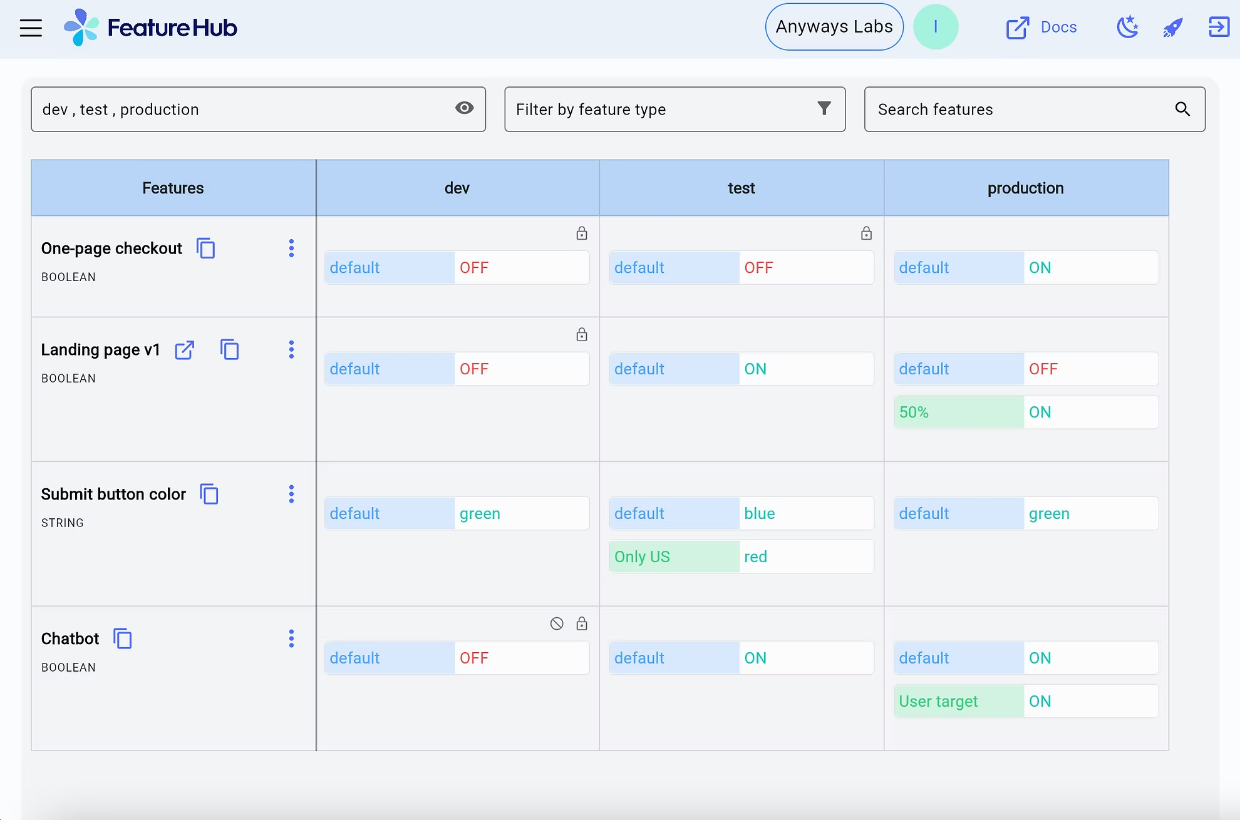
FeatureHub is a cloud-native open-source platform for feature flags and remote configuration. It’s smaller and more specialized compared to other feature flagging tools. You can think of it as the lightweight, Kubernetes-native option for teams that want flag management without the weight of a full experimentation or analytics platform.
The architecture reflects that philosophy. FeatureHub uses NATS for real-time cloud-native messaging and partners with Fastly to serve feature flags from edge locations globally. When a flag changes, your SDKs get the update via Server-Sent Events.
Supported SDKs
Client-side SDKs:
- JavaScript (includes React, Angular, SolidJS)
- Dart / Flutter
- Swift
- Ruby (for client use in Rails/Sinatra apps)
Server-side SDKs:
- Java (Jersey, SpringBoot, Quarkus)
- C# / .NET
- Go
- Python
- Ruby (for server-side)
- JavaScript / Node.js
- Dart / Flutter
Key capabilities
- Feature flags and runtime control: Manage feature flags and application behavior at runtime without redeploying code. The difference is that you get a runtime control plane within a cloud-native, edge-first architecture (Docker and Kubernetes).
- Governance and audit trails: You get built-in granular permissions, role-based access control, and full audit history to ensure compliance and accountability, even in regulated environments.
- Real-time streaming (SSE): Server-side SDKs receive updates instantly via Server-Sent Events, ensuring global applications reflect flag changes immediately.
- Polling and one-off GET requests: Your client-side SDKs can fetch flag states on demand or at configurable intervals, which gives you additional flexibility for browser and mobile apps.
Pros of FeatureHub
- Your self-hosted deployment has no artificial limits, so you get unlimited flags and users at zero cost. You won’t hit a paywall that forces an upgrade just because you added a staging environment.
- If your infrastructure runs on Kubernetes, FeatureHub fits natively. It offers Docker, Helm charts, and NATS messaging so you’re working with the same tooling your platform team already manages.
- The platform’s new partnership with Fastly means that flag changes reach your SDKs in real time via Fastly CDN edge caching and Server-Sent Events. For globally distributed applications, that means low-latency flag delivery without polling or stale caches.
Cons of FeatureHub
- FeatureHub supports percentage rollouts and multivariate flags, but you can’t analyze outcomes natively. If you want those insights, you’ll need to export the data and analyze it elsewhere.
- Google Analytics is the only analytics integration as of March 2026. If your team relies on Amplitude, Mixpanel, Segment, or your data warehouse for product metrics, there’s no native connection. You’ll have to build that pipeline yourself through Webhooks.
- There’s no feature for flag lifecycle management or staleness detection. As your flag count grows, tracking which flags are still active and which should be cleaned up is entirely manual.
Pricing
FeatureHub offers only one plan for its managed cloud offering. It costs $4.99 per user per month and bills API requests separately on a pay-as-you-go basis:
- Streaming: $0.38 per 10,000 requests
- REST: $0.35 per 10,000 requests
- Test: $0.33 per 10,000 requests
You can try it for free for 30 days.
Who is FeatureHub best for?
FeatureHub is ideal for cloud-native teams running on Kubernetes that want lightweight, self-hosted flag management with real-time streaming. Also, they wouldn’t require built-in experimentation or deep analytics integrations for their workflows.
Ratings and reviews
There are no publicly available reviews on platforms like G2, TrustRadius, or SaaSworthy.
7. FeatBit
Source
What is FeatBit?
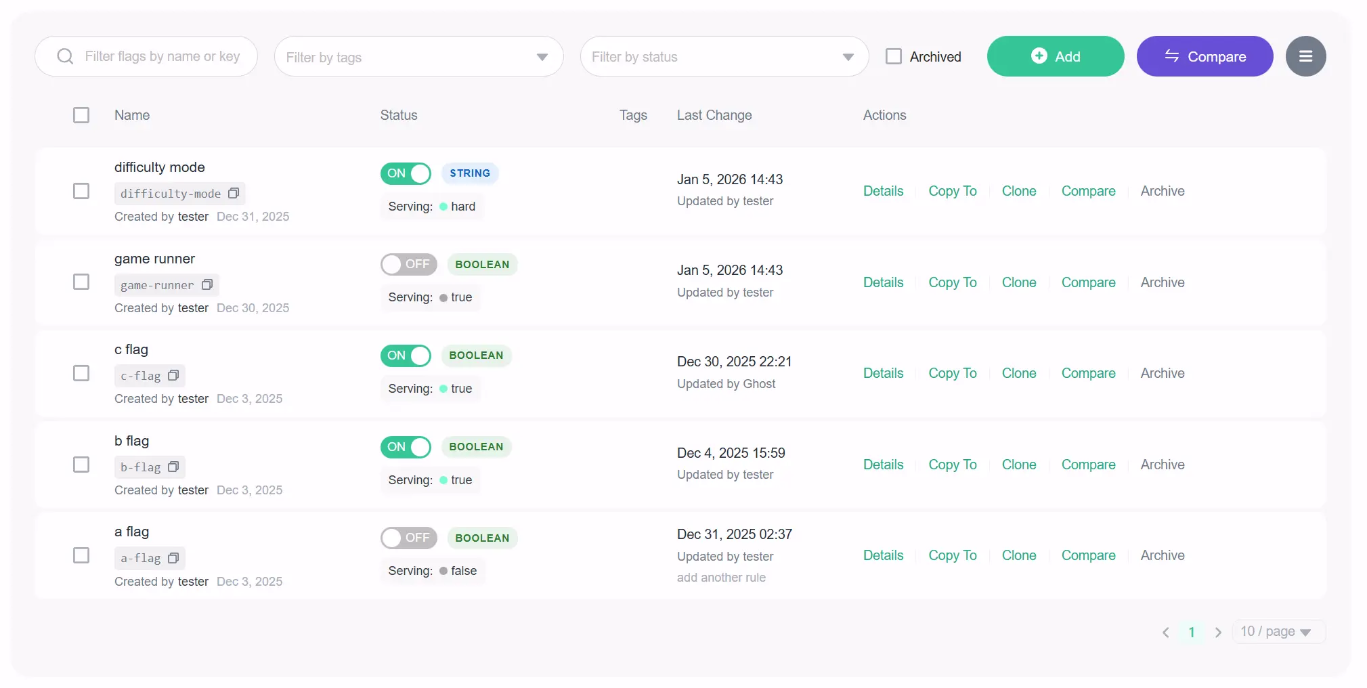
FeatBit is an MIT-licensed feature flag service founded in 2021, built primarily in C#. The platform supports traditional deployment pipelines as well as AI-native workflows, so you can control feature rollouts and experiments without using multiple tools.
The platform itself is an AI-native feature flag platform. This means it can guide release and experimentation decisions using AI agents, even if your team doesn’t have dedicated data scientists.
It also supports self-hosting on Kubernetes, Docker Compose, and in the cloud.
Supporting SDKs
FeatBit provides 9 client-side and server-side SDKs for a wide range of platforms:
- Backend: Node.js, Python, Java, Go, C#/.NET, Ruby, PHP
- Frontend / Client: JavaScript, React, Flutter, Swift, Kotlin
- Edge & other platforms: APIs and SDKs for integration into custom environments
Key capabilities
- Feature flags and remote configuration: Toggle features and manage key-value configurations dynamically across environments. You do get advanced segmentation and targeting, but limited experimentation capabilities.
- AI-guided release decisions: Automate experiments and flag evaluations using AI agents to optimize rollouts.
- AI Copilot: It integrates with coding workflows and developer tools via an MCP server and AI agents. As a result, it can answer queries or suggest actions related to feature flag workflows or rollouts.
- Featbit CLI and developer tools: You get a dedicated command-line interface for managing flags, which integrates with your workflows.
Pros of Featbit
- Your entire team can use FeatBit without a single licensing conversation. Unlimited flags, unlimited seats, no per-environment charges. If you’ve been burned by per-seat pricing, you can consider it.
- If you’re an ASP.NET Core team, FeatBit’s native .NET SDK is arguably the strongest open-source feature flag option for your stack. The C# foundation makes integration feel natural rather than bolted-on.
- The simplified standalone deployment mode (PostgreSQL only) means you can get FeatBit running without managing Kafka or ClickHouse. You don’t have to deal with additional operational overhead if you’re a smaller team.
Cons of Featbit
- The A/B testing will tell you whether a variant is statistically significant, but that’s about it. You can’t conduct complex experimental analysis — for example, Bayesian analysis or CUPED.
- Experiment data doesn’t connect to your data warehouse. You’ll need to export results to Datadog, Amplitude, Grafana, or another tool for deeper analysis.
- While FeatBit’s AI-guided release and experimentation capabilities reduce the need for a dedicated analytics team, they may require teams to trust AI recommendations over manual control. If you’re in a regulated industry, it could pose security and compliance issues.
Pricing
Featbit offers separate pricing plans for cloud and self-hosted infrastructure.
Online infra:
- Free: Up to 1,000 MAU across all connected SDKs.
- Pro: $45 per month for up to 15,000 MAU.
- Growth: $149 per month for up to 80,000 MAU.
- Enterprise: Starts from $3,999 per year for scalable MAU and enterprise features like dedicated SLA and support.
Self-host:
- Foundation: Free for the fully open-source platform.
- Enterprise: It starts from $3,999 per year. You get additional features, such as approval workflows and auto-sync agents.
- Enterprise Premium: You need to contact the team for a quote.
Who is Featbit best for?
Featbit works well for cost-conscious .NET teams that want feature flags with basic built-in A/B testing and zero licensing costs. If you’re running ASP.NET Core and don’t need advanced statistics, it gives you more out of the box than any other tool at this price point.
Ratings and reviews
It’s not listed on any major review platform as of March 2026.
8. Flipper

Source
What is Flipper?
Flipper is the feature flag tool the Ruby community has used for over a decade. It was created by Ruby veteran Johnny Nunemaker (formerly of GitHub) and maintained by Fewer & Faster.
Flipper does one thing and does it well: simple, performant feature flags for Ruby applications. It can be used for a variety of use cases beyond decoupling deployment from release. Engineering teams can also use the feature flags for internal tools, circuit breakers, backup provider cutovers, and temporarily blocking bad actors.
Supporting SDKs
- Ruby: Primary SDK via the Flipper gem.
- JavaScript: For frontend and Node.js environments.
- Adapters: ActiveRecord, Sequel, Redis, Mongo, AS::CacheStore, Moneta, and others for backend storage integration.
- API and CLI: REST API and CLI for custom workflows and automation.
Key capabilities
- Feature flags with flexible gate types: Toggle features on or off for individual users, groups (like beta testers or power users), or a percentage of users. Expression-based rules let you target users based on properties such as plan type, country, or account age.
- Audit history and Slack notifications: Every flag change is logged with timestamps and who made it across all environments. Slack integration pushes real-time notifications when flags change, so your team stays in sync.
- Flag lifecycle management: You can assign feature owners to each flag and track when each flag was last evaluated in each environment to determine when it’s safe to remove. You can also use tags to categorize flags by type (temporary, circuit breaker, etc.) or application area.
- Local-first resilience with adapter-based storage: Flag evaluations happen locally within your application, so performance is unaffected, and flags keep working even if Flipper Cloud goes offline.
Pros of Flipper
- If you’re on Rails, you can adopt it quite quickly. All you have to do is add the gem and run a migration to start managing flags.
- The platform is quite flexible and easy to use. It can support custom use cases, such as creating actor identifiers and setting up analytics event tracking.
Cons of Flipper
- It’s Ruby only, and TypeScript support is experimental. If your architecture includes Python services, Go microservices, or mobile apps, it’s not the right platform for you.
- There are no A/B testing or experimentation features. You can enable a feature for 50% of users, but you can’t measure whether it made a difference. For actual experimental analysis, you’ll need a completely separate tool and workflow.
- Every flag is Boolean-only. If you need multivariate experiments (show 3 different checkout flows to different segments), you’re managing separate flags for each variant.
Pricing
- Open-Source Gem (Free): Only 5 flags with two members are allowed on the plan.
- Cloud Bronze: $49 per month for up to 10 users, unlimited flags, one-day analytics retention period, and one custom environment.
- Cloud Silver: $149 per month for up to 25 users, one-week analytics retention period, and two custom environments.
- Cloud Gold: 50 seats for up to 50 users, one-month analytics retention period, and advanced permissioning capabilities.
Who is Flipper best for?
Rails developers and Ruby-first teams that want the simplest, most ergonomic feature flag experience available for their stack. If you don’t need experimentation, multi-language support, or analytics — and you just want flags that work beautifully in Rails — Flipper has been the answer for over a decade.
Ratings and reviews
They’re not listed on G2, Capterra, or TrustRadius. Most of the community feedback lives in developer blogs, Ruby forums, and GitHub, and it’s mostly positive because of its ease of integration and reliability.
Which open-source feature flag platform is right for you?
Here’s a quick refresher to decide which one’s the best choice for your needs:
- Choose GrowthBook if you want the most complete, enterprise-class, open-source feature flagging platform: 24+ SDKs with sub-millisecond local evaluation, Safe Rollouts with warehouse-connected guardrail metrics, SOC 2 Type II and ISO 27001 compliance, and caching at every layer of your architecture. And when you’re ready to measure impact, the built-in experimentation engine (Bayesian, frequentist, CUPED, sequential testing, bandits) means you never have to rip out your flagging infrastructure to add A/B testing.
- Choose Unleash if enterprise governance and compliance are non-negotiable. You get features like change request approvals, audit logging, ServiceNow integration, and FedRAMP support, which make it the default for regulated industries where flag changes require the same rigor as production database migrations.
- Choose Flagsmith if you want the fastest path to a working flag with remote configuration and native analytics integrations. It’s ideal for solo developers and mid-market teams that prioritize safety and speed over experimentation.
- Choose PostHog if you’d rather consolidate analytics, flags, experiments, and session replay into one platform than optimize any single capability. The generous free tier and integrated analytics make it a strong fit for early-stage teams that want breadth over depth.
- Choose Flipt if your team manages everything in Git and wants flag changes to go through the same PR and CI/CD workflow as application code.
- Choose FeatureHub if you’re running on Kubernetes and want lightweight, cloud-native flag management with real-time streaming.
- Choose FeatBit if you’re a .NET/C# team that wants feature flags with basic built-in A/B testing at no licensing cost.
- Choose Flipper if you’re a Rails team that wants the simplest, most ergonomic feature flag experience available for Ruby.
Avoid vendor lock-in with the right open-source feature flagging platform
Choosing an open-source platform for your feature flagging needs doesn’t have to be overly complicated. But you do need to know why you’re moving to a full-fledged platform and how it fits into your tech stack.
The right platform can change how your team ships features and iterates with confidence. The best open-source options give you safe deployments, sophisticated targeting, warehouse-connected guardrail metrics, and the flexibility to cache and extend the platform to fit your architecture.
The difference is that the platform was built with experimentation in mind — and feature flags act as the core delivery mechanism for this purpose. If that’s a core use case for your organization, it’s time to make the switch.
Learn more about how GrowthBook compares to PostHog, LaunchDarkly, and many others.
Start for free or book a demo to see how GrowthBook can help you deploy features at scale with a more data-driven approach.
See GrowthBook's flags in action
Join a live demo to see open-source feature flags, targeting, and experiment analysis in one walkthrough.
Pick a Demo Date
Related articles


Ready to ship faster?
No credit card required. Start with feature flags, experimentation, and product analytics — free.

