

How to implement feature flags at scale
.avif)
Creating your first feature flag is straightforward. You wrap a new feature in a conditional, roll it out to a small group of users, and monitor the results. It works well, and it’s easy to manage.
Then you add a second flag, then a third. Eventually, your team starts rolling out new features behind flags or testing their performance through percentage rollouts. It doesn’t take too long for feature flags to become a critical part of your infrastructure. But handling 10 flags versus 1000 flags is a whole different ballgame.
Even though they give you speed and control, at scale, they need better governance and architecture to keep delivering on that promise.
In this guide, we’ll explain how you can scale feature flag implementation and what to expect while doing so.
What are feature flags?
A feature flag is an if/else statement in your code that controls whether a feature is visible or active for a given user or segment in a specific environment. Instead of shipping a feature to everyone at once, you wrap it behind a flag and decide who sees it and when.
Note: If you’re new to the concept or need a refresher, check out our complete guide to feature flags that covers the fundamentals.
Watch here to learn more about how to use feature flags with GrowthBook
Why do product and engineering teams use feature flags?
Initially, feature flags were used as a convenience. But today, they’re central to how high-performing product and engineering teams ship software. Here are a few reasons why:
- Decoupling deployment from release: You can merge code to production without exposing it to users, so your deploy and release schedules don’t have to be the same. It changes the way you think about risk because deployment becomes a routine event. It’s not something that you have to worry about with bated breath.
- Faster iteration cycles: When you use feature flags, you can roll out features to a small user segment, test their performance, assess their viability, and decide whether to roll them out to every user much faster. Instead of weeks to test and make changes, you can do it in days. If something goes wrong, all you have to do is flip the flag.
- Enables continuous delivery: Without flags, continuous delivery often stops at the "deploy frequently" part because teams can’t separate shipping code from exposing it to users. Flags remove that bottleneck. You can merge to main multiple times a day while keeping everything behind flags. Only release when the feature is ready, not when the sprint ends.
- Better experimentation infrastructure: You can A/B test a new checkout flow or gradually roll out a backend migration to 5% of traffic before going wider. You learn on the go, and feature flags become the delivery mechanism for that purpose. The more you learn, the better the results (and user experience) over time.
Why is it important to implement feature flags at scale?
When you’re a small team shipping a single product, feature flags work well. It’s simple to use because there are only a handful of engineers and maybe a few product managers. So everyone knows which flags are live in the codebase, and they share a clear understanding of what’s happening.
But the real test comes when your organization starts growing. As your team grows, so does the deployment frequency. While you were creating maybe 10 flags a week, now you’re creating 10 flags a day to improve velocity and software quality.
In short, the more complex your product gets, the more complex your feature flagging practices become.
Without the right systems in place, feature and flag management start slowing you down. The very tool that was supposed to “accelerate” delivery introduces friction you didn’t anticipate.
As a result, you can expect problems like:
- Increasing technical debt as stale flags pile up in your codebase.
- Higher release risk because nobody knows which flags are active or who owns them.
- Inconsistent app behavior because the same flag evaluates differently across environments.
The Knight Capital precedent from 2012 is an unfortunate yet excellent example of how it can impact your business. It lost $460 million in 45 minutes after a deployment reactivated an obsolete feature flag tied to an old trading algorithm. Nobody removed the older flag, so when an engineer reused the same name, it pulled the older flag and started running unnecessary trades.
Even though this was an extreme case, it shows what’s really possible when you don’t have the right guardrails in place to govern flag management.
What challenges should you expect when scaling feature flags?
Here are a few issues you can expect while scaling feature flag usage:
Flag sprawl and lifecycle neglect
You’re expected to keep creating and using feature flags. But the problem comes in when you forget to retire or archive them. Over time, you end up with a growing layer of dead code.
It’ll make your app harder to test and harder to understand why things are going wrong. Typically, it’s best to keep the stale flag percentage under 15%. But most sit above 40%, if not 50%, because they can’t keep up with it manually. That’s why organizations like Uber had to build their own tool, Piranha, to remove 2,000 stale flags.
Learn more about when most companies adopt feature flags.
Ownership and cross-team coordination
In a small team, everyone knows who created which flag. In a larger organization, that tribal knowledge sits in a few engineers’ heads. Managing all the flags becomes harder, especially when multiple teams share the same service.
A 2021 study found that 25% of development effort is focused only on technical debt-related issues. When no one knows which targeting rules conflict with each other or who owns a flag, you can only expect to spend more time fixing problems.
Performance at scale
Flag evaluation happens on every request. When you’re running flags at a small scale, the overhead is barely noticeable. But at thousands of evaluations per second, it can become a different story.
For example, if your evaluation logic makes a remote API call to determine a flag’s state, it’ll add latency to every API response and page load. Even with reliable connectivity, you can still expect flickering and performance issues, whether you evaluate flags remotely or locally.
Tip: GrowthBook offers local SDK-based evaluation with ultralightweight SDKs (13.6kB zipped) to avoid flickering. Its SDKs also cache flag definitions locally with stale-while-revalidate semantics, so even if your connection to GrowthBook drops, your flags keep evaluating correctly.
User experience complexity
When you’re running dozens of flags simultaneously, it becomes genuinely difficult to know what any given user is actually seeing. You may not be able to answer questions like:
- Which flags are active for a user with a specific set of attributes?
- Which experiments are they enrolled in?
- Are two flags interacting to create a combination nobody has tested?
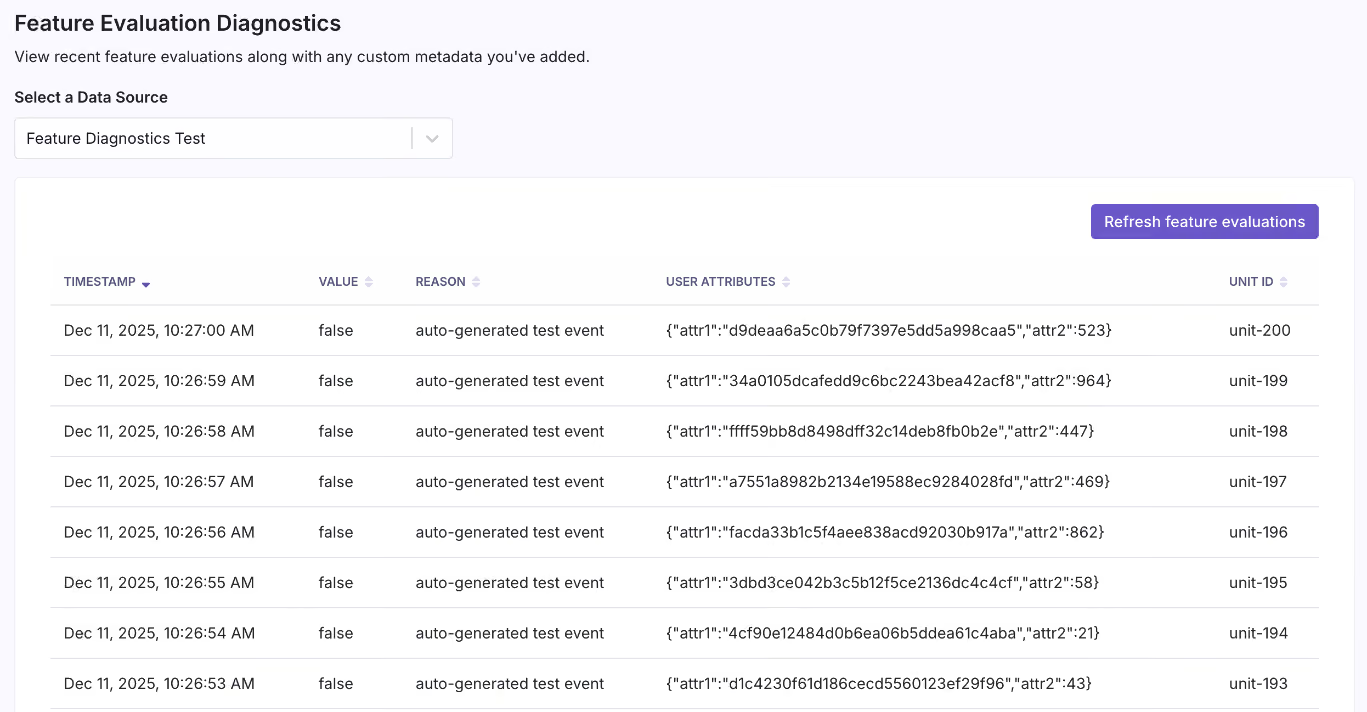
This is where simulation and diagnostic tooling becomes valuable. Platforms like GrowthBook let you preview what a specific user profile would experience before pushing a change live. And its Feature Evaluation Diagnostics show exactly why a flag was evaluated the way it was for a given user in production.
You can even pair this with the GrowthBook MCP Server to debug flag behavior directly from tools like Cursor or Claude Code. This helps you avoid dealing with UX bugs that are hard to debug in production because they’re so subtle—or even invisible in some cases.
Fragmented flagging and experimentation tools
Many engineering and product teams start with separate tools for feature flags and experimentation. As a result, you maintain two sets of SDKs and dashboards, which makes it harder to connect feature rollout to experimental results. Let’s say you roll out a new checkout flow to 10% of traffic and the conversion rate drops. If you don’t have the right connected tooling in place, you won’t find out until it makes a serious dent in your revenue.
As you scale flag usage, these issues get worse and harder to wrangle. More flags means more rollouts happening simultaneously, and without a shared data layer, you have no systematic way to know whether any of them are helping or hurting.
7 best practices for feature flagging at scale
Here’s how you can implement feature flags at scale with confidence:
1. Design a scalable architecture
The single most impactful decision you’ll make is how your SDK evaluates flags.
There are two models that you can consider:
- Remote evaluation makes a network call to a central service every time your application checks a flag. It’s easier to set up, but each call adds latency, which causes flickering. If that service goes down, your flags stop working.
- Local evaluation downloads flag definitions upfront and evaluates them in-process, with no network calls at runtime. The SDK has everything in its memory, so flag checks happen in sub-milliseconds. That’s why GrowthBook’s SDKs use this model because we believe that your application should never depend on GrowthBook being available.
But the evaluation model alone isn't the only thing you should look at. At scale, you also need caching at multiple layers of your architecture. For instance, CDN for serving flag definitions and distributed caching (like Redis) for microservice environments.
GrowthBook supports caching at every layer, including edge SDKs for Cloudflare Workers, Vercel Edge, and AWS Lambda@Edge. The cached rules update automatically in the background via streaming or polling, so the changes you make propagate within seconds.
Learn more about Client Side Feature Flagging.
2. Establish governance and ownership
You don’t want to work in a system where everyone can make changes, and no one takes responsibility for anything. That’s how incidents happen. Consider using measures like:
- Using a naming convention: A pattern like {type}-{team}-{feature}-{context} gives anyone on your team enough context to understand what a flag does without opening a dashboard.
- Assign ownership: Every flag should get an assigned owner at creation, and that owner is responsible for cleanup. Then layer in role-based access control (RBAC) to limit access to the right stakeholders.
- Set up governance documentation: Define naming and usage conventions to ensure everyone knows how things work in your organization.
- Set up additional guardrails: You need to make sure your dependencies are accounted for while working with feature flags. For instance, prerequisite flags let you define dependencies between flags where a dependent feature only activates when its parent flag is enabled, which prevents invalid state combinations in complex systems.
3. Manage the feature flag lifecycle
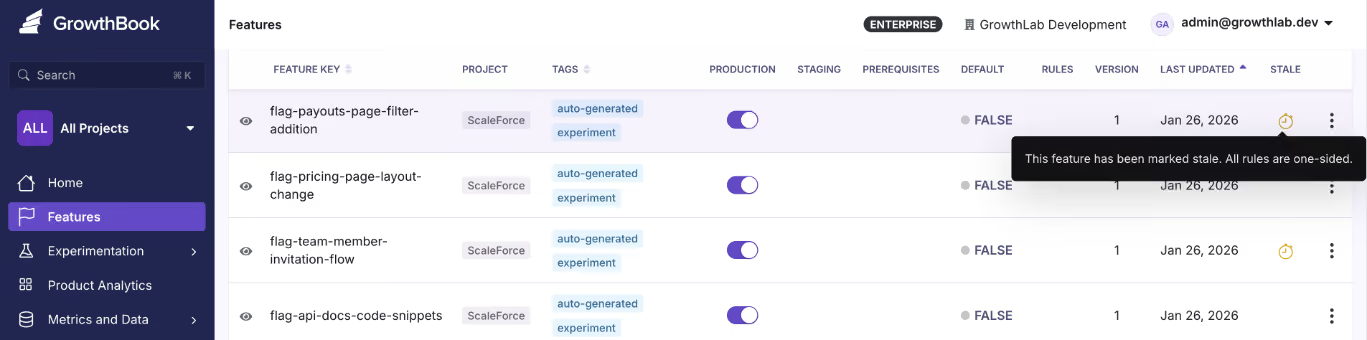
Every flag should have a planned end date—unless it’s a long-lived flag like a kill switch. So, set expiration dates when you create the flag so that you know when its usage has run its course.
Source
A good rule of thumb for release and experiment flags is to keep them on for 90 days.
4. Implement clean coding patterns
If you scatter raw if/else checks throughout your codebase, the flag’s logic can get mixed up with business logic. To avoid this, wrap flag evaluations in a centralized function or class. Instead of allowing if (flagService.isEnabled(’new-checkout’)) to appear in 12 different files, call it featureGates.showNewCheckout() from one place. Testing and cleanup get easier when you have to update in one location.
Also, create flags that serve a single purpose. If it controls too many unrelated behaviors or develops dependencies, you won’t be able to control where it gets used.
5. Integrate feature flags into CI/CD
Your pipeline already gates what code reaches production. Feature flags extend that control to what users actually experience after deployment.
For instance, you should run automated tests in both flag states (on and off) to understand its behavior. You’d be surprised how often code works fine with a flag enabled but breaks when it’s disabled.
6. Monitor, observe, and debug
You wouldn’t ship a feature without logging and monitoring. Feature flags deserve the same treatment. Start by monitoring flag evaluation events to see which user saw which flag state and when. It’ll give you the audit trail you need to debug issues later.
If you want a more sophisticated setup, consider integrating observability tools with your feature flagging solution or using one with built-in observability. This way, you can see what went wrong and its impact in real-time.
Source
7. Enable progressive delivery
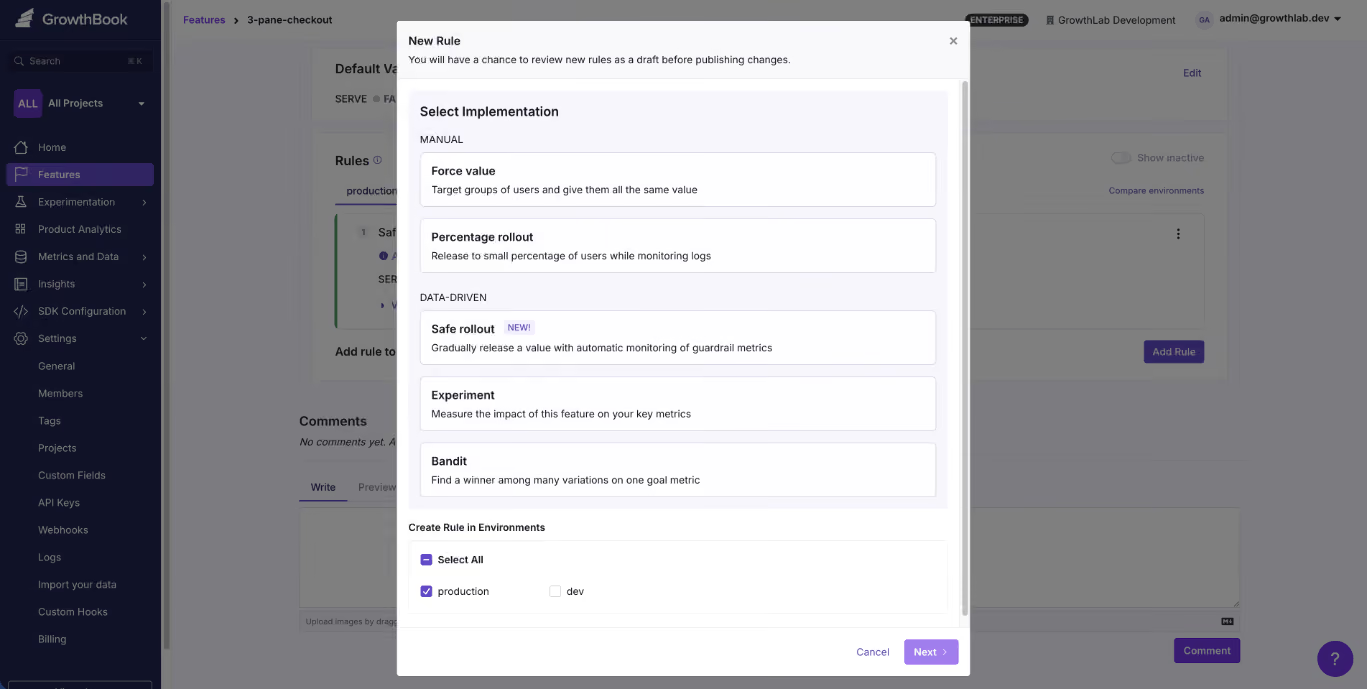
Instead of shipping to 100% of users and hoping for the best, use a gradual rollout method. Start by rolling out to 1% of users, then 5%, 10%, and so on. The next step is connecting your rollouts to guardrail metrics. This enables automated monitoring that surfaces warnings if a rollout degrades key signals like error rates, latency, or conversion.
GrowthBook's Safe Rollouts help you do this. You can define the metrics that matter, and the platform watches them as you ramp up traffic. If something degrades, you see it in the rollout dashboard before it becomes an incident in production.
Over time, adopt progressive delivery methods like canary releases and blue-green deployments to reduce deployment risk.
Related reading: 12 Common Feature Flag Mistakes to Avoid
How to choose a feature flag platform for scaled usage?
Here are a few factors to consider when you’re choosing a feature flagging platform:
Architecture and performance
Look for local SDK-based evaluation rather than server-side API calls on every request. You’ll experience sub-millisecond evaluation times, which influences your app’s experience.
Also, caching and offline support are table stakes for any latency-sensitive application. A platform that evaluates flags locally means your application keeps working even if the vendor's servers are temporarily unavailable.
If the platform doesn’t separate its read and write systems, ask how it handles load at scale.
SDK and platform support
You need SDKs that cover your full stack: backend, frontend, mobile, and edge. Platforms like GrowthBook offer 24+ SDKs that provide wide coverage while maintaining a consistent experience across different environments.
Also, make sure the flags behave the same way irrespective of which SDK you use. You don’t want to keep resolving bugs just because you use a different language for your app.
Governance and access control
Without governance, it’s impossible to scale. That’s why, at a minimum, you want:
- Role-based access control (RBAC) to make sure only the right team members have access to sensitive controls.
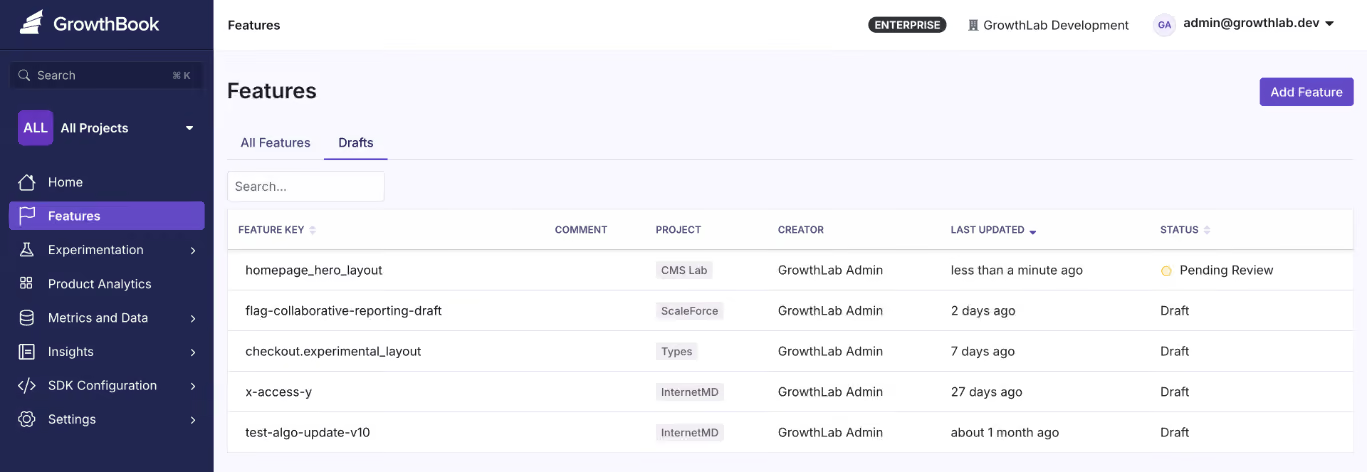
- Approval workflows to allow senior team members to review changes before they go live.
- Audit logs and change history to see what’s happening and when—which is useful for compliance audits too.
- Clear ownership assignment per flag so that responsibility is spread across the team.
- Prerequisite flag support to define dependencies between flags, preventing invalid state combinations in complex systems.
Source
Lifecycle management
The platform should make it easy to track flag status (active, stale, archived), set expiration dates, and surface unused flags for cleanup. These days, you can even connect to Claude or Cursor via an MCP and see where flags are referenced in your codebase, so look for capabilities like these to make it easier to manage flags.
Targeting and rollout capabilities
The ideal feature flagging platform should let you target users or environments. This capability is a building block for progressive delivery and robust experimentation.
At a minimum, the platform should support attribute-based targeting with AND/OR logic where you can target users by:
- Geography
- Device type
- Subscription tier
- Company ID
- Custom attributes
Here’s an example of what it looks like in GrowthBook. Within the platform you can even use Saved Groups to save time when the same targeting criteria apply across multiple flags. Another key capability is that when you use percentage-based rollouts, it uses deterministic hashing so the same user always gets the same variant, without requiring server-side session storage.
Source
Experimentation
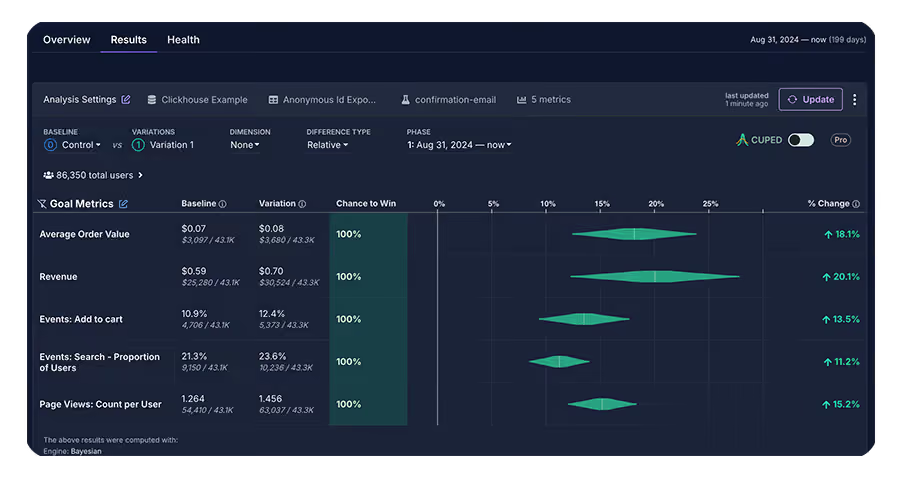
You might not need experimentation today, but choosing a platform that supports it natively means you won’t have to rip out your flagging infrastructure when you do. With GrowthBook, any feature flag can become a measurable A/B test without changing your instrumentation or adding a second vendor.
If you plan to run A/B tests or more complex tests, such as multivariate or CUPED tests, look for native experimentation support.
Everything should come out of the box, helping you avoid connecting too many tools just to test performance. For example, GrowthBook links feature flags to experimental capabilities, so you can modify source code without switching between platforms.
Source
Data ownership and deployment model
If you’re in a regulated industry like fintech, you need to make sure your platform of choice has a self-hosted option. It’s important to meet your compliance requirements—as data transfer or movement of any kind can introduce security risks.
For instance, GrowthBook offers warehouse-native experimentation and self-hosted options, which means you can run complex tests without sending your data to a third-party tool. Self-hosting solves compliance at the architecture level because end-user PII doesn’t leave your environment during flag evaluation.
And by connecting directly to your existing data warehouse like Snowflake, BigQuery, Redshift, ClickHouse, Databricks, and others, your rollouts will be informed by your actual data.
Integration with your existing stack
Make sure the platform also integrates with tools you already use, like:
- CI/CD pipelines (Command Line Interface)
- Observability tools (Datadog, New Relic)
- Communication tools (Slack, Discord)
- Infrastructure-as-code compatibility
- AI MCPs (Claude or Cursor)
Also consider vendor lock-in risk. Platforms that support the OpenFeature standard which is the CNCF specification for vendor-agnostic feature flag APIs give you a migration path if your needs change. For instance, GrowthBook supports OpenFeature with official providers for Java, Python, Go, .NET, and JavaScript. It also includes built-in migration tools for teams coming from LaunchDarkly or Statsig.
Cost and scalability of pricing
Look for a pricing model that fits your usage patterns. If you have very high-traffic websites or apps, it doesn’t make sense to go for a per-event or pay-as-you-go model. In fact, a fixed per-user cost might be a better option to control costs.
Note: While some platforms work well for small teams but force a migration when you outgrow them, others are built for enterprise but are painful to adopt. The ideal platform scales from your first flag to billions of daily evaluations without requiring a switch.
In fact, GrowthBook’s customers include teams processing 3+ billion evaluations per day on self-hosted instances and that’s because they built with scale in mind.
How Dropbox implemented feature flagging at scale
It’s one thing to talk about best practices in theory. However, it’s another to see them working at the scale of 700 million registered users.
Dropbox faced a problem that many growing companies run into. Their experimentation infrastructure had become fragmented through acquisitions. This meant they were managing too many platforms, including Stormcrow, their homegrown solution. And it resulted in challenges like:
- Increasing costs due to managing the flagging solution internally
- Dealing with long analysis periods, which delayed decisions
- Not having the flexibility to run experiments without changing the backend
That’s why its engineering team decided to implement GrowthBook. The platform allowed them to host the feature flagging product on-premise while allowing them to integrate with their existing Databricks warehouse.
As a result, they were able to consolidate six platforms into one — while processing 3+ billion feature evaluations every single day.
How GrowthBook supports feature flagging at scale
Your first feature flag was simple. But scaling it beyond 10 or even 100 flags requires clear architecture that stays out of your critical path and governance.
The best part is you don’t have to build this from scratch. You can use platforms like GrowthBook to put these practices into play—without the overhead of maintaining them yourself (unless you want to).
GrowthBook is built for teams that need an open-source feature flagging platform to deploy safely even as they scale to work together. You can take advantage of:
- SDKs that evaluate flags locally, so you don’t incur network overhead.
- Caching that works at every layer of your stack so that flag state stays consistent across services.
- A warehouse-native architecture queries your data where it already lives to avoid compliance issues.
- Governance features like RBAC, approval workflows, and even stale feature detection to keep your codebase clean and reduce technical debt.
- Built-in experimentation that lets you measure feature rollout impact with statistical rigor.
- A fully self-hostable platform that’s MIT-licensed, and supports the OpenFeature standard for vendor migration.
Over 3,000 companies use GrowthBook, including Dropbox, Khan Academy, Pepsi, and Typeform.
If you’re looking to scale feature flag implementation within your organization, you can start for free or book a demo.
Frequently asked questions
How many feature flags is too many?
There’s no clear number here because it depends on flags per engineer, flags per repository, flags per 1000 lines of code, the stale flag percentage, and the net monthly growth in number. A team with 500 well-governed flags is in better shape than a team with 50 abandoned ones.
How do you manage feature flag debt?
You should implement governance measures to reduce technical debt. For example, set expiration dates at creation, assign owners to every flag, and run regular audits to identify stale flags. Alternatively, you can use a platform like GrowthBook to automate these processes.
What is local vs. remote evaluation?
Remote evaluation makes a network call to a server on every flag check. Local evaluation downloads flag definitions upfront and evaluates them in-process without adding to your runtime overhead. That’s why local evaluation is faster and more reliable at scale.
How do feature flags impact performance?
It depends on your evaluation model. Remote evaluation adds network latency to every request. Local evaluation resolves in sub-millisecond time. At scale, this difference is significant — especially on mobile or in latency-sensitive user flows.
How do feature flags integrate with experimentation?
Feature flags control who sees what. But experimentation measures whether what they saw actually worked. When a platform supports both natively, you can run A/B or multivariate tests as part of your rollout process and make decisions based on real data before committing to a full release.
Related articles

Ready to ship faster?
No credit card required. Start with feature flags, experimentation, and product analytics — free.

