

Ship fast with a safety net: Feature flag management for the agentic era
AI has empowered developers to build new features faster than ever. What used to take a week can now be shipped in a day. The agentic era has transformed the way engineers work, but shipping fast without the proper guardrails can quickly lead to incidents. GrowthBook Feature Flags set your whole team up for the pace and volume of today’s development lifecycle.
The safety net for rapid AI development
Feature flags allow modern teams to ship fast while maintaining control. The best practice is straightforward: wrap every feature behind a flag so you can ship at scale and roll back the moment something breaks. But as teams scale and AI agents become more deeply embedded in workflows, ad-hoc flag management breaks down.
Without the right metrics monitored on every release, something that breaks in production could go undetected for weeks or even months before you realize the problem. By that point, dozens of other features may have shipped, making it difficult to identify which change is actually the culprit. Smaller failures compound the problem. Someone forgets to increment a rollout. A flag that should have been deleted six months ago is still sitting in production. Each rollout follows a different process depending on who is running it.
Consistency and guardrails are what enable teams to safely keep pace with the compressed development cycles that come with AI coding. Feature flags should be baked into the agent's coding workflow for every new feature, creating a safety net where guardrail metrics monitor performance and auto roll back if something degrades.
With that net in place, teams can move quickly, confident that bad releases will get caught early and rolled back. Humans can then focus on where judgment is actually needed, such as deciding which guardrail metrics matter, reviewing whether the rollout plan aligns to the risk, and approving changes that warrant human review.
Modern teams need enterprise-class flag management with the controls and governance to ship safely at AI speed. That’s where GrowthBook comes in.
GrowthBook 4.4: Safe and standardized feature flag management at scale
GrowthBook 4.4 extends our feature flag platform with 3 major new capabilities: release plans with automated ramp schedules, configurable approval workflows, and enhanced stale feature flag detection through expanded REST API and MCP server endpoints. 4.4 also includes SDK cache improvements, metadata in SDK payloads, a namespace overhaul, and more. Together, these controls turn feature flag management into a repeatable, scalable practice that lets you move quickly while de-risking every release.
Release plans with ramp schedules: Standardize and automate your rollout
In 4.4, we’re introducing release plans with ramp schedules: automated, staged rollout plans attached to a feature flag. Release plans make it fast and easy to define a standardized schedule and rollout process into a reusable template that everyone on your team can follow, with guardrails built in so safety is a standard part of how features are released.
You define the stages, set the percentages, time intervals, and guardrails, and GrowthBook executes the plan automatically. Choose from preset templates or build your own to target specific user groups and attributes. You can also gate individual stages of your release plan by prerequisite features or by the specific feature value a user is currently assigned.
With manual feature rollouts, you can run into two types of problems. Either someone forgets to increment the percentage, and a feature sits at a given stage indefinitely. Or someone moves too fast, and a problem that should have been caught at 10% instead hits 50% of users. Release plans keep rollouts from stalling at an early stage or accelerating past the point where a problem could have been caught. Build in approval requirements at specific stages based on your risk tolerance, requiring the rollout to pause for review and manual approval before advancing. You can also attach guardrail metrics so the feature auto-rolls back if any of them degrade, catching problems automatically between approval gates.
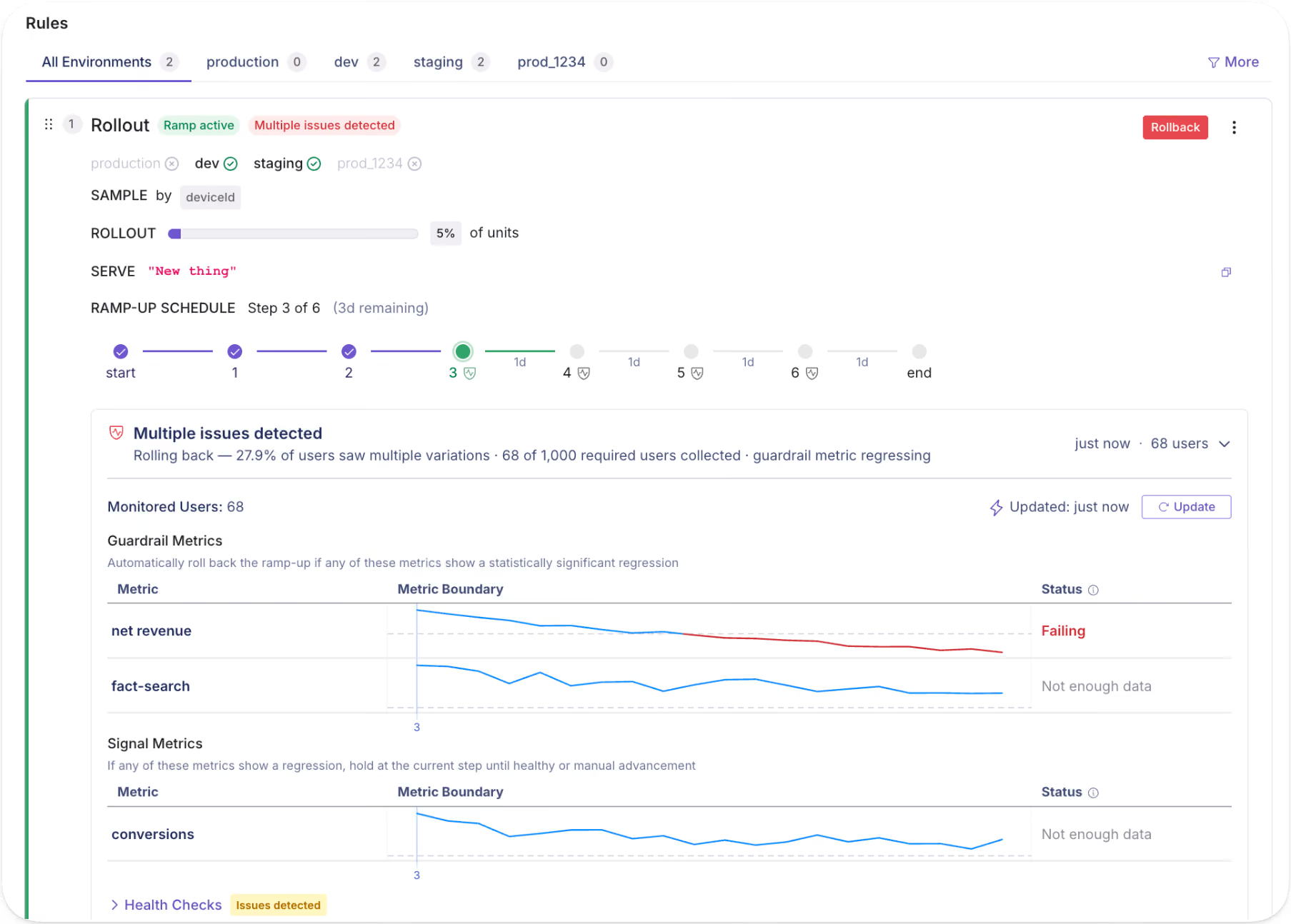
Best practices for designing a release plan
Guardrails help your team feel confident about shipping, and combining them with human approval gates ensures there are no gaps.
- Start simple and don't over-engineer your first release plan.
- Build out your process as you go, learning what works and what doesn't with each release.
- Choose guardrail metrics your team is aligned on
- Pair guardrail metrics with approval gates where it makes sense.
Once you have a process that works, standardize it as a default template with versions for different risk profiles or product needs (high risk, low risk, internal-only, etc.) Treat these templates as living artifacts and evolve them as your team learns what works and what areas need improvement.
Sample release plans
Rollout processes vary by team, product, and risk tolerance. Release plans are flexible enough to fit whatever process your team uses and ensure every rollout follows that process consistently, no matter who is running it. Below are two of the most common patterns we see, and how to structure a release plan for each.
Example 1: Simple percentage rollout
A simple percentage rollout is where you expose a small percentage of users before gradually going wider. Set approval gates at key checkpoints to enforce a metrics review and manual approval before committing to broader rollout.
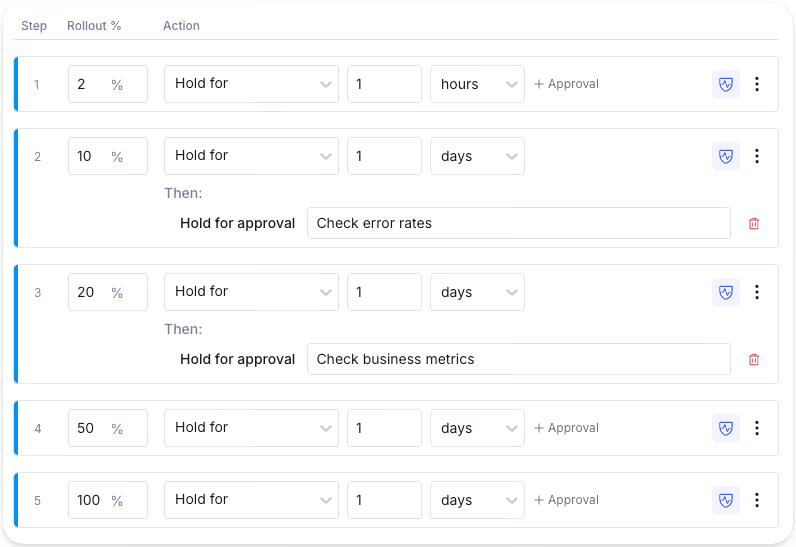
Example 2: Segmented rollout
A segmented rollout lets you control who gets access first, reducing risk to your highest-value users. For instance, you may opt to roll out a feature to free users before paid. Free users are valuable, but the risk of churn or revenue impact is lower than with paying customers. By the time you're ramping up paid users, you've already caught the obvious issues.
You may segment by any attribute available in GrowthBook, including location, device type, browser, user group, and more. Start simple or build in as much complexity as you need. You can also apply guardrails to specific stages; for example, you might be okay rolling the feature out to free users, but want it to auto-rollback if metrics degrade when it hits paid users.
The release plan with ramp schedules feature is available in the GrowthBook Pro and Enterprise plans.
Flag revisions, approvals, audit logs: maintain control and visibility
Feature flag revisions
When someone changes a feature flag, a draft revision can be submitted for review to approve or request changes. On approval, the change is published to the SDK. Nothing goes out unreviewed unless you want it to.
Flag revisions provide a complete audit trail, capturing who changed a flag, what they changed, and when they changed it. When something breaks, you get instant visibility into what recently changed. As multiple people manage flags over time, revisions also preserve the intent and context behind each change.
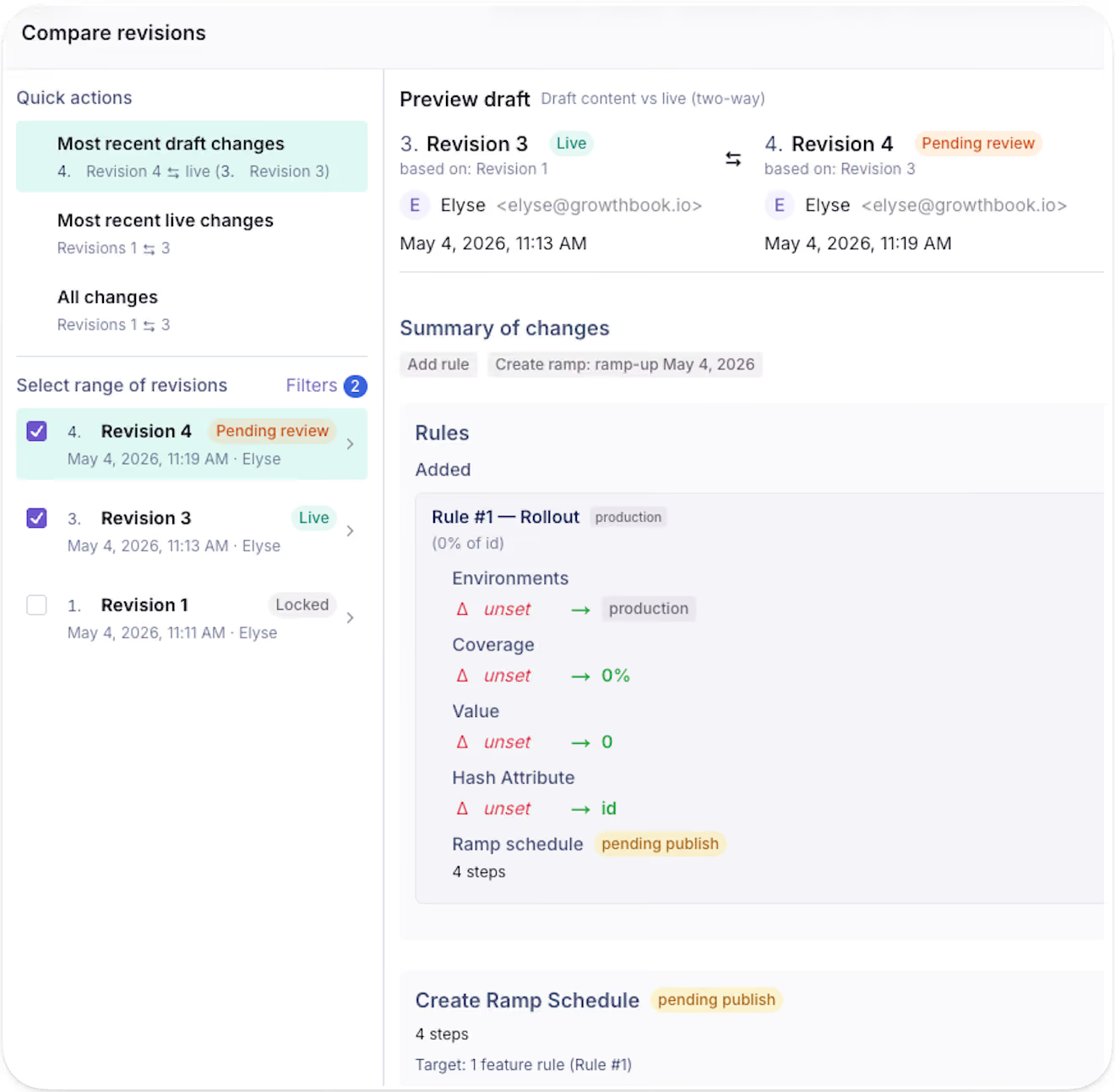
GrowthBook maintains a version history of all previous revisions of a feature flag over time, so you always maintain a clear picture of how a flag has evolved over time.
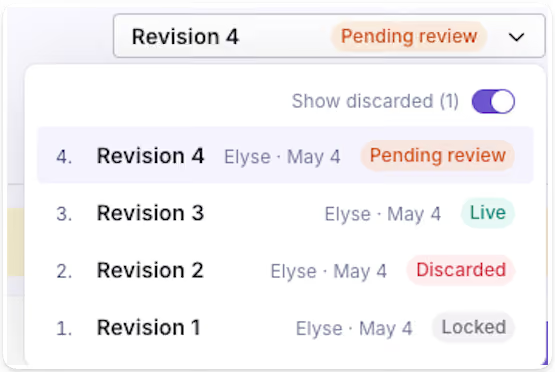
The revision feature is available for feature flags in all GrowthBook plans.
Feature flag approval workflows
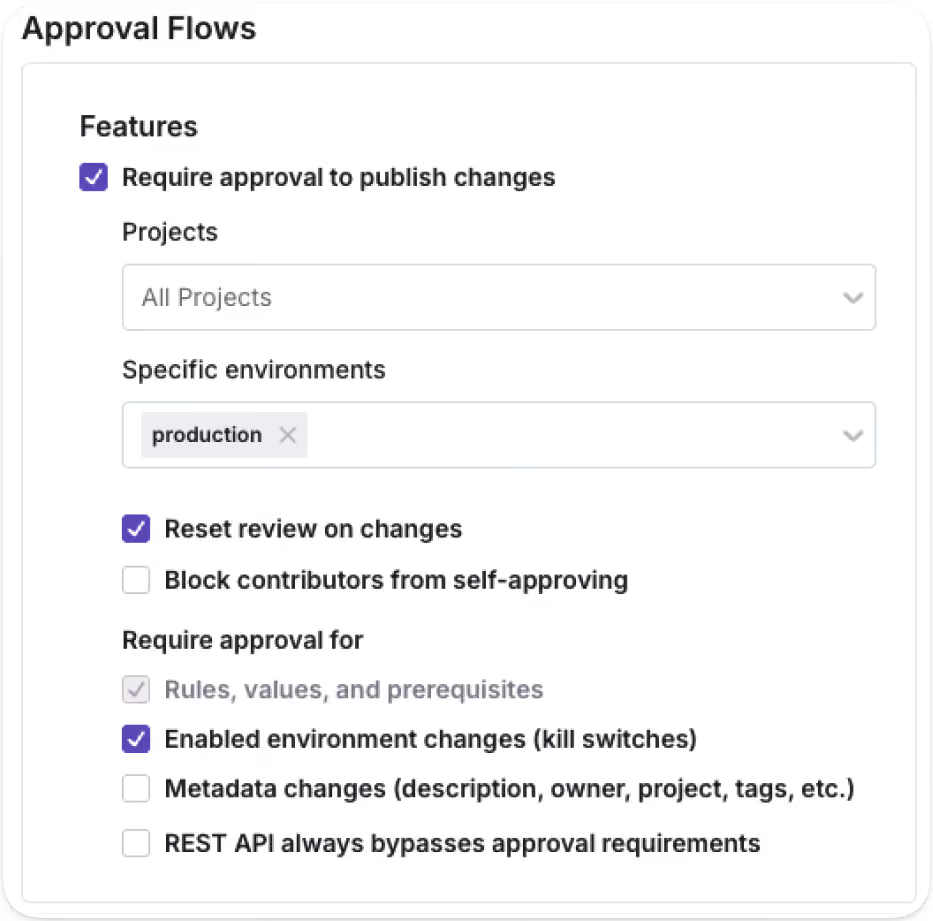
Approval requirements are configurable per project and per environment, giving you the flexibility to require review gates where they make sense. For example, you can require approvals for production while letting staging updates flow freely.
GrowthBook 4.4 expands the scope of approval requirements. Previously, approval workflows applied only to changes to rules and values. Now, you can also require approvals for environment kill switches, pre-requisites, saved groups, and metadata changes. This gives more granular control over what can happen without a review.
These approval workflows help teams move fast with the right safety checks at the right time, making governance tunable to your team’s needs. This level of control is especially important when agents are acting on your behalf. Agents can create drafts for all these change types and require human approval. The separation is clear and enforced, so your governance is applied to the full scope of what an agent can touch.
The feature flag approval workflow feature is available in the GrowthBook Enterprise plan.
Audit logs
For teams with compliance requirements, the audit log provides the paper trail without any extra process. They provide a timestamped record of every feature flag event, including changes, approvals, publishes, creation, and more.
You may also expand for a more detailed view of the specific changes made for each event.
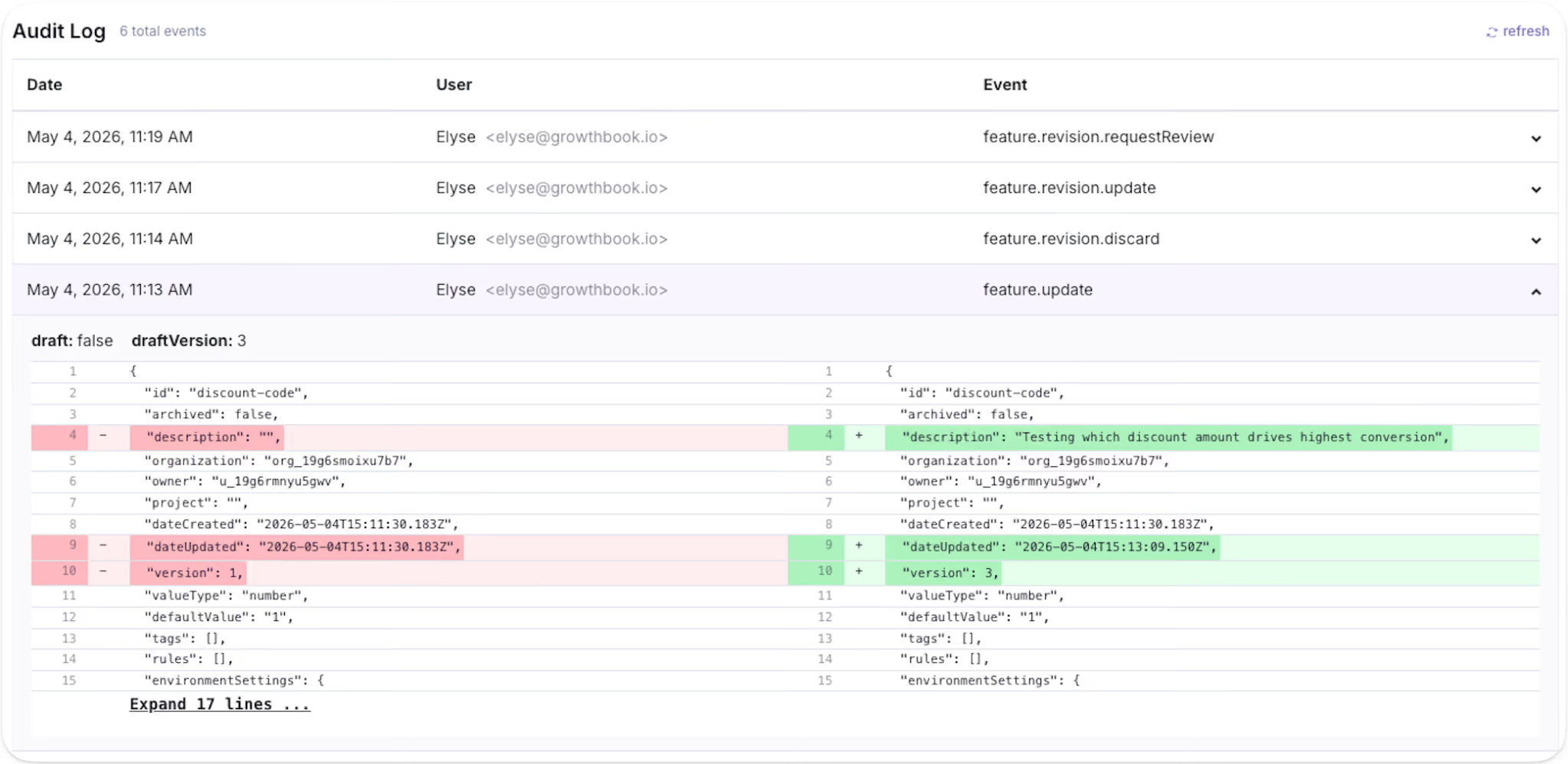
The audit log feature is available in all GrowthBook plans.
Stale feature flag cleanup with agents
GrowthBook categorizes a feature flag as stale if it hasn't been updated in 2 weeks and is not active in any environment, or if there is a one-sided rule that sends 100% of traffic to a single variation.
GrowthBook 4.4 also introduces support for teams using AI coding tools like Claude Code or Cursor to detect and remove stale flags that have outlived their purpose. Using GrowthBook's MCP server or REST API, you can prompt an agent to surface every stale flag in your environment, returning it as a reviewable table with additional context on why the flag is being surfaced as stale. Once you've decided which flags to remove, write a follow-up prompt asking the agent to locate and remove those flag references from your codebase to eliminate technical debt in one pass.
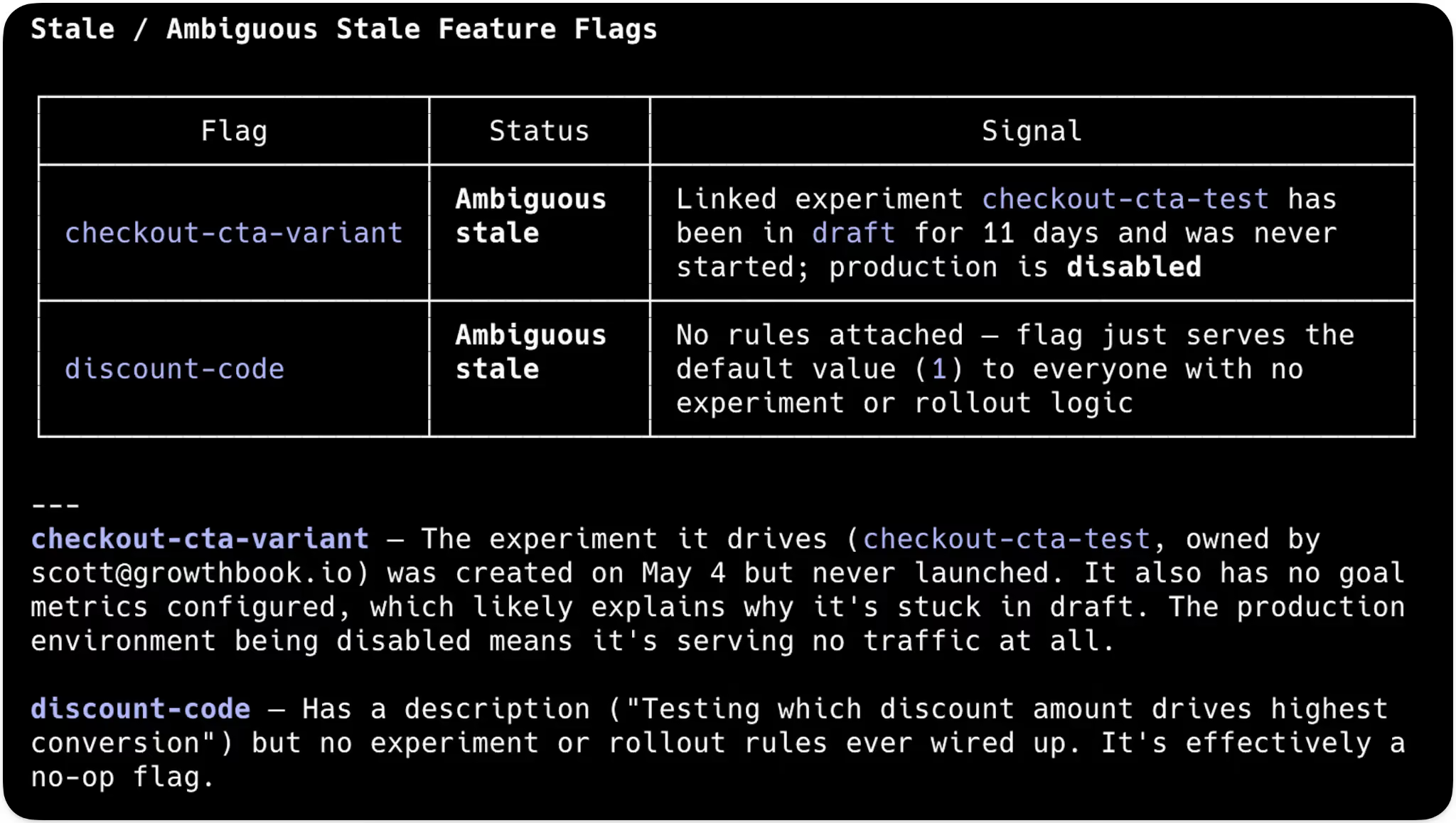
The same endpoints can also surface ambiguous flags that don't definitively meet the stale definition, but show signs they may no longer be in use. Examples include: flags with no rules defined, abandoned drafts, or disabled environments. Results come back as a table you can review to decide which flags genuinely need cleanup and which are still doing real work.
Stale flags create real risk: technical debt, performance overhead, and accidental production changes. Stale and ambiguous feature flag detection together help simplify flag hygiene by surfacing the flags worth reviewing, with enough context to tell what's truly orphaned and what's still needed in production.
The stale feature flag cleanup feature is available in all GrowthBook plans.
REST API and MCP server endpoints
In 4.4, we expanded our REST API and MCP server endpoints across the feature flagging surface. Anything your team can do in the GrowthBook app, AI agents can now do through the API or MCP server: create flags, manage revisions, configure release plans, set targeting rules, locate stale flags, and more.
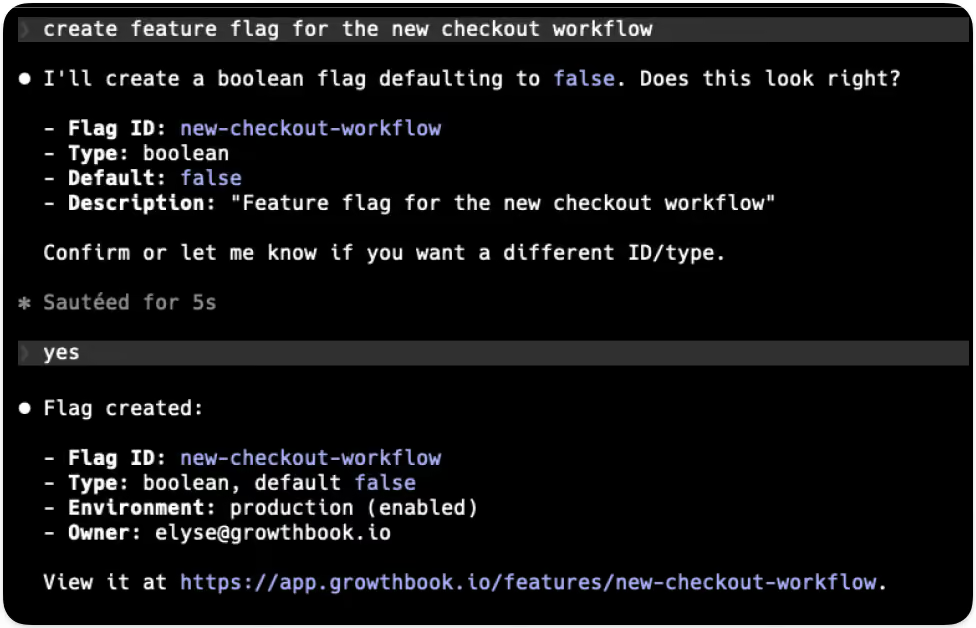
The same permissions, approval workflows, and audit logs apply to every API- or MCP-prompted action. Whether a human triggers a change from the UI or an agent runs it from your editor, it goes through the same review gate and shows up in the same audit log. Agents get the same platform and the same accountability as your team, with the scoping and guardrails calibrated for how they work.
The REST API & MCP Server endpoints are available in all GrowthBook plans.
Built for the way modern teams ship
The pace of development has fundamentally changed with AI, and the controls around how teams ship need to evolve with it. Teams need to move fast, test everything, ship safely, and roll back at the first sign of trouble.
GrowthBook 4.4 gives engineering and product teams the building blocks to do exactly that: a repeatable rollout process accessible through the app, REST API, or the MCP server. Whether the change comes from an engineer, a product manager, or an AI agent, the process holds.
Related articles

Ready to ship faster?
No credit card required. Start with feature flags, experimentation, and product analytics — free.

