

How Feature Flags Help With Progressive Delivery
.avif)
The traditional CI/CD pipeline treated deployment and release as the same event. You merge to main, and the code hits production while every user experiences the changes at once. If something goes wrong, you find out the hard way.
That’s what happened to OpenAI in December 2024. Its engineering team pushed a new telemetry service to every production cluster at once without a staged rollout.
Eventually, the service overwhelmed their Kubernetes API servers and took down apps like ChatGPT and Sora for over four hours. In their post-mortem analysis, they committed to using “robust phased rollouts with better monitoring.”
In short: progressive delivery.
In this article, we’ll explain what progressive delivery is and why modern engineering teams should make it the default way of releasing software.
What is progressive delivery?
Progressive delivery is a software delivery mechanism in which you deploy code continuously, but instead of exposing every user to changes at once, you increase the percentage of users over time.
James Governor, co-founder of RedMonk, coined the term in 2018 to describe practices like feature flags and canarying backed by observability. His framing focused on controlling the blast radius for change (and negative consequences), and it still holds today.
In fact, Google’s 2024 DORA report found that “elite DevOps teams” recover from failed deployments 2,293x faster than low performers. They’re more likely to use continuous delivery practices that control exposure at each stage, so a failed rollout affects only a fraction of users. As a result, recovery becomes a simple flag change rather than a full code redeployment.
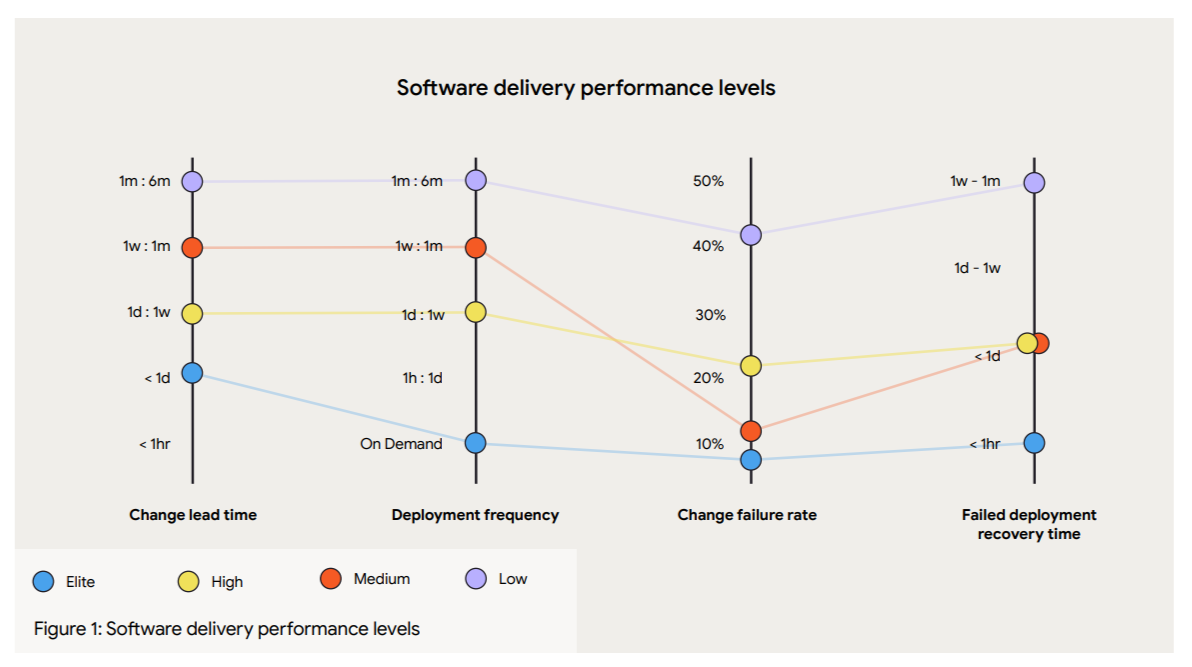
The lack of an intermediary layer like feature flags is one reason most engineering teams don’t become elite players. They know deployment is a technical event and release is a business decision, but sticking to traditional practices also means treating them as a single step, turning it into an all-or-nothing bet every time.
Feature flags fill that gap and create the missing layer between those two events.
You can deploy code wrapped in a feature flag, but keep it turned off until you’re ready to release. As a result, you can slowly release features to an increasing group of users and test performance at each stage.
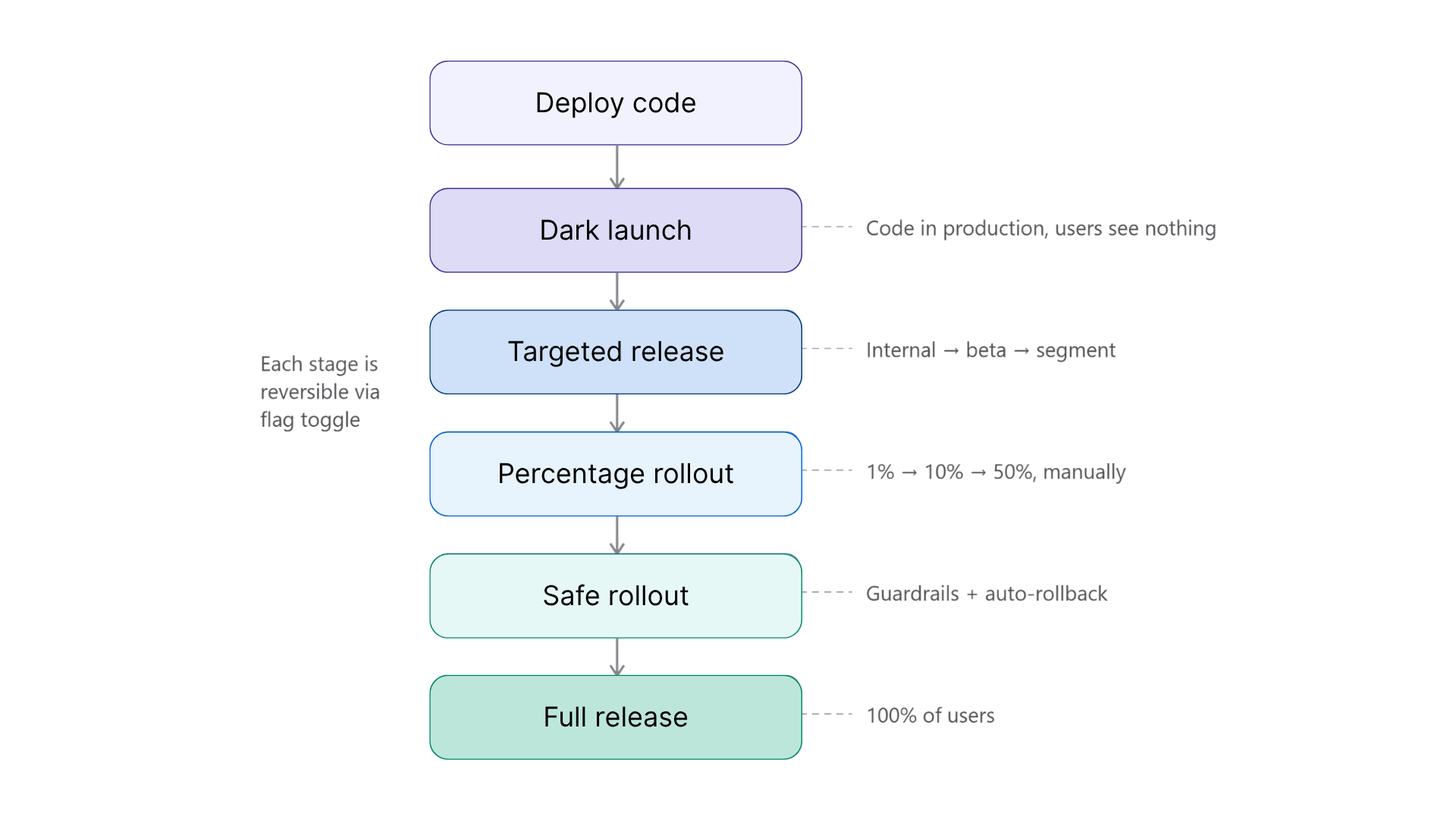
3 progressive delivery strategies to use with feature flags
Here are a few types of progressive delivery strategies you can take advantage of:
1. Targeted releases
This is one of the simplest ways to start with progressive delivery. You start by serving the feature to a defined group of users before opening it up to everyone. For example, roll it out first to internal employees for testing, then to a small beta group.
In feature flagging platforms like GrowthBook, you can do this by setting up a Force Value targeting rule with conditions. Every user that matches the conditions you’ve set will see the new experience, while everyone else sees the default.
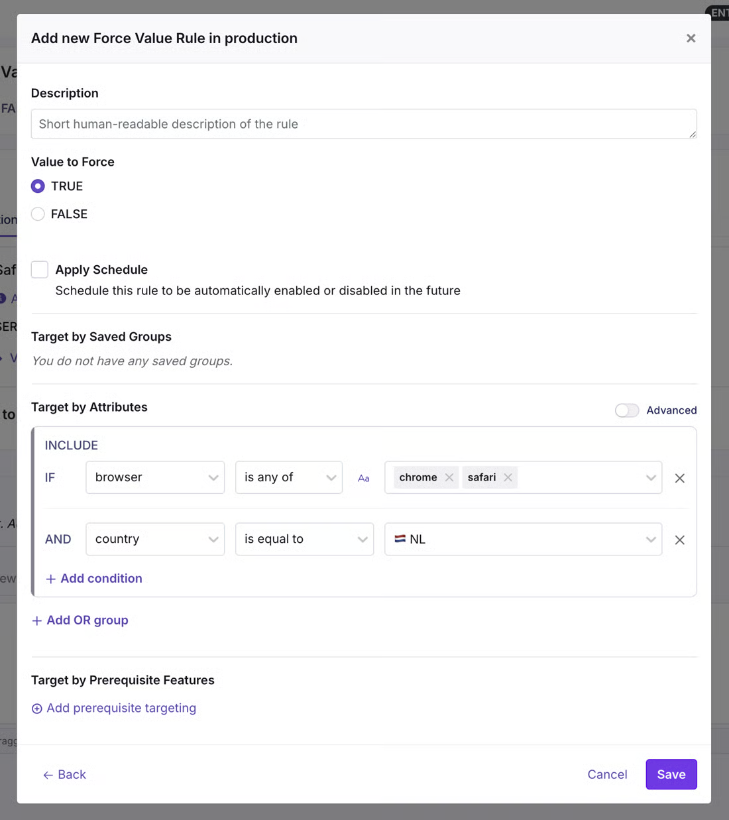
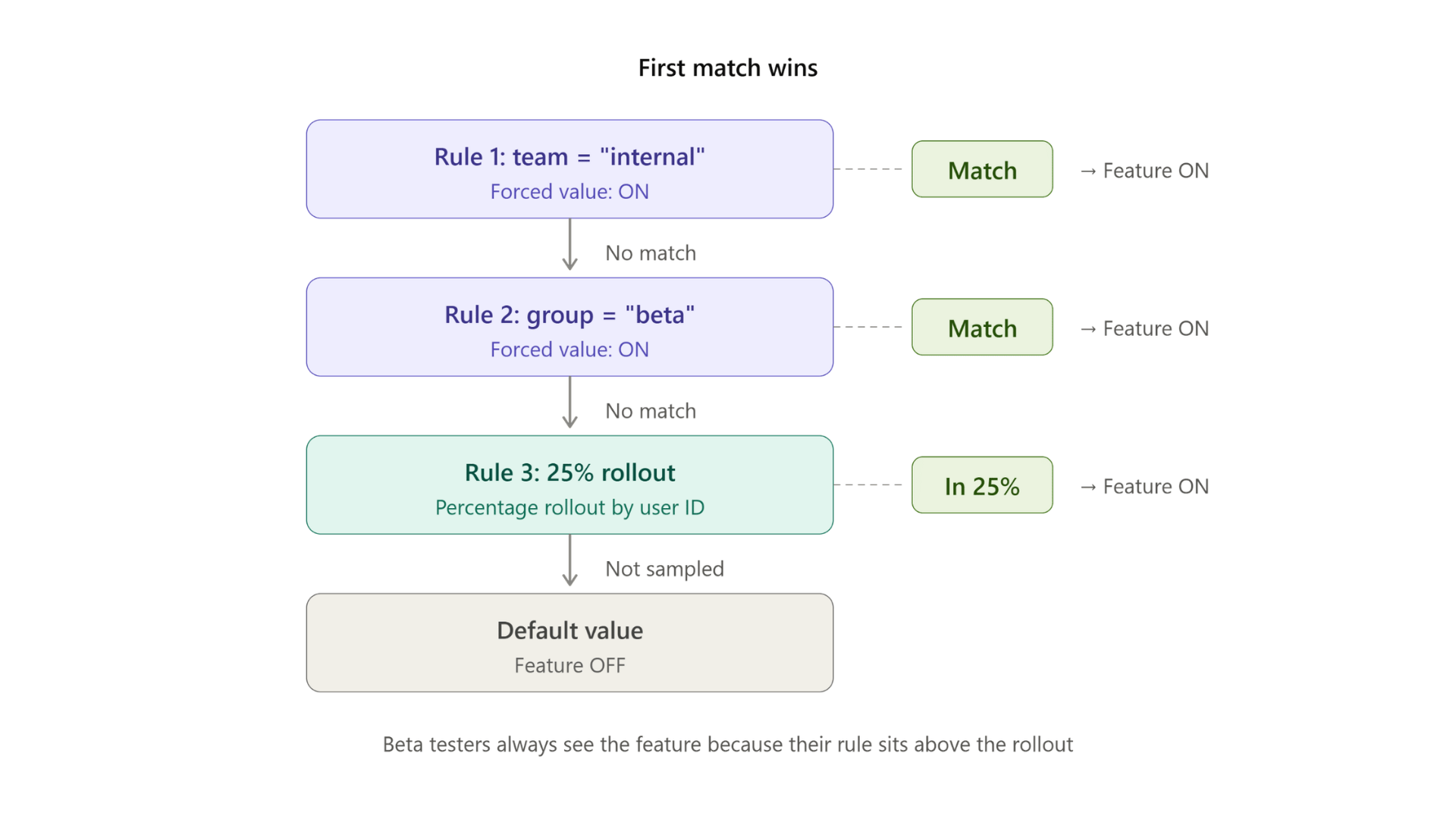
You can target attributes you already track, from user role and geography to specific app versions. Since these rules evaluate in order and with first-match-wins logic, you layer them as well. For example, add a beta segment and target them further based on geography or browser type.
2. Percentage rollouts and canary releases
When you need broader validation, that’s when you can start rolling it out to a bigger group. The question here changes from “Who are we serving the feature to?” to “How many users need to see it during this test?”
A percentage rollout randomly exposes the feature to a share of your users based on the value you set. You start with a small segment of 5–10% of users and then gradually expand. It becomes a canary release when you monitor the rollout at each stage and make a go/no-go decision before proceeding to the next stage.
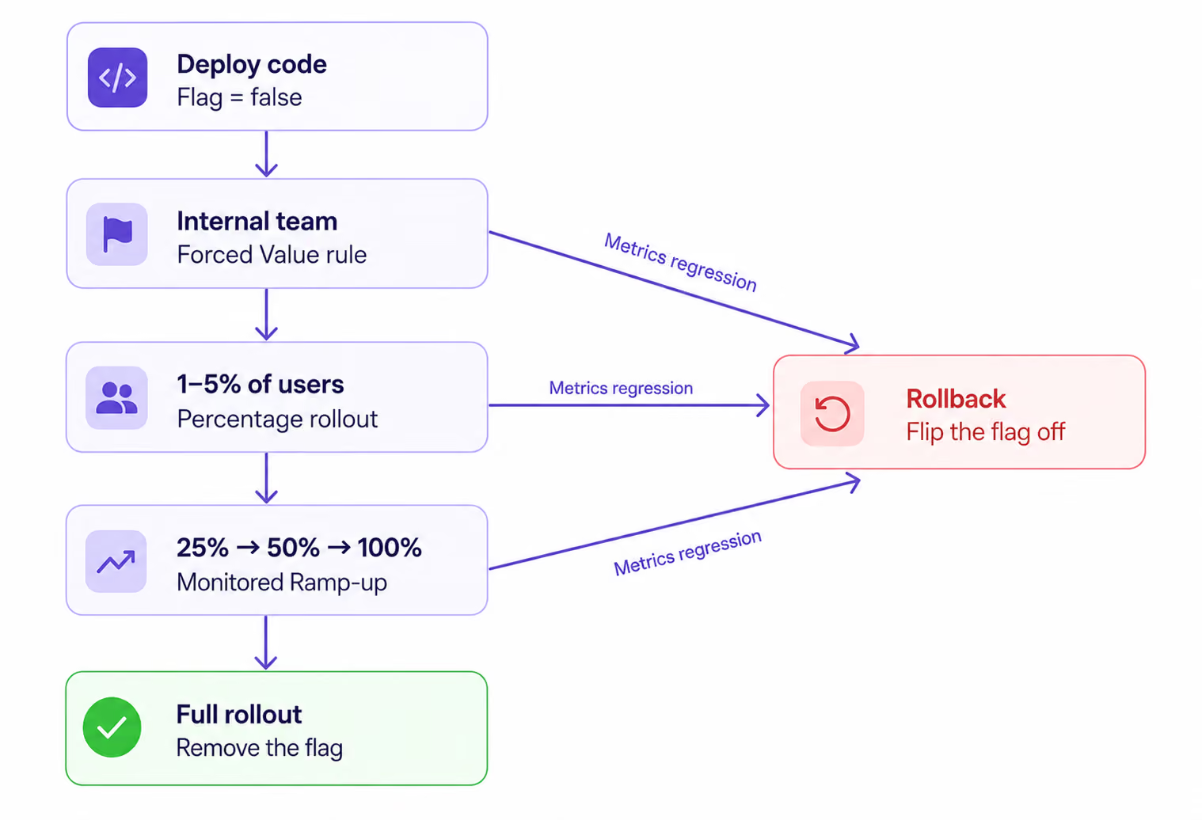
If you use a feature flag for the canary release, it works at the application layer. So if you expose individual users hashed on any attribute you choose, the same user gets a consistent experience across all requests. Granularity is per feature, which means even ten flags can sit at different rollout percentages, and you can test features simultaneously.
Within GrowthBook, you can use a Percentage Rollout Rule to put this into effect and even layer in specific groups, attributes, or prerequisite features for the rollout.
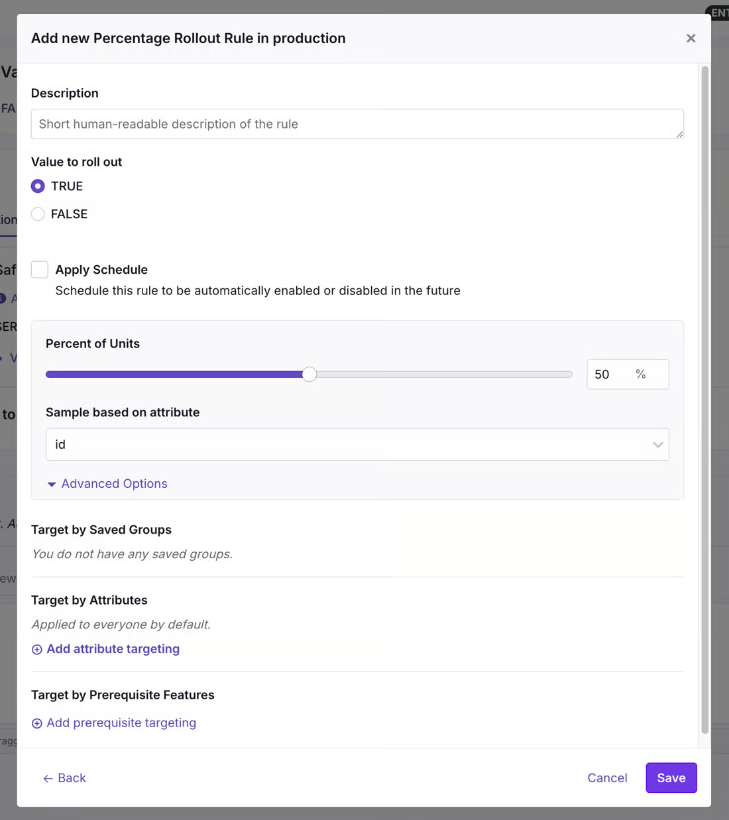
That said, a manual percentage rollout still requires you to bump the percentage by hand after deciding when it’s safe to expand. If you want to automate it, Safe Rollouts are a better bet.
3. Safe Rollouts
A Safe Rollout in GrowthBook is a Ramp Schedule with monitoring turned on. It works like a canary release, but the rollout is fully automated and advances through timed steps while the platform evaluates your guardrail metrics at each stage using sequential testing.
The default monitored ramp starts at 1% and works its way up through 5%, 10%, 25%, and 50% before releasing to 100% when the schedule completes. If a guardrail metric regresses at any stage, the rollout automatically rolls back and disables the rule.
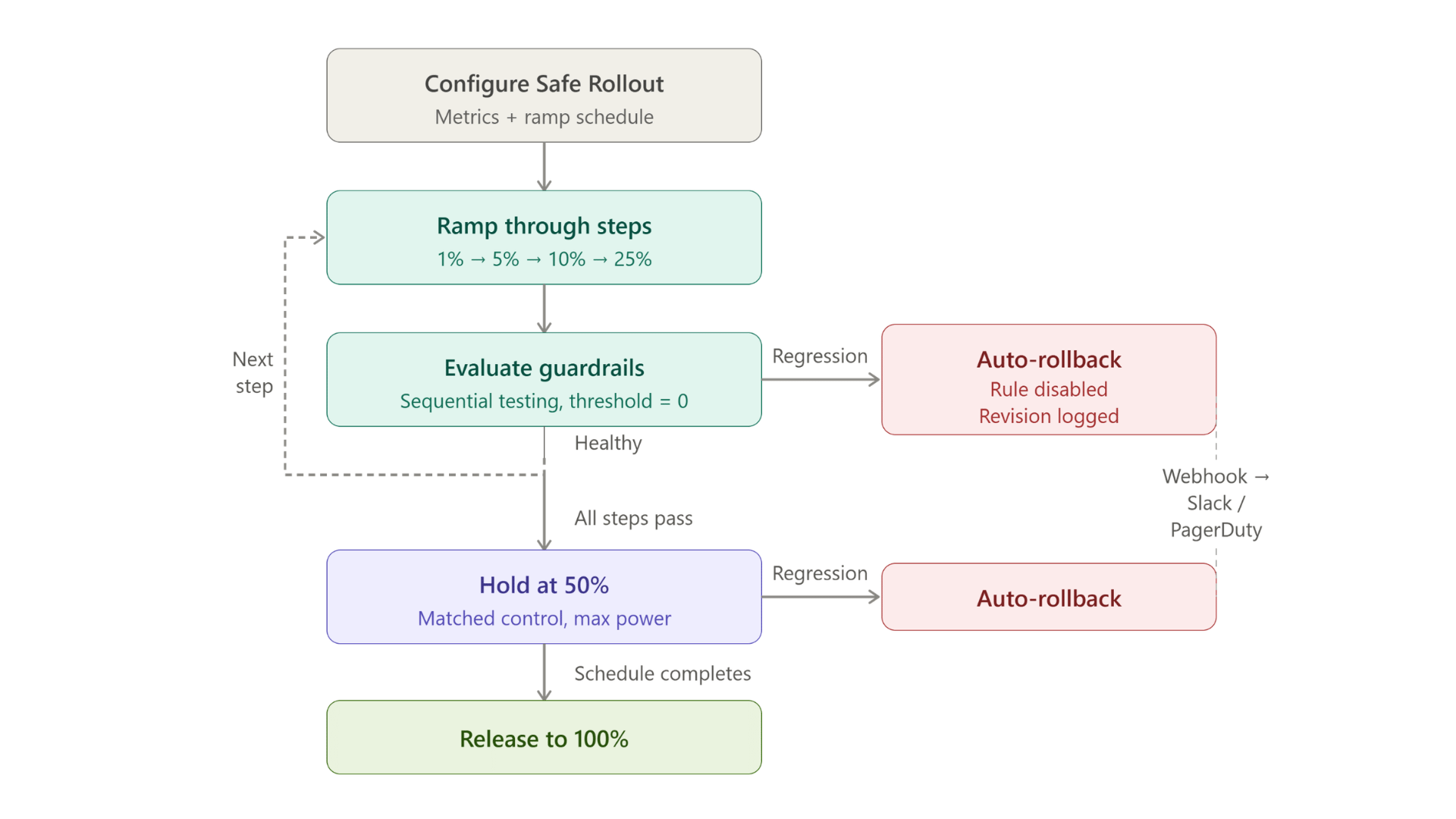
Also, if you do need human approval at each stage, you can configure that within GrowthBook.
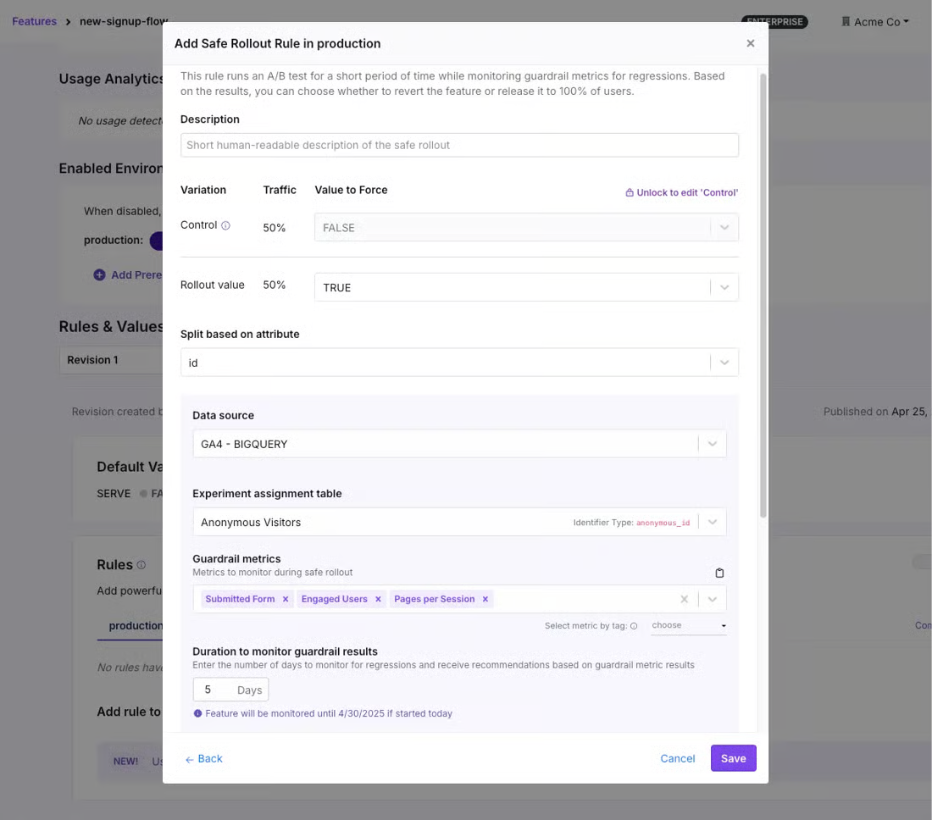
The ramp-up happens quickly for the first 25% of the total duration, and then the rollout holds at 50% for the remaining time. At 50%, half your users get the new value and half get the control, so the platform can compare the two groups with statistical confidence. And because these guardrail metrics are warehouse native, the same metric definitions can power an experiment on the same flag with the same SDK. Progressive delivery becomes the on-ramp to experimentation over time.
Depending on the metrics, you can expect the following actions:
| Type of metrics | What happens after regression? | Examples |
| Guardrail metrics | Automatic rollback. The rule is disabled. | Error rate, p95 latency, checkout completion |
| Signal metrics | These are secondary, but important KPIs. If one of these metrics declines, the rollout will be paused, but not canceled. This gives engineering time to research the cause. Auto-resumes on recovery. | Secondary conversions, support ticket volume |
| Health check metrics | Rollout holds by default. Flags an implementation issue. | SRM, no traffic, multiple exposures |
Plan rollouts that scale
See how ownership, lifecycle rules, and observability keep progressive rollouts manageable as flags spread across teams.
Read the Feature Flag Guide
How can you instantly roll back changes with progressive delivery methods?
The best part about using feature flags for progressive delivery is that you can roll back changes almost instantly if something goes wrong. In a traditional rollback process, you have to redeploy code, which can take minutes to hours, depending on the change. That happens because it goes back through the same path that caused the failure, as we saw in OpenAI’s outage incident.
A feature flag-based kill switch doesn’t have that problem. You simply change the value, and the SDK evaluates the updated rule or fallback path.
In fact, companies like Shopify have reduced their average rollback time from 18 minutes to 43 seconds by adopting progressive delivery methods. And it does it across 200,000 production deployments every month.
In GrowthBook, kill switches work at different levels of granularity:
- Per rule: You can pause or revert a single targeting rule. If a Safe Rollout detects that the guardrail metrics are regressing then GrowthBook surfaces a Revert Now button on the feature's detail page so you can manually roll back before the automatic rollback kicks in.
- Per feature, per environment: You can toggle the feature off entirely in production. GrowthBook removes it from the SDK payload, so the flag evaluates to null.
- Across features: You can use a boolean prerequisite flag to gate a group of related features. If you flip the prerequisite off, you block every dependent feature with one switch.
That said, how fast your users see the previous/fallback version depends on your setup. If you use GrowthBook's streaming (SSE), flag changes propagate in real time but you have to enable it. If your SDK polls through a CDN, the update arrives on the next cache refresh, which is roughly 30 to 60 seconds with default settings.
Which metrics should you measure during a progressive rollout?
There are three categories of metrics you should consider measuring:
- Guardrail metrics
- Signal metrics
- Health metrics
Let’s understand why they matter:
Guardrail metrics
Guardrail metrics decide whether a rollout is actually making a positive difference for your users. If they regress, they trigger an automatic rollback, so they need to prove the negative effect statistically. That’s also why you should choose two to three metrics only, or else you’ll create too many false positives.
For example:
- Error rates,
- p95 or p99 latency
- Business metrics (checkout completion or signup rates)
Signal metrics
Signal metrics pause the rollout but don’t revert it. You should use them to monitor second-order effects during the rollout. For example:
- Secondary conversion metrics
- Support ticket volume
- Adjacent page load time
Health check metrics
While you can define guardrail and signal metrics, health check metrics come as an automatic default in GrowthBook. The platform runs them without any configuration from you and flags issues with the rollout itself, not the feature necessarily.
For example:
- Sample ratio mismatch (SRM)
- No traffic
- Multiple exposures
Note: Within GrowthBook, the failing threshold is fixed at zero, so the rollout rolls back where there’s evidence that a metric is degrading significantly. Because the platform is warehouse native, you query the metrics you monitor against your own data warehouse so that you can trust the data.
Companies like Breeze Airways use a “do no-harm” testing approach to make sure new features don’t degrade critical metrics like bookings or revenue. That’s also where a Safe Rollout can help you roll out with confidence.
“People only see the wins, but there’s actually greater value in avoiding losses. We’ve stopped changes that could have cost millions.”
— Merritt Aho, Digital Analytics Lead, Breeze Airways
How to choose a feature flagging platform for progressive delivery?
When you’re evaluating feature flagging platforms, you’ll see baseline features like targeting and kill switches. But the difference comes down to how these platforms handle automation, measurement, and governance.
For instance, AI-led or agent-led software development is becoming the norm now. AI coding agents can create full release plans with concrete targeting rules and guardrail metrics. But the difference is that it can do it at scale and draft hundreds of release plans in minutes. If you don’t have the right guardrails in place, these changes can reach production before a human reviews them and could cause incidents. So your platform of choice needs to offer the same governance capabilities for agent-led changes too.
For instance, GrowthBook integrates with agents like Claude Code or Cursor via its MCP. So you can make changes via the MCP that land as a draft revision a human has to approve. Each change is logged as an agent- or human-made change so that your audit logs attribute it to the right actor. So, look for a platform that supports similar workflows.
AI-Native Feature Flags with GrowthBook Skills
If you’re evaluating platforms for progressive delivery, these are the questions worth asking:
- Can rollouts advance through stages automatically, or does someone have to bump the percentage by hand?
- Can you define custom ramp schedules with timed steps?
- Can individual stages require human approval before advancing?
- Does rollback trigger on a metric, or does it depend on someone noticing a problem?
- How does the platform decide a metric has “regressed”? Is it a fixed threshold you define, or statistical significance evaluated continuously?
- How fast does a rollback propagate to your users?
- Are rollout metrics defined in your own data warehouse, or in a third-party platform?
- Does the platform support the metric types you care about (event-based, revenue, latency percentiles)?
- Can the same metric definitions power both rollout safety and experimentation?
- Does every rollout decision (including automated rollbacks) land in an audit log as a diffable revision?
- Can you enforce approval workflows before a rollout reaches 100%?
- Are agent-initiated changes attributed separately in the audit trail?
- Can you self-host the platform on your own infrastructure?
- How many SDKs does the platform support, and do they cover your tech stack?
- Can an AI coding agent configure and drive a rollout safely through the same API?
Ship continuously but release deliberately
OpenAI’s outage started because deployment and release were the same event. This process is still the default for most engineering teams even though it doesn’t need to be.
Feature flags give you the missing layer between shipping code and exposing it to users. Progressive delivery is what happens when you use that layer deliberately: start small and widen the rollout only when your metrics tell you to.
Over time, your team will deliver more stable software faster, helping you become a high-performing engineering organization.
If you’re ready to build that control layer, try GrowthBook for free or join a live demo.
See staged rollouts at scale
Read how Dropbox rolls out features in stages across teams and stacks, with 3 billion feature evaluations every day.
Read the Dropbox Story

Related articles

Ready to ship faster?
No credit card required. Start with feature flags, experimentation, and product analytics — free.

