

Feature flags in CI/CD: continuous experimentation
When your continuous integration and continuous development (CI/CD) pipeline works, you’ve solved the problem of reliable deployment. While CI/CD has made it trivial to ship code, it doesn’t answer three questions that actually determine whether a release succeeds:
- Who should see this change?
- Is it behaving safely in production?
- And how do we know if it’s actually working?
Without answers to those questions, deployments become binary events. A simple change is either on or off, and your team is forced to compensate with slower releases or reactive rollbacks when something breaks.
Feature flags mitigate that by decoupling deployment from release. They let you ship code continuously while controlling exactly when and how it becomes visible.
In this article, we’ll explain how feature flags improve the CI/CD process and why you should consider using them.
Why CI/CD alone isn’t enough anymore and how feature flags improve it
Deploying code and delivering value are two different things, and most pipelines treat them as one. Here’s why:
The all-or-nothing deployment problem
When you merge to main and deploy, that change hits 100% of your users instantly. Your deployment is your release—a “Big Bang” of sorts. And with every Big Bang release, there’s a risk that something goes wrong and you’ll have to undo the whole deployment.
Now, the natural response is to ship less often or to add manual approval gates. But those decisions make the delivery process slower and less continuous, which is not why you adopted CI/CD in the first place.
The average cost of downtime now stands at $14,056 per minute, with more than half of organizations reporting that their most recent outage cost over $100,000. Engineering leaders are worried and rightfully so. Over 40% of organizations have experienced an outage due to human error, and 85% of those incidents trace back to people failing to follow procedures or to flaws in the development process itself.
If you’re still taking the risk of deploying all at once, even while adopting a CI/CD workflow, you’re just creating more room for mistakes.
Plus, if you don’t have the measurement mechanisms in place, you’ll never know if the deployment actually made a positive difference. Teams wait until users report a bug or an outage happens—and then you’re stuck in a reactive deployment cycle that eats into your ability to ship value.
How feature flags improve CI/CD processes
You can solve the problems we’ve stated above by using feature flags to introduce a control layer between your deployment pipeline and your users. They change three things about how releases work:
1. Decouple deployment from release
With feature flags, deployment and release are two separate events. You keep shipping code to production continuously through your existing pipeline, but features only turn on for specific users or segments—based on how you define the flag’s parameters. As a result, you can turn a feature off in seconds without redeploying code.
You can also conduct a “dark launch” where you ship code to production without exposing it to any user. It lets you test in production before anyone sees the frontend change.
2. Move from binary releases to graduated rollouts
You can avoid shipping features to all your users at once. Instead, move on to gradual exposure. Start with 1% of users, evaluate, expand to 10%, then 25%, 50%, and 100%. At each stage, you can target specific users, segments, or environments.
3. Create better business outcomes
When your blast radius is controlled, the downstream effects are measurable:
- Increase confidence in delivery: Engineering teams ship more frequently because a bad rollout won’t affect everyone. That confidence translates directly into faster time-to-market.
- Reduction in incident costs: Exposing a feature to fewer users means fewer major incidents. When something does break, the impact is limited to the percentage you rolled out to.
- Simplify rollback procedures: Feature flags cut mean time to recovery because you can roll back the new feature immediately. In fact, many feature flagging platforms automate this process based on certain thresholds.
Why you need to adopt a continuous experimentation mindset
Continuous experimentation means you’re embedding measurement into every feature release. So every time you ship, you define what success looks like and how you’ll measure it. After you ship, you check whether it arrived. The experimentation loop becomes the standard for how your team operates.
Industry-wide, only about 30% of product changes meaningfully move the metrics they’re meant to improve, according to research from Ronny Kohavi and echoed by GrowthBook co-founder Graham McNicholl at a 2025 ClickHouse meetup. That means roughly two-thirds of the features you build either have no measurable impact or actively make things worse.
Without experimentation, you have no way of knowing which category yours falls into.
Running A/B tests through feature flag rollouts
When you roll out a feature to 10% of users with a flag, you already have a natural test setup. The 10% seeing the new experience are your treatment group. The other 90% are your control. You’re one step away from a structured A/B test.
To close that gap, you can start by defining two kinds of metrics before the rollout begins:
- Goal metrics: These metrics measure what you’re trying to improve. For example, conversion rate, cart completion, engagement, or retention.
- Guardrail metrics: These metrics measure what shouldn’t degrade. For example, error rates, latency, page load time, and revenue per user.
If a guardrail degrades, you can stop the rollout. If the goal metric improves, you expand the experiment to a broader user base.
Continuous experimentation changes the definition of CI/CD
Traditional CI/CD delivers code continuously. With built-in feature flags, experimentation delivers learning continuously.
Engineering teams that operate this way stop making purely intuition-based product decisions. Each release cycle produces data that informs the next one and it compounds over time. You build a track record of what actually moves your metrics instead of a backlog of shipped features you hope moved them.
What are the mechanics of deploying using Safe Rollouts?
Here are three elements you need to start using feature flags in the CI/CD process:
1. Progressive percentage rollouts
A progressive rollout follows a ramp-up schedule. You start at 10% of users, increase to 25%, then 50%, 75%, and finally 100%. At each stage, you’re watching a defined set of metrics before moving forward.
Typically, the engineer who built the feature or experiment owns the rollout. So they can monitor these metrics and escalate issues if something goes wrong. For instance, if you’re releasing a new interactive learning feature and notice that the first segment of users engage with it successfully, you can ramp up the segment size.
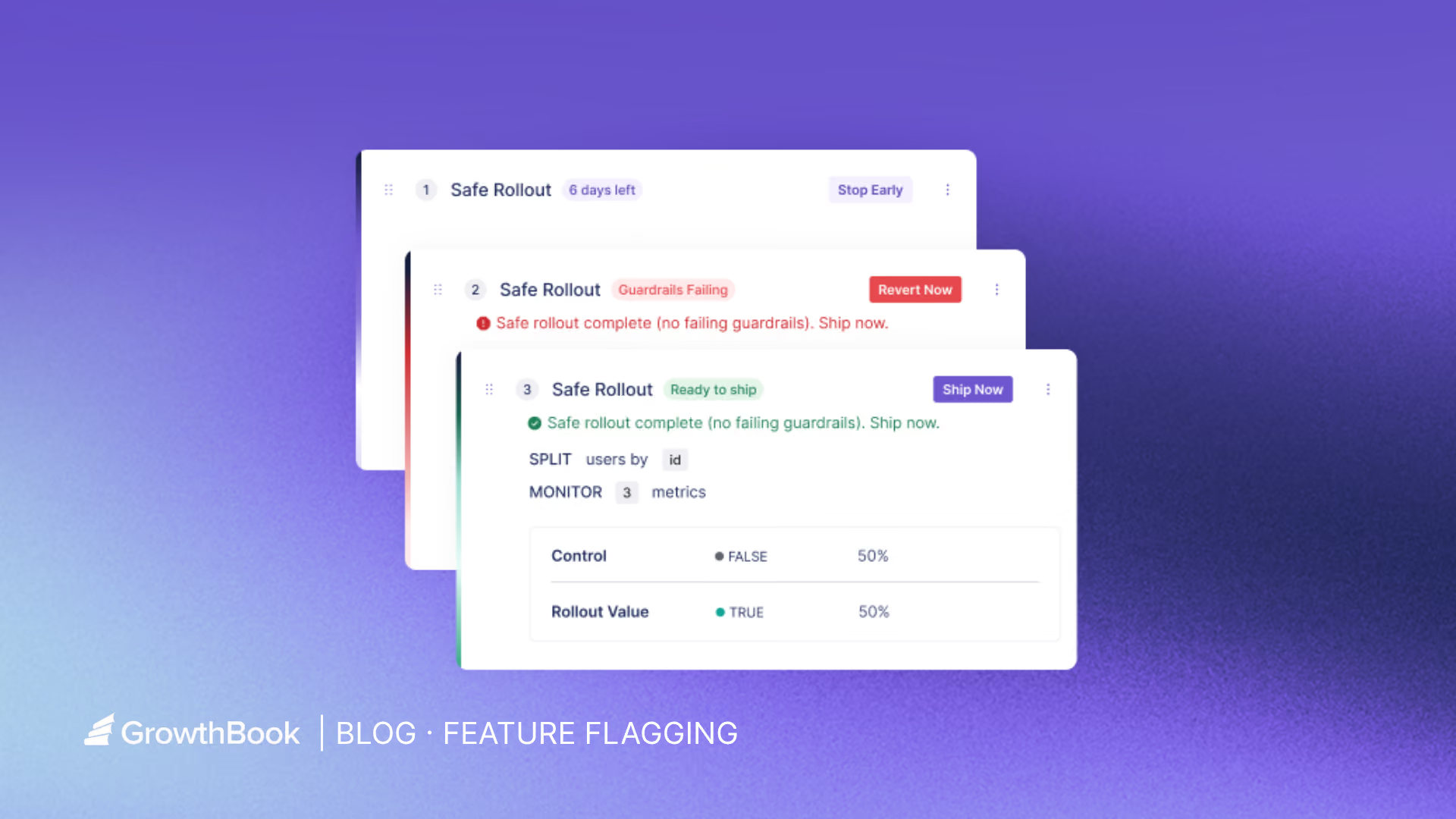
Platforms like GrowthBook offer Safe Rollouts that automate this ramp-up schedule, so you don’t need to bump the percentage manually. Since it’s based on one-sided sequential testing, the traffic percentage increases as the goal metrics improve or guardrail metrics aren’t met yet.

2. Guardrail metrics and automated monitoring
When a guardrail trips, the rollout pauses or rolls back automatically. You don’t have to worry about getting a pager at 3 AM or a Slack notification asking you to revert the rollback manually. In the same interactive feature example, if you notice that page load rates are decreasing for the interactive feature, it’ll roll back automatically.
GrowthBook lets you define guardrail metrics per rollout and automatically pause or roll back when they degrade.

3. Rollback decision criteria
You need to define your rollback thresholds upfront before the rollout begins. For example, “If the error rate increases by more than 0.5%, roll back automatically. If latency p99 exceeds 200ms, pause and evaluate.”
The platform you choose just executes the instructions. For example, GrowthBook has auto-rollback triggers for guardrail metric failures that execute predefined decisions. You can either customize this or use these built-in options:
- Clear Signals: It requires no guardrail failures and all goal metric successes
- Do No Harm: It only requires that no metrics are statistically significant in the harmful direction.
Here are the status signals you’ll see in GrowthBook:
How Khan Academy ships with feature flags
Khan Academy achieved a 5x increase in A/B testing capacity after adopting GrowthBook. Their Chief Software Architect, John Resig, explained this:
“Being able to turn a feature on and off with a flip of a switch is fantastic... That’s so much easier than having to do a deploy or a roll-back.[…] People [are] running more experiments with more confidence. GrowthBook is going to help us do a lot more testing.”
Its engineering team integrated the platform with their website, backend, and mobile apps. The workflow looks like this:
- Code merges behind a flag
- They define it based on attributes like classroom tags or student districts
- The flag turns on for a small percentage of users
- An experiment runs against goal and guardrail metrics
- Data informs whether to expand or revert
After full rollout, the flag gets cleaned up. GrowthBook’s Safe Rollouts tie this workflow together in a single feature. You get an automated ramp schedule, sequential testing, guardrail monitoring, and auto-rollback in one place.
Implementing feature flags in your CI/CD pipeline
Setting up feature flags requires more than just adding an SDK. You need the following to get started:
Environment-aware flags
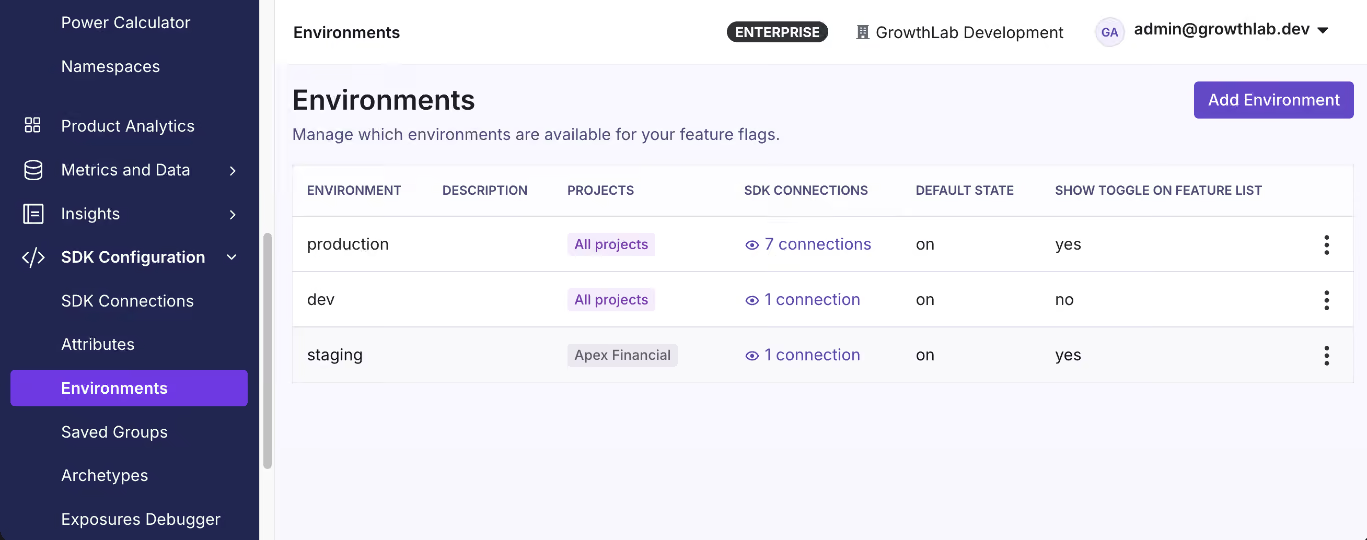
Your flags need to respect the same environment boundaries as the rest of your infrastructure. A flag that’s on in staging should be independently controllable from the same flag in production. Use separate SDK keys per environment (development, staging, and production) to prevent configuration drift.
Integrating flags with your CI/CD tooling
Typically, integration happens at two levels:
- Scanning your codebase for flag references as part of your pipeline to catch stale flags.
- Automating flag state changes via a REST API so flags are live just when the code is.
Note: You can use GrowthBook’s CLI to scan your codebase for flag references and integrate it into GitHub Actions. The REST API handles flag promotion across environments as part of your existing deploy workflow.
Feature flag hygiene
Stale flags can cause issues at runtime if left unchecked for a long time. You can avoid this by defining a flag lifecycle as part of your development process:
- Create the flag with an owner, a purpose, and an expiration date.
- Roll out the feature using progressive delivery stages.
- Experiment against goal and guardrail metrics during the rollout.
- Decide whether to ship fully or revert based on the data.
- Clean up the flag once you’re done using it.
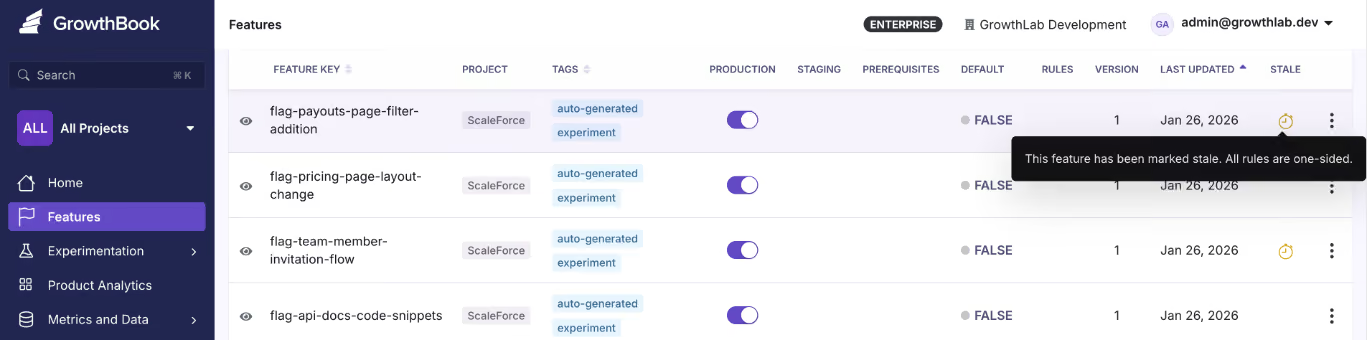
Note: GrowthBook surfaces stale flags through automated detection and Code References. If you’re not using a flag anymore, it’ll get flagged after it passes its expiration date or crosses the 90-day mark.
How to choose the right feature flag platform for continuous experimentation
When you’re evaluating feature flagging platforms, these are the questions that matter:
- Is experimentation built in or bolted on? If flags and experiments live in separate products, you’re context-switching between rollout decisions and impact measurement.
- Does it support safe rollout automation? Manual percentage bumps require someone to remember to do them. With automation, you can avoid this.
- Can you self-host and own your data? Many platforms route all evaluation data through their cloud. If you’re in a regulated industry with compliance or data residency requirements, it’s a must.
- Does it work across your stack? Choose a platform that has the right SDK across server, client, mobile, and edge environments.
- Is pricing predictable at scale? Per-MAU or per-event pricing penalizes growth. Per-seat pricing is ideal so that you only pay for the people who manage the flags.
- Does it support environment-level controls? You need independent flag states for each environment, with separate SDK keys.
- Can you integrate it with your existing CI/CD tools? Your flag platform should expose a REST API and a CLI to automate flag state changes during deployment.
- Does it help you manage flag lifecycle and cleanup? To avoid tech debt, choose a platform that surfaces them automatically and flags them for removal.
Learn more about the best open-source feature flaggting platforms.
Ship code continuously and measure what matters
CI/CD solved the deployment problem. You can reliably go from commit to production, and most engineering teams have that part figured out.
But the harder part is what happens after the deployment.
Feature flags help you control that part by decoupling deployment from release and treating rollbacks as minor configuration changes rather than redeployments. When you layer in experimentation, it closes the second gap by turning every rollout into a structured decision point.
If you’re looking for a feature flagging platform that enables CI/CD process, try GrowthBook for free or book a demo with our team.
Related articles

Ready to ship faster?
No credit card required. Start with feature flags, experimentation, and product analytics — free.

