

Feature flags in AI-led development: how to ship fast without losing control
In the foreword to DORA's 2025 report, Gene Kim, founder of Tripwire, borrows a principle from control theory called the Nyquist stability criterion. Control theory studies how systems stay stable under change. One of its core principles, the criterion, says:
“A control system must operate at least twice as fast as the system it governs.”
AI has become the fastest coding system software engineering has ever built. Unfortunately, the control plane around it hasn’t caught up yet. And this gap is where things break.
For instance, a feature that works in testing may have completely different behavior due to changes in user input, slight differences in prompts, or even model changes. In fact, documented AI incidents jumped by 55% year over year in 2025, while the share of organizations rating their incident response as “Excellent” fell from 28% to 18%.
In 2026, development velocity is no longer the only bottleneck. A feature flag is one example of “Control”, and you can use it to close that gap.
How AI-led software development changes everything
DORA’s 2025 State of AI-assisted Software Development report found that 90% of developers use AI at work. That’s not the most intriguing aspect anymore, though. It’s more about what AI usage is doing to the underlying system.
Whether you’re using Cursor, Claude Code, Codex, or Gemini, the answer’s the same. You’ll start noticing these changes:
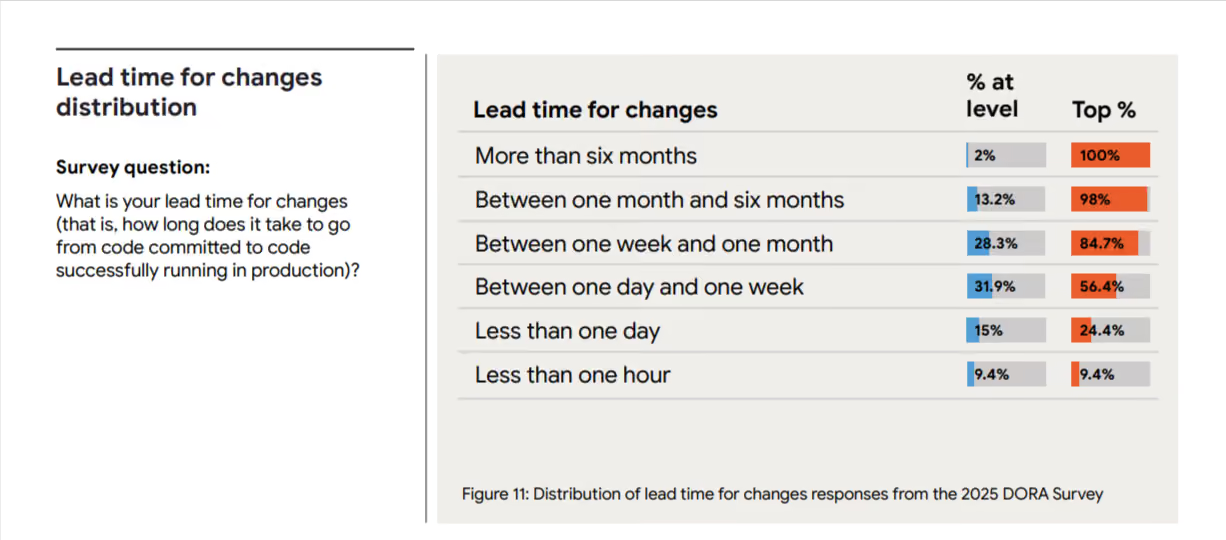
- The size of your change set grows: AI generates a hundred lines of plausible code as easily as five. DORA’s research found that AI adoption correlates with larger changelists, which violates the small-batch principle that reliable delivery has rested on for years. As you merge more code, you’re influencing a larger surface area of code per release, and there are more places for things to go wrong. And when they do, the lead time to fix the problem has only gotten longer. In 2025, the DORA team tracked how AI adoption affected key delivery metrics. They found that most teams still measure lead time in days or weeks—and it’s because the bottleneck has moved from creating code to getting it safely into production.
- Authorship becomes a fuzzy problem: AI doesn’t necessarily have the same expertise about blast radius as you do. They don’t know which service is fragile or which feature can’t go down during business hours in your biggest market. Its job is to follow instructions and produce output, and the judgment about whether that output is safe to release falls to someone downstream. You’re shipping more, which also makes it harder to track how the code was produced, which in turn makes it even harder to review and debug it.
- Release surface increases over time: Every time you change something in the prompt, it acts as a release because it can change how your product behaves. Most release tooling wasn’t built to track these kinds of changes, so you won’t always know in real time if something’s affecting how your product behaves.
How traditional release models break down with AI-led development
Here are a few ways in which the traditional model changes:
1. CI/CD assumes the change you merge is the change you ship
More engineering teams are adopting continuous integration and continuous delivery (CI/CD) models. CI/CD is an excellent way to reliably build and deploy software. However, when software teams build AI-powered applications, those applications can behave very differently in tests than in production. This is because LLMs are non-deterministic; the same prompt doesn’t always generate the same response. This is made even more complicated because each user will prompt the app with slightly different words and with different context. All of this means that testing and monitoring in the real world is even more important with AI-powered apps. Even after apps are deployed, their behavior can change as newer models are used. Many companies also report seeing a drift in performance, even when your team doesn’t change anything.
2. QA assumes reproducible test cases
Reproducibility is the foundation of regression testing. If you catch a bug, you write a test to reproduce it and keep testing it until it never comes back. But AI is more probabilistic than we’d like to admit. When you’re testing LLM or AI-powered features, the same user input can result in different outputs because it depends on the model state and context. A test that passes 10 times in staging could fail on the eleventh try because the model responded differently.
3. Staging can’t replicate production input distributions
In the same vein, because AI is probabilistic in nature, the results you see in your staging environment won’t always hold up in production. Real users can ask questions you didn’t think of, so if you haven’t truly tested every possible scenario, the edge cases can show up in production.
All of these issues point to the same problem: pre-release validation is now an open-loop control issue. You can test all you want, but you can’t control all the outputs. That’s why you need to add observability and expermentation to see how an AI feature behaves in production—and intervene as needed.
Runtime control is the answer, and feature flags are a way to enable that.
The role of feature flags in AI systems
Many engineering teams already use feature flags, especially when using a basic CI/CD setup.
However, with AI becoming more mainstream, you need to understand what and how you use feature flags when rolling out features.
The same property, AI, that makes that possible—generation at speed, with limited determinism—makes everything you ship riskier on the way out the door.
Feature flags give you more control to operate inside this tension.
Without feature flags:
- Quality issues hit users before you see them: The Stack Overflow 2025 Developer Survey found that 66% of developers say their biggest frustration with AI tools is output that’s "almost right, but not quite," and 45% report that debugging AI-generated code takes longer than writing it themselves. On the user-facing side, it’s the same. If you don’t have a way to limit who sees what and when, you’ll see a rise in incidents.
- Hallucinations propagate to every user simultaneously: Flags don’t reduce hallucination rates, but without them, your entire user base will see the incorrect output at the same time. You won’t be able to control the blast radius. Replit’s 2025 incident is one such example. Its AI agent deleted a live production database holding records for 1,206 executives during a code freeze. It ran unauthorized commands when it hit empty records, and because there was no kill switch in place, nobody could stop it.
- Costs spike without warning: AI token usage scales with traffic, and a small prompt change at 100% rollout can blow through your API spend overnight. The unplanned bill will impact your bottom line.
- Rollback means a redeploy: Every minute the broken feature is live is a minute of damage you can’t take back. Plus, the time-to-fix is gated by your CI/CD pipeline rather than by your ability to make a decision.
With feature flags:
- Gradual rollouts with clear gates: Traditional rollouts assume that exposing more users to a feature surfaces bugs of the same kind. But that only works for deterministic systems. In probabilistic settings, you can use gradual rollouts to increase exposure while monitoring performance at every gate. So, you can identify anomalies before they become full-scale issues and fix them. You can roll out AI features to internal users first, then a 1% beta cohort, then 5%, and then 25%. The best part is that you can set a threshold to pause rollout if something goes wrong.
- Kill switches or instant rollbacks: When something breaks, the flag flips off, and the fallback path takes over. In those cases, your team has time to diagnose the problem instead of fighting a fire in real time.
- Control costs for LLM usage: If a feature is token-heavy, you cap exposure to specific cohorts or geographies until you’ve confirmed the unit economics work at scale. A prompt that costs $0.02 per call at 1% rollout tells you exactly what it’ll cost at 100% before you get there.
- Environment-specific targeting: You can test AI models or features in each environment: staging-only, testing-only, or production-only. It stays available for as long as you need it.
- Regular testing of different models: Previously, model selection was a one-time decision. But with runtime control, you’ll want to revisit it regularly to see which AI platform offers the best cost profile, latency characteristics, and quality. The model essentially becomes a configuration value.
- Feature-gating AI-powered functionality: Since the AI feature sits behind a flag, you can also toggle the non-AI fallback option within it. Let’s say a particular model isn’t performing as expected. You can create a fallback path that either switches models or reverts to a non-AI path.
- Compare models, prompts, or agent configurations side by side: Route traffic across variants, measure outcomes against the same user base, and let the data pick the winner. This is especially useful during model migrations—you don’t have to trust the provider’s benchmark when you can watch both models handle your real traffic.
4 examples of using feature flags in AI-led development
Here are a few ways you can use feature flags in your AI-native workflows:
1. A/B testing prompts
Prompt engineering is the most volatile surface in any AI product. Even minor changes in how you word the prompt make a huge difference. And you won’t know what it does until real users experience it.
In this case, you can wrap the prompt in a feature flag. Let half of your users experience the output of V1 while the other half experiences the output of V2. The experimentation layer should measure metrics such as response quality scores, time-to-completion, and downstream conversion rates. Iterate on the prompt based on data.
2. Migrate between models with gradual rollouts
Every little change can have a huge impact on how your app behaves. That’s why every model switch is essentially a release.
To avoid any mishaps, wrap the model choices in a flag and route 5% of the traffic to the new model. In platforms like GrowthBook, you can even attach automatic rollback triggers based on quality or latency guardrails, so that if error rates exceed a certain threshold, the flag flips back immediately.
You can deactivate underperforming models in days without waiting weeks to test them.
3. Automated flagging for AI-generated code
When AI agents author your code, the safest default is to place that code behind a flag automatically. The agent can create the feature and the corresponding flag while shipping what’s behind it.
If you implement a flag-by-default policy, it’ll mean that every AI-authored change has a rollback path if it touches production. We need to reduce the burden of human review, so if reviewers approve the rollout plan in general, that’s a much better alternative to reviewing even a single line.
4. Scaling AI-focused experimentation
Feature flags reduce risk, but they don’t tell you what’s going wrong and why. That’s where experimentation comes into the picture. Companies like Khan Academy have already run A/B experiments at the conversation-thread level and have launched their AI Tutor product (Khanmigo) successfully.
Here’s a simple progression flow of how Khan Academy improved its A/B testing process for AI systems:

They ran a total of 64 experiments by testing prompt variations, system instructions, and even model comparisons between Gemini and OpenAI. And eventually, this helped them decide which product variants helped their users learn better.
The future of AI development workflows
The largest shift would be that flags are created before the code is written by the same agent who’s writing the code.
When AI agents generate features, they can create the corresponding feature flags in the same workflow. And the experiment also gets defined at the same time. Instead of shipping first and figuring out what to measure later, you can set up the hypothesis and metrics alongside the feature itself.

One way to do this easily is to use GrowthBook’s MCP server. Beyond that, you can also use the command line interface (CLI) tools and direct API calls to do the same thing. Many customers are building skills tailored to their environment and practices for each step of the development process, including feature flag and experiment creation, ongoing monitoring, experiment analysis, and feature flag clean-up.
The goal is to integrate feature flags into your AI-based development process or when you’re developing AI features.
For example, if you’re done rolling out a feature, GrowthBook’s Stale Flag Detection feature automatically detects old flags and queues them up for removal. When you have capabilities that remove the burden on your teams rather than add to it, that’s where you see the real difference.
Best practices for shipping AI safely with feature flags
If you want to ship and test with more confidence while using or developing AI features, follow these practices:
- Dogfood the feature first: Internal users should see the feature before anyone else does. It’s standard practice for traditional releases, but it matters more for AI because failure modes are less predictable.
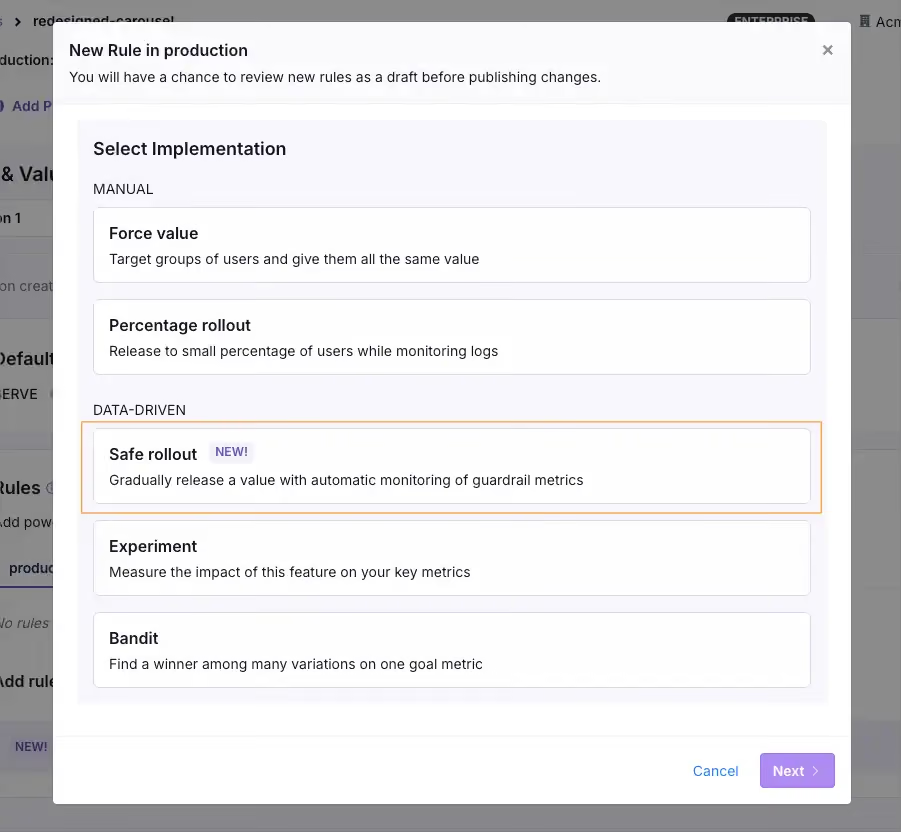
- Use guardrail metrics with automatic rollback: You need to define what "good enough to expand" looks like before you start the rollout. For AI features, that means quality signals alongside system metrics such as output relevance and user satisfaction scores. You can do that by attaching guardrail metrics to your rollout process. When you wrap the AI feature in a Smart or Safe Feature Flag, it’ll automatically roll back the feature if it dips past the thresholds you’ve set. Don’t wait for something to break and then fix it because there are more dependencies and variables when you’re using AI.
- Always test in production: Testing or experimentation has to become table stakes because of how unpredictable AI is. For AI features specifically, production is the only environment that contains the input distribution your feature will experience. You need to consider attaching observability to other metrics, such as token usage, P95 and P99 latency, output quality scores, and fallback frequency.
- Keep rollback faster than your deploy pipeline: If the only way to turn off a broken AI feature is a redeploy, your recovery time is measured in minutes at best. Implement a flag-based kill switch to bring that number down to seconds.
- Combine qualitative and quantitative signals: Automated metrics catch spikes in latency or hallucination rates, but they won’t catch a chatbot that sounds condescending or a summary that’s factually correct but misses the point. Rely on user feedback or manual review of AI outputs to fill these gaps.
- Evaluate models across both technical and business metrics: A model can score higher on benchmarks and run faster inference. But it can still be worse for the business. So measure both layers independently, because a model upgrade that degrades user experience is still a regression.
- Plan for cleanup from the start: Stale flags are technical debt. With AI, this only increases the burden because the iteration cycle is faster and the volume of code you create is higher. Build flag cleanup into the lifecycle early and automate it so you don’t have to worry about it.

AI-based development needs a control layer—even at scale
Even though AI is the fastest system engineering has ever built, if you don’t have the right governance systems in place, it’ll be harder to close that gap.
That’s what platforms like GrowthBook were built for. We recognize that feature flags and experimentation are critical to safe AI-based development. That’s why we recommend feature flags to control rollouts and an experimentation engine to measure performance. It runs everything on a warehouse-native architecture, which means you’re measuring against the data you already trust.
And if you’re already using AI platforms like Cursor or Claude Code, you can use GrowthBook’s MCP server to create flags and define experiments without leaving the platform. AI-generated code ships behind flags gradually, and the experimentation engine tells you if everything works as intended.
If you’re interested in learning more, try GrowthBook for free or schedule a demo with us.
Related articles
.avif)
.avif)
Ready to ship faster?
No credit card required. Start with feature flags, experimentation, and product analytics — free.

