

Decoupling deployment from release with feature flags
Engineers never deliberately decided to couple deployment and release. It happened by default, because there was no way to draw a hard line between merging code and exposing it to users.
And because of this process, your release schedule depends on whether you’re ready to deploy and not on whether your product roadmap requires it.
Well, that’s not the case anymore.
Feature flags allow you to decouple deployment from release by controlling what gets exposed to users, even after deployment. In fact, a 2026 study found that coupled deployments produce unsafe activations 60% of the time. But decoupled ones produced none for rollouts with gated exposure.
In this guide, we’ll explain how feature flags decouple deployment from release and why you should consider adopting them.
Deployment vs. release: What’s the difference?
Deployment is a technical event in which you push code to production, where it runs on your servers, but real users don’t see it yet. On the flip side, release is a business decision. Here, you make the feature visible to users, and it depends on your organization’s roadmap rather than when the code was shipped.
Without feature flags, deployment and release happen together. Even a half-finished feature gets released to users if you deploy it. With feature flags, you separate these events.
Why you should consider decoupling deployment from release
.avif)
When you separate deployment from release, it changes the risk profile of every change your team ships. Here’s how:
- It makes releases low-stakes
A bad release doesn’t have to be a crisis anymore. In the traditional software development process, if something goes wrong, the fix also runs through the same pipeline that caused the problem. And your users continue to experience issues until you rectify the problem.
But when you decouple deployment from release using feature flags, the risk becomes containable. The code stays deployed and only the exposure changes. If someone turns the flag off, users can see the older version of the code in seconds while your team looks into the problem.
For instance, in a platform like GrowthBook, because flag evaluation happens locally from a cached payload, a simple toggle switch sends the updates to every SDK in real time. As a result, the changes show up on the next check, which is almost immediately.
In short: the act of reverting a change becomes boring, and that’s the goal.
It lets you ship faster
The fear of breaking production also pushes teams toward batching releases. When every release is an all-or-nothing bet, you hedge by bundling changes into bigger, less frequent releases. But that also increases your risk and slows down development.
Decoupling releases solves that issue. The 2025 DORA survey shows what teams do once it’s gone:
- 22.7% of organizations deploy to production at least once per day
- 44.6% deploy at least once per week. This is the type of cadence a decoupled release offers. You can deploy continuously, but release only when you’re ready.
In fact, trunk-based development becomes the norm, with every merge going straight into main behind a feature flag. So you don’t have to deal with long feature branches or the bugs they introduce.
It gives product teams control over the release moment
Once you separate deployment and release, you can also change the ownership of the release process to the team that should hold it. While engineers deploy code, product managers can decide when users actually see the new change or feature, without relying on the development team.
Here’s how it differs:
- Engineering answers, “Is this code safe to run in production?”
- Product answers, “Should users see this now?”
Let’s say a product manager for a telehealth platform wants to release a new appointment-booking flow in one region before rolling it out nationwide. If engineers already deployed the feature two weeks back, all the PM has to do is set the targeting rules using a feature flag (such as geography or plan type) and launch it.
Tip: Choose a platform that gives non-technical teams full control too. For instance, GrowthBook’s dashboard is built so that non-engineers can manage flag states. If they need attribute-based targeting or want to build Saved Groups, they can do that without writing code.
How feature flags decouple deployment from release
Feature flags create the missing layer between deploying code and releasing features. Here’s how you can set them up as is or using GrowthBook:
Step 1: Wrap new code in a flag
Attach an if/else wrapper to your new code so that when you deploy the feature, it defaults to an “off” state. In this case, the code runs in production while it still allocates memory and initializes its dependencies. However, users can’t see or experience the feature yet.
if (feature.isOn("new-booking-flow")) {
  renderNewBooking();
} else {
  renderCurrentBooking();
}
This process is called a “dark launch.” A 2026 study found that these kinds of shadow deployments identified 40% of potential regressions that the sandboxing stage didn’t catch. You can see what goes wrong before you release the feature.
Note: Within GrowthBook’s feature flagging platform, every feature wrap dark launches by default. Dark launches still rely on the flag’s state so the performance matters here irrespective of whether your users see it. GrowthBook's SDK evaluates flags locally from a cached payload rather than making a network call per check, so there’s no latency between each call. Also, if its servers become unreachable, the SDK continues working with the last cached state. As a result, your dark launch doesn’t break because the flag service went down.
Step 2: Choose your release strategy
Once your code sits dark in production, the flag becomes the release mechanism. Now, whoever owns the flag owns the release moment.
You can use any of the following release strategies to launch the new change, depending on the risk level and level of validation you’ve done:
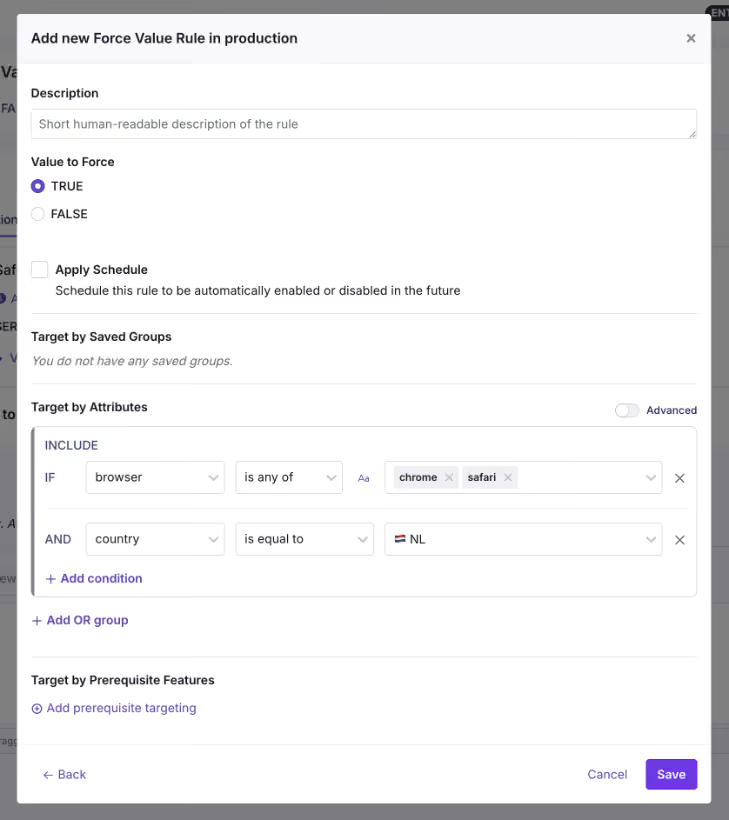
If you’re launching a minor change, you might want to do an instant release. In GrowthBook, it uses a simple Forced Value rule where you define the targeting conditions and release the change. If you need more control over who sees the feature, you can add targeting conditions based on any user attribute using the same Forced Value rule. You can also add prerequisite features to ensure the flag only activates when another feature or rule is already in effect. If you target the same segment frequently, use Saved Groups to create reusable segments.
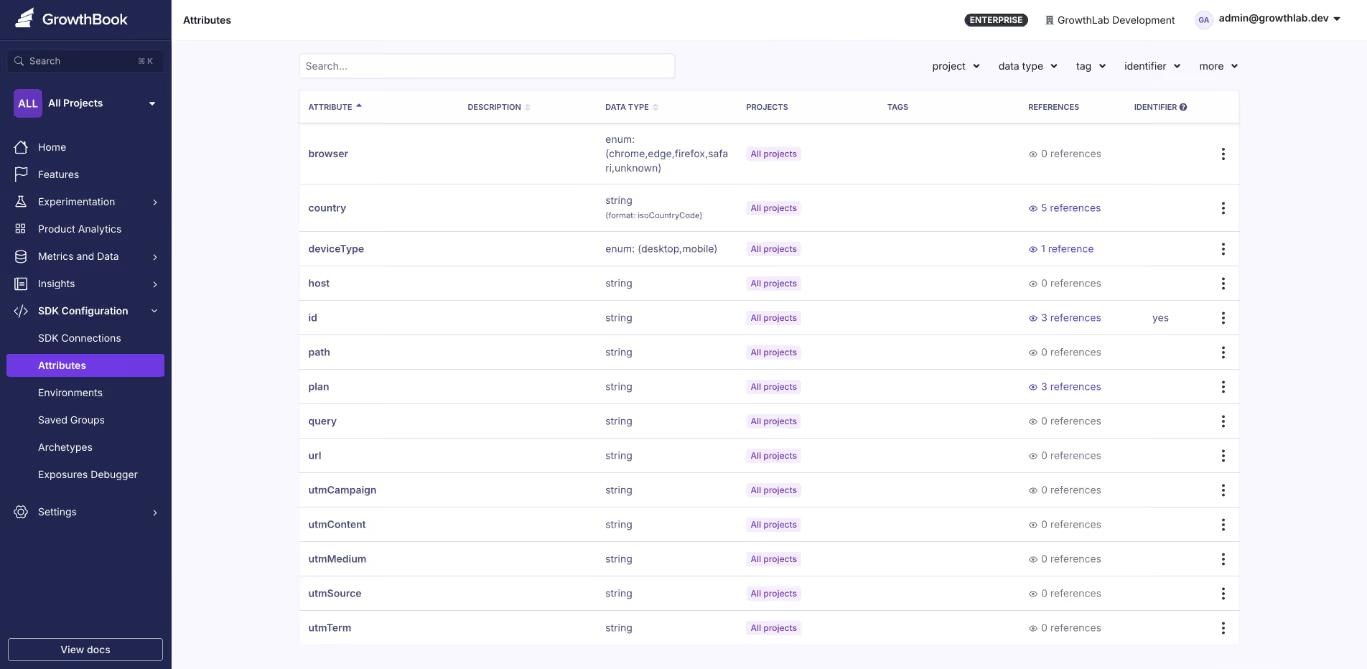
Here’s a list of attributes you can use in GrowthBook:
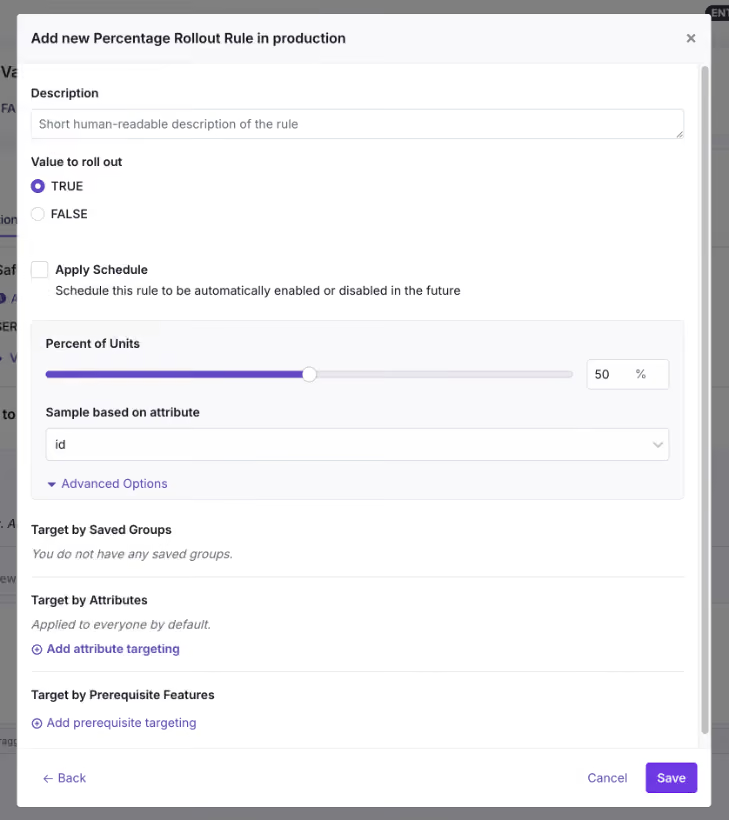
Even though targeting lets you choose a specific audience, it can’t tell you whether it actually works for them. The safest way to test that is to use a Percentage Rollout along with an experiment. Here, you define the percentage of users to run the test with and then monitor the metrics you need to see whether the feature improves or degrades them. You can do more granular targeting using Saved Groups or Prerequisite Features.
But if you roll out the feature while testing at every step, Ramp Schedules and Safe Rollouts are the best ways to do that. It uses a combination of percentage rollouts and observability to make that happen. A Ramp Schedule is a release plan you attach to a targeting rule, and at each step, all you have to do is define the percentages, timeframe, and approval workflows. GrowthBook automates the step-up on a timeline you define, so you don’t have to manually go back and ramp it up. If you attach guardrail metrics like error rates or latency spikes to it, it becomes a Safe Rollout (Monitored Ramp-up) where the rollout can be paused or reverted automatically if the metrics degrade.
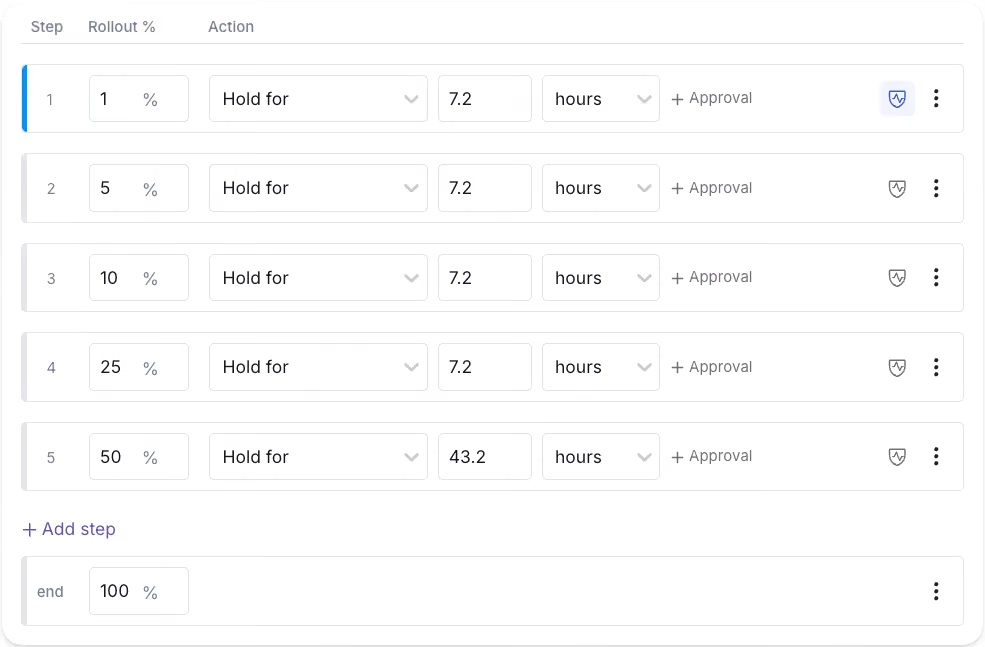
For instance, if you’re monitoring the new booking flow feature, review metrics such as conversion rate and error rate before the rollout starts.
Step 3: Monitor the rollout and remove the flag
Once the feature flag and accompanying code go live, it’s time to monitor the rollout. This means the guardrail metrics you defined earlier have to be monitored. Here, you’ll do a percentage rollout and monitor performance at each stage.
Let’s say you’re monitoring error rates for a new booking flow. If you notice a spike at 10% rollout, you can revert to the old version immediately. If nothing goes wrong, move on to the next step of the rollout. Within GrowthBook, the platform monitors these metrics at every stage and pauses or reverses the rollout if they cross the defined thresholds.
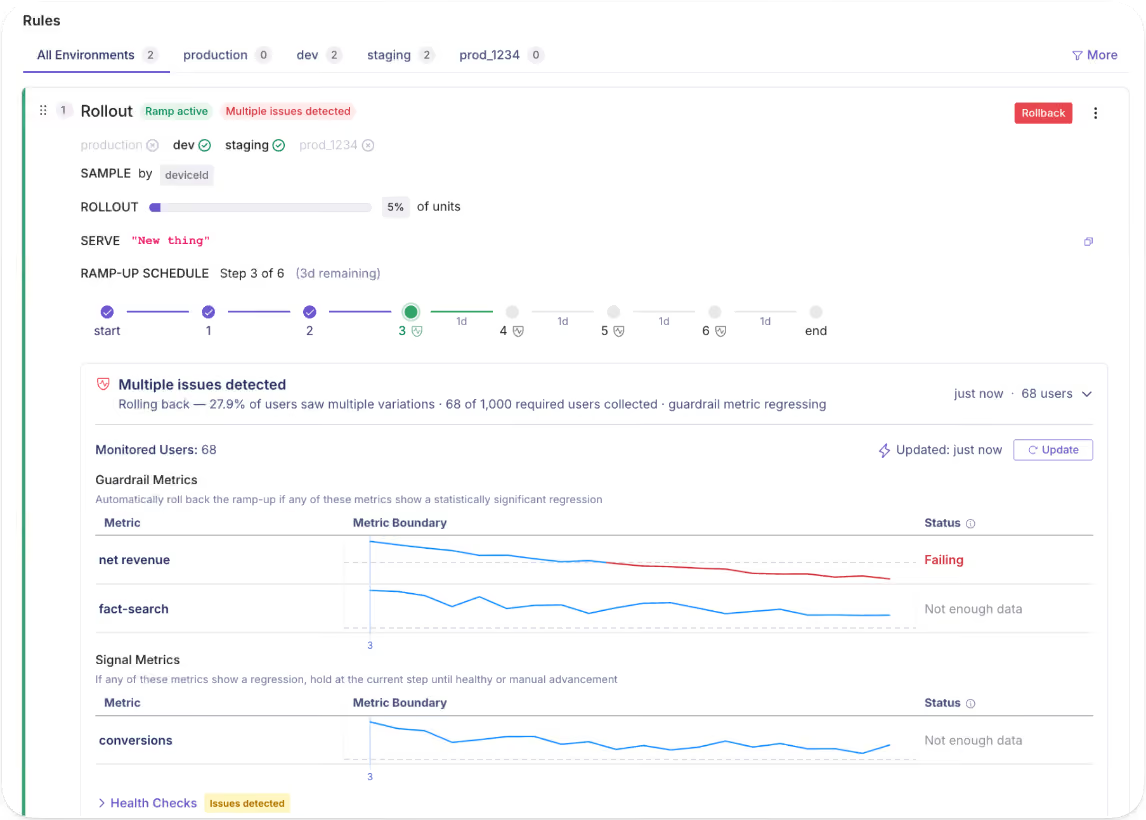
After you hit 100% with stable performance, archive the flag or remove it from your codebase.
How does governance work when deployments and releases are decoupled?
When you start decoupling your delivery process, you’ll contend with two questions:
- If any engineer can toggle a flag in production, what stops an accidental release?
- And if PMs own the release, what stops someone from exposing a feature that isn’t finished?
Both of these questions have one answer: approval workflows.
On platforms like GrowthBook, you get this built in, so every change is treated as a draft that eventually goes out for review. It only gets merged into production when the right person approves it. And the published versions “lock” because every time you make a change, the platform takes an immutable snapshot of the change. If any changes cause an issue, you can always roll back to the previous version, and that gets recorded in the audit logs too.
As a result, the staging process runs without interference, and you involve stakeholders only when the flag needs to go live.
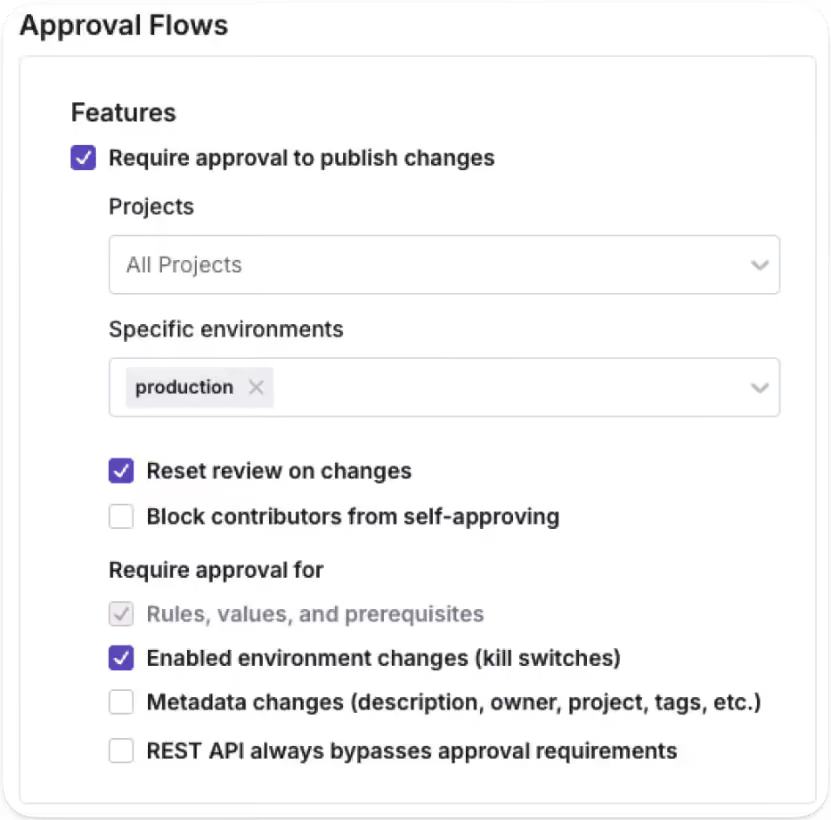
That said, the “who” changes as more organizations use AI to deploy and release features. You can now use AI coding agents to draft flag configurations and release plans programmatically through GrowthBook’s MCP server. Even though the agent handles the setup, a human stakeholder still approves them before anything goes live.
Note: GrowthBook blocks authors from approving their own requests, so you use the four-eyes principle by default. If someone edits a draft after approval, the review process is reset (unless you’re an admin).
What does the feature flag lifecycle look like?
The decoupling process doesn’t end when you hit 100% rollout. The full lifecycle runs through four stages:
- Deploy
- Release
- Expand
- Clean up
.avif)
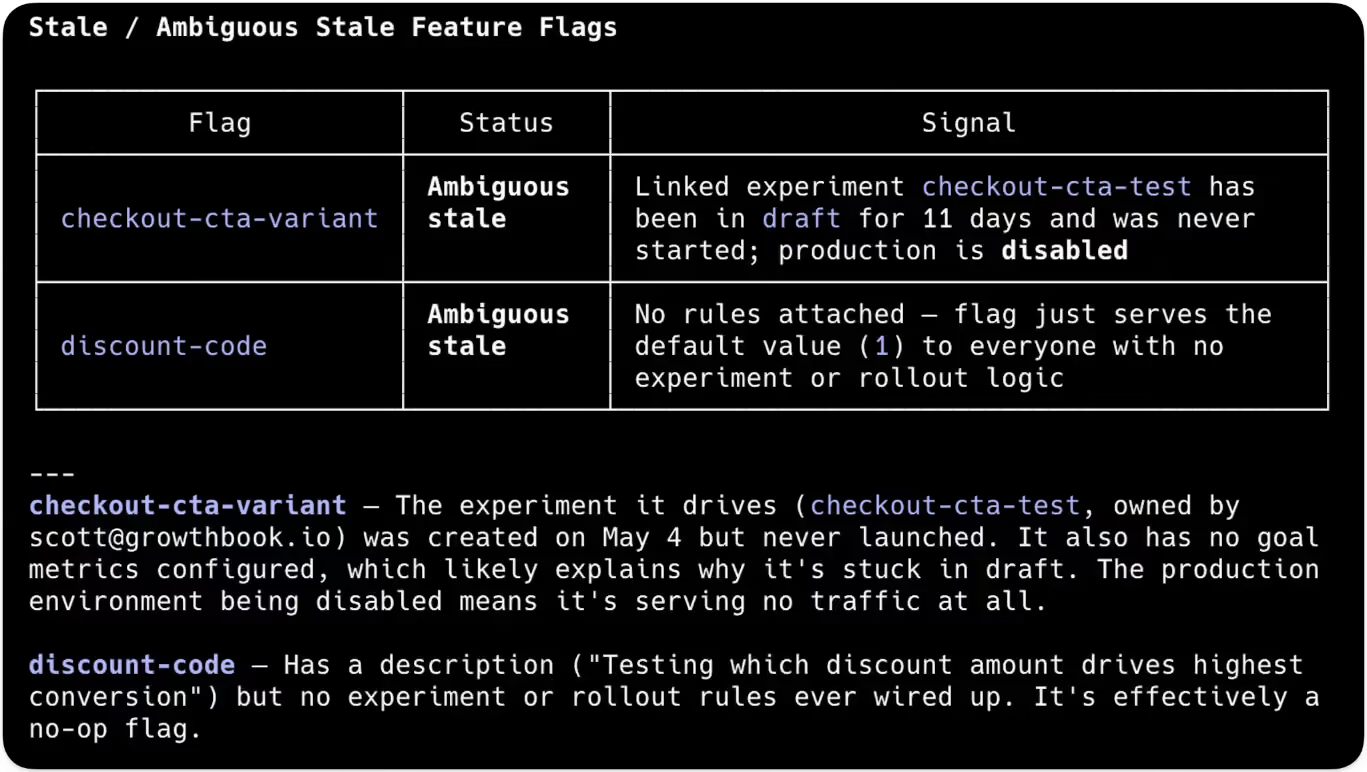
We’ve seen that most engineering teams forget the fourth stage, which is the clean up. In fact, Uber built their own automated refactoring tool, Piranha, to clean up over 2,000 stale feature flags. It’s expected when you haven’t baked in governance during the deployment process. Your team keeps adding flags without removing them until something goes wrong.
In a nutshell, the control layer you added for safer releases becomes technical debt that increases risk.
Your “definition of done” should include clean-up, too. Once the feature serves 100% of users with stable metrics, it shouldn’t exist in your codebase. Either archive it or remove it altogether.
Platforms like GrowthBook automatically surface stale flags. If a flag is untouched for more than 2 weeks and is disabled everywhere or routes all traffic to a single variant, it’ll show up in the dashboard. You can use Code References to pinpoint exactly where it is in your codebase.
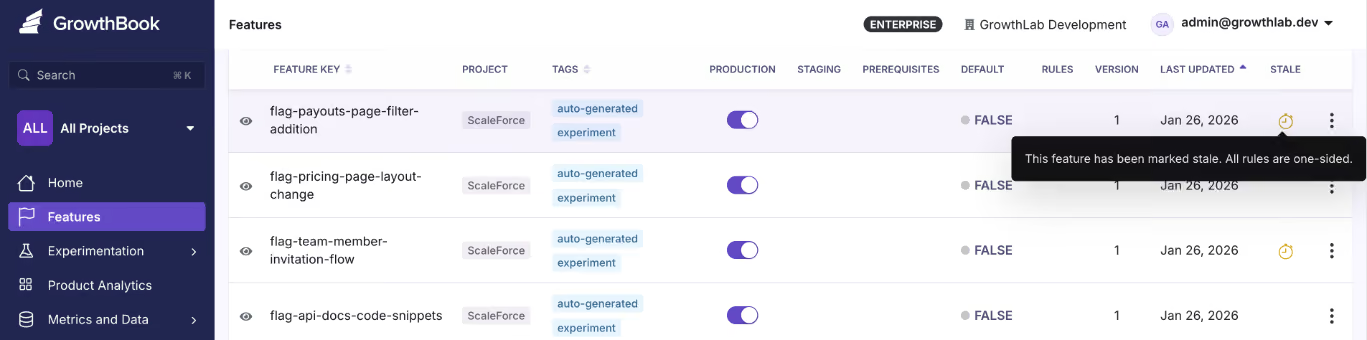
And then use the GrowthBook MCP server and ‘flag-cleanup’ GitHub skill to clean it up without ever leaving your AI agent’s interface. Once you’re done cleaning up the stale flags, document it and move on to the next release.
5 mistakes engineering teams make when decoupling deployment from release
Even though decoupling solves the issue of slow development, you still need strong governance in place to implement it effectively. Here are a few mistakes every engineering team should avoid while using feature flags for decoupling:
- Leaving flags in the code indefinitely
It’s easy to create a flag, but it’s also just as easy to forget about it after you’re done releasing a new update or feature. The problem is that it’ll continue to quietly serve a single variant of the change to every user via a hidden conditional branch. That’s why you should continue to clean up stale flags once you’re done using them or at least every 90 days. Assign an owner and a removal date while you’re creating the flag to avoid this issue.
- Skipping approval workflows in production
Without a proper approval workflow in place, there’s a good chance unauthorized users can create a flag that accidentally releases something. Gate production behind sign-off and let staging happen freely so that the risk lives in an environment where real users don’t experience the bug or a premature feature.
- Using flags as permanent configuration
Feature flagging systems are usually built for even minor configuration changes, but the problem is that engineering teams assume that when they create the flag, they’ll eventually settle on one path and remove the other. In reality, that’s rarely the case. When you forget to clean up your flags or even switch off (if needed), that’s just not the case. That’s why we’ve seen incidents like the Knight Capital accidental trading glitch happen. If you are using feature flags as a permanent toggle, like with kill switches or toggles for location-based capabilities and plan-based tiers, mark it as permanent and document it. If it’s not permanent, it should have an expiry date.
- Releasing without a rollback criterion
Before you flip the flag, define what “something went wrong” looks like for this specific feature. That means identifying the issues your users could experience and tying those issues to guardrail metrics that would degrade if the feature has problems. If you don’t, your users might experience severe app performance issues, while you won’t even know that something broke in production. Consider defining your guardrail metrics and their thresholds while creating flags, and use a Ramp Schedule (Safe Rollout) to monitor performance as you slowly ramp up the rollout.
- Treating decoupling as an engineering-only win
Decoupling deployment from release is a cross-functional change, and that’s also why it’s a sociotechnical problem. In addition to engineers, even quality assurance (QA) teams and product managers are involved in the process, so each team needs to have the right level of access and visibility into the release. The goal is to give each team self-serve access to the data and controls they need. For example, product managers should be able to target segments and schedule releases, while QA teams should be able to monitor the metrics and roll back if needed. Ideally, you’re working with a platform that gives even non-technical users the right access to make changes without writing code.
It’s time to deploy continuously, but release features intentionally
Nobody decided to couple deployment and release. It was the default for the longest time, but that doesn’t mean it should continue to be.
You have tools like feature flags that help you decouple deployment from release successfully without breaking things. In fact, you can ship fast without breaking things. Deployment becomes a non-event, and release becomes a deliberate choice made by whoever’s closest to the customer.
That’s why the engineering teams that adopt feature flags improve deployment frequency while reducing change failure rates.
Curious how feature flags could improve your development process? Try GrowthBook for free today.
Related articles

.avif)
Ready to ship faster?
No credit card required. Start with feature flags, experimentation, and product analytics — free.

