GrowthBook 5.2: Interleaving experiments and Human in the Loop for agents

TL;DR
- Interleaving experiments (private beta): Compare ranking algorithms 50-100x faster by blending results from both into one list.
- Human in the Loop for agents: Agents propose risky changes, and a person approves them before they happen.
- Remote saved groups: Target flags and experiments at lists of millions of IDs without growing your SDK payload.
- A redesigned experience: A new design for experiments, metric creation, data onboarding, and settings, plus smaller improvements across the product.
We built GrowthBook to enable any engineering or product team to release features and run experiments, and to do so in complex situations. GrowthBook handles the hard work as you release and run experiments across web, mobile, and server-side code; target precise groups of users; and define metrics in your warehouse’s SQL dialect.
Experimentation, especially, isn’t getting any easier. If you work on search or recommendation algorithms in your product, you’ve probably struggled to run timely A/B tests to compare your algorithms. Your team almost certainly builds software with agents. Someone is (hopefully) watching what they’re doing, and making sure they stay within guardrails. And the lists of users you’re targeting for releases, or experiments, or campaigns are growing into the millions (again, hopefully).
A lot of teams have built their own answers to these problems, and have bolted solutions onto the platforms they use.
GrowthBook 5.2 takes them on in the platform, with new support for interleaving, human in the loop controls for agent operations, and scalable saved groups. And we’ve redesigned the commonly used parts of GrowthBook, from connecting your warehouse to setting up an experiment, so they take fewer steps.
Testing ranking algorithms quickly: Interleaving experiments
Let’s say you’ve developed a new ranking algorithm for search results, recommendations, or a news feed and you need to see if your users prefer it. If you run a traditional A/B test, you’ll split users between the old and new algorithms and then wait until the experiment reaches valid conclusions. If the difference in the rankers’ quality is relatively small, results could take a long time to show up.
Interleaving provides a different approach. Rather than assigning each user to a specific algorithm, interleaving blends the results from both rankers into a single list. Each user sees results from both algorithms and acts as their own comparison, which lets you reach a result substantially faster (50-100x faster!) than traditional A/B tests.
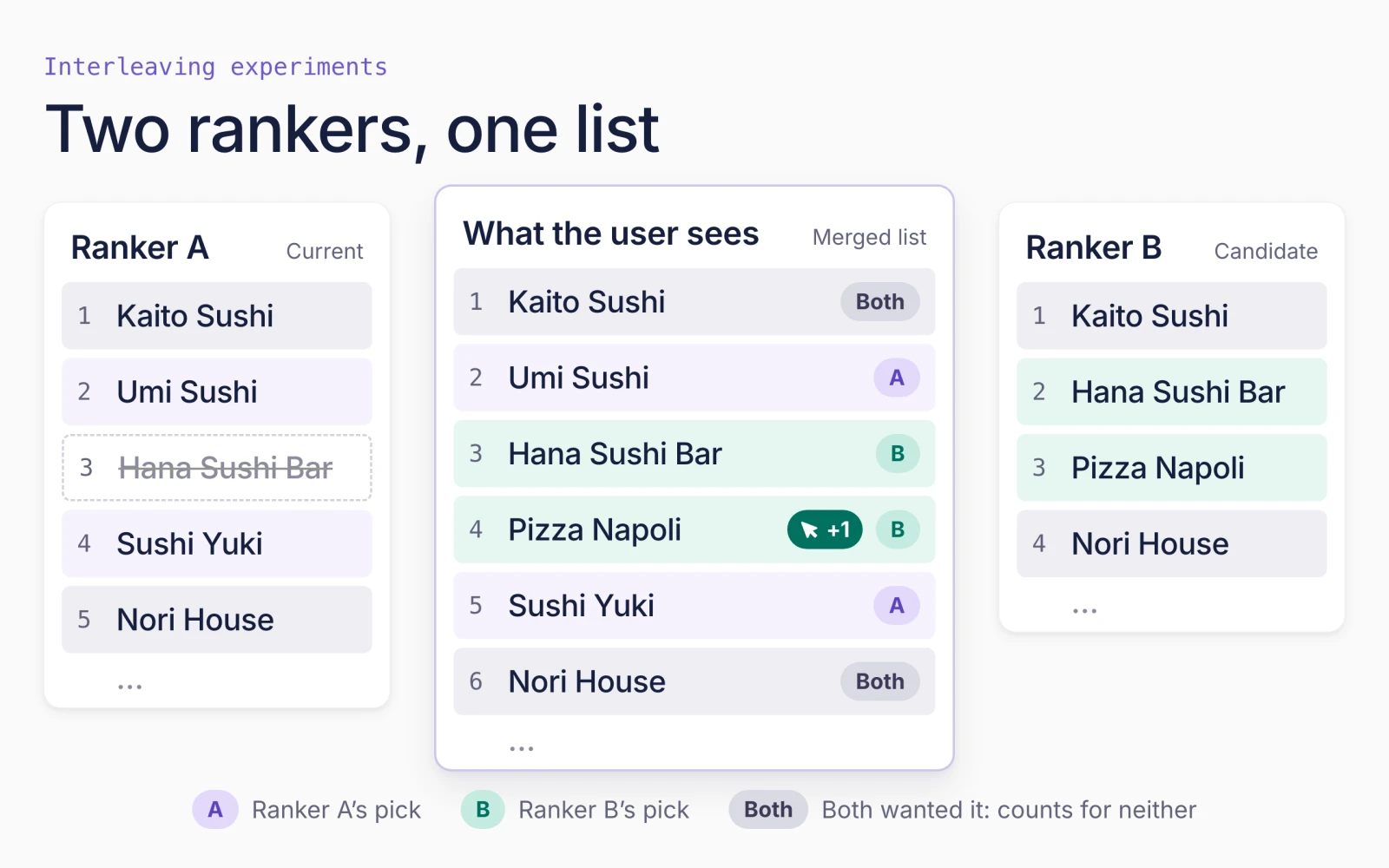
GrowthBook is the first experimentation platform to offer interleaving experiments, which are mostly built in-house by teams reading academic papers. Interleaving has been critical at Netflix, DoorDash, and Airbnb, and we’re excited to bring the technique to more companies.
Interleaving is in private beta for Enterprise customers. To learn more about how interleaving works and why it speeds up testing ranking algorithms, read this deep dive from our data scientist, Hampus Poppius.
Building controls for agents: Human in the Loop workflows and API key improvements
Agent permissions are a major security and reliability concern for anyone driving parts of the flag, experiment, or analytics workflows with AI agents. While we’ve had approval workflows and API permissions that govern both humans and agents, we’ve made significant improvements to agent controls with 5.2.
We’re excited to introduce Human in the Loop mode for API keys. It’s like “auto-mode” for agent actions in GrowthBook, and it identifies and restricts actions that agents can do autonomously. It’ll let agents propose risky changes, but flag them for human approval in the GrowthBook application before the change is applied. This mode is available for our MCP OAuth server and personal access tokens.
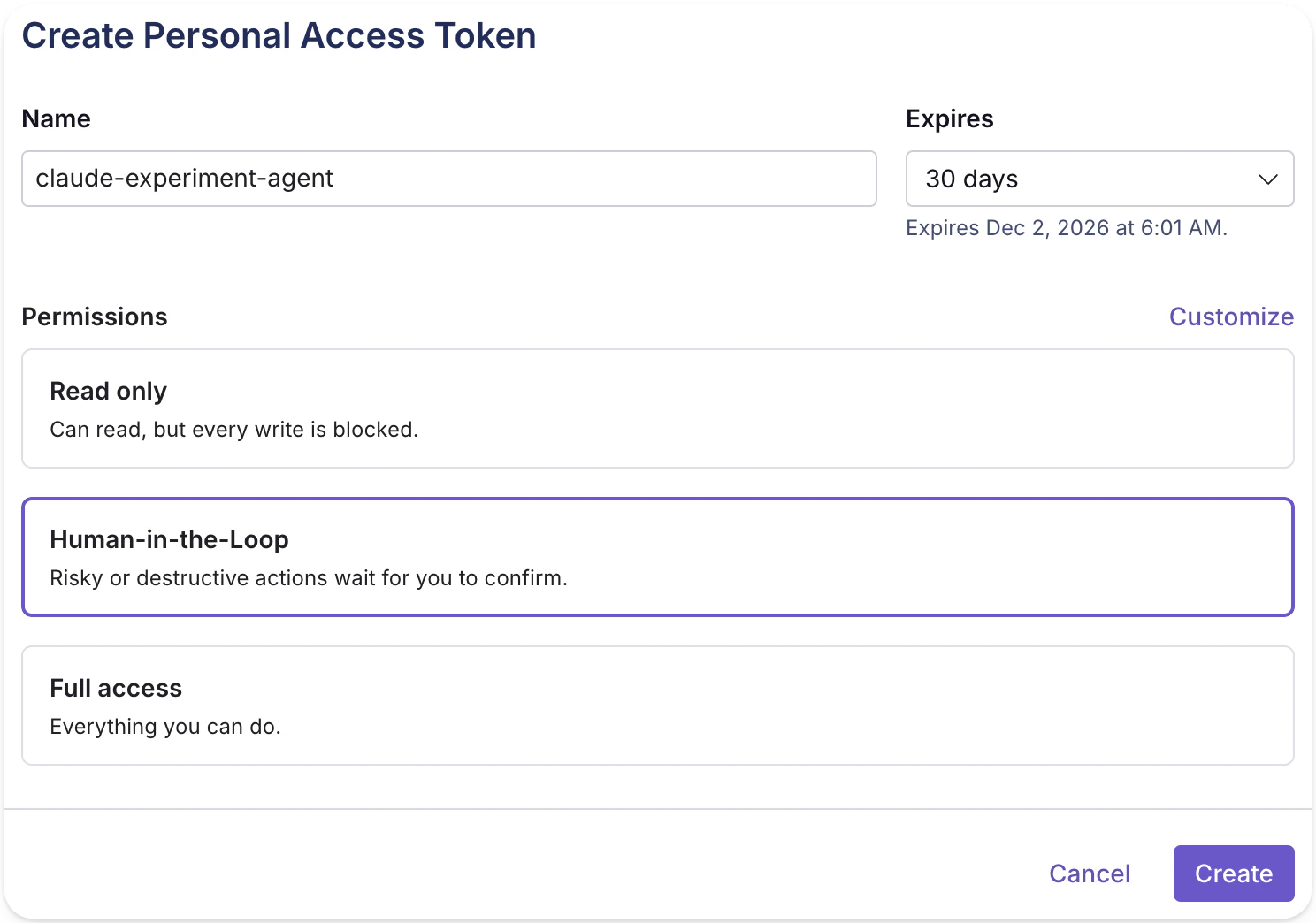
We’ve also made it easier to control agent permissions and make agent ownership visible:
- Agent permissions: Admins can now turn off a member’s tokens, set expiration rules for tokens and keys, give tokens fewer permissions than their owners, and set finer-grained permissions.
- See who an agent acted for: When an integration such as a Slackbot uses an API key, it can name the teammate who asked. Revision history, reviews, and webhooks show which actions an agent took and who it was acting for.
- Increased API coverage: GrowthBook 5.2 adds 30 new endpoints and updates 60+ more across organization settings, webhooks, audit logs, data source configuration, experiment lifecycle management, and more. We’re continuing to close the gap between what’s possible through the UI and the API.
Target lists with millions of IDs
The audience for your feature or experiment could be a list from another tool: a cohort of beta users, the members of a loyalty program, or everyone who received a campaign email. These types of lists can have millions of IDs.
With remote saved groups, you can now upload CSV files with millions of IDs for targeting feature flags and experiments. The size of your client payloads won’t increase. Remote saved groups work with the GrowthBook Proxy and remote evaluation already, and we’ll continue to add support for other back-end SDKs.
See who’s in your experiments and what your queries cost
GrowthBook is warehouse-native. It runs your experiments and queries your warehouse. Our 5.2 release gives you better visibility: see who’s in each experiment when you debug, and what’s driving warehouse costs across your queries.
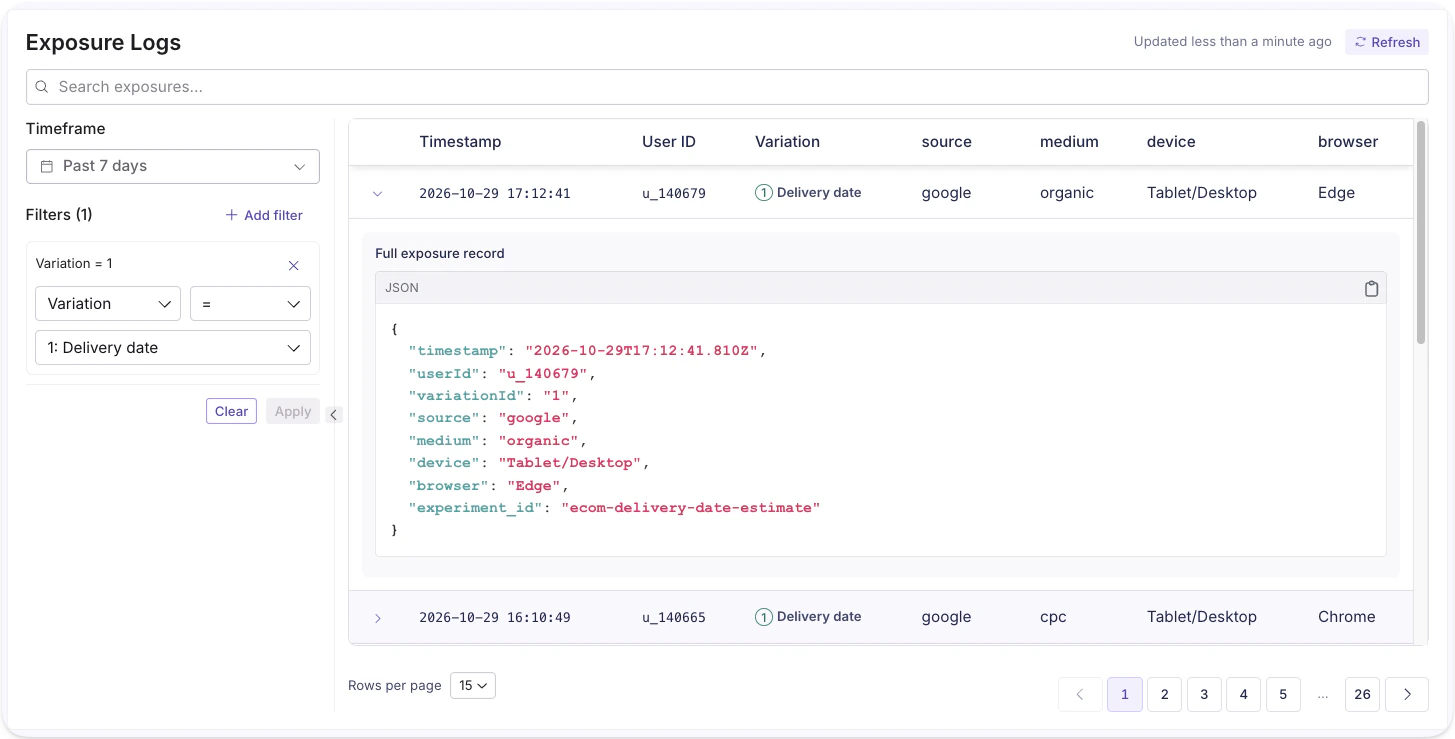
Experiment diagnostics: A new Diagnostics section on an experiment's Health tab lets you filter and view raw exposure events, so you can see exactly who is in an experiment and which variation they saw, without writing a query. When a data quality question comes up during analysis, you can trace it to individual events instead of relying on aggregate counts.
Warehouse usage dashboard: Each data source now gets a Usage dashboard showing which queries, experiments, and people are driving warehouse costs, with tips for reducing spend.
GrowthBook, redesigned
We’ve been gradually updating the user experience of GrowthBook, both in visual design and workflows. Throughout, we’re trying to make tasks in the application happen with fewer steps, while reducing decision fatigue. We’ve accelerated that initiative with 5.2, and made changes across data source setup, metric creation, experiment creation, and settings. We’re rolling this design philosophy out across the product, and would love to hear your thoughts on it!
Experiments: The experiment page now supports inline editing, shows clear next steps, and has the visual polish we’re introducing throughout the app.
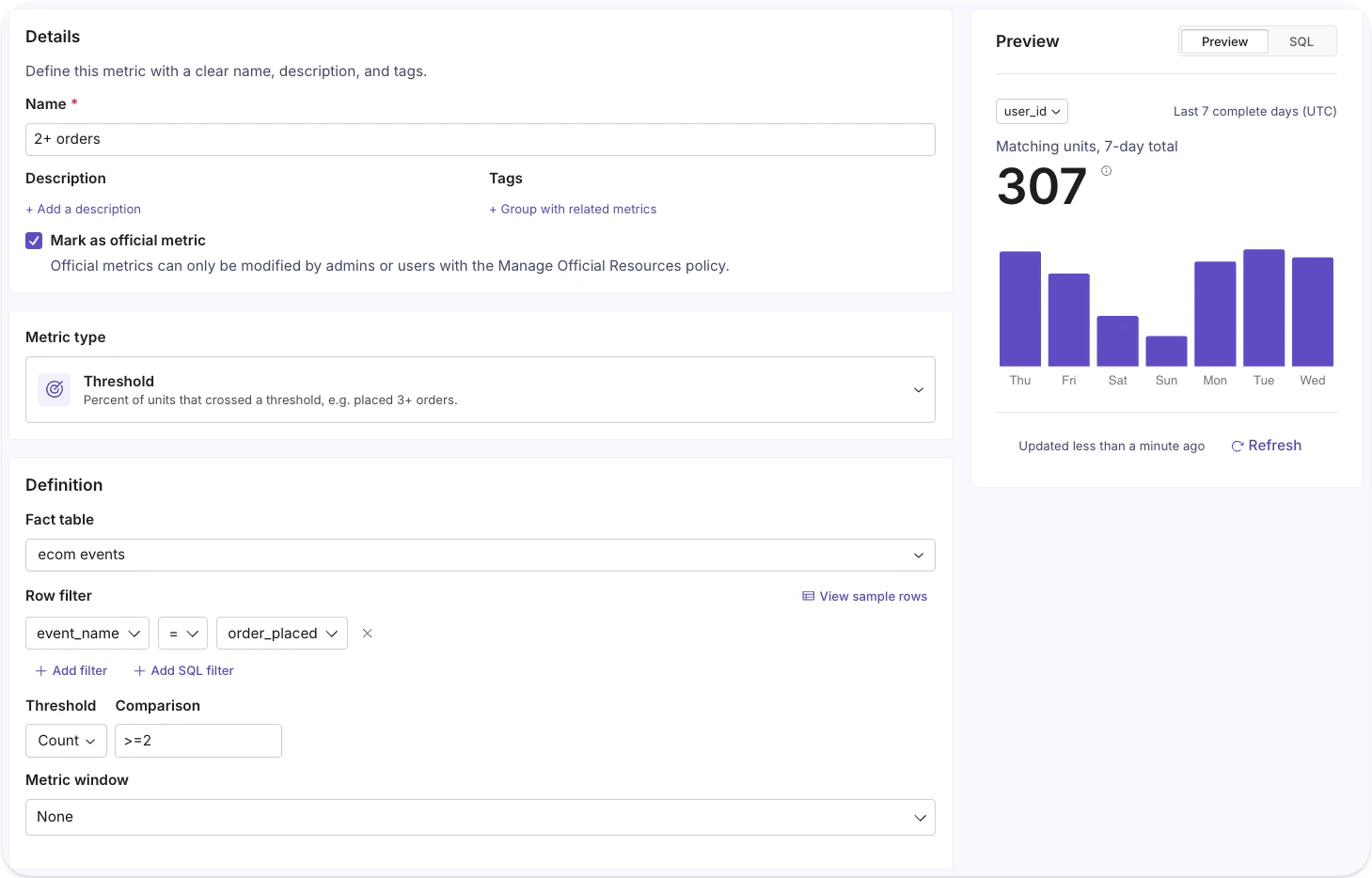
Metric creation: There are now 12 metric types. The 5 new ones include threshold metrics, such as “% of users with at least 2 orders,” and active days. Metric types and settings are more intuitive, and you can preview the result on your warehouse data before you save, so you can verify the metric and catch errors.
Data onboarding: Connecting GrowthBook to your warehouse and configuring queries has been a point of friction. We rebuilt the flow from scratch, simplified each step, and provide better guidance to make onboarding easier.
Settings: GrowthBook gives you a lot of control over how it works, which means a lot of settings to sift through. The settings page is reorganized and redesigned, so you can find what you need faster and make GrowthBook your own.
Also new in 5.2
Contextual bandits go visual: Create variations in the AI Visual Editor and use contextual bandits to determine which one each user gets. Contextual bandits also now have an automatic holdout arm for measurement and a new Health tab.
Free tier for the Event Forwarder: To lower the barrier to warehouse-native experimentation, we’re offering 1M events per month free with our Event Forwarder on Starter plans. Pro plans include 2M events per month. You can track exposures and events with the GrowthBook SDK, and deliver them to your BigQuery, Snowflake, or Databricks warehouse without managing your own pipelines.
dbt Sync: A new tool turns your dbt models into GrowthBook fact tables and metrics, syncs them to GrowthBook, and keeps them up to date as your models change.
LLM trace integrations: A/B test your AI features with experiment metrics that combine business data and LLM trace data from Langfuse or Arize Phoenix.
What to try first in 5.2
Until now, teams that wanted interleaving, approval gates for agents, or targeting lists in the millions built them in-house or went without. With 5.2, that work is in GrowthBook.
5.2 is live on GrowthBook Cloud and available for self-hosted. Two places to start:
- Turn on Human in the Loop for an agent’s personal access token or MCP connection. The agent can propose a risky change, and you approve it in GrowthBook before it takes effect.
- Open an experiment, create a metric, or connect your warehouse. All three flows have been rebuilt to take fewer steps.
Interleaving is in private beta for Enterprise customers, and Hampus’s deep dive explains how it works. The release notes cover everything else, and you can watch the 2 minute 5.2 overview video to see it in action.
Give 5.2 a try and tell us how it goes in our Github Discussions. We’d love to hear what’s working, what isn’t, and what you’d like us to build next.

Related articles


Ready to ship faster?
No credit card required. Start with feature flags, experimentation, and product analytics — free.