

12 common feature flag mistakes to avoid
Feature flags almost always start as a matter of convenience. Maybe you’d like to control a feature’s release, or reduce the risk associated with every deployment. But the ones you ship today keep running tomorrow, and the ones you ship next quarter run alongside them.
Next thing you know, you’re operating a distributed system inside your distributed system—one with its own state, its own consistency problems, and its own failure modes.
The trouble is that most of these failures are quiet. And you won’t know until they do real damage to your infrastructure.
In this article, we’ll walk you through 12 feature flagging mistakes and how you can avoid them irrespective of your team size and usage.
Why feature flags fail in real-world systems
Like any other tool, feature flags are prone to incidents because of how they’re used in the first place. If you look at public postmortems from engineering teams that run thousands of flags, the damage traces back to how a flag was created or managed.
Now think about how you treat a feature flag. It gets a pull request, a Slack emoji, and a long, quiet life nobody tracks. That asymmetry is where things break down. At 10 flags, you carry the full picture in your head. At 100, you rely on a spreadsheet and good intentions. At 1,000, ownership becomes tribal knowledge, and stale flags pile up faster than anyone can clean them.
It’s also why companies like Uber built Piranha, a tool specifically designed to retire more than 2,000 stale flags. Its teams realized that manual cleanup processes could never keep up with the pace at which flags were created.
You don’t know what you don’t know. So, incidents also happen because you’re not sure what problems flags can create in the first place. Unless you know the pitfalls, it’s hard to implement the right governance measures to prevent that.
12 common feature flag mistakes that reduce its efficacy
Here are some of the most common mistakes engineering teams make while using feature flags. These mistakes fall into three broader categories, which include:
- Implementation mistakes: These issues live in your code and are introduced when you create the flags themselves. They usually stay invisible until something breaks in production.
- Operational mistakes: These are process gaps that widen over time and turn manageable flag counts into unmanageable debt.
- Strategic mistakes: These are the larger missed opportunities because it includes the ways your flag practice could generate more value but doesn't, because nobody designed for it.
Implementation mistakes with feature flagging
1. Reusing feature flags
You shipped a flag six months ago. The feature is live, everyone’s happy, and the flag name is just sitting there in the codebase. So when you’re adding a toggle to a new feature, you might think about reusing the name. But that’s a bad idea.
Knight Capital learned this in the most expensive way possible. In 2012, an engineer repurposed a flag name still tied to an obsolete trading algorithm. The deployment activated the old code path instead of the new one, and within 45 minutes, the firm lost $460 million.
How to avoid it: Treat flag names as immutable. Once you’ve deployed a flag, retire the name after you retire the flag. If you’re using a feature flagging platform like GrowthBook, it enforces this with regex-based naming validation that catches duplications before they reach production.
2. Using client-side flags for security
You use a feature flag to gate access to premium features or admin functionality on the client side. But the problem is that client-side flags are visible to users. Anyone with browser DevTools can:
- Inspect the SDK payload and see every flag and its rules
- Figure out exactly what’s being gated
- Modify the local flag state
- Call your API directly to bypass it
Feature flags control visibility, not access. They decide what users see—not what they’re authorized to do.
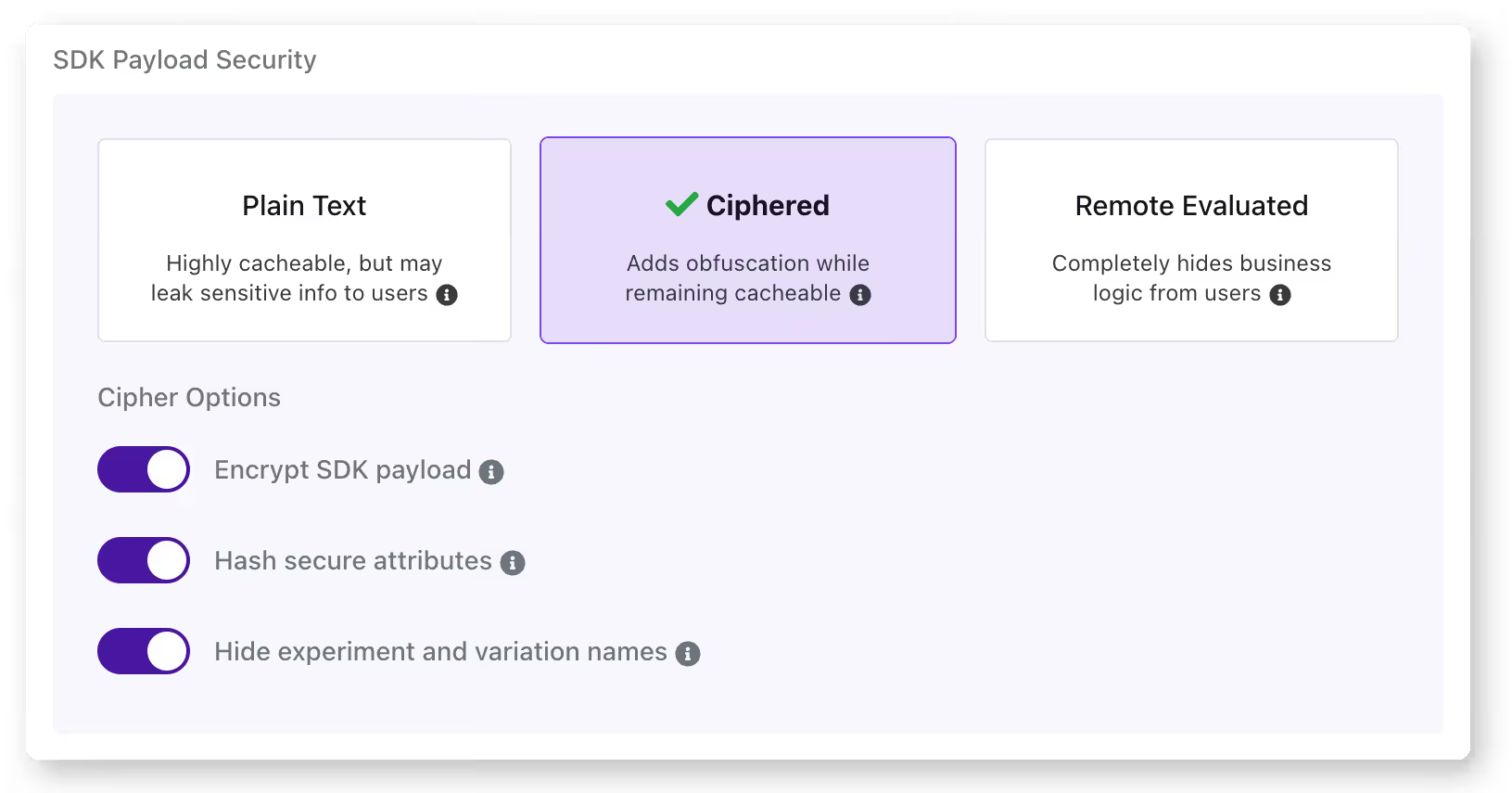
How to avoid it: Keep your authorization logic server-side. Use feature flags for UI presentation but enforce actual access control through your backend. For an additional layer of protection, GrowthBook supports encrypted SDK payloads that obfuscate client-side flag configurations. So it makes it much harder to reverse-engineer your flag rules.
3. Not testing all flag states
Your CI/CD pipeline tests your application with the current production flag configuration. But does it test what happens when the new flag is turned on or off? If you’re only testing one state, you’re assuming the other works, and that assumption may not always hold up in reality.
That’s how Slack dealt with a 6-hour outage back in 2020. When its team rolled out a feature flag, it triggered a performance bug. Even though they caught the bug and rolled back within 3 minutes, the rollback left a stale HAProxy state that caused the outage.
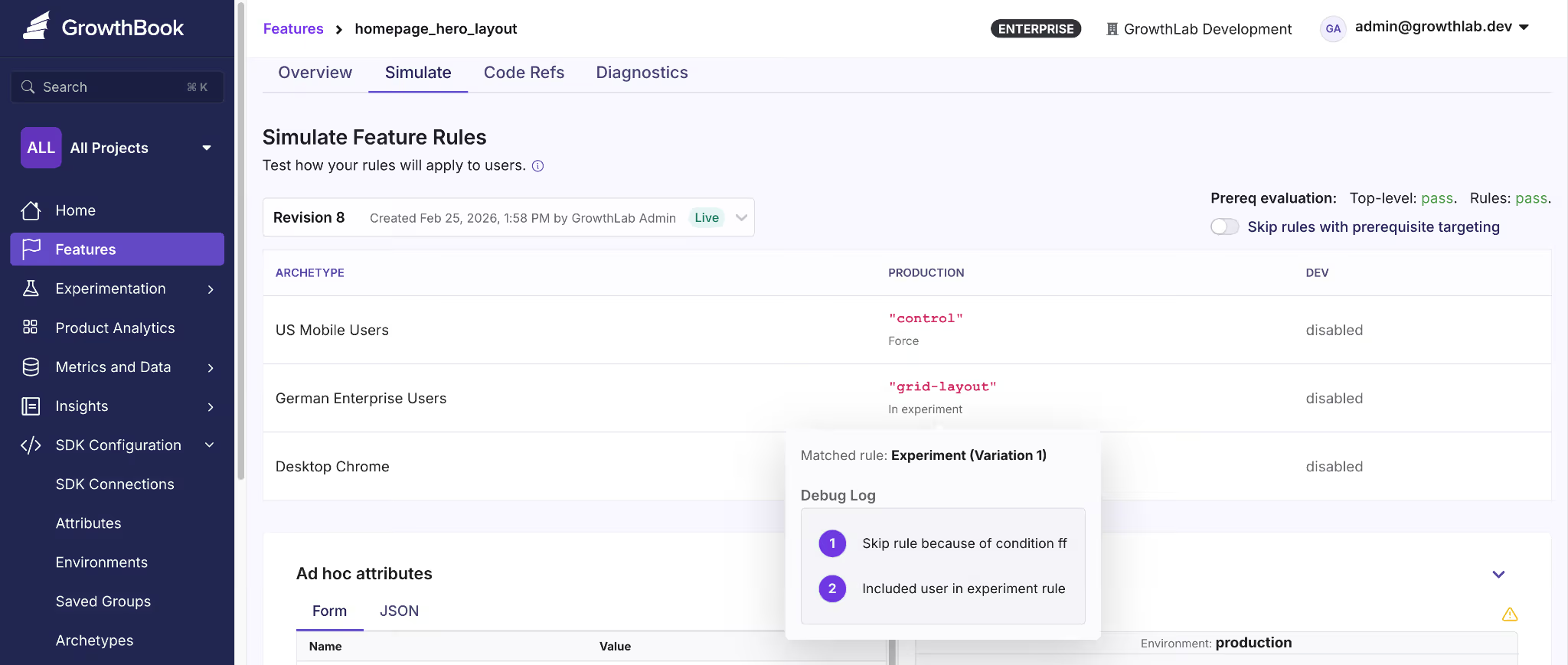
How to avoid it: You can avoid this by testing the current production state, the new state you’re rolling out, and the rollback state for every flag you deploy. GrowthBook offers a simulation tool that lets you see how different rules impact what users see and you can even test it in different states.
That said, it’s a simulation of what user see, not how the flag will behave so you need to run an actual experiment for that purpose.
4. Overloading a single flag with too much logic
Let’s say you created a flag called new-dashboard. It was meant as a toggle for the new UI. But over time, your product team could’ve asked you to display the new analytics panel if the user is in the Enterprise tier. Now the flag controls two behaviors and you can’t change one without risking the other.
Even if you have 10 flags with clean boolean logic, you’ve already created 1,024 possible code paths. Overloading every single one of those with complex logic complicates this.
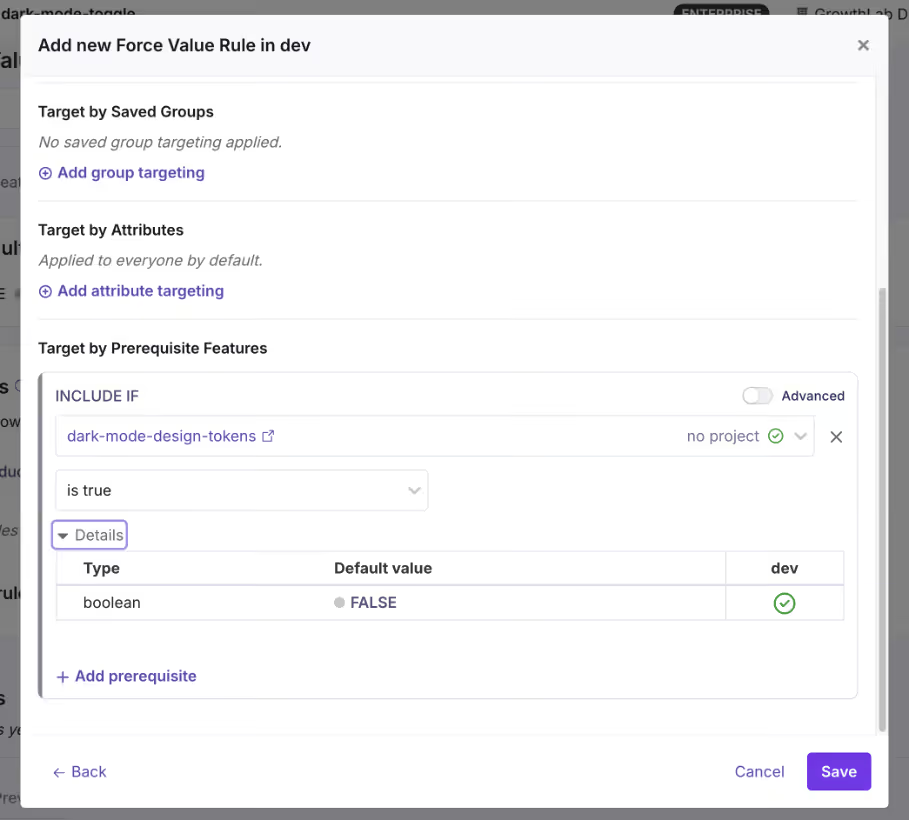
How to avoid it: Apply the same single-responsibility principle you’d use for any function or class. If a feature requires multiple independent toggles, create separate flags and use prerequisite flags to define their dependencies.
Operational mistakes with feature flagging
5. Letting flags become zombie flags
A zombie flag is a flag that’s still in your codebase but no longer serves any useful purpose. It increases your technical debt and the problem doesn’t stop there. Every zombie flag adds a conditional branch that your team has to debug or manage in the future. That’s why you need the right governance measures in place to stop flags from accumulating in the first place.
How to avoid it: The simplest way is to define the flag type and the time it should be live. For example, if it’s a release toggle, set a calendar reminder or Jira ticket to clean it up after 30 days.
Or use a feature flagging platform that offers stale feature flag detection. For instance, GrowthBook identifies stale flags automatically, and when you use it with Code References, you’ll know where these flags are present—making cleanup easier.

6. Poor naming conventions
Compare these two lists:
// Typical naming convention
gb.isOn("ff-123")
gb.isOn("test")
gb.isOn("experiment_2")
gb.isOn("new-thing")
// Self-documenting
gb.isOn("new-checkout-flow")
gb.isOn("holiday-2024-promo-banner")
gb.isOn("pricing-page-v2-experiment")
gb.isOn("premium-analytics-entitlement")The first set is vague at best. If something goes wrong, you’ll spend too much time wading through your commit history and Slack threads to figure out what it means. The second one, however, tells you why the flag was made and for which rollout or experiment.
How to avoid it: Establish a naming convention early and enforce it. A good pattern includes the feature area, intent, and optionally a timestamp or version:
{feature-area}-{description}-{type}So: checkout-redesign-release, pricing-page-v2-experiment, eu-compliance-widget-killswitch. GrowthBook lets you enforce naming patterns with regex validation. If you accidentally reuse an older flag’s name, it’ll reject it and force you to create another one.
7. No ownership or lifecycle management
If you don’t require your team to own a flag when they create or use it, you’ll end up with a codebase full of decisions nobody can explain. It makes the cleanup and auditing process almost impossible because no one has the necessary context for the flag’s purpose and usage.
Without it, you can’t answer basic questions:
- Who do you page when this flag behaves unexpectedly?
- Who decides when it’s safe to retire?
- Who’s accountable if it causes an incident?
How to avoid it: Assign an owner to every flag when it’s being created. It has to be an individual so there’s a clear line of accountability when they move out of the role—and someone else steps in. GrowthBook supports flag-level ownership and project-based organization, so you can filter by owner and quickly see who’s responsible for what.
8. Ignoring rollback procedures
Most teams think about rollback as “just turn the flag off.” And for simple boolean flags, that might work. But you also need to remember that flags don’t exist in isolation. A rollout can trigger side effects that don’t reverse when you roll it back.
How to avoid it: For every flag rollout, document what happens beyond the flag itself. Ask:
- Does this rollout trigger any irreversible writes?
- Will caches, queues, or third-party integrations retain state from the rolled-out version?
- Does the rollback path need its own deployment, or is flipping the flag truly enough?
This is where testing comes into the picture. But also, you should have a way to gradually roll out features so that when you see an inkling of something problematic, you can roll back before the blast radius expands.
For instance, GrowthBook offers a Feature Diagnostics that lets you inspect how flags are actually evaluated in production. As a result, you can verify what’s actually happening or has happened in one place.

Strategic mistakes with feature flagging
9. Treating feature flags as a short-term tool only
Most teams adopt feature flags for one reason: safer releases. And that’s a perfectly good reason. But that’s never the end of it. If you only think of flags as temporary release wrappers, you never build the governance or engineering mindset you need to sustain them at scale.
Over time, you’ll end up with thousands of ad hoc flags that become a pain to manage or even clean up because nobody designed a system to handle them. That’s why you need to treat feature flags as a critical part of your code’s infrastructure.
How to avoid it: Build a governance system that acts like you’ll be managing 100 flags in a week, even if you’re not right now. GrowthBook gives you the scaffolding for this. Here are a few ways it does that:
- Force naming conventions through regex validation
- Allow flag and project-level ownership
- Provides the ability to schedule flags to roll out and back
- Build approval workflows to control who can deploy flags
- Create kill switches that work as long-lived flags

10. Lack of observability and metrics
Unless you have observability tied to your flags, you’re flying blind. Most engineering teams monitor infrastructure metrics like error rates but don’t connect the flag’s state to the product’s metrics. Let’s say there’s a 5% drop in a payment feature’s performance, you won’t notice it in real time.
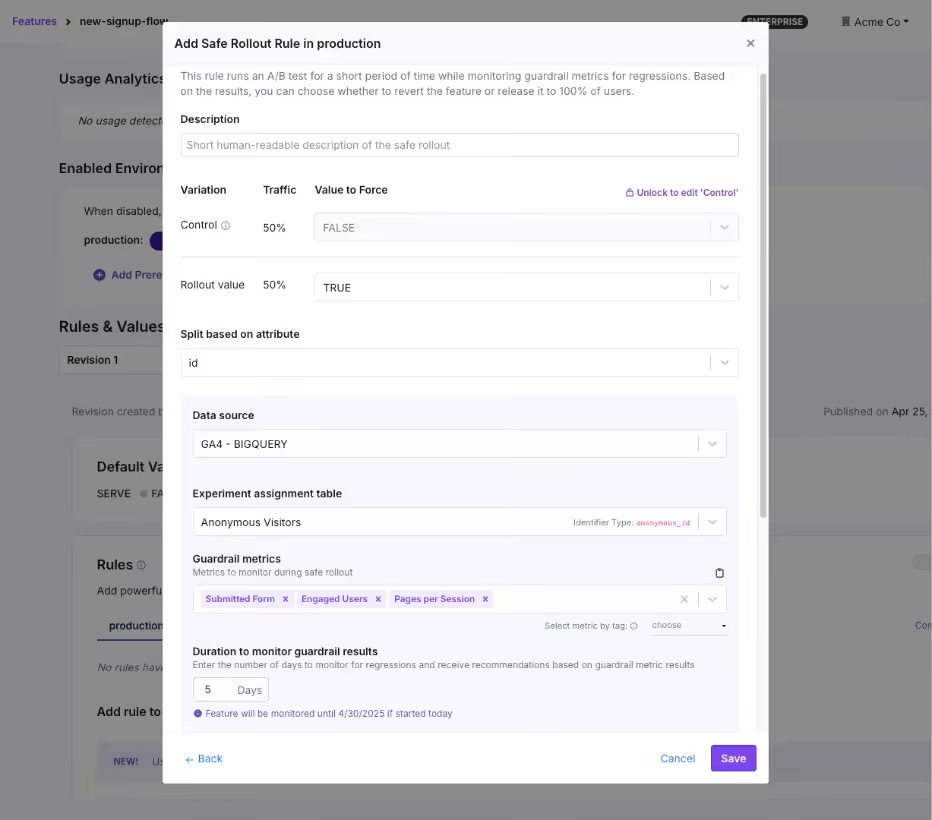
How to avoid it: Tie your flags to the metrics that matter. Every flag rollout should have at least one success metric and one guardrail metric defined before you flip the switch. GrowthBook’s Safe Rollouts does this natively. You can select the guardrail metrics and the platform monitors behavior in real time.
You can even set the rollout cadence using Ramp Schedules where you can define the percentage thresholds and the platform handles the increments automatically. And because the platform is warehouse-native, it analyzes your metrics directly in your data warehouse—reducing latency.
11. No segmentation or controlled rollouts
Gone are the days when Big Bang deployments were the only way to release a feature or system. You no longer have to wait with bated breath for every deployment, because controlled rollouts let you test a deployment with a small segment of users before rolling the feature out completely.
You start with 5% of traffic, monitor the results, and expand gradually. If something goes wrong, you’ve affected a fraction of your users instead of all of them.
How to avoid it: Use percentage-based rollouts as the default for every flag, and use targeting rules to control who sees the feature, not just how many.
GrowthBook supports attribute-based targeting with AND/OR logic, where you can segment by geography, subscription tier, device type, company ID, or any custom attribute you define. You can use that with Saved Groups for reusable audience segments and percentage rollouts with deterministic hashing, so the same user always gets the same experience.

12. Not connecting feature flags to experimentation
This problem stems from a lack of observability. You already have the delivery mechanism and the underlying infrastructure in place to experiment. But many engineering teams still don’t measure performance using this system.
They ship the feature, confirm it doesn’t break anything, and move on. But they never ask: “Did it actually improve anything?”
How to avoid it: When you create a flag for a new feature, ask whether it’s also a candidate for an experiment. If so, attach metrics to the flag and measure the difference between the old and new experiences. Many engineering teams call these “do no harm experiments” where you’re not running a full-blown experiment. But you’re attaching a few guardrail metrics to every rollout to see if a release affects something that matters.
Alternatively, if you’re already running experiments, start using feature flags to make the process easier.
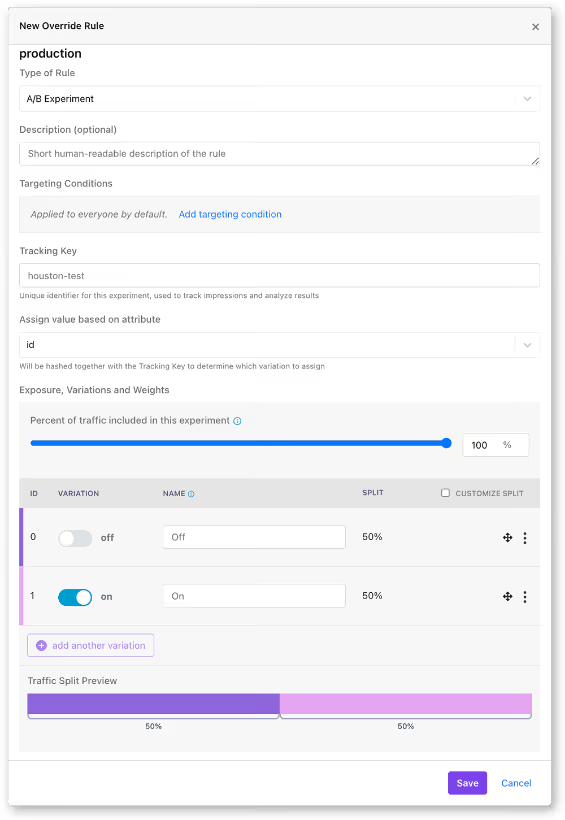
GrowthBook makes this simpler by keeping feature flags and experiments on the same platform. You can turn any feature flag into an experiment with a few clicks by just:
- Assign users to control and variation groups
- Defining success metrics
- Using the GrowthBook’s stats engine for analysis
How lack of proper feature flagging practices can break the system at scale
At 20 flags, these mistakes are minor inconveniences. But at 200 flags, they’re systemic risks.
When you start implementing feature flags at scale, it turns them from a simple coding tool to a critical part of your coding infrastructure. At that level, even small mistakes can balloon into complicated (and expensive) incidents if you don’t manage them well.
Facebook’s 2021 outage is one example of this pattern. During routine maintenance, an engineer issued a command to assess backbone capacity via a functional global ops flag.
Unfortunately, it unintentionally severed all connections between Facebook’s data centers. Even though the internal audit system should’ve blocked the command, a bug allowed it through. The 6-hour outage resulted in a $100 million revenue loss and affected 3.5 billion users.
That’s why you need to implement these best practices carefully because the incidents don’t scale linearly. If you’d like to learn how to build the right feature flagging infrastructure at scale, check out this guide.
Related: Learn more about release management best practices to follow.
Where most teams go wrong with feature flags
You don’t experience high-risk incidents because of feature flags themselves. But rather because of how you use them.
Ultimately, feature flags are a distributed system that’s constantly growing within your infrastructure. That’s why you need the same discipline you apply to any other production infrastructure. Measures like feature flag governance and observability are table stakes today—and the only way to prevent technical debt in the long run.
If you’re looking for a feature flagging platform that operationalizes this line of thinking, try out GrowthBook for free.
Related articles
.avif)
.avif)
Ready to ship faster?
No credit card required. Start with feature flags, experimentation, and product analytics — free.

