How to review feature flag changes made by AI coding agents
Today, an AI agent can create a feature flag, configure an experiment, and explain why that change is ready to ship. But just because it can do all these things, it doesn’t mean it’s doing the right thing the right way.
Sonar’s 2026 survey found that 96% of developers don’t fully trust AI-generated code. But only 48% always verify it before committing. This becomes a problem without the right guardrails in place. For example, what happens if you create a targeting rule that accidentally exposes a feature to the wrong users?
To avoid this, many engineering teams are adding more review and approval layers, without turning every change into a manual investigation.
In this article, we’ll walk you through 10 questions to ask before approving an agent’s changes and how to set up these guardrails properly.
What changes when an AI agent creates or manages feature flags?
Typically, an AI agent reaches your feature-flagging platform through an MCP server or command-line interface (CLI). Regardless of the connection source, it’ll use the platform’s API, and the credentials you use determine what the agent can do.
For instance, if the agent uses a personal access token (PAT), it inherits the permissions that are associated with the token’s owner.
That said, the real question is what really happens after an agent makes a change. In a platform like GrowthBook, agent-generated changes appear as drafts that can require review or approval before they reach production.
Note: Just because the change lands as a draft in GrowthBook doesn’t mean it has an approval layer. A simple review is very different from a two-person approval layer. You can scope approval requirements to specific environments or projects, so smaller or less impactful changes can skip them.
If you use GrowthBook’s Agent Skills, your team can see which API calls are made because the skills are open source. Not every feature-flagging vendor offers this level of visibility. That’s why you need to define your review rules early. In fact, 61% of technology professionals haven’t interacted with AI agents that operate with relatively little oversight. Give an agent the same scrutiny you would give a new teammate with production access.
Charles Williams, SVP and Software Engineering Director at Truist, puts it clearly. He says, “You’re managing your AI agents. Your AI agents are your employees.” This is especially true in regulated industries like finance, where an unintended change can have drastic consequences.
Start with these four questions about the agent’s work:
Does the actual change match the agent’s explanation?
A 2026 study found that 1.7% of agent-authored pull requests had descriptions that clearly didn’t match the code, most often by claiming changes that were never implemented. So review the platform-rendered diff and verify the changes before publishing them.
Did the agent change more than the task required?
Another 2026 study reported that 58.02% of developer-led interventions were focused on guidance like constraining agent actions and enforcing project conventions. Sometimes the AI does more than you ask for, so it’s important to rein it in.
Check which projects, environments, flags, and rules the draft touches before evaluating if the agent did the right thing.
Can you give every draft meaningful attention?
Agents can produce changes faster than humans can inspect them. In fact, 80% of pull requests co-authored with AI in open-source projects, from contributors with no prior code ownership, were merged without explicit review. It’s not necessarily about feature flags, but it does show the risks. That’s why you need additional review or approval layers.
Can you tell which actions came from the agent and which came from a person?
If an agent uses a teammate’s personal access token, its API actions may be attributed to that token owner. So use an appropriately scoped agent identity or credential where supported, and verify that the audit trail records the agent’s actions and the human approval separately.
10 things to check while handling feature flags with AI agents
When you use an agent to create or manage feature flags, you need to do two things:
- See if it completed the task accurately
- Check what the change does after it reaches users
Both checks matter because it’s human nature to assume the agent did its job.
Use this 10-point review checklist to do that:
1. Which environments and projects does the change touch?
Compare the draft with the task you gave the agent. There’s a good chance it did more or less than you asked. Case in point: in 2025, Replit’s agent deleted an entire production database during a code freeze. Since then, Replit introduced an automatic separation between development and production databases.
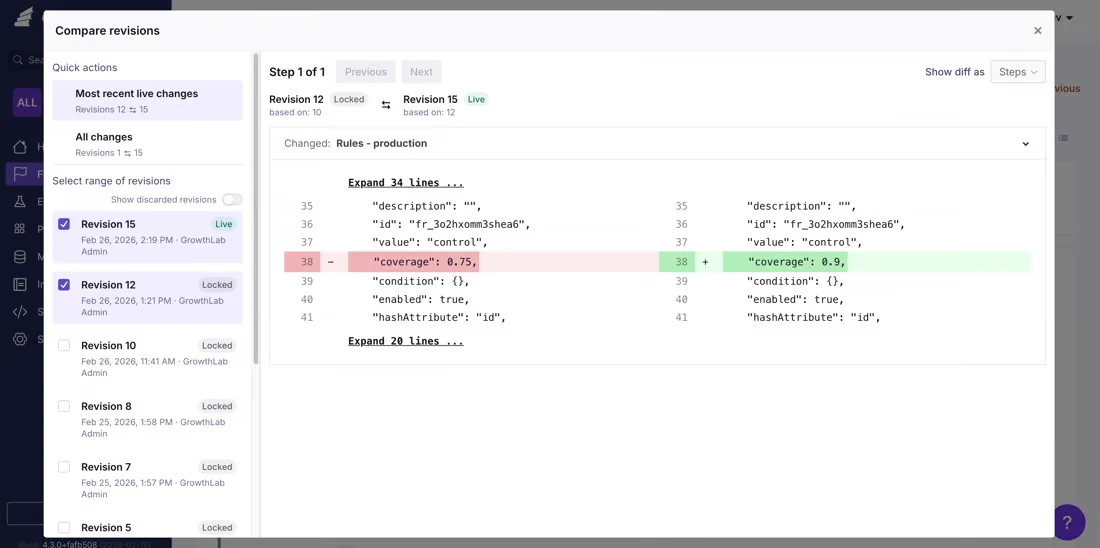
You can apply a similar principle to feature flags. In GrowthBook, you can use the “Compare Revisions” capability to see the differences between the live version and the draft before publishing.
You can also restrict who can make changes by environment and project.
2. Who will actually see the new value?
Sometimes a targeting rule can reach more users than intended. It depends on the rule order, user attributes, and any saved groups the flag references.
Let’s say you ask an agent to enable features for beta users. The rule might target a saved group whose membership changed, or an earlier rule may consume that traffic before this rule gets evaluated.
You can inspect that behavior in a few ways in GrowthBook:
- Rule conflict warnings can identify rules that “will not reach” or “may not reach” users in a given environment, including the rule that consumes their traffic.
- Simulation lets you test which rules match a set of user attributes and what value those users receive.
- Archetypes let you save representative profiles such as a beta tester or enterprise customer for repeatable checks.
- Saved group revisions let you review changes to group membership separately. This matters because editing a saved group can affect every flag that targets it.
If something conflicts, modify the rule before publishing.
3. Did the default or fallback value change?
The default value determines what a user receives when no targeting rule matches. A fallback value may also determine what your application does when flag evaluation fails.
So if either changes, it can affect users beyond the audience covered by your targeting rules.
Let’s say a feature is disabled for most users but enabled for a beta group. If the default changes from false to true, users who don’t match the beta rule could receive the feature too. That’s why you should add approval steps that cover rules, values, and prerequisites.
In addition, GrowthBook’s flag-create skill starts new flags disabled in every environment, giving you a safer starting point.
4. Is the rollout percentage reasonable?
If you’re creating a rollout with AI, it might accidentally jump to 100% of users. To avoid this, check the starting percentage and conditions for increasing exposure.
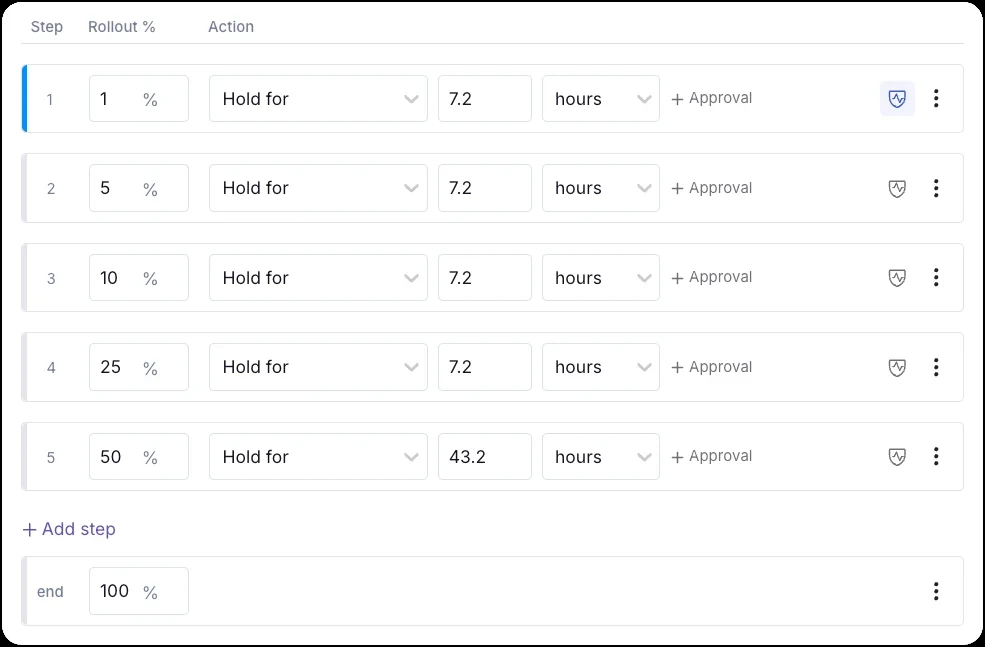
For example, GrowthBook’s Ramp Schedules let you release a feature in stages. You set the percentage for each step and decide what has to happen before exposure increases, like a set wait time or a teammate’s sign-off with “Hold for approval.” That way, you can approve a 5% start without approving 100%.
If you also want monitoring, use Safe Rollouts. The rollout moves through default steps of 1%, 5%, 10%, 25% and 50% before releasing to 100%, and rolls back automatically if a guardrail metric degrades.
5. Are prerequisite flags or dependent features affected?
Flags can interfere with each other if they have dependencies or similar targeting rules. You can avoid mishaps by cross-checking which flags or features they affect and understanding how they conflict with each other.
For example, if you want to switch off an old ledger-v1 flag but an instant payouts feature needs it to be enabled, the latter can switch off too. You won’t know that unless you check its dependencies.
Note: In GrowthBook, you get prerequisite settings, which let you define these dependencies. A dependent feature only turns on when the prerequisite is live and serving true. You can also use the read-only flag-graph skill to trace prerequisites and dependents before making a change.
6. Is the flag running a live experiment?
Let’s say an agent widens a targeting rule in the middle of an A/B test. The experiment can start using one audience and end with another, without your knowledge. It’ll eventually impact your test results.
In GrowthBook, you can avoid this by using the flag-graph skill to surface linked experiments and holdouts. If something needs to be changed, either start a new experiment or apply changes to the new traffic using sticky bucketing.
7. Do value types and JSON structures still match what the code expects?
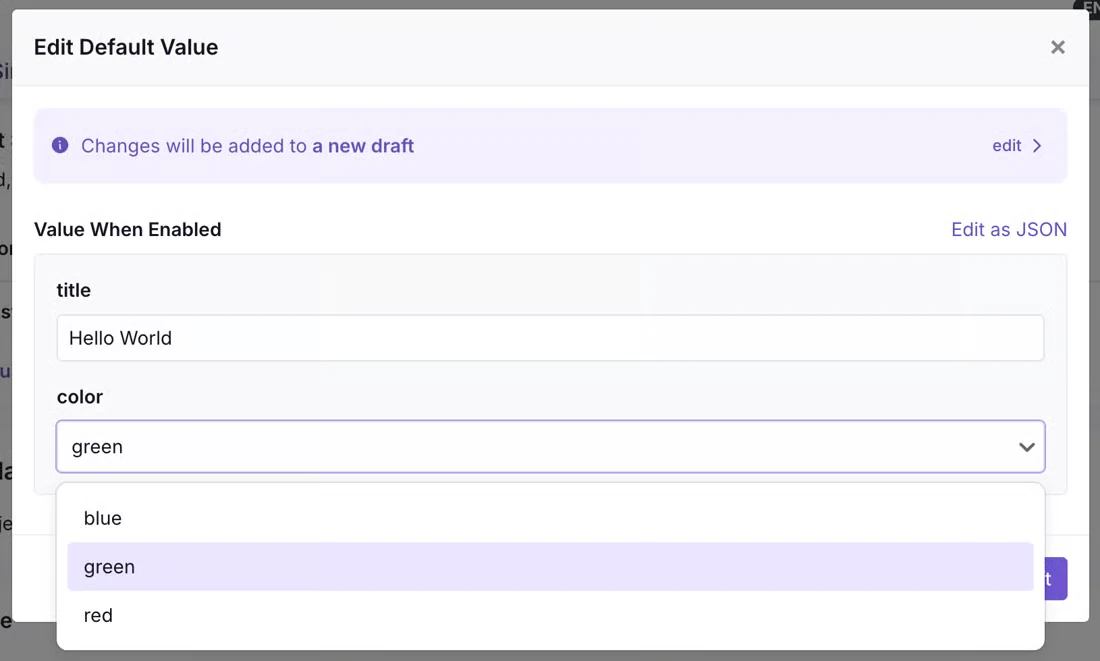
Feature flags can return strings, numbers, booleans, or JSON structures that your application consumes directly. If an agent renames a JSON key or changes “10” to 10, the value won’t match what the code expects.
Using JSON Schema Validation (Enterprise plans), you can enforce constraints on:
- JSON values
- Allowed values
- Minimum/maximum limits (string and number flags)
You can’t save invalid values or publish them if the relevant validation applies to the rule. The CLI can also generate TypeScript types for your flags, which can help you catch mismatches.
8. Does the kill switch still work?
If or when a feature starts misbehaving, you need a quick way to turn it off. The kill switch should work irrespective of any change you make.
So, check whether it works in every environment when you create a flag draft with AI. Also, see whether turning off the feature requires additional approval. This might make sense for a risky or business-critical feature, but applying the same guardrails to a low-impact change can slow incident response later.
Note: GrowthBook gives you the ability to configure approval requirements for “Enabled environment changes” (kill switches) separately. Revisions can also be reverted without approval if you set it up in your organization’s settings.
9. Is a “stale” flag safe to delete?
Just because your feature flagging platform flags a feature flag as “stale,” doesn’t mean it’s time to delete it or that your app has stopped reading it.
For instance, GrowthBook surfaces these flags when they haven’t changed for two weeks and are either disabled in every environment, or serve one value. But the same flag could be a dependency for another one.
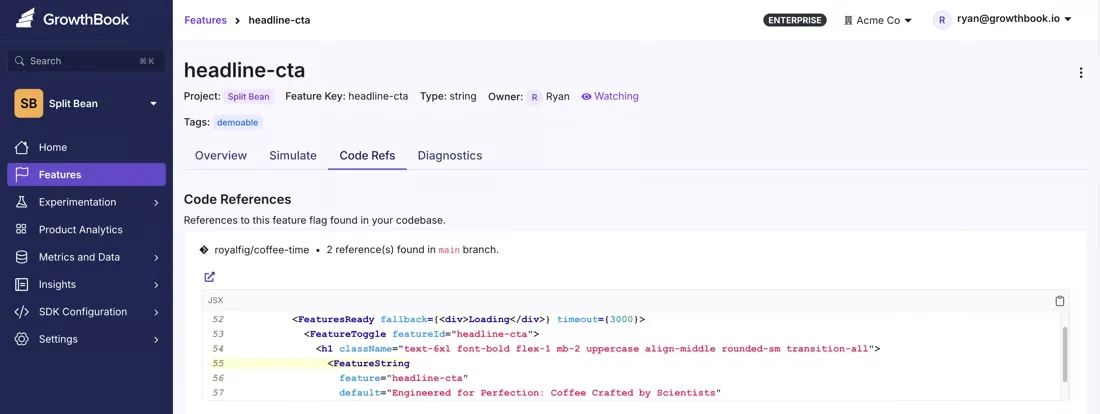
Just use the Code References tab to show which lines reference the feature flag. Then run a check using the MCP server to return SDK patterns to identify those references. Archive the flag first, check what breaks, and delete it only if nothing is affected.
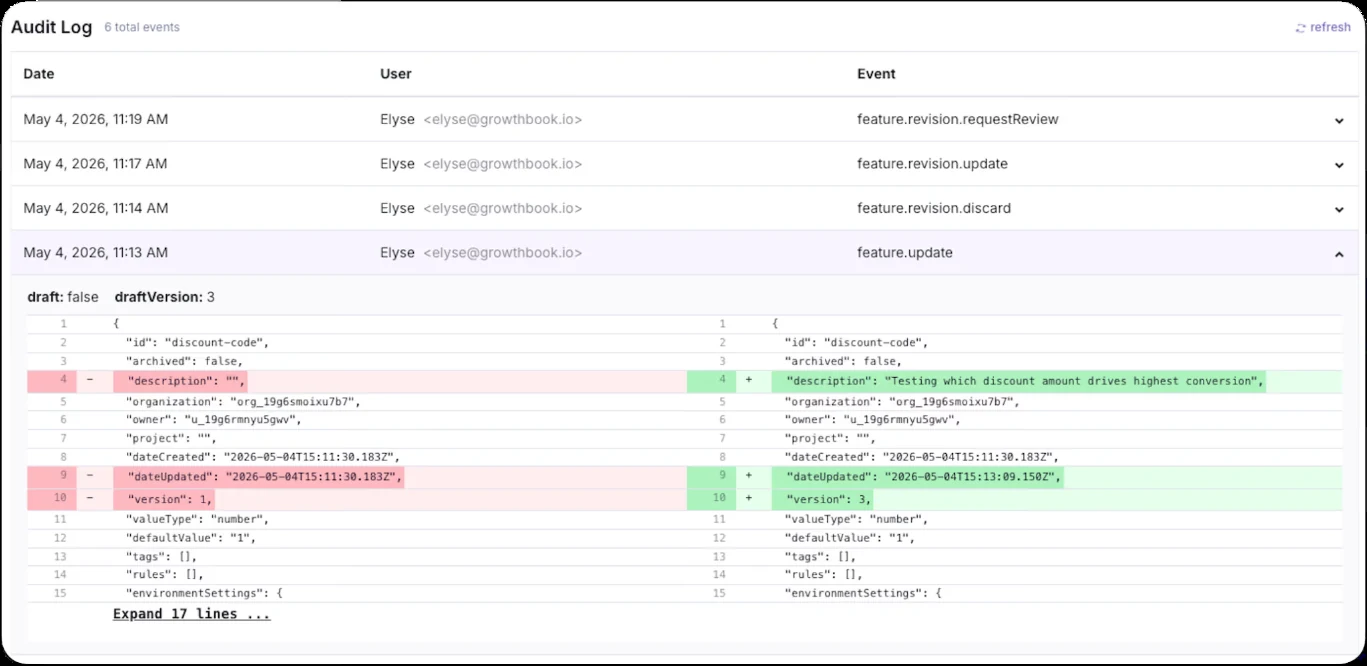
10. Can you tell who made and approved the change?
In the event of an incident or audit, you’ll want to establish what happened and who authorized the change. If your agent uses PATs that belong to a developer’s account, the actions might appear in their name.
That’s why GrowthBook also lets you use a separate API key for agent-related changes. And this appears differently in your audit log.
You can even block contributors from self-approving their changes. If an approval gate was bypassed, the API call records which gates were skipped and why. This way, your audit log has everything you need to recreate or understand the actions.
See agent-safe flag reviews live
Join a live demo to see how GrowthBook drafts, diffs and approves feature flag changes made by people and AI agents.
Pick a Demo Date
How to set guardrails so AI agents can’t skip review
A checklist only works if you build it with review in mind. In GrowthBook, approval flows are opt-in, but drafts are automatic. Even with approvals on, the REST API can skip them when the “REST API always bypasses approval requirements” setting is on, so an unreviewed agent change could go live.
You can prevent that by configuring three settings together:
- Enable Approval Flows for the projects and environments where you want changes reviewed. This is available on Enterprise plans.
- Turn off “REST API always bypasses approval requirements.” All of your agent skills, the CLI, and MCP use the REST API. So, this setting determines whether API calls are subject to approval requirements.
- Remove approval-bypass permissions from the agent’s token. An agent inherits the permissions associated with its credentials. If the token can bypass approval checks, your approval flow can’t provide the protection you expect.
Once these settings are in place, you can tighten the workflow further:
- Separate draft permissions from publish permissions: Custom roles on Enterprise plans let you give an agent permission to prepare changes without allowing it to publish them. These roles and rules enforce the four-eyes principle from the start.
- Require fresh approval after edits: If an agent changes a draft after someone approves it, the previous approval no longer counts. GrowthBook can reset approval when the draft changes.
- Require drafts to be rebased before publishing: This helps prevent an older agent draft from overwriting newer changes that have already gone live.
- Give each agent a dedicated, revocable token: This limits permissions to the resources and actions it needs for the task. Also, make sure the same token isn’t used for another task to prevent confusion during audits.
Ultimately, treat these changes the same way you treat permissions for a production database. You can let the agent prepare a query and inspect its results without giving it unrestricted write access.
For feature flags, let it create and manage these flags but don’t let it get published without review.
Which feature flag checks should you automate and which need a human involved?
Once you’ve established who can publish a change, decide which checks should run automatically. You can use specific rules to validate things like naming conventions and schema constraints. But targeting rules need a closer look.
That’s where Custom Hooks come in (self-hosted Enterprise only). They let you enforce validation rules at different levels. You can use them for:
- Warnings flag a potential problem and let an authorized reviewer decide whether to proceed. In the UI, the reviewer can select “Save anyway,” while API callers can use ignoreWarnings where supported.
- Hard blocks can stop a change when it violates a rule you’ve decided must be enforced. A hook that throws an error cannot be overridden by ignoreWarnings, and schema validation prevents invalid values from being saved or published.
- Privileged overrides let authorized callers bypass certain checks when an exception is necessary. Permissions for skipHooks and skipSchemaValidation should be limited to people who are allowed to make those decisions.
You can also use publish-time hooks to enforce specific approval policies. Since GrowthBook makes review information available, you can see who made the change and whether they did it via the dashboard or an API key.
| Type of feature flag-related check | Should you automate or involve a human? | Why do so? |
| Naming conventions and required tags | Automate as a warning | A rule can check the flag’s own fields |
| Description required before enabling in production | Automate as a warning | The field is either filled in or empty |
| Value types and JSON structure | Automate as a hard block | The schema defines the right answer |
| No targeting on PII such as email | Automate as a hard block | A hook can reject the attribute outright |
| Unreachable or conflicting rules | Automate as a warning | GrowthBook detects them from rule order |
| Who a targeting change reaches | Keep human | It depends on who sits in your segments and why |
| Rollout speed and timing | Keep human | It depends on launches, traffic, and who’s on call |
| Edits to a flag with a live experiment | Keep human (experiment owner) | Only the owner knows what the change does to results |
| Deleting a stale flag | Automate detection, keep the deletion human | Code references show usage, and a person confirms nothing broke |
Different companies do this differently. For example, Meta’s engineers reviewed 80% of test fixes that an agent generated. They had a human at the end of the line, and 31.5% of the reviewed changes landed. On the other hand, companies like Tessl use workflows where humans never review 95% of the code. That figure covers code shipped through Tessl’s automated “Dark Factory,” which relies on automated verifiers to get the job done, and this only happened because the team could define the checks clearly.
Similarly, with feature flags, you can turn the repeatable checks into automated rules using Custom Hooks. And keep approvals separate from the agent’s ability to create a draft.
This way, you can still keep humans in the loop and ship fast without breaking things.
Put approval gates on your agents
Approval flows, custom roles and JSON Schema Validation are part of GrowthBook Enterprise. Book a demo to plan agent guardrails with our team.
Book a Demo
How GrowthBook helps you review AI agent changes safely
When an agent changes a targeting rule, you need to know who will actually see the feature before you approve it. GrowthBook’s most recent versions now give you a way to check the draft, validate the change, and control who can publish it.
You can:
- Use your AI agent to prepare a flag change through GrowthBook’s Agent Skills, CLI, or MCP integration.
- Inspect the revision diff, simulate targeting rules, and use validation to catch invalid values before they reach users.
- Use approval flows and role permissions to keep publishing authority with the right people.
- Access audit logs, which record what happened and who did it.
The best part is that you can build the workflow around how your team already works. For example, companies like Fyxer use an agent to create flags and experiments. Then, a team member reviews the change before launching tests through Slack.
You can do the same by letting agents handle setup, then reviewing/approving changes before they go live.
If you’re interested in seeing how you can use AI agents for feature flagging:
- Explore it yourself by signing up for free.
- Book a demo to walk through the platform and how it can help.

Related articles
Ready to ship faster?
No credit card required. Start with feature flags, experimentation, and product analytics — free.