Feature flags and experimentation in one platform: 7 reasons teams stop running two tools

There was a time when Dropbox, the cloud collaboration software company, tested an onboarding change that seemed like an improvement. Its conversions fell and its team would’ve never figured that out without running a small-scale test to catch this expensive mistake.
Yet, even at Dropbox’s scale, where it processes one billion logs daily and evaluates features three billion times a day, feature flags and experimentation used to live in separate platforms. Analysis took days, and the ripple effect slowed the entire team.
It’s something a majority of engineering teams deal with. They release a change and measure its impact, but use different tools to do it. So when do two tools create unnecessary friction, and when is specialization worth keeping?
In this article, we’ll explain why using a single platform for feature flagging and experimentation is the right choice.
Why do feature flags and experiments end up in different tools in the first place?
A feature flag controls who sees which version of your code. An experiment measures what that version did to your metrics. If you’ve ever run an A/B test behind a flag, you’ve already used both together.
In fact, an A/B test is usually a flag that splits users into a control group and a variant, with metrics attached to measure the difference. Other tests, like percentage rollouts, work the same way, but they only become experiments after you attach specific metrics to the rollout.
Because engineering teams see “feature flagging” and “experimentation” as separate tools for different use cases, they start by buying them separately. Engineering usually picks a tool to ship features safely, but product and data teams are involved while buying an experimentation tool. And this makes sense for a few reasons:
- You run a mature in-house stats engine: Let’s say you’re on a healthcare analytics team, and your statistical methods are already validated and documented for regulators. Replacing that setup adds unnecessary risk, and you’re better off keeping the platform.
- Your CRO team only tests marketing pages: If your conversion team runs copy and layout tests on landing pages and never touches code, a separate testing tool can work well for them.
- Your contract renews next year: Migration costs are real. A BCG study found that 75% of IT buyers say technical migration costs are their main concern when switching platforms. It’s easier to plan around a renewal date and probably more cost-effective too.
- You want to avoid vendor lock-in: Consolidating platforms also means you have one point of failure, rather than spreading risk across platforms. In fact, 62% of IT buyers worry about vendor lock-in due to the dependency it creates. You can address this with open-source platforms.
While these reasons are valid, separate tools work well when the handoff between teams is clear and for most teams it isn’t. For instance, a national ecommerce retailer (and GrowthBook customer) ran feature flags in one tool for five years and ran A/B tests through a separate vendor.
Over that time, its flags got wired into roughly 250 workloads across multiple languages, and each team built its own metrics and conventions. So when the numbers from different teams disagreed, nobody could say which one was right.
Eventually, this was the reason the retailer switched to GrowthBook because the consolidation allowed them to work from a common architecture with shared metrics and tracking. As a result, the company also got a reliable way to run experiments for the first time in years.
That’s part of why they merged both capabilities into a single in-house platform called Launch Control.
You can even solve this issue by sending flag data to a separate analytics tool. But if the exposure data gets lost or corrupted during transit, you’ll lose experimentation data. A warehouse-native platform does the same job without the additional handoff.
7 reasons teams run feature flags and experimentation in one platform
Here’s why you should consolidate both capabilities into one platform:
1. Metrics are defined once
When you use different tools for feature flagging and experimentation, your metric definitions can be very different.
For example, if your experimentation tool calculates conversion rates from its own event stream, your product team might calculate them from your warehouse data. Every time you get a winning experiment, you have to decide which tool’s data to rely on to standardize reporting.
Even large-scale companies like Breeze Airways (an airline company) have dealt with this. Its teams wasted time reconciling data across platforms, which eventually ate into their data team’s week. That’s why 57% of data practitioners spend most of their workday maintaining or organizing datasets.
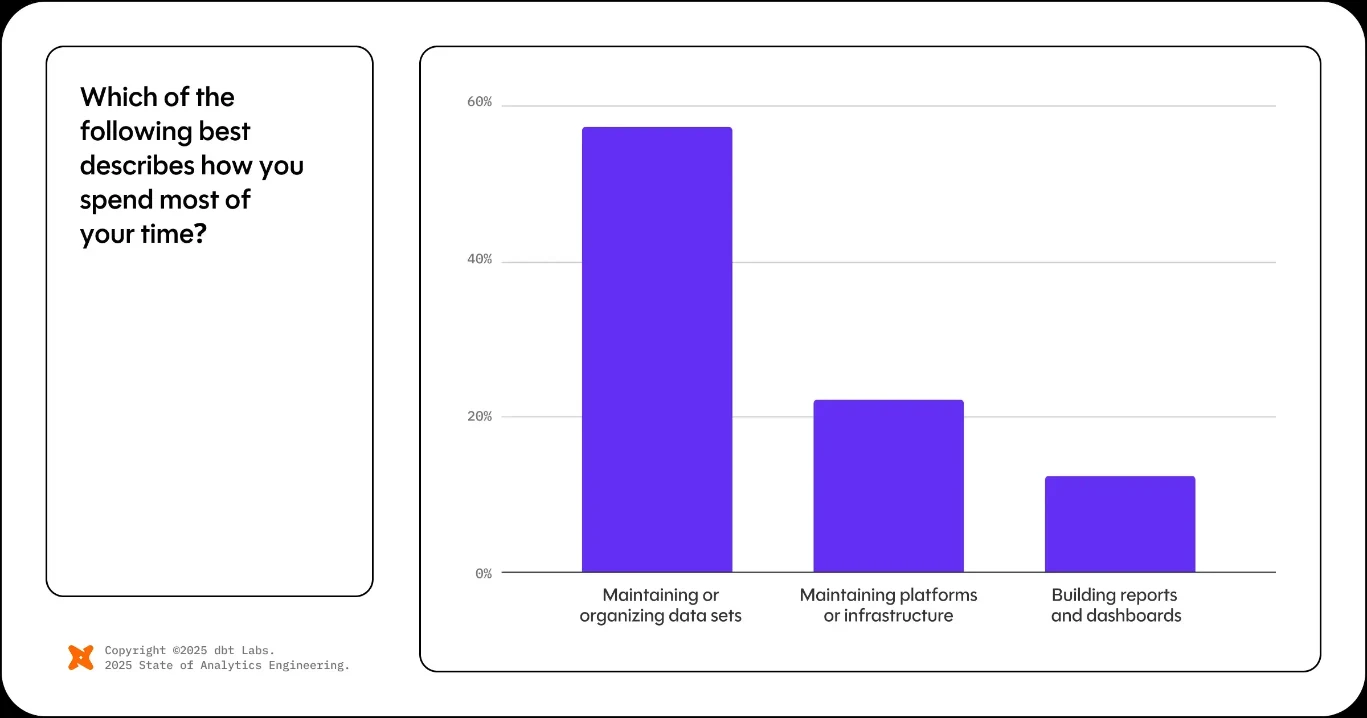
With a single platform, you define the metric once and point everything at it. The single definition powers:
- Experiment results so every business function uses the same data and definitions for reporting.
- Rollout guardrails so your platform of choice judges a rollout on the same numbers as a test.
2. One SDK and one set of targeting attributes
If you use two tools, you have two SDKs in your codebase working on potentially overlapping functions. Each SDK comes with its own hashing algorithm and its own names for the same targeting attributes.
At first, it may not cause an issue. But if users switch devices, they’ll end up in tricky situations that could muddle your experiment results. For example, a customer might see a new version of your app on the web version and the old one in the mobile app because the two SDKs hashed the same user ID into different buckets.
Even with one system, flag cleanup can be difficult given the scale of the problem. With two SDKs, the problem becomes significantly worse because your team has to maintain two sets of assignment and targeting rules for the same users. Every rule that falls out of sync creates technical debt. It adds unnecessary technical overhead and raises the risk of an outage because of a misconfigured rule that’s present in two SDKs.
Companies like Uber have already seen this play out well. When it unified its configuration platform with its experimentation system, its team saw a 100x drop in p99 latency, from 10 ms to 100 µs.
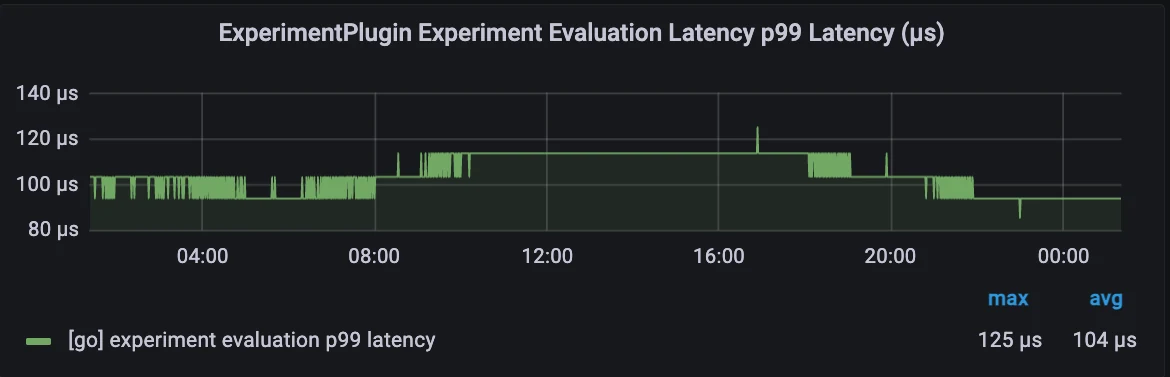
Similarly, platforms like GrowthBook run flags and experiments through one SDK with one hashing scheme. And since SDKs evaluate locally from a cached payload, they don’t need to make a network request when you add an experiment to a flag.
3. Assignment and exposure logging stay in sync
Let’s say your flag tool assigns shoppers to a new checkout flow on the server, but your analytics tag fires the exposure event in the browser. Some of those shoppers will never fire it:
- Bots hit your server and get a variant, but they never run your client-side JavaScript. (On some websites, this can be 50% or more of your traffic.)
- Ad blockers stop tracking scripts from loading for “often 30-40%” of real users.
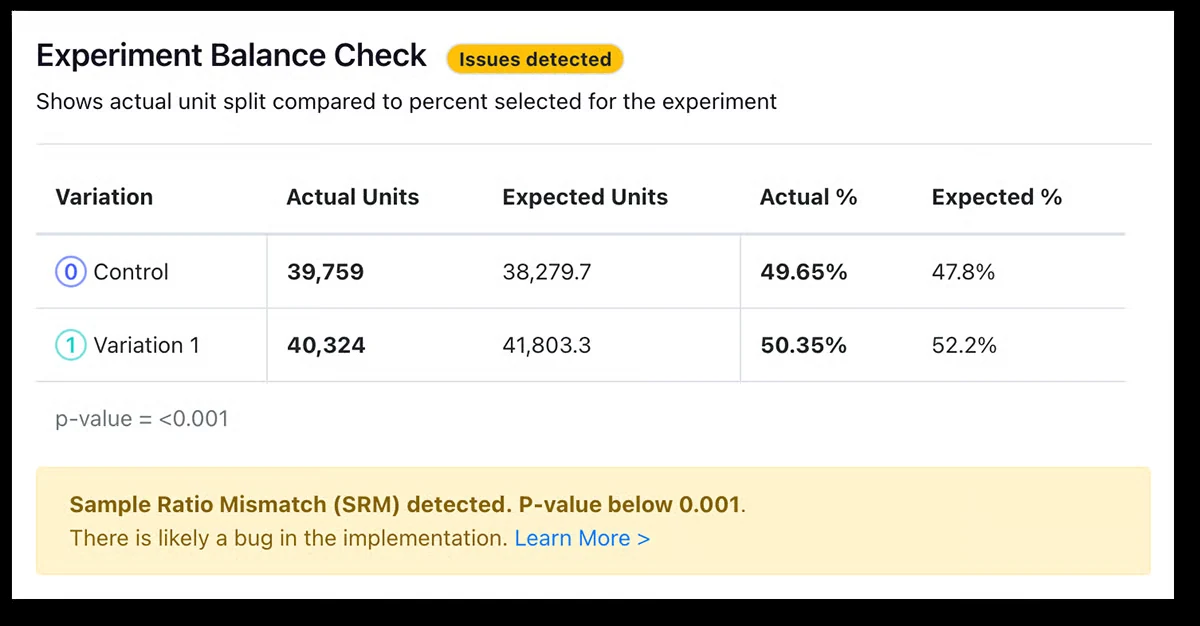
The test that was supposed to be 50-50 comes back as 52-48, which results in a sample ratio mismatch (SRM). So, you can’t trust what the experiment’s results tell you.
You can fix this by firing both of these events from the same place.
In platforms like GrowthBook, the SDK call that evaluates your flags also fires trackingCallback. This function assigns and logs the user in one step, and since the platform owns the assignment and analysis, it also acts on SRM. You can pause or roll back a rollout if the platform detects SRM.
See flags and experiments in one place
Join a live demo to watch a feature flag become an experiment, with results calculated from your own data warehouse.
Pick a Demo Date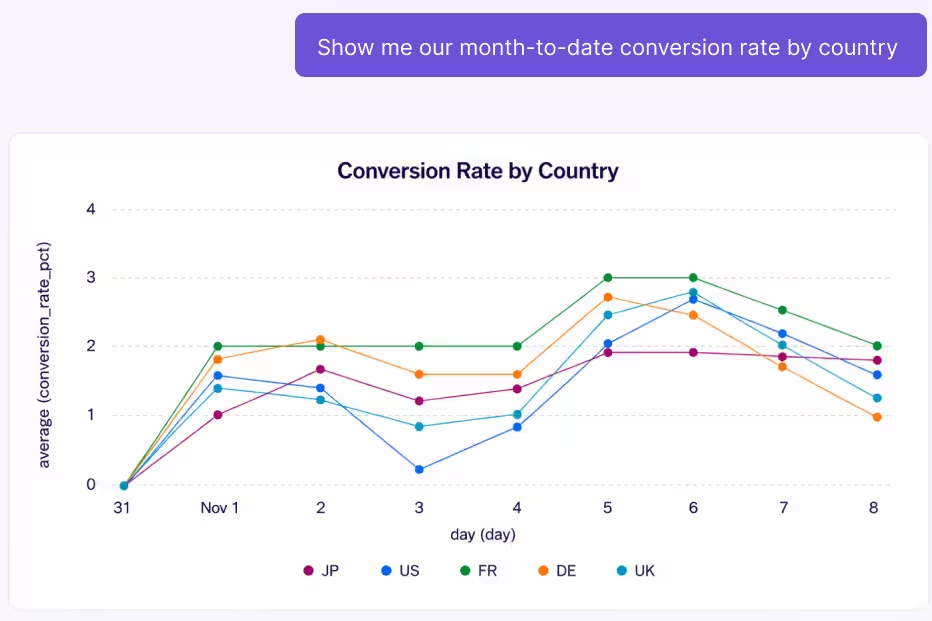
4. Every rollout can become a measured test
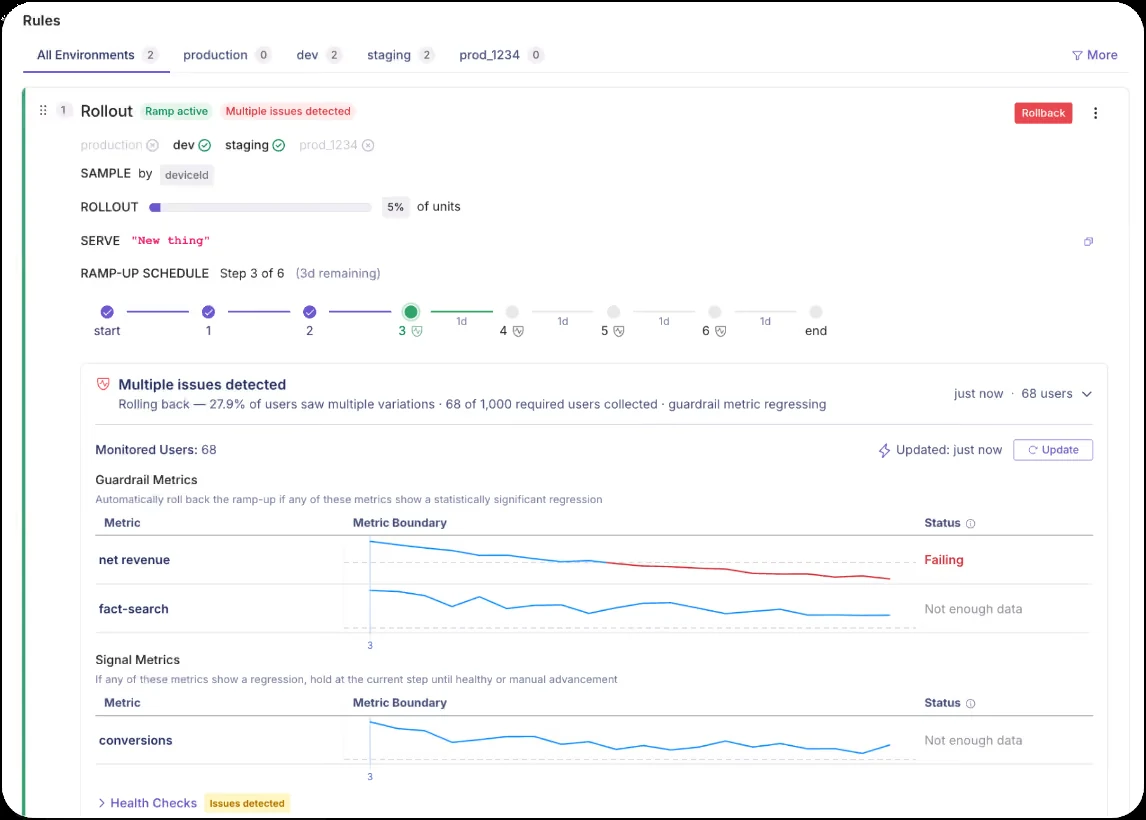
A percentage rollout already splits your traffic. But with a control group or specific metrics, you can turn it into an experiment. If you use a single platform, you don’t have to wire up a new integration to run an experiment. You can also ramp up the rollout gradually by testing performance at each stage.
Priya Singhi, VP of Analytics and Data Science at Early Warning, explains why:
“I’ve seen where [teams go] one straight to 100% only to realize there are some production challenges. You’ve hit some snags. So to me, going on a slow ramp, 25, 50, 75, does basically two things. You get to see how the backend service is behaving as you’re ramping up, and it helps you watch for your guardrail metrics as you keep ramping.”
With 37.9% of teams seeing more than 16% of their deployed changes fail, it’s good practice to test everything before you ship.
Note: In GrowthBook, you can add guardrail and signal metrics to a Ramp Schedule to test a rollout at every stage automatically. If a guardrail metric regresses, it automatically rolls back the change.
5. Lower total cost of ownership
If you run feature flags and experiments in two different platforms, you need to consider the following:
- A second contract comes with its own renewal data and price increase terms. The typical SaaS inflation rate is 13.2%, so every new tool you add to your stack means another contract and line item you have to manage.
- When you are working with two different tools, their pricing structures can vary significantly. One platform can charge based on events while the other charges based on monthly average users (MAUs). In some cases, platforms charge for experimentation products separately on top of a standard contract. This makes it difficult to track and manage costs when every tool charges in a different way.
- Pipelines that copy your event data into a vendor’s system are a security and compliance risk.
It’s one reason GrowthBook offers seat-based pricing for a combined platform. As Graham McNicoll, co-founder and CEO of GrowthBook, explains:
“One of the issues we really wanted to combat was, in our industry, there was a lot of opaqueness. People had no idea how much it would actually cost to run a program because it’s usually based on event traffic or monthly tracked users and all these things. And people got really frustrated. One of the things we really wanted to tackle was just being really transparent with our pricing. So we base it on seats.”
You also need to consider maintenance costs. Companies like Upstart estimated that an in-house build “would have required four engineers in the first year and at least two engineers thereafter.” That’s why it chose to consolidate three tools into GrowthBook instead.
6. One governance model for humans and AI agents
When feature flags and experiments live in separate tools, your team has to manage two sets of permissions, approval workflows, and audit logs. It becomes harder to oversee as more people and AI agents start creating or changing flags and experiments.
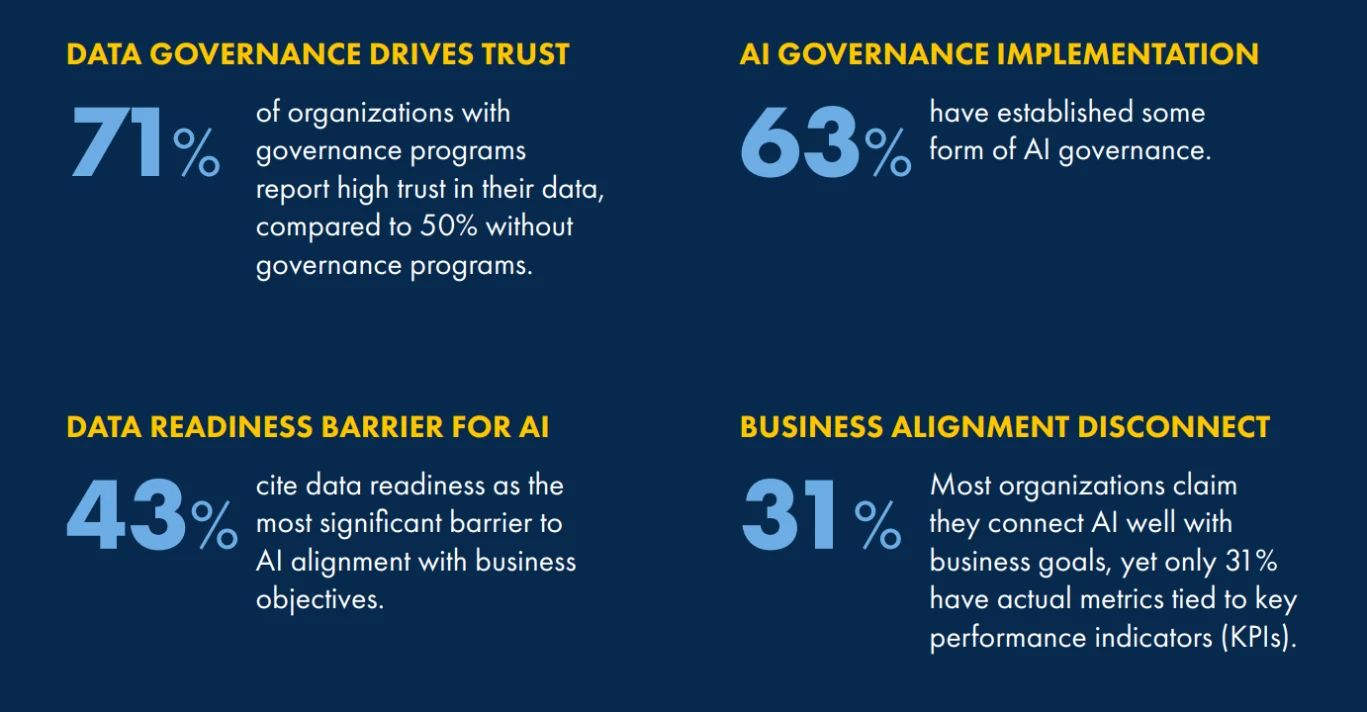
It adds distance between your systems and, ultimately, an additional point of risk. In this case, governance matters here because it affects how confidently teams can act on their data. That’s why 71% of organizations trust their data more when they have a data governance program, especially when AI is involved.
A single platform compresses the risk surface. And if the platform has governance controls in place, you don’t have to wrangle additional tools to stay compliant.
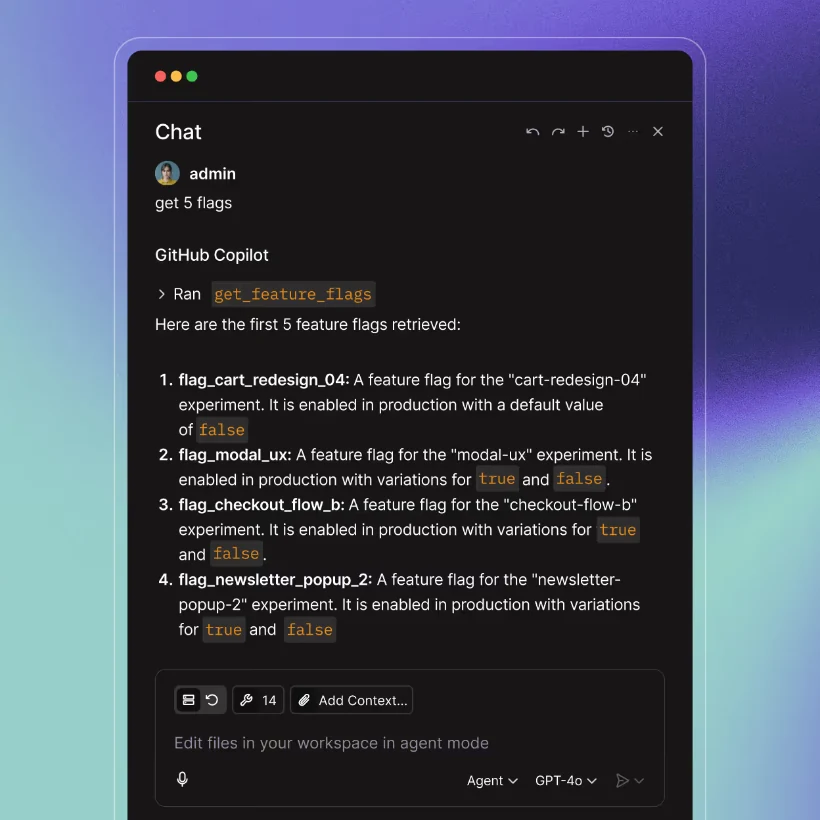
GrowthBook brings these workflows together. It offers an MCP server that lets AI agents interact with feature flags and experiments, while open-source skills let you perform flag- and experiment-related tasks. You can even require approvals before any change hits production.
7. Collision control across features and experiments
If you’re working with data, product, or marketing teams, any changes these teams make together can collide. In fact, Singhi dealt with this when she led storefront product analytics at Wayfair:
“Let’s say the ads team was trying to add more of these sponsored ones, but it would hurt the landing page or search team’s metrics. So again, you have to be very careful. And as you’re running thousands of concurrent tests, try to understand who’s running what on your page and what might get impacted.”
It’s hard to track this, especially when experiments and rollouts live in different tools. You can only prevent this when one platform sees every test and rollout.
For example, GrowthBook does the following:
- Namespaces keep experiments mutually exclusive, so when a user enters the app, they see only one. It works as long as the namespace uses the same hash attribute.
- Holdouts can withhold a group of users from new features and new experiments at the same time.
- Prerequisite features let you turn a flag on only for users bucketed into a specific experiment variant. You can only implement that kind of dependency when flags and experiments share one rules engine.
How to consolidate feature flags and experimentation without breaking live tests
Consolidation sounds easy until you realize you have to migrate flags and experiments that are already running. A minor issue could throw away weeks of data.
You can avoid that by using the following best practices:
- Inventory your flags and running experiments: Before you start migrating to another platform, make a list of every flag and experiment, along with the tools they’re in. There’s a good chance you’ll find stale flags too that you can decide to archive or delete.
- Define your metrics: Before you migrate, rebuild your key metrics in the new platform and check them against the numbers your current tool reported for a past experiment. If they match, you can trust the new setup. In GrowthBook, you define these metrics as fact tables in your own warehouse.
- Let running experiments finish in the previous tool: If you switch a live test to a new SDK, it’ll reshuffle what your users see depending on how the experiment is defined in your previous tool. Leave in-flight tests where they are and analyze them from your warehouse while the old tool keeps assigning users. In GrowthBook, import External Experiments lets you read those results in the new platform, as long as the assignment data lands in your warehouse.
- Move exposure logging into one place: Make sure you fire any new exposure events from the same SDK call that assigns the variant, then remove the old analytics tag so that you don’t log the same user twice. In GrowthBook, the SDK does that through the trackingCallback function.
- Retire duplicate flags and the second SDK: When you migrate tools, there’s a slight chance a flag still controls the same feature in both these tools. If you leave it, it could add a second payload and second hashing scheme to your app. Instead, find duplicate flags, remove them, and then remove the old SDK once that’s done.
Plan your move to one platform
Book a demo to map your flags, running experiments and metrics onto GrowthBook with our team, without breaking live tests.
Book a Demo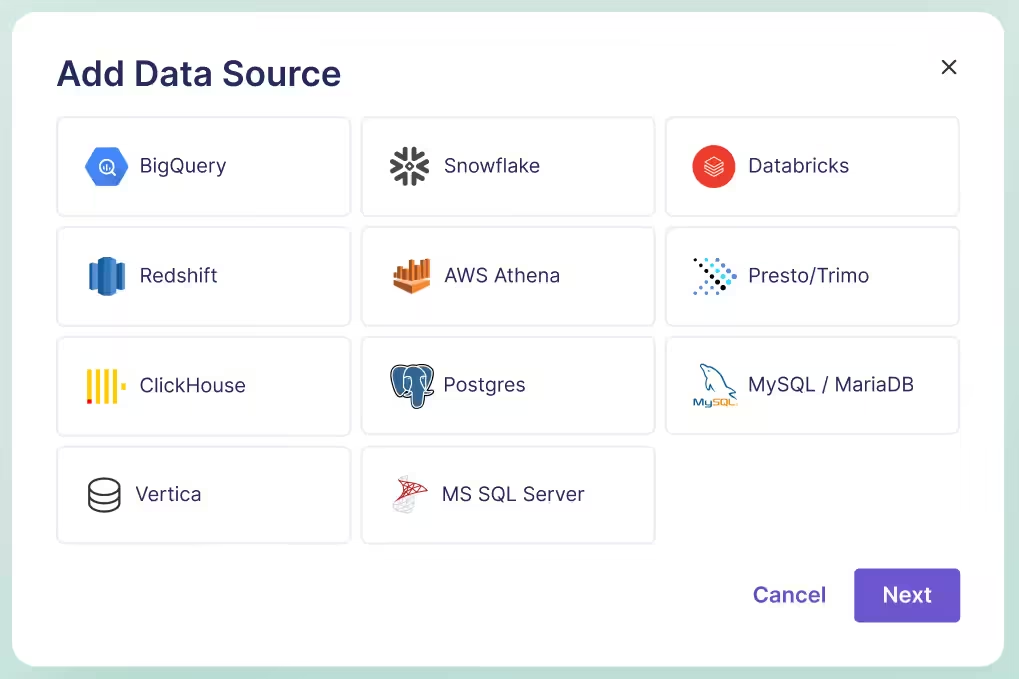
How GrowthBook combines feature flags and experimentation in one platform
Dropbox eventually moved to GrowthBook and consolidated six tools into one platform because of this decision. Today, its engineering team runs experiments against its own data lake and manages staged rollouts across 3 billion feature evaluations every day.
But the biggest benefit is that they manage feature delivery and measurement in the same platform, without stitching workflows together. That’s the philosophy we built GrowthBook on.
All your feature flags and experiments share one SDK, and warehouse-native metrics let data or product teams analyze results using their own data. In addition, you get capabilities like:
- Ramp Schedules and Safe Rollouts: Ramp releases on a schedule (paid plans), and add guardrail metrics to roll back automatically when something regresses (Enterprise plans).
- Temporary Rollouts: Ship an experiment’s winning variant to 100% of users without deploying code again.
- Warehouse-native metric library: Define a metric once in your warehouse and use it everywhere, as an experiment or within your product analytics dashboard.
- Collision control: Use namespaces to keep experiments mutually exclusive, and holdouts (Enterprise plans) cover features and experiments together.
- AI agent access: Agents can create and manage flags and experiments through open-source Skills and the MCP server. You can implement changes directly or after review.
- Insights dashboard: Track your win rate and the combined impact of your experiments across the program. Treat the summed impact as a directional signal, since it can’t replace a holdout.
- Open source and self-hosted: GrowthBook is MIT-licensed so that you can run the whole platform on your own infrastructure.
With one platform, the goal is to make every release easier to measure, every result easier to trust, and every next decision easier to make.
If you want to see how it works:
- Get started for free and experience it yourself.
- Join a live demo to see GrowthBook in action.
- Book a demo if you need guidance on migration or specific features.

Related articles
Ready to ship faster?
No credit card required. Start with feature flags, experimentation, and product analytics — free.