How to dark launch AI features and test them before release

Your team just built an LLM feature, and it passed its offline evals and behaved well in staging. It makes sense to flip the feature flag on launch day, but just because the feature passed evals doesn’t mean it’s ready for production.
In a study of a deployed conversational AI assistant, Meta researchers found that a raw offline engagement score had limited success predicting live A/B test outcomes: its F1 score was just 34.3% across 113 comparisons in a later validation cohort. The study also shows that a more carefully calibrated evaluation framework can improve those predictions.
So how do you see how an AI feature behaves on real traffic before a single user sees its output?
That’s where you use a dark launch.
In this article, we’ll explain how you can dark launch AI features with feature flags to test and ship with confidence.
What does a “dark launch” mean for AI features?
A dark launch is a process where you put new code into production and run it on real requests, but users don’t see the output. In some cases, the output is limited to an internal group, like employees.
The code essentially sits in the middle. It’s not inactive, but it’s also not fully in production where the output is visible. If the feature flag wrapping the code is off, it won’t execute. In a canary release, real users see the change from the first percent of traffic, but a dark launch gives you the production signal of a canary while users keep seeing what they saw previously.
If you’ve worked with traffic mirroring, this will feel familiar. The new service gets a copy of live requests, and the responses go to a log instead of back to the user.
With AI features, the same setup now has a second job. A normal dark launch just checks if the code runs safely. But with an AI dark launch, it also has to judge whether the output is good because the same prompt can give you different results on every run.
That’s why feature flags become your control plane. Your app runs the inference, and the flag decides whether to make the hidden call and which model to use. And if you’re already using a tracing tool for LLM calls, it’ll record what the model did and how well it scored, while the feature flagging platform decides who gets which model and which prompt.
Why staging isn’t enough to test an AI feature’s behavior
Even though staging can confirm the code works, it can’t show how an LLM will respond to the inputs your users send. Here’s why:
- Real prompts differ from your test set: When you’re testing the inputs you’ve curated, you’re testing a much smaller sample than what your users will actually send. So you won’t be able to test a representative sample of prompts before they go to production. That’s one reason Shopify’s Sidekick team moved from curated “golden” datasets to ground-truth sets based on real production conversations.
- Model behavior can change over time: As new models come out or current models update, the outputs you get from the same prompts can change. For instance, a 2023 study found that GPT-4’s accuracy at identifying prime numbers dropped from 84% in March 2023 to 51.1% in June 2023. It shows why engineering teams should re-evaluate model behavior over time instead of assuming outputs will stay consistent.
- Production dependencies can introduce surprises: Factors like provider rate limits, upstream changes, and autoscaling behavior can impact the quality and latency of the output in ways even your test environment can’t predict. For instance, Superhuman (formerly Grammarly) used shadow traffic to validate a new inference provider against real requests before running an A/B test. The A/B test then exposed a silent upstream update that briefly hurt output quality, along with autoscaling edge cases that caused latency spikes.
- Technical quality doesn’t establish business impact: Even if an AI feature produces good outputs, that doesn’t mean it improves business outcomes like activation or conversion. You need to test the model with real users before you can draw a concrete conclusion about its impact.
A dark launch can help you test for all of this so that you know how the prompt or model will behave before it enters production.
Put your LLM feature behind a flag
Start free with GrowthBook feature flags: run a new model in shadow mode, target employees, then widen exposure without a redeploy.
Start for Free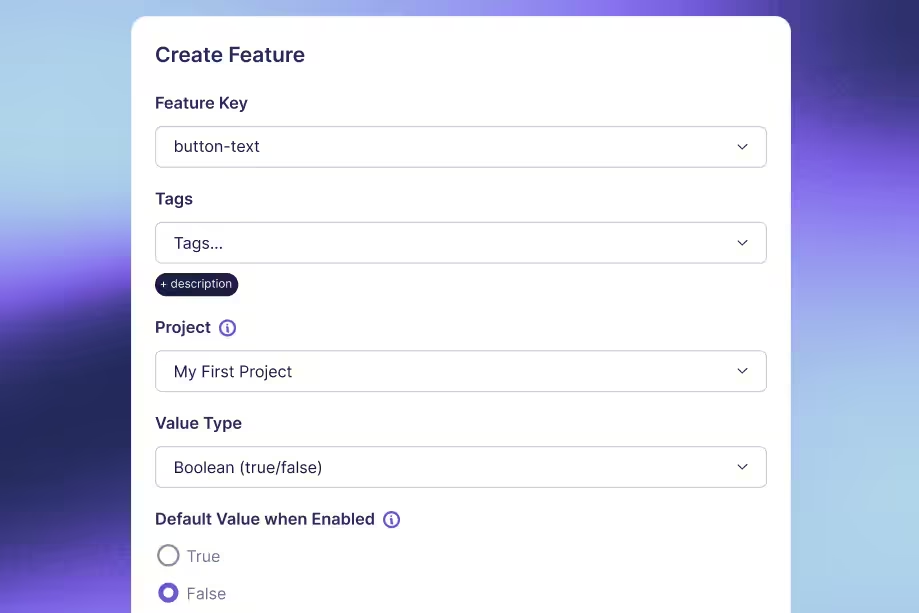
How to dark launch an AI feature in 4 steps
Let’s say you’re running a fintech app that has a help chat. Right now, a scripted bot answers common questions and hands over the rest to a human agent. If you’re looking to replace it with an AI assistant, you need to know if the answers are accurate.
A dark launch lets you do that. Here’s how it works in GrowthBook:
Step 1: Run offline evals on a golden dataset
Start by creating four flags in GrowthBook, all turned off in production:
support-assistant-enabled: A master switch for the whole feature.support-assistant-shadow: To decide whether the AI runs in the background without touching live traffic.support-assistant-rollout: To decide who can actually chat with the assistant.support-assistant-config: A JSON flag that tells your app which model and prompt version to use.
Keep the prompt text itself in your codebase, where every change goes through code review. The config flag only points to a version you’ve already approved:
Then, run offline evals to test the assistant against a set of sample questions. It’ll let you test the model or prompt against a standard question set and catch issues before the feature goes live.
You can collect a sample from old support questions (with personal details removed) and score each answer with a rubric or LLM judge. Review the answers and iterate from there.
Only move on when the assistant meets your quality bar and has no critical failures in the test set.
Step 2: Run the AI feature in shadow mode on live traffic
In shadow mode, the AI assistant answers real customer queries in the chat box, and your app saves each answer instead of showing it to the user. Your users still see answers from the scripted bot.
Here, you’ll be able to do two things:
- Test the AI feature on real customer questions, which are usually messier than a “sampled” set.
- Get an idea of what it’ll cost you to run this feature at your actual chat volume.
In GrowthBook, you can add a percentage rollout rule to the shadow feature flag and start with 1% of users. Use a targeting rule here instead of an experiment rule, since users don’t see the output.
Here’s what that looks like in your app:
runShadow() is your own code. It checks the config against the models you’ve approved, removes sensitive details, calls the model, and saves the answer for scoring. If GrowthBook can’t be reached, both flags read as off, so customers still get the scripted bot. If your team uses a tracing tool like Langfuse or Arize Phoenix, that’s where you can log each saved answer and its score.
Score the outputs the same way you did in your offline evals. Check whether your chosen metrics, like latency and cost, stay within limits. If it looks good, move on to internal testing.
Step 3: Release to internal users only
Next, roll out the AI assistant to your team only. This is critical because humans tend to catch mistakes an LLM judge can’t, and your support agents can tell the difference between a good answer and a bad one.
For example, Dropbox tested its AI product Dash the same way. They ran the product through “feature rings,” which expanded in this order:
- Internal teams
- All Dropbox employees
- External alpha users
- Self-serve customers
It helped them avoid audience overlap and get a more accurate picture of how the product performs.
In GrowthBook, you can add a targeting rule to support-assistant-rollout that only matches employees or a list of test accounts. Then ask your testers to check a few things:
- Is the answer correct for your bank’s actual policies?
- Does the assistant hand off to a human when it should?
- Does it say anything your support team would never say to a customer?
- Do replies arrive fast enough to feel like a conversation?
Fix the errors they find and move on when they trust the answers.
But treat this step as a checkpoint rather than a “be-all and end-all” answer because only your real users can tell you if a feature is truly useful to them.
Step 4: Hand off to a guarded rollout or A/B test
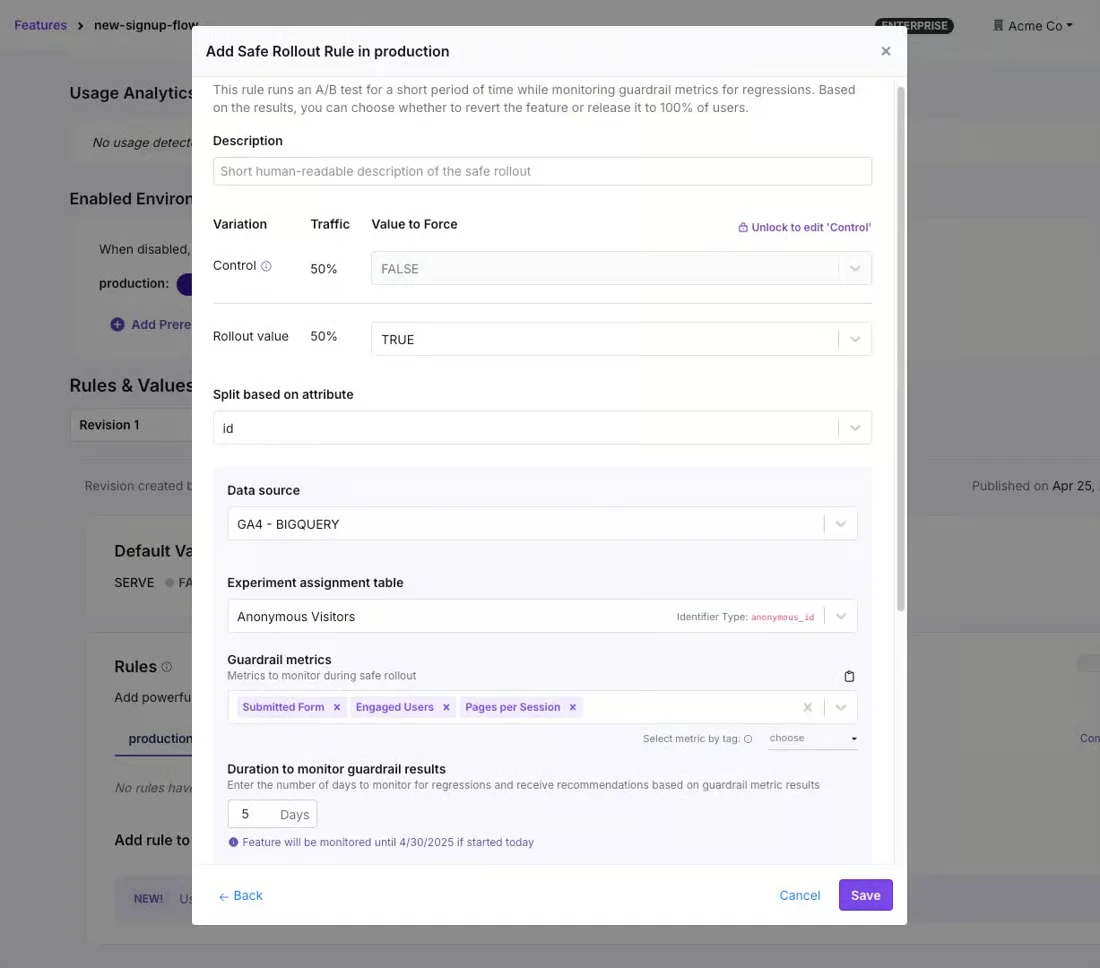
Once you’ve tested it with employees, roll out the assistant to real users. You can add a Safe Rollout rule to support-assistant-rollout. It widens exposure in steps while comparing users who get the assistant against a control group.
You can monitor guardrail metrics like response time and error rate throughout. If a guardrail metric regresses, GrowthBook automatically rolls back and disables the rule, so customers go back to the scripted bot. Signal metrics only pause the rollout until the metric recovers.
To test whether the AI feature makes a difference for users, run an A/B test and see whether any of your business metrics move. If you already trace LLM calls, integrate your tracing tools with GrowthBook to combine metrics like latency and cost from your tracing tool with results from the A/B test.
Note: Safe Rollouts are available on paid plans. On the free plan, use a percentage rollout and widen it by hand while you watch the same metrics.
Which metrics should you measure before users see an AI output?
A LangChain report found that output quality and latency are among the biggest challenges when putting AI agents into production.
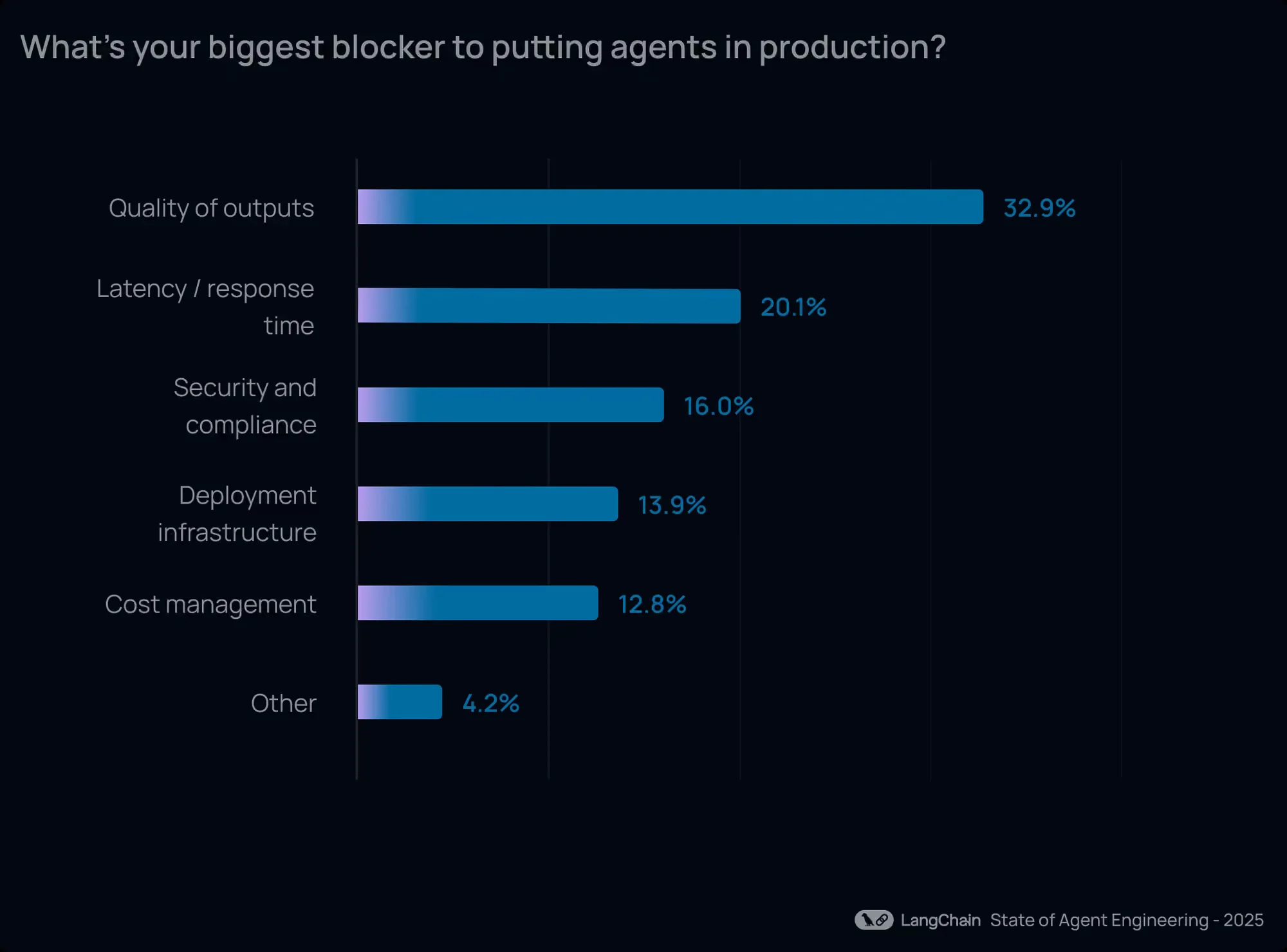
Define your metrics before shadow testing starts and reuse them across internal testing and rollouts. These signals become the guardrails you use to decide whether you should increase exposure or roll back the rollout.
Make sure you’re comparing equivalent populations and request types at each stage.
| Signal | How to capture it in the dark launch | GrowthBook metric for the rollout and A/B test |
| Quality | Log a judge or rubric score for each output, along with the number of outputs scored. | Mean or ratio metric on a judge-score fact table. |
| Latency (TTFT, p95/p99) | Measure duration around the model call. Track TTFT for streaming responses and end-to-end latency where relevant. | Quantile metric at P95 or P99, where lower is better. |
| Cost per request | Log token usage and estimated cost for each inference. | Ratio metric: total inference cost divided by the number of eligible requests. |
| Error and refusal rate | Record provider errors, timeouts, and model refusals. Track them separately where possible. | Ratio or proportion metrics; use as guardrails where regressions indicate harm. |
| Fallback rate | Record requests that invoke a fallback model or path. | Ratio metric that can serve as a guardrail or signal, depending on the failure mode. |
You can also reuse data from your LLM tracing tool instead of rebuilding these metrics. For instance, GrowthBook’s LLM observability integrations help you trace the experiment and variation each user was assigned to and then the platform reads the latency, cost, token, and eval-score data your tracing tool usually collects.
By the time you reach the A/B testing stage, the LLM judge scores you’ve been logging can sit right next to your business metrics in the results and you’ll get a fuller picture of how the AI feature is performing.
Note: The Langfuse and Arize Phoenix integrations are currently in beta. Self-hosted Langfuse connects directly, while Langfuse Cloud users export their traces to their own warehouse first.
Keep these points in mind during the dark launch:
- Set thresholds per feature: There’s no universal latency target. For instance, Dropbox’s engineering team set release budgets for their product, Dash, at a source F1 of at least 0.85 and p95 latency under 5 seconds. Similarly, you can set your own based on your infrastructure’s constraints or specifications. For example, if your AI assistant replies in a live chat, its latency should be in seconds so that users trust it.
- Calibrate your judge before you trust it: An LLM judge is a model, too, so its definition of “good” can differ from yours. It can reward the wrong output, so don’t lean on its judgment without testing first. Hand-label a sample of outputs and run the judge on it. Calibrate the judge’s instructions based on the results, and run regular checks to make sure it doesn’t drift.
- Don’t review metrics in isolation: When you review metrics in context, you’ll notice they behave differently under specific conditions. For instance, Intercom found that adding latency to its Fin AI agent raised resolution rates by up to 2 percentage points. A seemingly negative action can make a positive difference, showing that your assumptions may not always hold.
How can you manage risks associated with dark launches?
Even though dark launches keep the output away from real users, the API call still counts as inference. It consumes resources and could process personal data, so you need to account for these issues:
Control inference spend with sampling and a kill switch
When you mirror a request to a second model, you pay for an additional inference. At a 2% sampling rate, the shadow model runs on 2% of eligible traffic, and the spend depends on request volume, token usage, and model pricing.
That unpredictability is one reason one in four companies miss their AI cost forecasts by 50% or more.
You can limit that spend by doing the following:
- Start with a low sampling rate and increase it when the results justify collecting more data. This is where Ramp Schedules help because you ramp up exposure on a timeline you set, and you can hold each step for a timer or a teammate’s approval.
- Add a “Disable on date” to turn the shadow rule off at a specified time. This limits the run duration and reduces costs.
- Make
support-assistant-enableda prerequisite for the shadow and rollout flags. If you want to stop the feature, you can turn the flag off, and every flag that depends on it will turn off. - You can back the config flag with a Config and add validation rules (Enterprise plans) that reject unsafe values before they’re published. For example, a rule can block any change that sets
max_tokensabove 300, so a simple typo can’t increase your token spend.
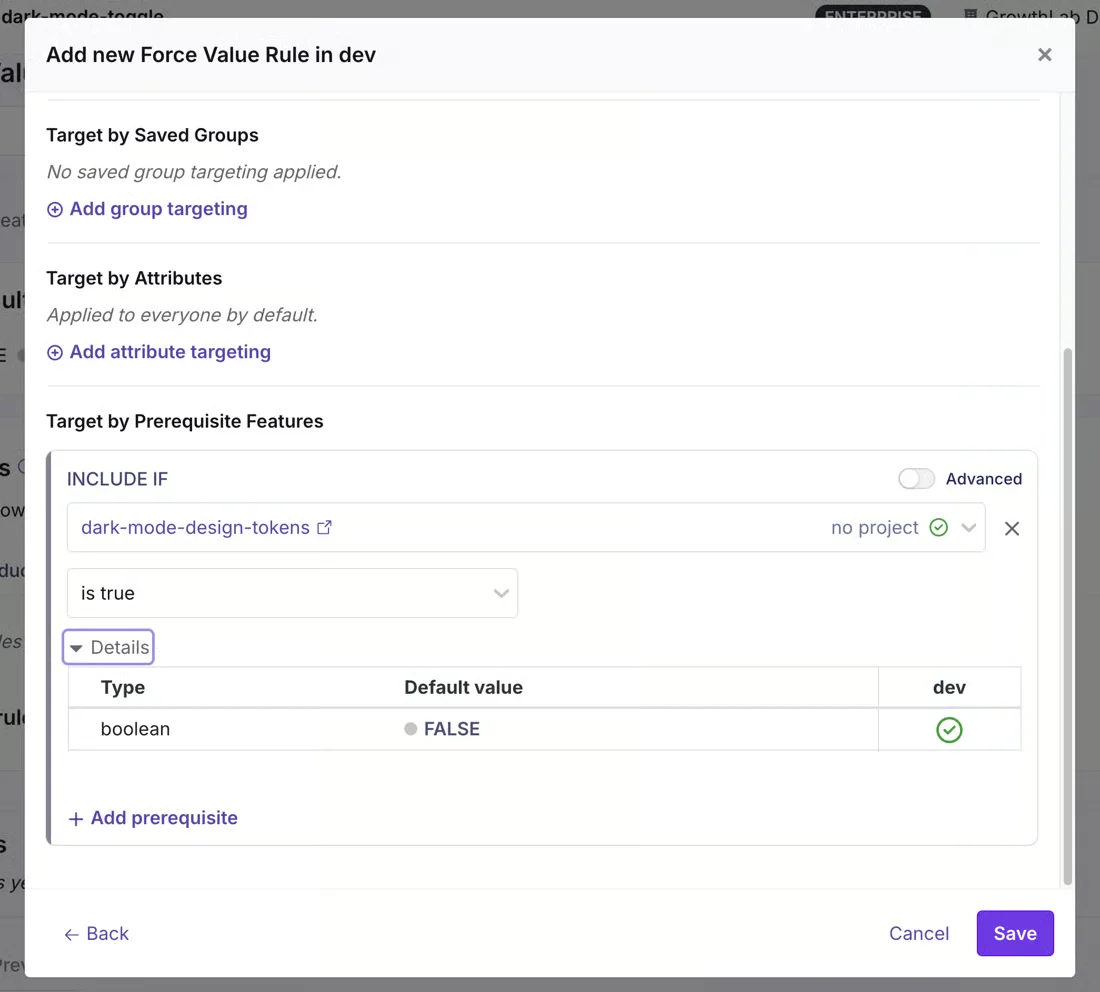
The faster you can roll back changes, the more control you have over potential risks while testing AI features.
Keep shadow calls off the request path
If a shadow call runs inline, the user may wait for a model whose answer they might never see. This can make the experience much slower.
To prevent this, dispatch shadow calls or run dark launches through a separate asynchronous path so the user response never waits for the new model. You can apply timeouts and resource limits and score the output in a separate job.
Protect PII in prompts and logged outputs
Even though your output is hidden, it’s still considered a “stored output.” In fact, a study of real LLM conversations found that even when personal information was removed, it remained in 70% of queries.
GrowthBook handles this in the release and analysis layers. For instance, it keeps targeting attributes private because the SDK evaluates flags locally. If the targeting rules or Saved Groups exclude specific accounts or regions, the shadow call never runs for them.
Plus, you can evaluate AI flags with a server-side SDK to avoid exposing the data to browser-side clients.
These controls don’t replace prompt redaction, but they give you more control over the use of your data and your customers’ data.
How GrowthBook helps you dark launch and test AI features
When you dark launch AI features, you can see how they perform in production without exposing users to the output. But there are still several steps between passing an offline eval and actually testing the feature in stealth.
GrowthBook helps you control that entire progression:
- Target internal users
- Configure which model or prompts to test
- Restrict exposure with feature flags
- Carry the same warehouse-defined metrics into other tests
Your application still runs the inference and evaluates the dark launch outputs. But GrowthBook manages the release controls and monitors the impact of these changes.
That’s how organizations like Khan Academy have moved AI tutor features from offline evals to live experiments. If you want to see how it works:
- Check out our guide on testing LLMs and prompts.
- Sign up for free and run a dark launch for an AI feature yourself.
- Join a live demo to see GrowthBook in action.
See a guarded AI rollout live
Join a live demo to watch a flag move from shadow traffic to a Safe Rollout, with guardrails that roll back automatically.
Pick a Demo Date

Related articles

Ready to ship faster?
No credit card required. Start with feature flags, experimentation, and product analytics — free.