Feature flags in AI-led development: How to stay compliant
Picture this: your auditor pulls up a production change from the sample, and it’s a change an AI agent wrote. The engineer who prompted the change in production also approved the merge, so the production log credits the service account with the release.
So, who really approved this change?
On paper, you have two actors and one sign-off step. But in practice, just one person started the change and approved it, which is the equivalent of approving your own pull request from a second GitHub account.
From a compliance perspective, there was no separation of duties, and your audit trail didn’t catch it.
IBM’s report found that even companies with an AI governance policy had an approval process for AI deployments in only 45% of cases. AI-assisted development has become the norm, but it also expands the risk surface, especially when you use it to make changes in production.
In this article, we’ll explain what compliance looks like when you’re using AI-led development processes with feature flags and how to stay compliant.
How does compliance work when AI agents write the code or push changes?
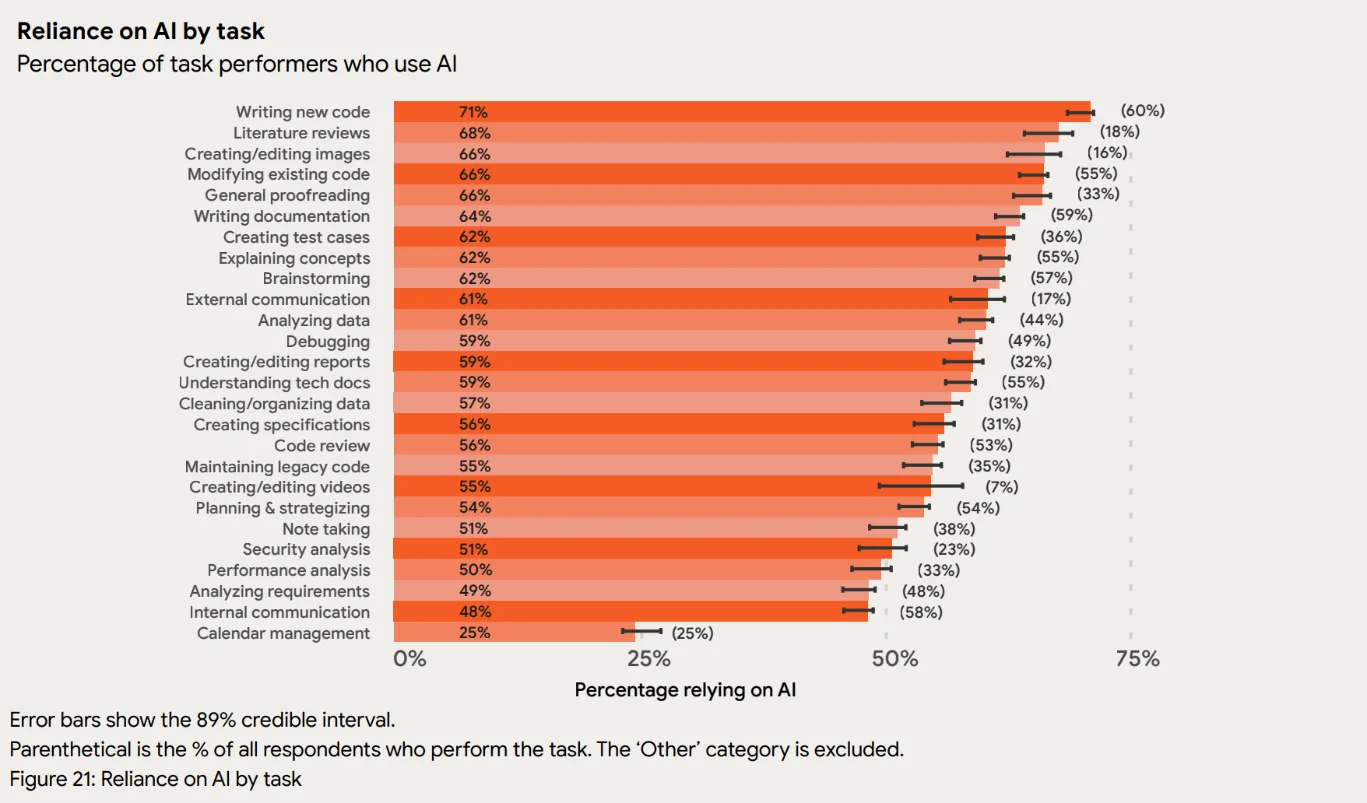
AI agents now write a sizable chunk of your production code. In fact, a 2025 DORA report found that 90% of technology professionals use AI at work, with “writing new code” as one of the top use cases. Even at larger enterprises like Google, well over 30% of the code engineers check in now starts as an AI suggestion.
That said, even if you’re moving faster, you’re more likely to break things without the right guardrails in place.
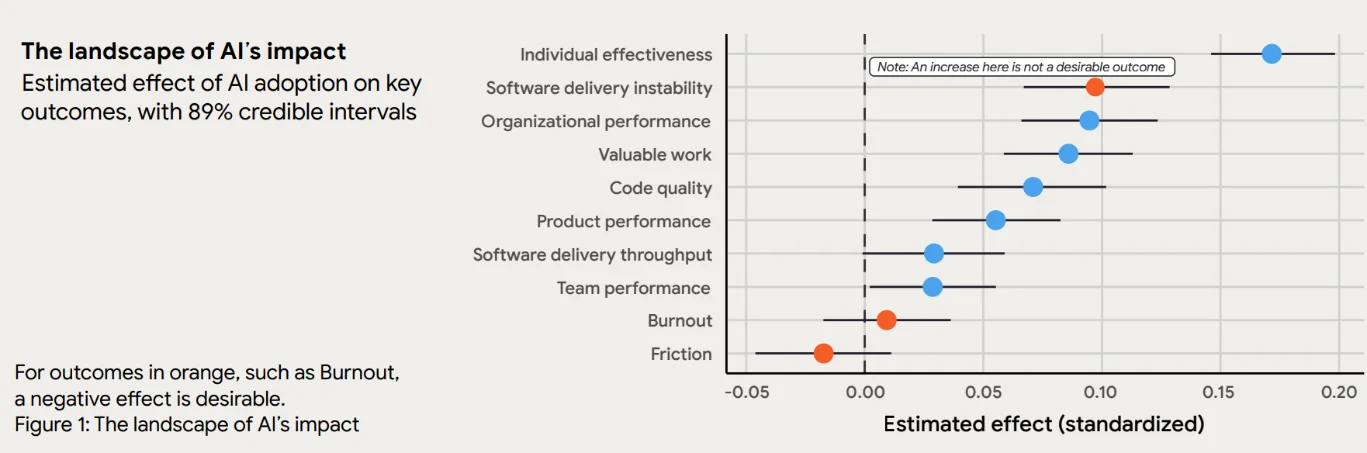
From a compliance perspective, it creates gaps because every control you’ve built to date was built for humans. It assumes that a human made and reviewed that change, but that’s not the case anymore. And it’s contributing to more unstable software, even as you improve throughput.
These issues show up in four areas:
- Volume: As more changes ship, auditors pull more agent-authored work into every sample.
- Authorship: Your audit log records either a bot account or the prompter’s credentials, and it doesn’t always tell you who made the change.
- Approval: The engineer who prompts the agent often reviews its output too, so it doesn’t follow the four-eyes principle.
- Access: Agents hold API keys and tokens with write access to production systems, including your feature flags.
We’ve already seen this play out in a real organization. In July 2025, AWS disclosed that an inappropriately scoped GitHub token let an attacker commit malicious code into the Amazon Q Developer extension for VS Code. The compromised code went out in a release automatically. Even though it failed to execute because of a syntax error, the incident showed how one over-scoped token could push code straight to users.
Which compliance frameworks apply to AI-based feature flag usage?
When it comes to feature flags and AI-led development, you need to consider complying with these frameworks at a minimum:
- EU AI Act
- ISO/IEC 42001
- NIST AI RMF
- SOC 2
If you're a financial entity in the European Union (EU), the DORA RTS on ICT risk management also applies (a separate regulation from Google's DORA report). Article 17 requires the people who approve changes to be independent from the people who request and implement them, which is the four-eyes principle in regulatory terms. It also requires fall-back procedures for failed changes, and Article 12 requires change logs that are protected against tampering and deletion.
Let’s look at each of the frameworks in detail:
EU AI Act
The EU AI Act separates providers, who build AI systems and put them on the market, from deployers, who use them. If your team ships with coding agents, you’re a deployer, and using an agent doesn’t turn your product into a high-risk system.
| Clause | What it controls | What it means for you | GrowthBook control |
| Art. 12: Record-keeping | Automatic logging of events over the system’s lifetime | Your system needs to log events automatically so its behavior can be traced. Tamper-proofing isn’t explicitly required. | A full history of every flag change, with before-and-after snapshots, so you can trace which version of an AI feature was live at any point. |
| Art. 14(4)(e): Human oversight | The ability to interrupt the system and bring it to a safe stop | An AI feature needs an off switch a human can use without a redeploy | Per-environment kill switch and revision revert |
| Art. 26(2): Deployer oversight | Assigning oversight to people with the competence and authority to act | Oversight belongs to named, documented people. “The platform team” won’t pass. | Environment-scoped publish permissions and required reviews |
| Art. 26(6): Log retention | Keeping logs for at least six months | You need a retention setting you control, including flag logs | Event webhooks and JSON export to your SIEM, or self-hosted storage. GrowthBook doesn’t document a Cloud retention period, so set retention on your side. |
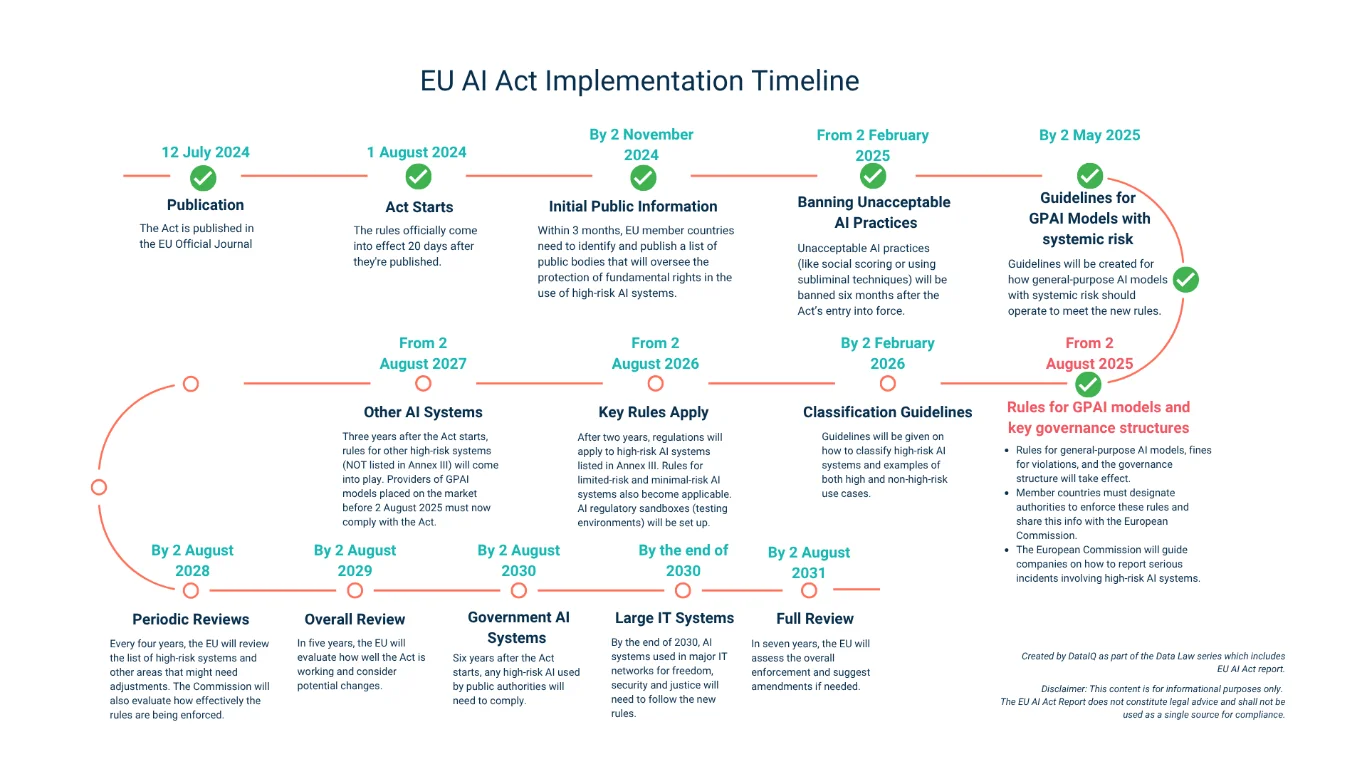
Note: On 27 July 2026, the Digital Omnibus on AI also entered into force. The obligations for standalone AI systems have been pushed back to 2 December 2027 (Annex III) and for AI built into regulated products to 2 August 2028 (Annex I). So, you have about 13 months to get all your flag approval and log retention processes in place before it starts applying.
ISO/IEC 42001
ISO/IEC 42001 is a certifiable standard for AI management systems, so this framework governs how your controls operate every day. It doesn’t have a clause specifically for change control. But you can find change management in Clause 8, and deployment is handled in Annex A.
| Control | What it controls | What it means for you | GrowthBook control |
| A.3.2: AI roles and responsibilities | Defining and allocating roles for AI systems | Approvers and oversight owners are named in writing | Role-based and project-scoped permissions, plus required reviews |
| A.6.2.3: Design and development documentation | Recording how the system was built and changed | You need a history that shows what changed and who changed it | Revision history on every flag change. A Custom Hook can require a ticket ID on each one. |
| A.6.2.5: AI system deployment | Planned, controlled deployment against release criteria | An approval step before anything goes live, with proof it happened | Approval flows, publish gates and schema validation |
| A.6.2.6: Operation and monitoring | Monitoring the system once it’s live | You can spot a problem and stop it quickly | Kill switches, revert, and Safe Rollouts with automatic rollback |
| A.6.2.8: Event logs | Automatic event logging for traceability | Flag change events count as evidence, so retention matters | Audit log and event webhooks. Retention is yours to set. |
NIST AI RMF
The NIST AI RMF (Artificial Intelligence Risk Management Framework) is voluntary and outcome-based, and it describes what “good” AI usage looks like in an organization. It provides a list of considerations to improve the trustworthiness of AI use internally.
| Subcategory | What it controls | What it means for you | GrowthBook control |
| GOVERN 2.1 | Documented roles and responsibilities | Who can create, approve, and publish AI changes is written down | Role-based permissions and environment-scoped publishing |
| MANAGE 2.4 | Mechanisms and assigned responsibility to supersede, disengage, or deactivate an AI system | You need a tested off switch with a named owner | Per-environment kill switch and revision revert. Running drills is on you. |
SOC 2
SOC 2 is also a voluntary auditing framework provided by the American Institute of Certified Public Accountants (AICPA), and it specifically looks at how you manage and use customer data. As of 2026, there are no AI-specific criteria, but your AI agents are governed by the same controls it specifies.
For instance, a Type II report looks at how governance controls were operated over a period. So an auditor can pull a sample of changes and see how those changes were made and if they comply. Even if an AI agent makes those changes, you’re still required to log an author and an independent human approver.
| Criterion | What it controls | What it means for you | GrowthBook control |
| CC8.1: Change management | Changes are authorized, tested, approved, and implemented in a controlled way | Every agent-authored production change needs an independent human approval, and flag changes count as production changes | Required reviews and self-approval blocking. Branch protection covers the code side. |
| CC6.1: Logical access | Restricting access to systems and data | Agent credentials get the same least-privilege treatment as human accounts | API keys scoped by role, project, and environment |
| CC6.2: Provisioning and removal | Registering and removing users and credentials | Every agent key needs an owner and a removal process, including keys for short-lived agents | Keys can be disabled without deletion, and personal access tokens stop working when their owner is removed |
| CC6.3: Role-based access | Access based on roles and reviewed regularly | Agent keys belong in your access reviews | Project-level roles and last-used tracking. Keys don’t expire on their own, so you handle rotation. |
| CC7.2: Monitoring | Monitoring system components for anomalies | You can spot an agent acting outside its usual scope | Audit logs separate human, API key, and system actions, and webhooks stream events to your SIEM. To tell agents apart, you need one key per agent. |
Who is accountable when an AI agent changes production?
Since AI agents can now open pull requests and change flag configurations on their own, you need to distinguish between AI-led and human-led changes.
Here’s why:
Why AI agent commits break your audit trail
When you use an AI agent, there are two main issues you can expect:
- A shared bot identity: Your agents and CI jobs all commit and call APIs as one account, such as ci-bot. The log shows that a change happened, but it can’t tell you which agent made it or which engineer asked for it. So you need a differentiator here.
- The prompter’s own credentials: The agent runs on a team member’s personal token, so the log says “[user]” edited the checkout-redesign flag at 2:14 AM. But in reality, their agent made the change when they weren’t even logged in.
Either way, the log names someone who didn’t do the work.
It’s a problem because SOC 2 expects privileged actions to trace back to a real person who’s accountable for said actions. If your log answers “Who did this?” with a bot account or the wrong engineer, it shows up as an exception in your SOC 2 report.
That’s why you need to record provenance at both ends of the change.
Give each agent its own named credential, such as an API key named for the agent. Every time it makes a change, the change gets logged with the name. Your audit log can only be as specific as the keys behind it, so if you use the same key, you’ll run into the same problem.
Can an AI agent approve a change under SOC 2?
The short answer is no. Your AI agent can’t approve a production-related change because it’s about accountability, and an AI agent can’t take accountability. That’s why your governance policy should require a human approver who didn’t make the change.
Even though agents can’t approve changes, they can do the following:
- Draft a flag change
- Summarize the diff for a reviewer
- Run checks before a human reviews the change
Note: If you’d rather have the platform handle enforcement, you can use GrowthBook’s Custom Hooks to block publishing if a human doesn’t approve it.
Separation of duties in AI-assisted development
Separation of duties means the person who asks for a change can’t also be the person who approves it. With AI-led development, it’s easy to break this rule without anyone noticing.
Let’s say an engineer on your team asks Claude Code to add rate limiting to an endpoint. The agent opens a pull request, and then the user reviews and merges it. If you look at the log, it looks like two different people requested and reviewed the change, but in reality, it’s just one person. This violates clauses like SOC 2’s CC8.1, so you need to make sure the four-eyes rule applies here too.
If a human requests a change and an AI agent makes it, another person should review and approve it. In the case of feature flags, just turn on approval rules to avoid this issue.
How to govern AI agent service accounts and API keys
If an AI agent has MCP or API access to production, it’s considered a privileged non-human identity. It carries the same permissions a human user has, but without multifactor authentication (MFA), which is risky because the token is long-lived and can be scoped to do more than it should.
These days, auditors are looking for failure modes like:
- There’s no MFA on the credential path, and the key alone can make a change. If the key gets leaked, that’s a vulnerability.
- Some tokens are scoped beyond their actual usage. For instance, if they’re built to create flags but they can also publish to production.
- Short-lived agent credentials can be missed because you never documented them in your access review inventory.
- If you have more than one agent on one key, it’ll muddle attribution in your audit logs.
In short: if you’re already using a specific policy for human-led development processes, apply it to agents too.
When you’re creating keys, specify the purpose, type, name, AI platform, environment, and project. Document this, and make sure your logs automatically pick up changes they make.
8 capabilities your feature flagging platform should have for AI-led development
When you’re choosing your next feature flagging tool, make sure it has these capabilities:
1. Draft-first agent changes that require human approval
Every time you ask your AI agent to make a change, it should land as a draft first, not a published change. Basically, you’re preventing the agent from making any changes it’s not meant to and getting a pair of human eyes on it before pushing it live.
In platforms like GrowthBook, agent-related changes can land as a draft inside the same approval workflow, just like human-made changes. Although we give you the flexibility to publish changes without approval, we recommend doing this on a case-by-case basis.
You can also use Agent Skills to create new flags that are off by default and tell the agent to never self-approve.
2. Per-agent scoped credentials with short TTLs
Each agent your team uses should have its own credential, scoped to different projects and environments, and with a short TTL. If you limit its use, it’s easier to see which key caused which changes and why.
GrowthBook offers secret keys with their own roles, and you can narrow their scope by project and environment. So, you can limit what a key can do in staging versus production. You can also disable them without deleting them so that you can maintain an inventory for future review.
Note: Usually, API and personal access tokens (PATs) don’t expire on their own. Also, PATs can’t be scoped to projects or environments, so it’s better to create a dedicated key per agent.
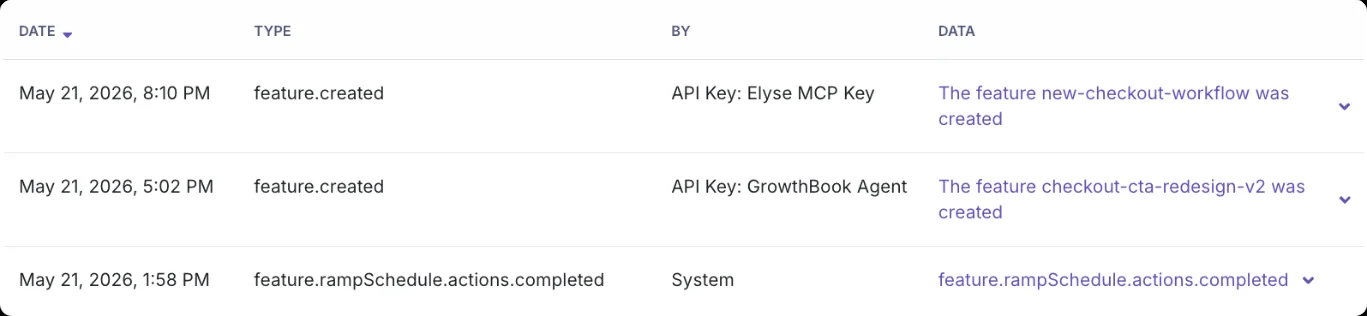
3. Audit logging that differentiates between humans and agents
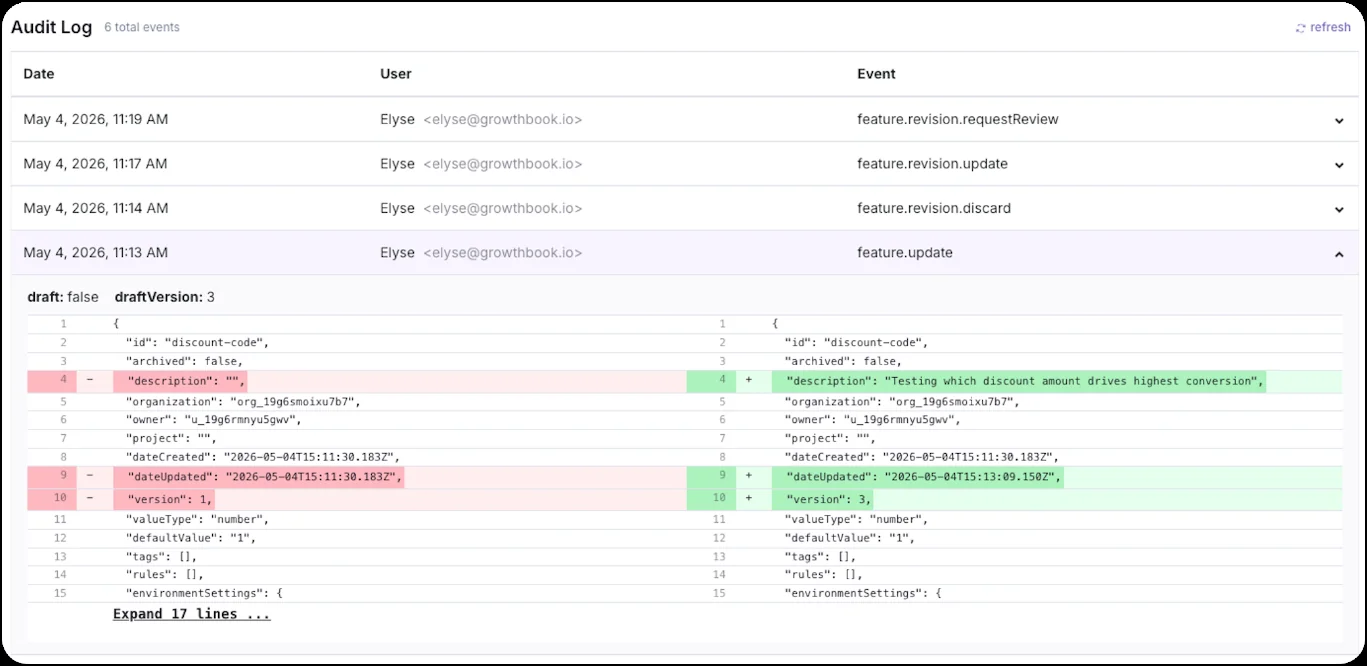
The first thing your auditor will ask about is who made a change and what the flag/change looked like before and after. So, your audit logs should record the following information:
- Timestamp
- User or actor
- Event type
- Before/after snapshot
This is where your keys come in handy. For example, GrowthBook tags each change and tells you who made it (logged-in user, API key, or platform). Since users can’t edit the log, even if there are exceptions for approvals, like when admins skip review, it’ll get recorded.
Note: If your agents share the same key or run on a team member’s PAT, you won’t know who made the change. So, use one key for each agent.
4. Approval workflows that block the prompter from approving
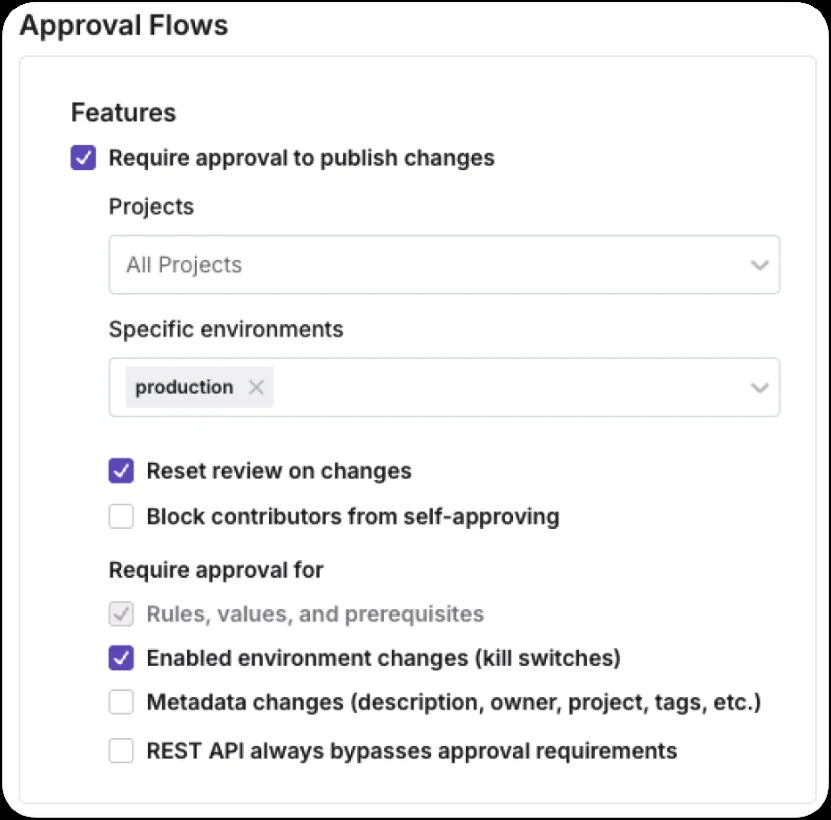
To stay in line with the four-eyes principle, you should be able to block self-approval for any changes. As a result, another person on the team is prompted to review changes before publishing.
In GrowthBook, this is set by default. Turn on "Require approval from a non-editor" to extend that block to everyone who edited the draft. You can also configure a Custom Hook to add more approval gates if needed.
5. Pre-deployment validation applied identically to human and agent changes
To stay compliant, make sure every change faces the same checks, whether a human or an agent makes it. If an AI agent gets an ungoverned path to production, it’ll become your weakest control.
It’s also why GrowthBook gives you the flexibility to run the same publish gates if the changes come from:
- The platform itself
- REST API
- MCP server
- Command line interface (CLI)
If a publish gate fails, you’ll know exactly why and can fix it immediately. For instance, JSON schema validation checks a flag’s values before they go live. Or, if one version of a feature conflicts with another, it gets flagged before you push it to production.
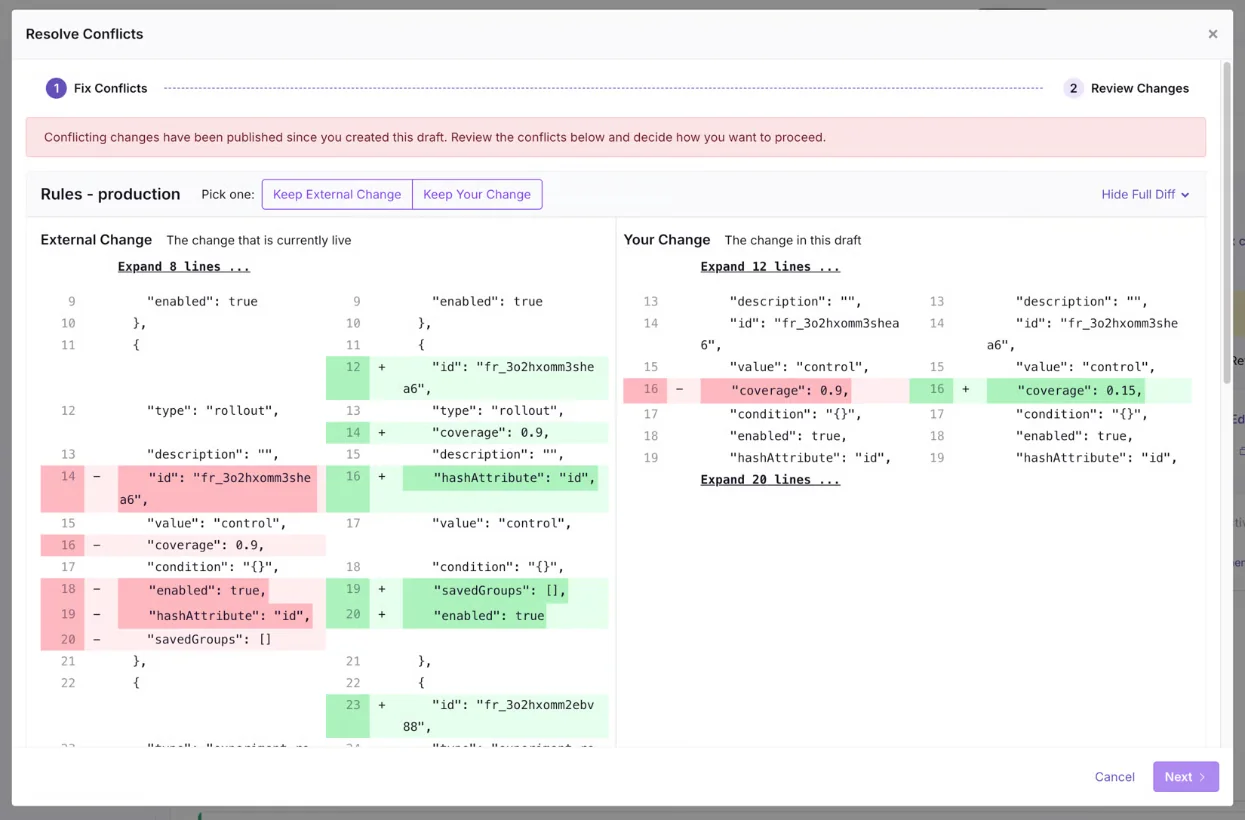
Note: You can also choose to bypass these checks by giving users org-wide bypass rights or choosing the option to skip reviews when the REST API is used.
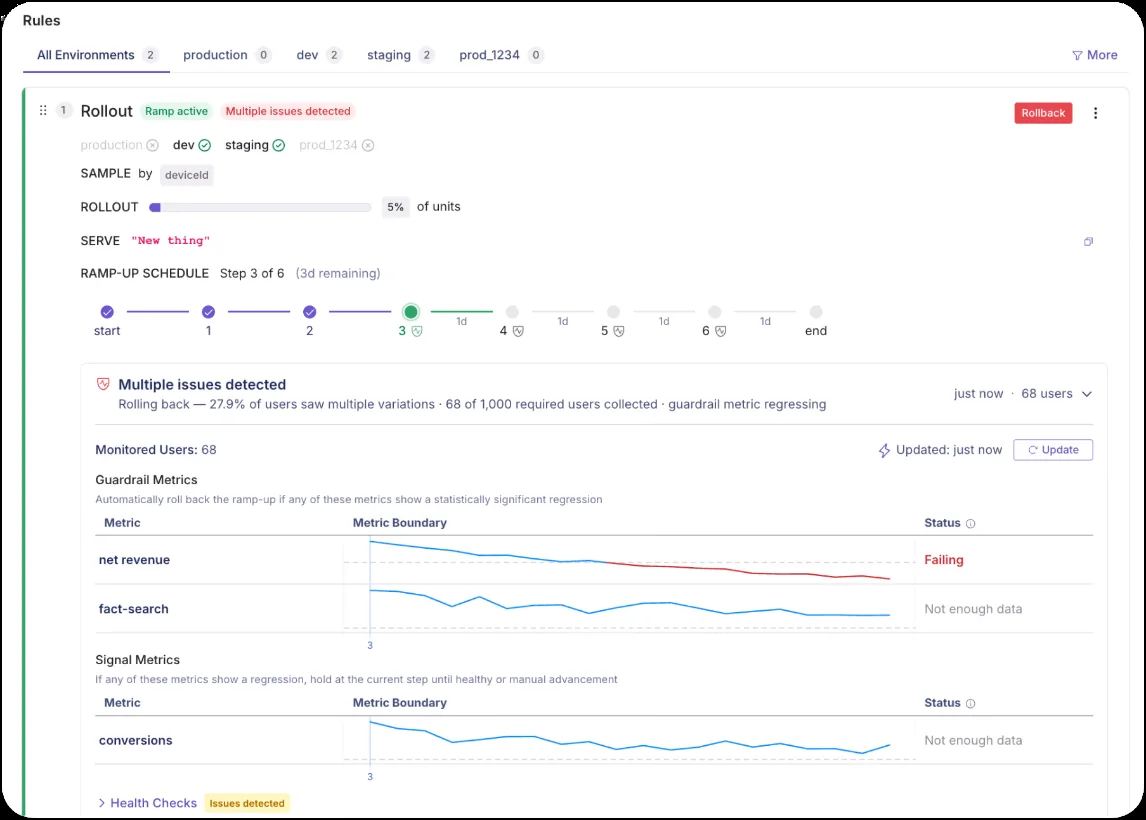
6. Automatic rollback tied to guardrail metrics
Every rollout you conduct should be able to reverse itself if and when a guardrail metric regresses. This level of automation gives you the override the EU AI Act and ISO 42001 ask for because the rollback itself becomes evidence.
For instance, GrowthBook’s Safe Rollouts let you create a ramp-up schedule where you attach separate guardrail metrics like error rates or p99 latency to each step. So if something goes wrong at any step, the rollout stops and rolls back completely.
That said, you can also configure approval gates at each step and prompt a human to review them before ramping up.
7. Log export and retention under your control
Any good governance policy ensures that you have full control over where your logs live and how long you keep them. Frameworks like the EU AI Act require you to keep them for at least six months.
In this case, your best option is to stream events into your SIEM and set retention periods there. This way, you can export at will and store them in the environment you trust most.
Note: GrowthBook’s event webhooks stream feature, revision, rollout, and ramp events. It includes the actor type and the endpoint so you can recreate the audit trail if needed. If you self-host, everything lives in your own database, and nothing expires.
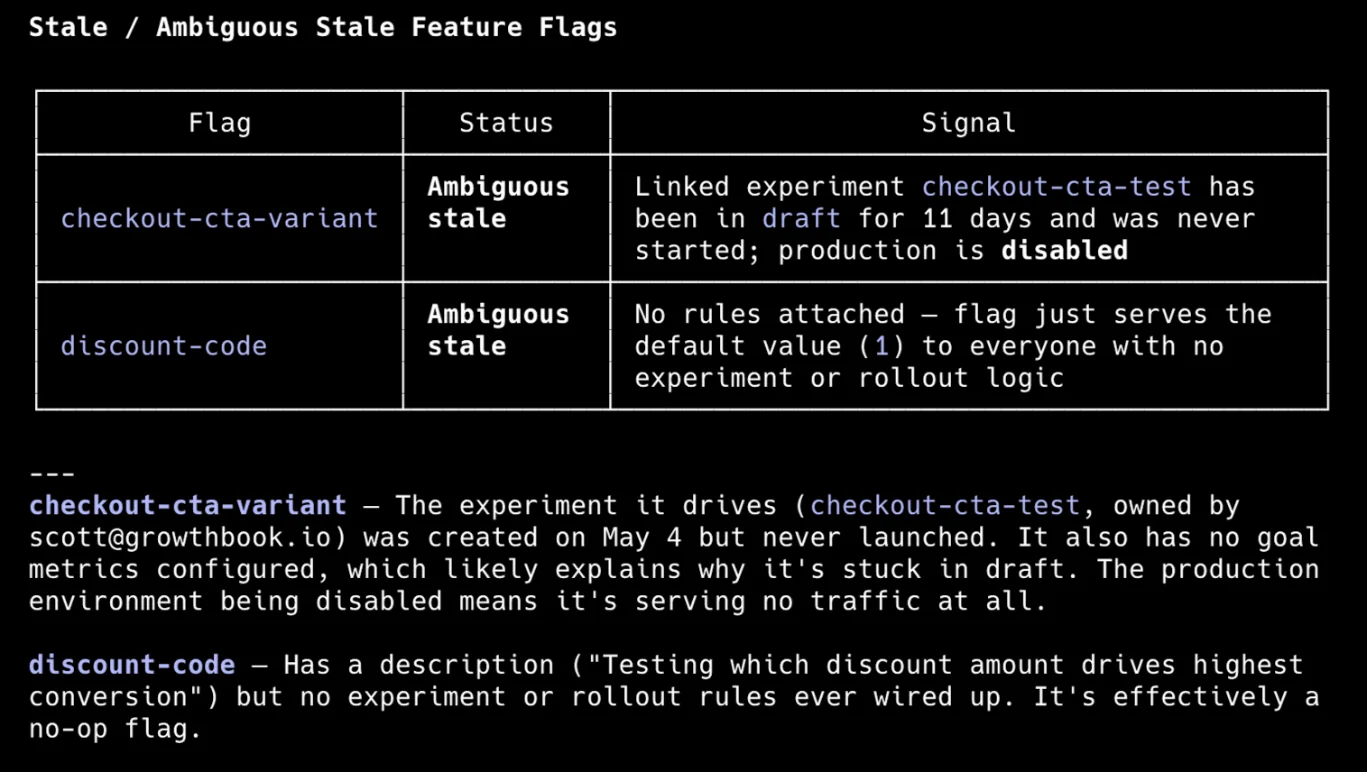
8. Stale flag detection to avoid incidents
A 2022 study found that interactions between feature toggles grow by about 22% over time. With every cross-interaction, you’re increasing the surface area of risk and any resulting incident.
That’s why your feature-flagging platform should include stale-flag detection capabilities. GrowthBook does this and surfaces flags that have been untouched for over two weeks and disabled everywhere, or ones that serve a single value to every user.
Plus, the flag-cleanup Agent Skill uses Code References to find where a stale flag lives in your codebase. From there, you can decide what to remove and keep.
What should a feature flagging governance policy include for agent-driven teams?
While your feature flagging platform can provide the governance capabilities you need, you still need the right systems in place.
The thing is, a commit can tell you what an agent wrote, but the feature flag data tells you what reached users and who allowed it. Your auditors will ask the latter.
For instance, in July 2025, Replit deleted a production database during a code freeze. The freeze was only present as an instruction, but the agent made its own call and executed it despite being told not to. This happened because the organization lacked controls to separate deployment from production changes.
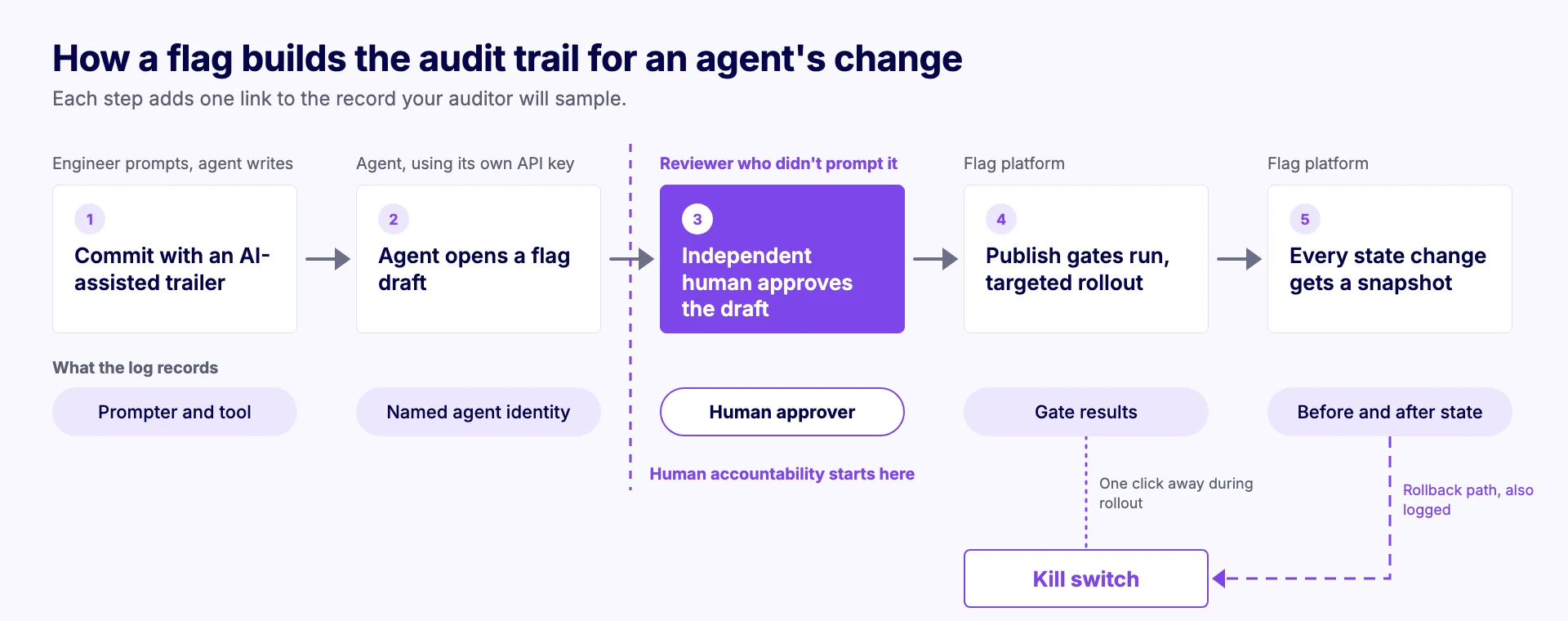
Since feature flags are capable of making production-level changes, your audit trail should look like this:
- The commit should record the action, mark it as “AI-assisted,” and record who did it.
- The agent can open a flag draft with its own key, but the log should name the agent instead of a shared bot account.
- A human on your engineering team reviews and approves the draft. The log records it as a human session and blocks any form of self-approval (if they initiated the change).
- Any publishing gates you have will run first before the flag is pushed live. The change will impact a targeted segment first and ramp up if you’re rolling it out in increments.
- Every change state gets logged in your audit trail, and if you roll back a feature, that change gets logged too.
Several companies are already working this way. Dropbox, for instance, uses a self-hosted version of GrowthBook to meet its security and compliance requirements. When it releases features for AI products like Dash, it does so through staged “feature rings” that start with the internal team and end with self-serve customers.
That said, a feature-flagging platform with an audit log doesn’t solve the governance issue. Since it’s a socio-technical problem, you also need policies in place to make it part of your process. For example:
- Use provenance naming where agent-created flags get a prefix like “agent” or similar so that it’s easy to review them. You can do it via Custom Hooks.
- Implement approval processes based on the rollout’s blast radius. If it only rolls out in staging, you don’t need an elaborate workflow.
- Every feature flag you create should have a clear owner and a date of expiry and cleanup.
- Run kill-switch drills to confirm the assigned person still has access or permission to pull the plug when needed.
You should also know what not to include in your AI governance policies. While it’s nice to be thorough, if a framework is voluntary or doesn’t mandate anything specific, you can avoid it initially.
Simply using a coding agent doesn’t make your process a “high-risk system.” It’s more about what you do with it and whether someone is involved in the review process.
If your feature flagging platform has strong governance features, that’s more than enough to stay compliant.
What will auditors ask about your feature flags in AI-led development?
As soon as AI agents start showing up in your audit logs, make sure you log those changes, just like human-led changes.
Here’s a checklist you can use to prove that your feature flags are compliant:
| Question to prepare for | Evidence to have ready | Frameworks |
| Can you tell human changes apart from agent changes in your code and flag logs? | Audit log entries showing actor type, one named key per agent, and AI-assisted commit trailers | ISO 42001 A.6.2.8, SOC 2 CC7.2 |
| For any sampled agent change, can you identify the human who prompted it? | Commit trailers or tickets linking each agent change to its prompter | SOC 2 CC8.1, ISO 42001 A.6.2.3 |
| Who approved each sampled agent change, and were they independent of the prompter? | Approval records showing a different named human for every production change | SOC 2 CC8.1, DORA RTS Art. 17 |
| Can an agent or API key approve its own change anywhere in your pipeline? | Self-approval blocking settings, a human-approval Custom Hook, and confirmation that API keys can’t bypass reviews | SOC 2 CC8.1, ISO 42001 A.6.2.5 |
| Do agent changes pass the same pre-deployment checks as human changes? | Publish gate configuration covering every channel, plus the list of people with bypass rights | ISO 42001 A.6.2.5, SOC 2 CC8.1 |
| Are the roles for creating, approving, and publishing flag changes documented? | A permission matrix covering both people and agent keys | NIST AI RMF GOVERN 2.1, ISO 42001 A.3.2 |
| Does every agent have its own credential, scoped to the environments it needs? | A key inventory showing each key’s owner, role, and allowed environments | SOC 2 CC6.1, CC6.3 |
| How do you create, review, and revoke agent credentials? | Provisioning records, access reviews that include agent keys, last-used checks, and a rotation schedule | SOC 2 CC6.2, CC6.3 |
| Who is responsible for stopping an AI feature, and can they do it without a deployment? | A written oversight assignment, kill switch permissions, and a record of your last drill | AI Act Art. 14 and 26(2), ISO 42001 A.3.2, NIST AI RMF MANAGE 2.4 |
| What happens when an agent change fails in production? | Rollback history, automatic rollback records, and reviews of emergency changes | ISO 42001 A.6.2.6, DORA RTS Art. 17 |
| Where do you keep your logs, and for how long? | SIEM retention set to at least six months, plus monitoring of your event webhooks | AI Act Art. 26(6), DORA RTS Art. 12 |
| Can you reconstruct a single agent change from draft to production? | An exported history of one change, end to end | All of the above |
The goal is to show that every change can be traced end to end. Let’s say a Cursor agent creates a draft flag change using its own key and requests review. A developer on your team approves it, so your audit log should have the before-and-after snapshot for it.
If you do revert a change, that should also be logged so that you can export the history to your SIEM and create an evidence packet.
Keep every AI agent change accountable with GrowthBook
When an auditor pulls an agent-written change from the sample, the question they’re really asking is who signed off on it. If the only approval on record comes from an engineer who prompted the change, you simply don’t have a good answer yet. And this could cost you in the long run.
With AI-led development, true compliance comes down to answering this question for every agent-related change.
As your agents take on more work each quarter, you need an assigned owner and reviewer to ensure someone owns the decision to release it. A feature flag is where you can enforce this.
Platforms like GrowthBook come with these controls built in, so you don’t have to spend too much time enforcing governance and can avoid looking for evidence after the fact. That’s one reason AI-forward companies like Dropbox, Upstart, and Khan Academy use it to build AI products with AI.
If you’re interested in seeing how it can work for you, watch our 5-minute demo or join our live demo to learn more.

Related articles
Ready to ship faster?
No credit card required. Start with feature flags, experimentation, and product analytics — free.