GDPR compliance & feature flags: a guide to staying compliant
If your app caters to users in the European Union (EU), GDPR applies to your feature flags as much as it does to your ad trackers. And a second EU law, the ePrivacy Directive, requires consent before you store an identifier on a user’s device, unless it’s strictly necessary.
That’s where feature flags get tricky.
Your flag SDK usually runs before your cookie banner appears on the page. It'll pick a version of the feature and, by default, write a random ID to a cookie so the user sees a consistent version. The cookie gets set before the user clicks “Accept.” And regulators have fined companies for this.
In 2025, France’s CNIL fined Shein, an e-commerce marketplace, €150 million in part because of an A/B testing cookie, with a 10-year lifetime, that it set before users made a choice. It might make sense to block the SDK until the user consents, but then your flags can’t do their job on the first page load, and users see the page change after it renders.
In this guide, we’ll explain how GDPR works when you’re using feature flags and how you can make them work while staying compliant.
What is GDPR compliance?
The General Data Protection Regulation (GDPR) is an EU law that governs how companies collect and use personal data. When it took effect in May 2018, it replaced disparate privacy laws with a single set of rules across the EU. GDPR compliance means meeting these requirements.
Under Article 3, even if you don’t operate in the EU, as long as you cater to users or customers in that region, your operations come under GDPR’s purview. For engineering teams, it can come down to two things:
- What personal data does your app touch?
- Do you have a valid reason to access it?
For example, when people think of GDPR, they think of personal information like names and email addresses. But a random ID stored in a cookie counts too. If you can use the information to single out a user and their activities, the law governs that process. As a result, anything you do with the data counts as “processing.” This includes collecting, storing, reading, sharing with a third party, and deleting it.
Before you process personal data, you need a legal reason for doing it, which GDPR calls a lawful basis. Article 6 lists six of them. The two that are relevant to feature flags are consent, where the user has explicitly agreed, and legitimate interest, where you have a reasonable business need that doesn't override the user's rights.
Your obligations depend on your role in handling the data. Here’s how the roles break down:
| Role | Who it covers | Where it shows up in your tech stack |
| Controller | The company that decides why and how personal data gets processed | Your company, since you decide what your flags target and what gets logged |
| Processor | A vendor that processes personal data on the controller’s behalf | A hosted flag platform that receives user data from your app |
| Sub-processor | A processor’s own vendors | The cloud provider that hosts your flag platform |
| None of the above | A vendor that never receives personal data | A flag platform you self-host inside your own infrastructure |
As the controller, you carry the main responsibility for compliance, even when a vendor does part of the work for you.
Do feature flags fall under GDPR?
The short answer is yes. Feature flags fall under GDPR when they use or store data that can identify users. Let’s consider how a typical client-side flag SDK works when someone lands on your site for the first time:
- The SDK fetches your flag rules from a server or CDN, and that request carries the user’s IP address and browser details.
- It generates a random ID for the user so it can assign them to a version of each feature.
- It saves that ID in a cookie or local storage so the user sees the same version on their next visit.
- It evaluates each flag against the attributes you pass in, like the user’s country or plan.
- If you’re also running experiments, it records which version the user saw and sends that event to your analytics tool.
Each of these steps touches a different rule, so you need to know which articles apply and why.
GDPR vs. ePrivacy: which law governs your feature flag cookie?
The ePrivacy Directive is an older EU law, and Article 5(3) is the part most people know as the “cookie law.” It covers any process where you store information on a user’s device or read information that’s already stored there. It includes cookies, local storage, and fingerprinting techniques that read device characteristics.
Unlike GDPR, ePrivacy applies whether or not the information is personal data. If you’re collecting a unique identifier via client-side code, that also counts as accessing the device. The directive lets you store something on a user’s device only with the user’s consent, or when it’s strictly necessary for a service the user asked for. If the cookie isn’t strictly necessary, you need consent before the SDK writes it. Once you set the cookie, GDPR governs what you do with the data.
ePrivacy decides whether you get to store the cookie, while GDPR decides what you can do with the data after you’ve accessed it.
What personal data do feature flags collect?
Usually, feature flags touch personal data in areas beyond the cookie. Here are a few examples:
- Assignment identifier: This is the random ID the feature flagging platform assigns to the user. You’ll often see it described as containing no PII, but PII is a US term, and GDPR’s definition of personal data is much broader. Under Recital 26, data counts as personal if you can use it to single out a user. So a random UUID is personal data in your hands. Pseudonymizing it under Article 4(5) lowers the risk, but it doesn’t take the ID out of GDPR.
- Targeting attributes: These are the values you pass into the SDK so it can decide which version to show, like a user’s country or email domain. Once they’re tied to a user, they’re personal data. Here, apply data minimization so your feature-flagging tool passes only the attributes your targeting rules need.
- Flag rules in the SDK payload: A client-side SDK downloads your targeting rules so it can evaluate them in the browser. Anyone with access to that data can read the payload in their browser’s network tab. So if a rule targets email = jane@example.com, every visitor can see that email, and this applies to “Saved Groups” built from real user IDs.
- Event and request data: If you log which version of a feature a user saw, that event is personal data. This is the main reason measurement needs consent. That said, where those events end up depends on you and your feature flagging vendor and their SDKs. For example, GrowthBook’s SDK hands each event to a tracking callback you write so that information doesn’t get sent anywhere unless your own app sends it. However, if you’re using a script tag, by default, it forwards the data to tools like Google Analytics or Segment. So, keep those tools behind your banner too.
Do you need consent to use feature flags?
It depends on what the flag does and what it stores on the user’s device.
A feature flag that doesn’t do anything on the user’s device doesn’t trigger ePrivacy. Use cases like kill switches and entitlement checks fall into this group. There’s no cookie to consent to here, but GDPR will still apply to the attributes you use.
But the requirements can change once a flag writes an identifier to the device:
| Category | Examples | Do you need consent? |
| Strictly necessary | Security controls and flags that deliver a feature the user explicitly asked for. | No, but regulators read this exemption narrowly. |
| Measurement, personalization, or marketing | A persistent ID used to analyze behavior or tailor content. | Yes. When in doubt, assume you need it. |
| Legitimate interest | Using a business need to justify writing a cookie or localStorage entry. | Not an option under ePrivacy. |
Note: Be careful before labeling a cookie “necessary.” It only qualifies if it’s needed for something the user explicitly requested. In November 2025, CNIL fined Condé Nast €750,000 partly for cookies labeled strictly necessary without a clear purpose. And a 2022 study of almost 30,000 websites found potential cookie violations on 94.7% of them. The top problem was cookies that weren’t declared at all (82.5%), and more than a third of sites (36.4%) had at least one cookie in the wrong category.
Even when you need consent, your flags can keep working before the user clicks “Accept.” You can evaluate them in memory and hold off on writing the user ID to the device.
Which GDPR clauses apply to feature flags?
The GDPR articles that apply to feature flags fall under two groups:
- Decisions you make in your own app and SDK configuration
- The vendor you choose and how you deploy the feature flagging platform
Here’s how it maps out:
| Law and GDPR article | Requirement | What does it mean for feature flags? | How GrowthBook handles it |
| ePrivacy Art. 5(3) | Storing or reading information on a user’s device requires consent unless it’s strictly necessary | The assignment ID cookie counts, and so does anything else the SDK writes to the browser, like cached flag definitions | You can turn off automatic cookie persistence (data-no-auto-cookies on the script tag, uuidAutoPersist: false in the JavaScript SDK, or NO_AUTO_COOKIES in the Edge App) and write the cookie later by firing a growthbookpersist event once the user consents. You can also disable the localStorage cache. |
| Art. 6(1)(a) and Art. 7 | Consent must be freely given, and users must be able to withdraw it as easily as they gave it | Anything you measure with flag data has to wait for consent and stop when the user withdraws it | You can pass a consent attribute into the SDK and target rules on it. Tracking runs through a callback you write, so events only leave the page when your code allows it. |
| Art. 5(1)(c) (data minimization) | Only process the personal data you actually need | Pass the SDK only the attributes your targeting rules actually use, so nothing extra leaves your app | The SDK evaluates flags locally, so attributes stay in your app. Remote evaluation goes a step further and keeps targeting rules and other users’ values out of the browser. |
| Art. 4(5) and Art. 25 (pseudonymization, privacy by design) | Build privacy protections into your systems from the start, including pseudonymizing data where you can | Values you target on can end up in the client-side payload, where anyone can read them in the network tab | Secure attributes replace targeting values in the payload with salted SHA-256 hashes. Remote evaluation removes the rules from the browser entirely. |
| Art. 5(1)(e) (storage limitation) | Keep personal data only as long as you need it | Your assignment cookie and any stored assignments need a lifetime that matches your retention policy. | You choose where sticky assignments are stored, whether that’s a cookie, Redis, or your own database, and how long you keep them. The gbuuid cookie defaults to a 400-day lifetime, which is longer than the roughly 13 months CNIL recommends, so check it against your policy. |
| Art. 17 (right to erasure) | Delete a user’s personal data when they ask | You need to find and remove every trace of a user, including flag assignments and any events tied to their ID | GrowthBook doesn’t store your users’ events. They live in your own warehouse, so erasure is a delete query you run in your own systems, along with clearing the user’s cookie. |
| Art. 28 (processors) | Any vendor that processes personal data for you needs a written contract covering how they handle it | If your flag vendor handles personal data, you need a DPA and a list of the other companies they share it with | GrowthBook Cloud acts as a processor under a public DPA and publishes a dated subprocessor list. If you self-host, GrowthBook isn’t a processor for the platform at all. |
| Art. 32 (security) | Take security measures that match the level of risk | Control who can change flags, and be able to switch off a feature that mishandles data without waiting for a deploy | GrowthBook is SOC 2 Type II attested and encrypts data in transit and at rest. You also get role-based access, SSO, and kill switches for each environment. |
| Art. 5(2) and Art. 30 (accountability, records) | Show how you comply and keep records of your processing | You need a record of who changed which flag and when, especially for flags that affect what data gets collected | Audit logs record every change and can't be edited by users, and you can export them for review. Approval flows require a review before a change reaches production. |
| Chapter V (international transfers) | Moving personal data outside the EU needs a legal mechanism | Flag data and events may travel to a vendor based in another country | GrowthBook’s DPA relies on Standard Contractual Clauses (SCCs). Managed Warehouse customers can keep event data in an EU region, and edge evaluation or self-hosting keeps user attributes inside your own infrastructure. |
In short: a lot of what GDPR asks of your flags gets decided in a few lines of configuration.
How to run feature flags behind a cookie consent banner
Keeping your flags working behind a consent banner comes down to timing. Here’s how it works:
How to use delayed persistence to avoid storing user data
Let’s say you’re rolling out a redesigned pricing table to 20% of your traffic, and a new visitor from Germany lands on your pricing page.
Before your consent banner loads, GrowthBook’s SDK starts without turning on automatic cookie storage. You can do that with the data-no-auto-cookies attribute on the script tag or uuidAutoPersist: false in the JavaScript SDK. The SDK will still generate an ID for the visitor, but it’ll hold that ID in memory without writing it to the device. That’s enough for the SDK to decide whether the visitor is in the 20% rollout and render the pricing table accordingly.
Once the banner appears, the consent manager you’ve integrated with tells GrowthBook what option the user chose. If the user accepts cookies, your code fires a “persist” event and the SDK writes the ID to the cookie. If they decline, nothing gets stored on the device.
document.dispatchEvent(new CustomEvent("growthbookpersist"));Note: If a visitor declines cookies, they get a new ID on each page load, which could change which version of the pricing table they see. You can avoid this by letting them log in or bucket them by “account ID” instead.
How to prevent flicker when consent is granted
When a user consents to cookies, the version they see doesn’t change. GrowthBook keeps using the same ID it already assigned them before consent, so they stay in the same bucket.
That leaves two situations where a user can still see a version change. Before consent, a visitor gets a new ID on every page load, so they can bounce between versions of the same page. And if you gate a flag on consent, its value flips the moment the user clicks “Accept,” which can cause a visible flicker.
You can handle both in a few ways:
- Render the feature server-side: Your backend evaluates the flag before the HTML goes out, so the user gets the right version in the first response and it never switches on them. If you can bucket on an ID your server already knows, like an account ID, you don’t need to write anything to the browser at all. The catch is that anonymous visitors still need a cookie to see the same version on every visit, so for them, you’re back to waiting on consent.
- Hide flagged elements briefly: Hide the flagged elements until consent resolves. Here, hide only the parts of the page the feature flag controls, and show them once the SDK has the final consent value or a short timeout passes. The first view stays consistent, but the page can feel slower, and a long timeout can hurt your Core Web Vitals.
- Serve the default value until consent: Users who haven’t consented yet see the flag’s default, usually your existing experience. Once they consent, they enter the rollout and get their assigned value. The downside is that your rollout reaches a smaller share of traffic than the percentage you set.
- Accept the flicker: Let the SDK re-evaluate the moment the user consents, without a page reload. Users may see the page jump, which is fine for small element changes but not for a full layout rollout or experiment.
How to use feature flags without cookies
If you store nothing on the user’s device, ePrivacy Article 5(3) doesn’t apply. You can get there by evaluating flags on your server or at the edge, or by using remote evaluation, so only the final flag values reach the browser. The Wikimedia Foundation runs GrowthBook this way at the CDN layer, and its team says identifiers “stop at the CDN boundary.” The one catch is that anonymous users still need some kind of identifier if you want them to see the same version on every visit.
Keep flags behind your consent banner
GrowthBook's SDKs can hold the user ID in memory until consent. Self-host it or start on GrowthBook Cloud for free.
Start Free
7 GDPR capabilities your feature flag platform should have
The sections above cover what you can do in your own code. But your code can only go so far, depending on what your platform allows. If your SDK writes a cookie on load or sends events straight to the vendor, no amount of careful consent wiring will fix that.
So when you’re evaluating feature flag platforms, or checking whether your current one holds up, look for these capabilities. Each maps back to a specific GDPR requirement, and we’ll cover how GrowthBook handles each one.
1. Deferred identifier persistence
If your SDK writes a cookie as soon as it loads, the ID is on the user’s device before your consent banner even appears. That counts as storing information without permission under ePrivacy Article 5(3).
If the user declines cookies but the ID is already on their device, your consent manager can’t undo that. So, choose a platform where the SDK keeps the ID in memory and stores it when you say so.
2. A tracking callback you control
Some SDKs send an event to the vendor the moment they evaluate a flag, so data leaves the page before the user has made a choice. Under GDPR Articles 6 and 7, you need consent for this.
Your platform should let you decide where that data goes, and when.
For instance, GrowthBook doesn’t send events anywhere on its own. When a user is assigned to a feature flag or experiment, the SDK calls a trackingCallback function you write. It receives the experiment and the variation the user was assigned, and your code decides where that goes.
For plain flag evaluations, though, it uses a separate onFeatureUsage callback. Your code decides where that data goes and when. If you use the script tag, it forwards exposure events to tools like Google Analytics or Segment by default if they’re already on the page.
3. Server-side, edge, and remote evaluation
With client-side evaluation, the browser has to store the ID to show a consistent version, and the targeting rules can ship to every visitor. So, you may need a platform that goes beyond that and offers server-side evaluation, edge app, or remote evaluation.
Here’s how they work in GrowthBook:
- Server-side SDKs evaluate flags on your backend, in languages like Node.js, Python, Go, and Java, and send only the final values to the page. The browser never sees your targeting rules, and if you bucket users on an ID your server already knows, like an account ID, nothing needs to be stored in the browser at all. The trade-offs are that personalized responses are harder to cache, and any browser-only attributes you want to target on, like viewport size, have to be sent to the server before it can evaluate the flag.
- The Edge App evaluates flags at your CDN, on platforms like Cloudflare Workers or Fastly. Only the final values reach the browser, and user attributes stay inside the infrastructure you control.
- Remote evaluation keeps a client-side SDK but moves the evaluation to an endpoint you run, like the GrowthBook Proxy. The browser gets back only that user’s flag values.
- Client-side SDKs are still there for the parts of your product where they make sense, but pair them with deferred persistence.
4. Minimized and hashed targeting attributes
Let’s say you roll out a new billing page to an enterprise customer by targeting their email domain. With client-side evaluation, the domain sits in the SDK payload where anyone can read it in the browser’s network tab. To avoid this, you need a setup that minimizes data access and implements privacy by design.
For instance, GrowthBook’s SDK evaluates flags locally so none of those attributes reach its servers. If you need the values in the payload, you can mark them as a secure string, and the platform replaces the targeting values with salted SHA-256 hashes.
If you use the script tag or the auto-attributes plugin, the SDK also collects details like the page URL and UTM parameters automatically. They stay in the browser, but you should include them in your records. The plain JavaScript SDK collects none of these unless you add that plugin.
5. EU data residency or self-hosting
If your flag vendor stores user data in the US, your DPO will want to know how that transfer is covered under Chapter V. The simplest answer is to keep the data in the EU, so look for a platform that lets you choose where it lives.
GrowthBook gives you two options:
- Self-hosted: You run the whole platform on your own infrastructure, using a Docker image and a MongoDB database. User data doesn’t leave your environment, so there’s no processor relationship or cross-border transfer to assess. GrowthBook does collect anonymous usage telemetry by default, including IP addresses, but you can turn it off if needed.
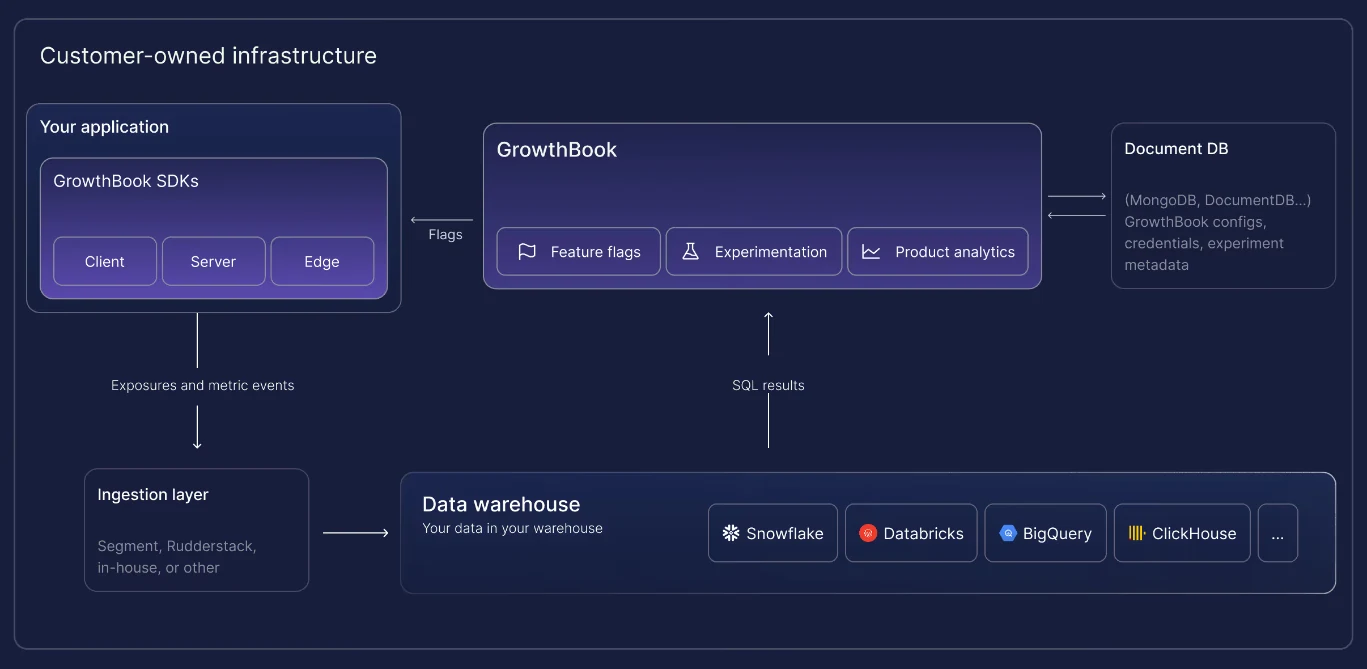
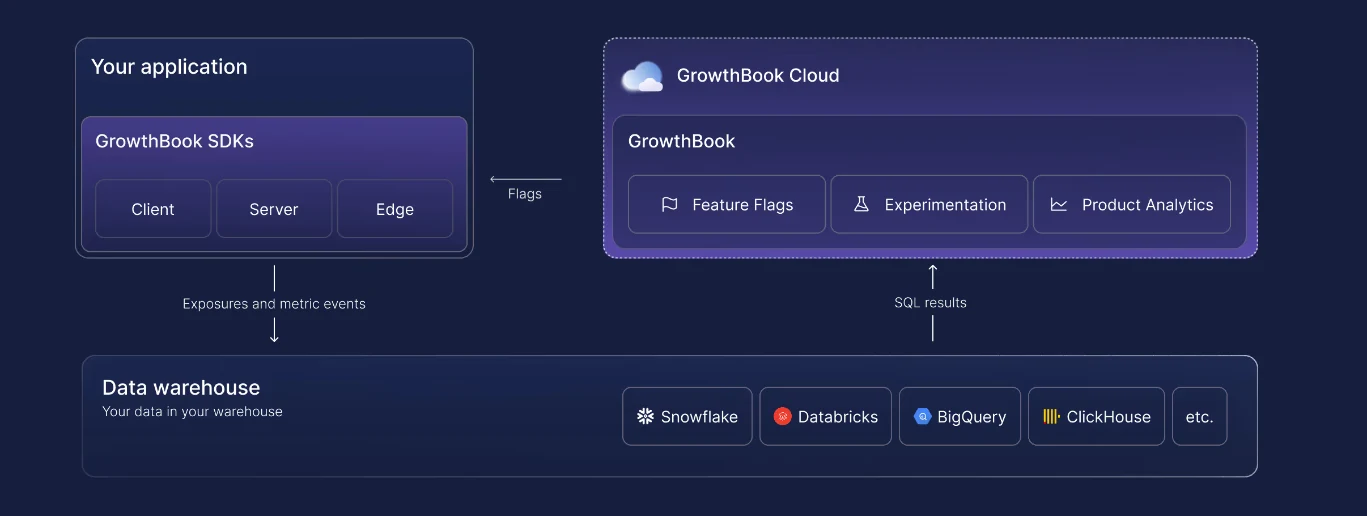
- GrowthBook Cloud: You can connect your own warehouse, which can sit in the EU or the US. The platform reads from it with read-only access and stores aggregate results. If you’d rather not run the warehouse yourself, you can use GrowthBook’s Managed Warehouse and provision it in the EU.
6. Erasure that runs in your own systems
When a user asks you to delete their data under Article 17, you need to find every copy and remove it. However, if your feature flagging vendor holds this data, you might need to file a support ticket and wait for their team to do it. It’s simpler to choose a platform where the vendor never holds user-level data, so erasure is something you run yourself, with no copies left behind at a vendor.
Since GrowthBook is warehouse-native, it connects to your warehouse and runs its analysis there. GrowthBook only stores aggregate numbers, so user-level data lives in three places outside of the platform’s control: your data warehouse, the user's browser, and your sticky bucketing store.
If you’ve built Saved Groups from lists of user IDs, those live in GrowthBook, so remove the user from them too.
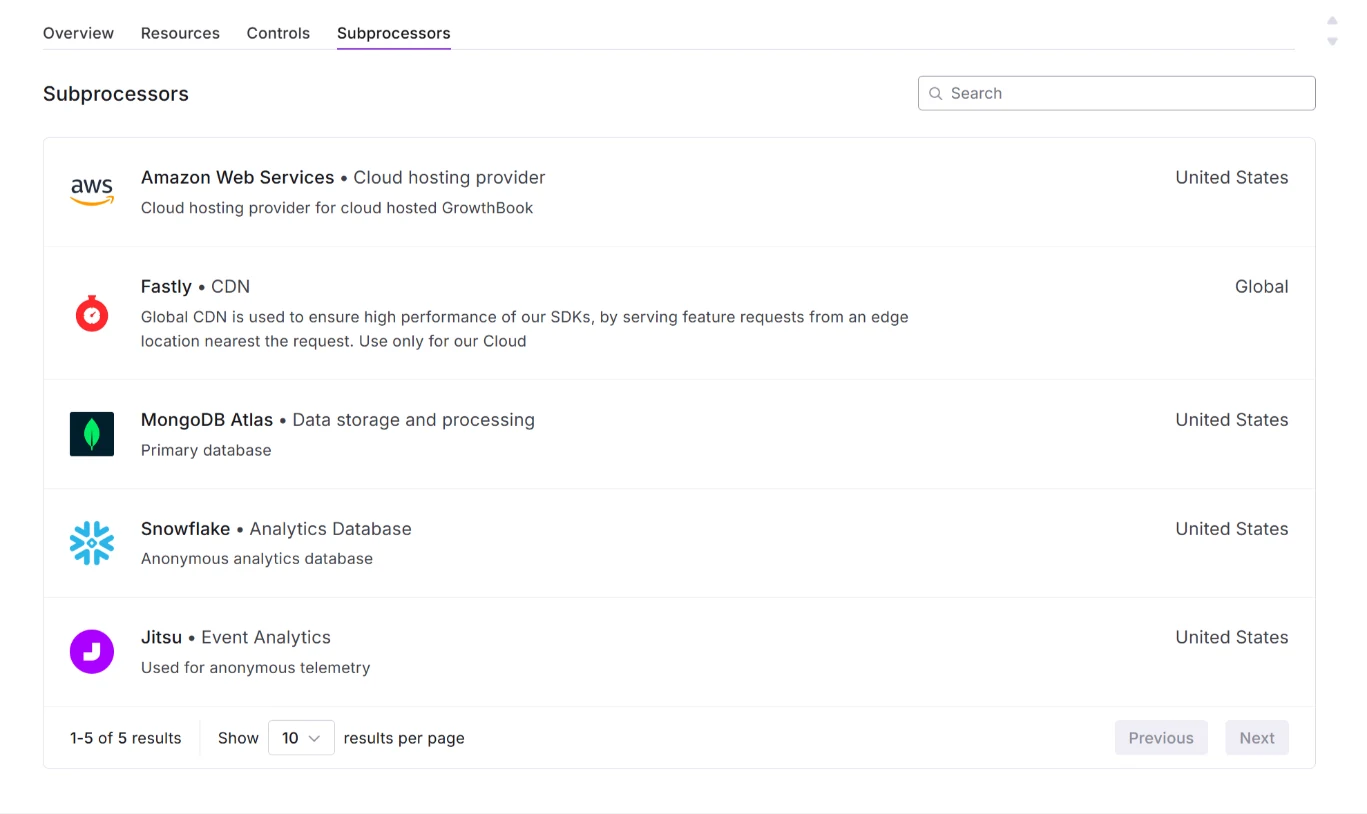
7. A public DPA and subprocessor list
If your flag vendor processes personal data on your behalf, you need a contract that sets out what they can do with it along with information on their subprocessors. Your vendor should make this available so your DPO can review it before you sign anything.
For instance, GrowthBook has a publicly available Data Protection Addendum (DPA) as part of its customer agreement, and its subprocessor list is public and dated. You get advance notice (30 days) of any changes and the right to object.
If there’s a breach that affects your data, GrowthBook will notify you within the period set in the DPA.
GDPR compliance checklist for feature flagging tools
Typically, a Data Protection Officer (DPO) is the person who’s responsible for overseeing GDPR compliance in your organization. They’ll want to review evidence that your entire infrastructure, including feature flags, works as intended.
A 2025 study of more than 250,000 websites across 31 European countries found that 67% used a consent banner, but only 15% of all these sites met even a minimal definition of compliance. They failed mostly because they didn’t give their users a way to reject cookies.
If your feature flags store an ID behind a consent banner, have the following evidence ready:
| What they’ll ask about | What to produce | Where it’s required | Where it lives |
| Lawful basis | The lawful basis for each category of flag: legitimate interests for operational flags like kill switches, and consent for experiments that measure behavior | Art. 6 | Your records of processing and your privacy notice |
| Consent wiring | The code that connects your consent manager to the SDK, tested for both acceptance and withdrawal | Art. 7, ePrivacy Art. 5(3) | Your codebase and test suite |
| Deferred persistence | Proof that the SDK doesn’t write an ID to the device before consent | ePrivacy Art. 5(3) | Your SDK configuration |
| Minimized attributes | A list of the attributes you pass to the SDK and why each one is needed | Art. 5(1)(c) | Your SDK setup and your GrowthBook attribute settings |
| Records of processing | An entry for your feature flag system that covers what it processes and who can access it, including any request logs your vendor keeps | Art. 30 | Your records of processing |
| DPIA screening | A recorded decision on whether your flag setup needs a data protection impact assessment | Art. 35 | Your privacy documentation |
| Retention | How long your cookie and stored assignments last, and how long events stay in your warehouse | Art. 5(1)(e) | Your SDK configuration and your data stores |
| Vendor contract | A signed or incorporated DPA and a current subprocessor list | Art. 28 | Your signed DPA and the vendor’s subprocessor page |
| Transfer mechanism | How any data leaving the EU is covered, like SCCs, the EU-US Data Privacy Framework, or an EU data region | Chapter V | Your vendor’s DPA and your deployment setup |
| Erasure process | A completed test deletion, from request to confirmation | Art. 17 | Your warehouse and your privacy records |
| Privacy notice | Your public notice explaining what your feature flags and experiments collect, and how users can opt out | Art. 13 | Your privacy policy |
Keep an inventory of your flags too, because an old flag can still write an identifier or pass an attribute you may no longer use, and it’s a compliance risk until you remove it.
Walk through your compliance setup
Book a demo to review deployment options, data residency and our DPA with the GrowthBook team before your DPO signs off.
Book a Demo
How GrowthBook supports GDPR-compliant feature flags
Whether your organization stays compliant with GDPR comes down to understanding two things:
- How to decide which version a user sees.
- If you’re storing an ID on the user’s device during this process.
These factors determine which directives or articles apply to you and how you should show evidence of compliance. Ideally, your feature flagging platform lets you handle that separately, with flags running on page load first while your consent banner decides what gets stored. The page renders straight away, and you only have to wait for the user to accept cookies.
GrowthBook was built for that. It keeps your users’ data inside your own infrastructure and gives you control over anything that touches the user’s device. You have to write the code to connect your consent manager or integrate it via webhooks. Once you do, you get:
- Deferred cookie persistence across GrowthBook’s browser SDKs and Edge App, so the ID only gets written once your consent manager says yes.
- Local evaluation that keeps targeting attributes inside your app instead of sending them to GrowthBook.
- A tracking callback you write, so events don’t leave your page unless your code sends them.
- Secure attributes and remote evaluation that keep sensitive targeting values out of the browser payload.
- Warehouse-native analytics that run in your own warehouse, so GrowthBook stores only aggregated results and user-level data stays where you can delete it.
- Self-hosting and an EU region deployment for teams that need to keep user data in the EU or take GrowthBook out of the processor question entirely.
- Kill switches and an immutable audit log to give you the ability to shut off a feature that mishandles data and show exactly when you did.
Regulated companies choose GrowthBook to handle sensitive data for this reason. And since we’re SOC 2 Type II attested and built to support GDPR, COPPA, CCPA, and HIPAA compliance, you get the data-handling controls you need in one platform.
Interested in seeing how GrowthBook works? You can:
- Review our DPA and security documentation by visiting our Trust Center.
- See how the platform works by booking a live demo or getting started today for free.

Related articles
Ready to ship faster?
No credit card required. Start with feature flags, experimentation, and product analytics — free.