

8 ways to use feature flags to reduce risk in deployment
.avif)
You’re deploying more often than you were a year ago. And there’s a good chance your team has already shipped AI-assisted code into production. Despite these changes, your deployment pipeline still works the same way it always has. It either goes out, or it doesn’t. That’s where the risk is.
The 2025 DORA report found that AI adoption increases throughput and stability. As you ship more code, the surface area for mistakes increases, too. And recovery just takes longer when you don’t have fallback systems or derisking mechanisms in place.
That is the same operating problem behind JPMorgan Chase's experimentation in the age of AI: AI changes shipping speed, but teams still need measurement systems that catch bad changes before they scale.

However, feature flags change the unit of risk. Instead of every deployment being an all-or-nothing bet, you control who sees what, when, and how fast—and reverse it if needed.
In this article, we’ll walk you through different ways how feature flags can reduce risk during deployment.
1. Decouple deployment from release
Instead of merging code and exposing it to users in the same step, you can use feature flags to decouple those steps. Just wrap the feature with a flag, and deploy code to production with the flag off. Once you confirm everything looks good, you can release the feature independently. The operational impact is on your recovery time. A rollback means flipping the flag off, not undoing your work entirely.
If something breaks, you can actually investigate the specific issue and reverse the deployment immediately. Even companies like Amazon Web Services (AWS) operate this way. They deploy features weeks in advance but hide them behind flags. When executives announce the features on stage, their engineers flip a flag to make them available. As a result, nothing risky happens during a keynote.
This use case requires your flag platform to maintain an independent state per environment, so a flag stays off in production while it’s enabled in staging.
Platforms like GrowthBook let you use feature flags for all of this and more, free with unlimited environments on every plan. Each environment gets its own API key and independent flag states, so the separation between ‘deployed’ and ‘released’ is enforced at the infrastructure level.

2. Kill switches
Typically, if you have to roll back a deployment, you need to reverse the entire deployment. It takes more time, more coordination, and adds another layer of risk to the issue you’re dealing with.
In fact, DORA’s report found that 56.5% of engineering teams need between 1 and 7 days to recover from failed deployments. Only 21.2% recover within an hour. If you want to be a part of the latter group, you need to use kill switches.

Create a kill switch by wiring a pre-configured feature flag into a feature before it goes live. And when something goes wrong, you just have to flip it off to kill the feature. In 2024, CrowdStrike experienced a global outage when a faulty Falcon sensor update shipped directly to endpoints. It bricked 8.5 million Windows machines, and the recovery had to be done manually for each device.
If CrowdStrike used a staged rollout process and had a kill switch in place, it could’ve dramatically reduced the blast radius of this update.
The speed of a kill switch depends on how fast your flag platform evaluates state changes. If evaluation requires a server round-trip, you’re adding latency to your recovery window. So, choose a feature flagging platform that evaluates flags in milliseconds to enable almost immediate responses. In GrowthBook, kill switches work instantly because flag evaluation happens locally in the SDK.
3. Progressive rollouts
An all-or-nothing release means that a single bad deployment immediately affects 100% of your user base. And the CrowdStrike incident is just one example. That’s why you should use feature flags for progressive or staged rollouts instead.
Instead of releasing to everyone at once, you start with a small percentage of users and expand in increments based on what you observe. This directly reduces the severity of your change failures over time.
The rollout sequence typically looks something like this:
- 5–10%: Validate core functionality and watch for error rate spikes
- 25%: Confirm performance holds under moderate load
- 50–75%: Monitor business metrics like conversion and latency at scale
- 100%: Full release once confidence is established at each stage
Automating the ramp requires two things: deterministic evaluation so users don’t flip between variants mid-rollout, and metric-aware expansion so the rollout doesn’t advance past a stage it shouldn’t. GrowthBook offers both through Safe Rollouts where it automates this process. So, the same user always sees the same variant throughout the rollout. You can monitor results at each stage—and only ramp it up if the observability thresholds have been met.

4. Attribute-based targeting
Progressive rollouts control how many users see a new feature. But it distributes the exposure randomly. That means your highest-value customer could experience the buggy version of your release. You can use attribute-based targeting to avoid this.
Instead of random assignment, you control which users see the feature based on specific properties. For example:
- Organization
- Subscription tier
- Geography
- Device type
- Internal employee status
The impact is similar to progressive rollouts, where you’re reducing the severity of your change failure rate.
Also, this kind of targeting requires flexible rule logic where you can combine attributes with AND/OR conditions and reuse audience definitions across flags without recreating them every time. You can use GrowthBook to do this, as it supports AND/OR rule logic for targeting and Saved Groups for reusable segments like “beta users” or “enterprise tier.” Since it uses deterministic hashing, you can keep the experience consistent based on the attributes you choose.

5. Dark launches
You deploy in staging so that you can dot all your I’s and cross all your T’s. But in reality, you can’t accurately replicate production because the data volume or traffic shapes aren’t the same.
Dark launches resolve this issue by routing real production traffic through a new code path while discarding the output. None of your users sees the feature or experiences any change. But your engineers do see how the new code behaves under real-world conditions. From an operational perspective, dark launches improve your change failure rate by catching regressions before release. You’ll still see the failures, but your users won’t.
Let’s say you’re launching a new AI feature. You can route it to a small percentage of your traffic. Then compare guardrail metrics, such as latency or error rate, against the existing path. You can discard the output and just use the results to iterate from there.
It’s useful for database migrations, infrastructure swaps, algorithm changes, and new API integrations.
6. Guardrail metrics and automated rollback
Even with progressive rollouts, someone still has to watch the dashboard—unless you’re using a platform that alerts you automatically. But that’s not the case for most engineering teams. By the time you notice something, the damage is done.
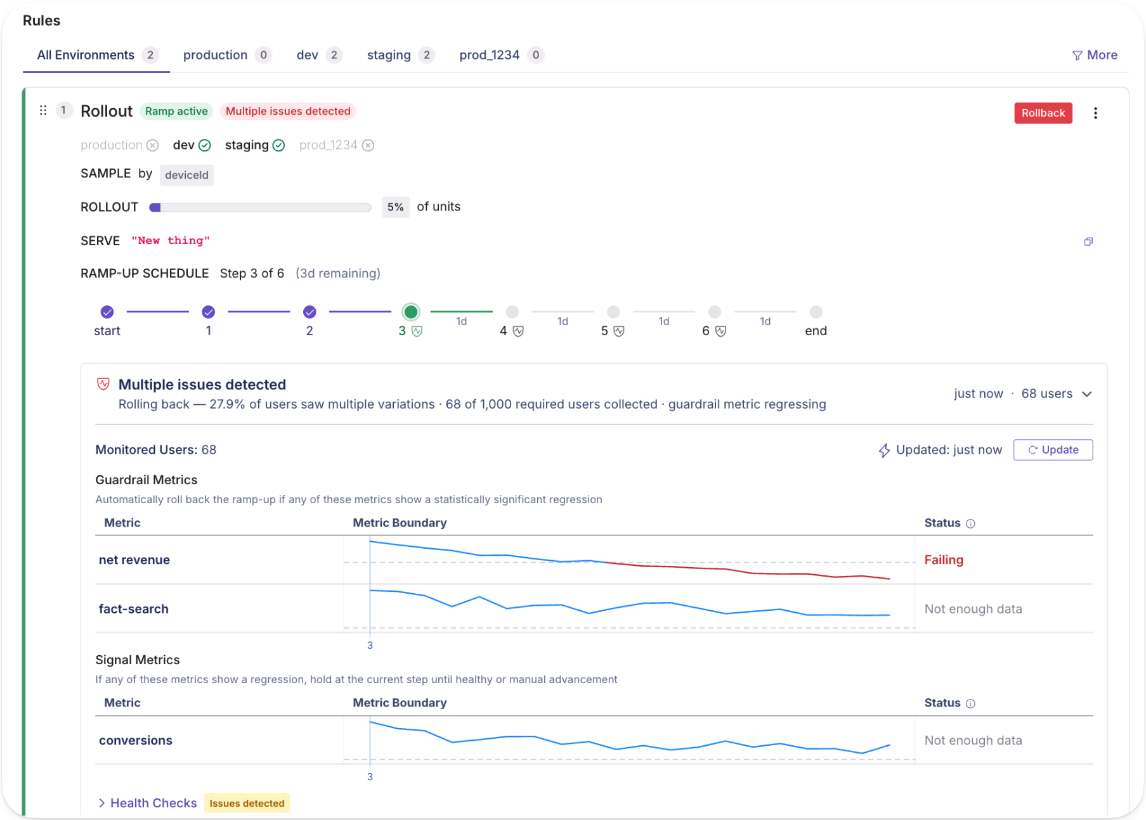
Guardrail metrics and automated rollback remove that bottleneck. Within GrowthBook, you can define thresholds that are continuously monitored during the rollout. If the threshold is breached, you can expect the rollout to reverse automatically. It reduces the severity of change failures and your mean time to recovery for each incident.
GrowthBook uses sequential testing and one-sided confidence intervals to monitor guardrails continuously. And it’s warehouse-native, so you’re checking against the same data definitions your analytics team already trusts.
The metrics you choose depend on the feature or deployment, but here are a few examples:
- Error rate on affected endpoints (e.g., rollback if error rate exceeds 2% in the treatment group)
- p99 latency on critical paths (e.g., rollback if checkout latency exceeds 800ms)
- Conversion rate on revenue-critical flows (e.g., rollback if purchase conversion drops below baseline)
7. Multi-service release coordination
It’s normal for a single feature to span multiple services in a microservice architecture. But that also makes deployments a messy process.
Let’s say you deploy a new checkout feature to the cart service, but the payment service still runs the old version. You end up in a partially live state, and you can’t debug without coordinating it across multiple teams and repositories. With feature flags, you remove that intermediate state.
You can deploy all the services with the flag off and verify the deployment independently. When everything works well, you can activate the feature across all services together by flipping the flag on. As a result, you can reduce your chance of failure rate—and improve recovery time if there’s an incident.
GrowthBook’s REST API lets you verify that your services are ready before activating the flag programmatically. So, the release is atomic across your entire system instead of a staggered manual process.
8. Flag-based circuit breakers
Failed deployments are more the norm than the exception. And that’s by design. If you don’t have the right measures in place to derisk a deployment, it’s expected. And since every deployment has dependencies, it only runs through your entire infrastructure.
A flag-based circuit breaker gives you a pre-built fallback path gated by a feature flag. When an external dependency starts failing, you flip the flag to activate the fallback. It could be a kill switch or even something as simple as cached data. It doesn’t always prevent a dependency failure, but it does contain the blast radius of an incident.
In October 2025, AWS DynamoDB experienced an outage in the US due to a DNS race condition that affected several other services. Because there were no circuit breakers in place, every subsequent system failed—and was down for 15 hours. If its engineering team had activated cached fallbacks or degraded modes, it would’ve been a minor incident.

With GrowthBook, it’s a simple fix. You can build a fallback path and gate it behind a flag. Here’s how:
- Create a boolean flag set to off by default, as this serves as the fallback path.
- Your application code checks the flag. When it’s off, the primary integration runs, but when it’s on, it activates the fallback.
- When a dependency degrades, you flip the flag manually in the dashboard or programmatically via the REST API.
- The SDK evaluates the new state locally, so the switch propagates quickly.
Reduce deployment risk with feature flags
You’re shipping more code than you were a year ago, and if the Cortex 2026 benchmark is any indication, you’re nowhere close to slowing down. That also means the risk of incidents increases over time.
The report found that pull requests (PRs) per author have increased 20% YoY, and incidents per PR rose to 23.5%. As more code goes out the door, failure rates are climbing.
Your risk model needs to adapt to tackle this. Feature flags give you the controls to maintain deployment speed while derisking deployments. It lets you expose a feature with more intention, so you’re never betting 100% of your user base at once. If something breaks (and it usually does), you can catch those regressions and roll back immediately.
If you want to test out feature flags for any of these use cases, why not try GrowthBook? It gives you feature flags, Safe Rollouts, attribute targeting, and a full REST API with unlimited environments, flags, and SDK connections.
You can get started for free or book a demo to see how it can work for you, too.
Related articles

Ready to ship faster?
No credit card required. Start with feature flags, experimentation, and product analytics — free.

