

Client-side feature flagging: advantages and pitfalls

Feature flags are a powerful tool for building products that unlock significant advantages. With feature flagging, you can do staged rollouts, focused releases to specific user groups, remote configuration, A/B testing, and quickly turn off any feature if required. All of these benefits apply regardless of where you are running your feature flags. However, when using feature flags on the client side of a website/application, there are technical aspects to consider.
Local vs. Remote Configuration for Feature Flags: Pros and Cons
When using feature flags with a JavaScript SDK, there are a few ways these systems can work. Features can be sent down to the SDK for local evaluation, or the SDK can make a network call to a service with a user attribute and have that service return a list of feature states for that user. This latter way is called remote evaluation. There are pros and cons to both local evaluation and remote evaluation.
Using local evaluation for feature flags
With local evaluation, the feature flagging payload can come from anywhere, including a network call, a cache server, or even served statically from the file itself. One advantage of this is that the payload is the same for all users, so it can be cached. As a result, feature flags evaluated with local evaluation are much faster than remote evaluations, even if a network call is required.
The downside of local evaluation is that the rules must be transferred to the client running your SDK—in this case, the browser. As a result, you have to be careful not to disclose sensitive data, such as your targeting information.
GrowthBook has some built-in ways to help you avoid leaking information.
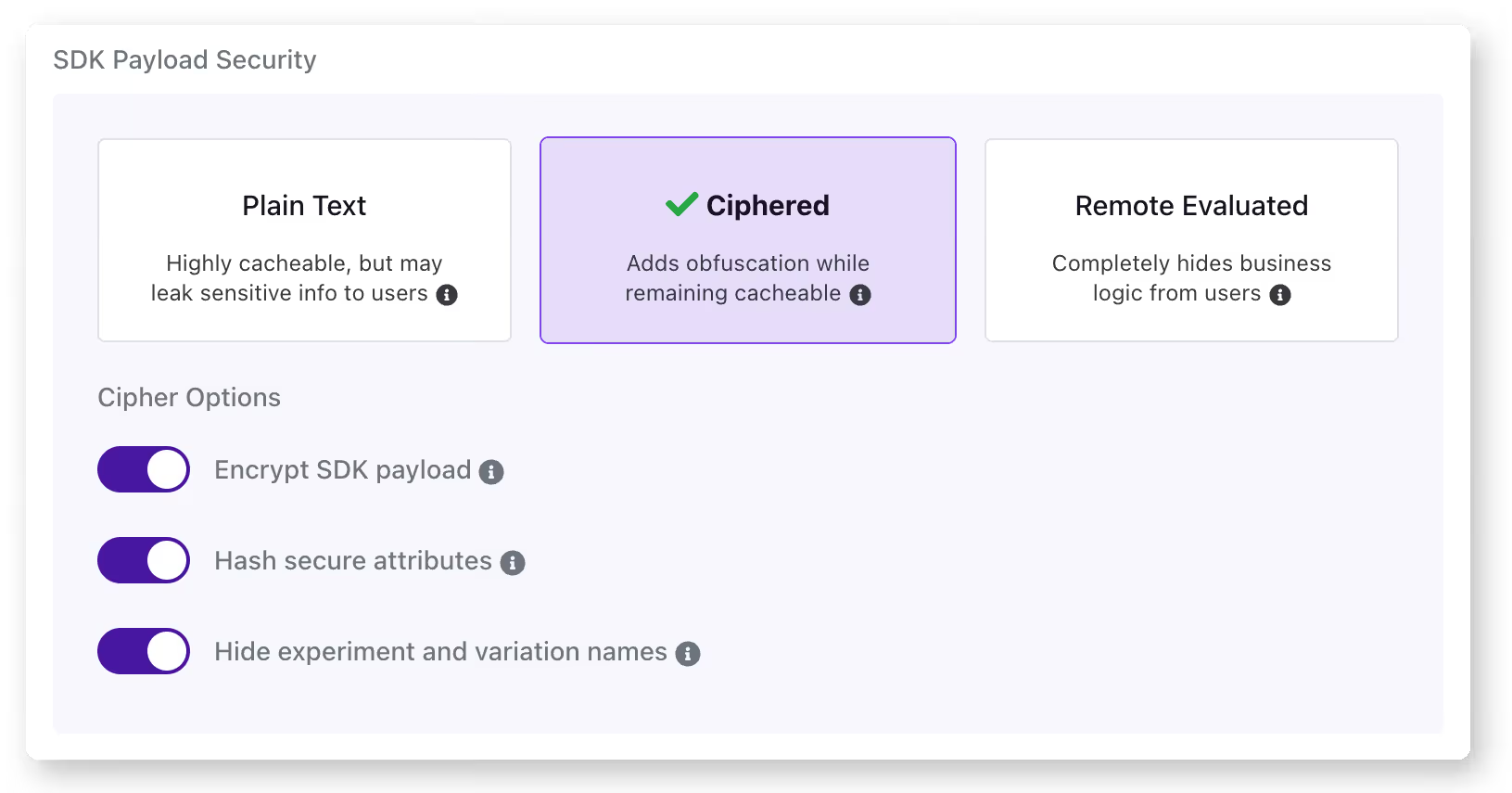
Payload encryption: The entire payload will be encrypted before being sent to the browser. This will prevent most people from seeing the payload's contents, and anyone inspecting the network request will not see anything meaningful. However, as the SDK on the client is decrypting, the contents can be visible with sufficient effort. You can learn more about setting this up with GrowthBook.
Hash secure attributes: With this option, you can hash the attribute values marked as 'secure' in the GrowthBook UI. The targeting conditions referring to these attributes will be anonymized via SHA-256 hashing. Values will be matched based on their hashed results, so the actual values are not visible. Hashed values, however, are not a perfect solution as they can be brute forced with enough effort and time, and they make targeting with regex impractical. When evaluating feature flags in a public or insecure environment (such as a browser), hashing provides an additional layer of security through obfuscation. You can read more about setting this up in GrowthBook.
Hiding experiment and variant names: With this option selected, users will not be able to see helpful experiment names or variant names. This helps remove any context around the features or experiments you're adjusting.
Using these settings, you can help protect sensitive information that you may inadvertently expose to the browser. For the highest level of protection, however, it's best not to pass that information to the browser at all. You can achieve this by not just targeting based on sensitive information, or for cases where this cannot be avoided, you can use remote evaluation.
Using remote evaluation for feature flags
With remote evaluation, the SDK passes a user identifier to a service to determine which features to enable for that user. The advantage is that the rules around which features are exposed are completely hidden from the browser. It also enables you to use more dynamic lookups based on that user.
Using remote evaluation requires a network call and is, therefore, slower than local evaluations. If your site or application requires feature flag states to show correctly for this user, it can cause moments where the default cases are shown. Finally, setting up a remote evaluation is slightly more complex than using local evaluation.
The remote evaluation server can be any endpoint that returns the state. To make this easier to implement, GrowthBook supports remote evaluation via our proxy server. You can also use an edge worker on the CDN for this.
Summary
Using client-side feature flags adds valuable functionality to your site or application. Hopefully, this article helps you understand the advantages and pitfalls of client-side flagging.
Related articles


Ready to ship faster?
No credit card required. Start with feature flags, experimentation, and product analytics — free.

