The Uplift Blog

Subscribe
Thank you! Your submission has been received!
Oops! Something went wrong while submitting the form.
SQL Explorer: Time to Be the Marco Polo of Your Data
Analytics
Product Updates
2.3

SQL Explorer: Time to Be the Marco Polo of Your Data

Jul 3, 2025
x
min read
Michael and Ryan explore SQL Explorer

Sometimes you need to scratch your own itch. And, when you do, it’s sooo good.

That’s what happened with our newest feature, SQL Explorer.

We found ourselves in GrowthBook always needing to run some kind of basic SQL query like checking on feature usage. It meant having to open another tool (Mode in our case) and running the query there, getting the data, and then heading back to GrowthBook. That context switching is tedious, and, if you’re not careful, you’ll find yourself in a totally different tab, reading AITAH posts.

Well, we just got a whole lot more time back because you can now run those queries right in GrowthBook with our new SQL Explorer. Its adoption has already been through the roof, so if you’re not using it, you’re likely missing out on one of our most useful new features. It’s even got us thinking: “Do we need Mode any more?”

Here are 3 common use cases to help you get started.

1. Not Like the Other Events

It’s common to have an events table where all your events are unceremoniously dumped. It could be purchase, add-to-cart, sign-up, check-out-started, and so on. But it’s hard to know just looking at the table schema or first few rows what’s really available.

With SQL Explorer, you can just ask:

SELECT DISTINCT
  event_name
FROM
  db.public.events
LIMIT
  1000

Boom! Every unique event name. Save the query and return to it anytime to remind yourself of all your events, cherishing each of them as you do.

SQL query results showing four unique event types: add_to_cart, purchase, signup, and product_view.
SQL Explorer results showing four distinct event types: add_to_cart, purchase, signup, and product_view

2. The Business Intelligence Deep Dive

Bob from Marketing asked Sally from Product to ask you how conversion rates are doing in Japan compared to your other markets. Lucky for them, you were already checking on an experiment in GrowthBook, so you pulled up SQL Explorer and ran this query:

SELECT 
    country,
    COUNT(DISTINCT user_id) as unique_users,
    COUNT(CASE WHEN event_name = 'purchase' THEN 1 END) as purchases,
    ROUND(AVG(CASE WHEN event_name = 'purchase' THEN amount END)::numeric, 2) as avg_purchase_amount,
    ROUND(
        (COUNT(CASE WHEN event_name = 'purchase' THEN 1 END) * 100.0 / 
        COUNT(DISTINCT user_id))::numeric, 2
    ) as conversion_rate_percent
FROM events 
WHERE timestamp >= CURRENT_DATE - INTERVAL '30 days'
GROUP BY country
HAVING COUNT(DISTINCT user_id) > 100
ORDER BY conversion_rate_percent DESC;

You see that conversion rates are consistent across your regions, and because Bob and Sally are part of your GrowthBook org, you can just share the query directly with them, so they can investigate the data firsthand.

Table displaying conversion rates and purchase data by country, with UK showing highest conversion at 25.25%.
SQL Explorer table showing conversion rates by country with UK leading at 25.25% over the past 30 days

There’s no doubt Bob will invite you to his BBQ this year.

3. Look at This Graph

Rows of data are fine. Who doesn’t love some good rows of data? But sometimes it’s nice to have a chart, too.

With the SQL Explorer, it’s easy to visualize any query as a bar, line, area, or scatter graph.

Imagine you want to see your funnel events from the past 30 days laid out over a gorgeous line graph. You start with the SQL:

SELECT
  DATE (timestamp) as date,
  event_name,
  COUNT(*) as event_count
FROM
  events
WHERE
  timestamp >= NOW() - INTERVAL '14 days'
  AND event_name IS NOT NULL
GROUP BY
  DATE (timestamp),
  event_name
ORDER BY
  date,
  event_name
LIMIT
  1000

Then, add the visualization. Here we choose a Line graph with the date as the X axis and event_count as Y. Finally, we set event_name as the dimension.

And now:

Line chart showing funnel events over time with product views, signups, purchases, and add-to-cart events tracked daily
Line chart from SQL Explorer showing product views, signups, purchases, and add-to-cart events tracked daily over 14 days

Now you’ve got a sick multi-line chart that immediately shows you if that checkout flow tweak last Tuesday did anything. It did! It made things worse.

The best part? Again, you can save this query and visualization, rerun it whenever, and Slack the link to your team. No more screenshots, Loom gloom, or Phil asking for more details on the query.

Phil, now you can just check out the query yourself, bud.

Time to Explore

Your data is already accessible within GrowthBook. Why not explore it? You no longer have to fire up 15 different tools to answer some basic questions about your data.

Whether you're settling office debates about conversion rates, proving that yes, your latest feature actually is being used, or creating visualizations that make you look like a data wizard in Monday's standup, SQL Explorer has your back.

So go ahead, scratch some itches. Your future self (and Bob's BBQ guest list) will thank you.

SQL Explorer showing a saved query with visualization ready to share with teammates
GrowthBook Launch Month - Week 4
Releases
Product Updates
4.0

GrowthBook Launch Month - Week 4

Jun 25, 2025
x
min read

Launch month continues with our Managed Warehouse product and feature flag usage analytics.

Managed Warehouse

GrowthBook Managed Warehouse architecture showing real-time event ingestion from SDK into ClickHouse

We’ve talked to thousands of companies and seen our fair share of data warehouse and event-tracking setups. We’ve noticed 3 consistent problems:

  1. They are a LOT of work to set up and maintain, especially for companies without dedicated data engineers.  Google Analytics + BigQuery is the most common one we see, and that takes over 40 steps to configure (yes, we counted).
  2. Data is often refreshed on a schedule instead of in real-time. You don’t want to wait 24 hours to find out a new feature or experiment is killing your metrics.
  3. Pricing and performance are optimized for batch workloads. Refreshing experiment results frequently or exploring your data can become slow and costly.

This week, we’re excited to launch our new Managed Warehouse product on GrowthBook Cloud. We set out to solve all of these issues, and we’re super happy with the results:

  1. One-click setup and zero maintenance. Doesn’t get much easier than that!
  2. Data arrives within seconds, letting you quickly detect issues.
  3. Queries are crazy fast and free (only pay for ingesting the data, not querying it)

Under the hood, this is powered by ClickHouse, an open-source database optimized for fast analytics at scale. You still get raw SQL access and all the other benefits of a true warehouse-native platform, just without the cost.

The first 2 million tracked events each month are free for Pro users, and we have super affordable usage-based pricing beyond that.

Feature Usage Analytics

GrowthBook Feature Usage Analytics showing live flag evaluation counts by assigned value over the past 15 minutes

This week, we’re also launching Feature Usage Analytics, which is designed to leverage many of the benefits of the new Managed Warehouse.

For each feature flag, you can see how often it's been evaluated, which values are being served, which rules are being hit, and more.  This is a game-changer for feature flag management and makes debugging issues so much faster.  As an added benefit, this helps you stay on top of tech debt by highlighting stale flags that are no longer in use.

So how does it work?  The GrowthBook SDK sends an event to the Managed Warehouse every time a feature flag is evaluated in your app. This usage data is then aggregated and displayed within seconds.

For now, this is only available for the new Managed Warehouse on GrowthBook Cloud, but we plan to open it up to everyone eventually.  If you are interested in this, but are self-hosting (or already have a data warehouse), let us know, and we can keep you in the loop!

I Started Talking to My Experiments with MCP. Here's What Happened
Experiments
AI
Feature Flags

I Started Talking to My Experiments with MCP. Here's What Happened

Jun 24, 2025
x
min read

AI is a terrible experimentation partner. It agrees with everything, suggests obvious ideas, and can’t do math. It’s an obsequious yes-man who assures you that changing the checkout button color will increase ARR by 100m.

And yet, a recent experience has me convinced it will usher in a fundamental shift in how we interact with our experimentation platforms.

Moment de Sandwich

Full disclosure: I work for GrowthBook, an experimentation platform, but I don't run many experiments myself. My relationship with experimentation is like a chef who designs kitchens but doesn't cook—I build the tools, but I'm not in the trenches using them.

So when I was testing our new MCP Server (more on this shortly) with a sample data set, I wasn’t expecting any revelations. I was just doing QA, sandwich in one hand, typing into Claude Desktop with the other: “How are my experiments doing?”

Within seconds, I got back a breakdown of my last 100 experiments, sorted into winners, losers, what’s working, what’s not, and some helpful insights. For example, AI noticed November experiments tanked and connected it to holiday shopping behavior. When I asked what to test next, it suggested building on our mobile checkout wins. Nothing groundbreaking, but not terrible advice either.

Screenshot of Claude Desktop analyzing GrowthBook experiments, showing a summary of 30+ completed experiments categorized as winners, losers, and inconclusive results, with insights about November 2024 performance and mobile UX improvements
Claude Desktop analyzing GrowthBook experiments via MCP, showing winners, losers, and insights from 30+ completed experiments

Watching this all unfold in a chat window, though, was a revelation. There wasn’t any navigation, clicking, form fields, or context switching. It made me question the expectation that experiments need to come to the platform. What if the platform came to them instead?

MCP Makes It Possible

You can’t just go to Claude or ChatGPT or any AI tool, ask how your experimentation program is doing, and expect an answer. It doesn’t have that information by default (and nor should it). What made it possible was the Model Context Protocol, or MCP.

The engineering world has been abuzz about MCP, which is an open standard for connecting AI tools to the “systems where data lives.” This phrase comes from Anthropic, which developed the standard and announced it in late November 2024. More concretely and in the context of this article, MCP makes it easy to connect AI tools like VS Code, Cursor, or Claude Desktop to your experimentation platform and the data that powers it.

I was able to ask nonchalantly about experiments because I had added GrowthBook’s MCP Server to Claude Desktop, which let the bot fetch my latest experiments and summarize the results. From there, using the same chat window, I could follow up with any question I wanted (even those I might be too self-conscious to ask our team’s data scientist).

But the party doesn’t stop there, especially when the MCP server is used in a code editor. Compare these processes for setting up a feature flag with a targeting condition:

  • The old way: Open GrowthBook, create a flag, fill fields, add targeting rules (eight clicks, three form fields). Switch to the code editor. Add flag. Forget the flag name. Switch back. Check the docs. Update the code again.
  • With MCP: Highlight code. Type: “Create a boolean flag with a force rule where users from France get false.” Done. Flag created, code updated, and no context switching required.

But MCP isn’t the death knell for experimentation platforms (which is great for me, as someone who works for one). Rather, it’s their evolution from rigid applications to fluid infrastructure. Sometimes you want a conversation, but other times it’s a dashboard or precise dropdowns with every option visible. The breakthrough is accessing your experimentation platform in whatever mode fits the moment.

What Changes When Platforms Become Fluid

What is it about experimentation via chat that’s so compelling? It feels natural. Julie Zhuo, former VP of Design at Facebook, explains that it combines two interactions every human already knows—speaking naturally (since age two) and texting (25 billion messages sent daily). No learning curve or docs to read. Just describe what you want.

This matters more than it seems. Every dropdown menu, config screen, and nested navigation is a micro-barrier between thought and action. Conversational interfaces remove that friction entirely.

This opens up the possibility of experimentation in media res. Customer interview reveals a pain point? "Create an experiment testing whether removing this friction improves activation." Done, before the meeting ends.

When your platform is ambient—available through conversation, IDE, Slack, wherever—the gap between conception and execution becomes negligible.

Reality Check

And yet. AI is still a terrible experimentation partner:

  1. It's too agreeable. It'll encourage any idea, with the goal of pleasing you rather than improving your experimentation program. AI optimizes for your satisfaction, not your success rate.
  2. Precision is optional. During a breakout session at Experimentation Island 2025 on experimentation and AI, there was a consensus: AI has many uses in experimentation, but analysis isn't one of them. It often calculates based on vibes and shows its work post hoc, which it generates purely to please you (see point 1).
  3. Complex operations overwhelm it. We tried adding full experiment creation to the GrowthBook MCP Server. It failed. Too many inputs (randomization unit, metrics, variants, flags, environments) in specific sequences. The AI would skip steps or force you to type every parameter, which defeats the purpose.

But like the first iPhone shipping without features we now deem indispensable (copy and paste, app store, video), these are temporary limitations. Prompts can be engineered, analyses can be improved, and MCP has been evolving quickly. (They recently introduced “elicitations” for handling complex multi-step inputs like those involved in experiment creation.)

The Platform Paradox

This isn’t just about making experimentation easier (though it does). It’s about changing when and how experimentation happens.

Right now, experimentation is something you do at your desk, in your platform, during "experiment planning time." Tomorrow, it'll be woven into every moment where product decisions happen. Code reviews, customer calls, shower thoughts—wherever ideas emerge, your experimentation platform will be there, in whatever form you need.

Ironically, as experimentation platforms become more fluid, they also become more essential.

When you can create tests from anywhere, you need a rock-solid infrastructure ensuring those tests are configured correctly and run flawlessly. When anyone can launch an experiment through chat, you need sophisticated governance and guardrails. The possibility of such fluid interactions means that the platform actually needs to do more. It’s the paradox of invisible infrastructure—the more seamless it is to use, the more sophisticated it must be underneath.

Simpsons meme showing Homer in underwear labeled 'EXPERIMENT WITH CONVERSATIONAL AI' while muscular Homer below is labeled 'THE PLATFORM HOLDING IT ALL TOGETHER', illustrating the paradox of simple interfaces requiring complex infrastructure
Meme illustrating the paradox that fluid conversational AI interfaces require increasingly sophisticated platform infrastructure underneath

The future isn't conversational AI replacing experimentation platforms. It's experimentation platforms becoming fluid enough to meet us wherever we are—through conversation when we're exploring, through visualizations when we're analyzing, through precise controls when we're configuring.

We get a preview of this future with MCP. Yes, it’s imperfect, occasionally frustrating, and limited in some crucial ways, but it’s also genuinely magical when it works. See what I mean by trying out our MCP Server with any of your favorite AI tools. Create flags with a single sentence or check experiments while having a sandwich. Ask the crazy questions you've been holding back. Feel better about yourself after hearing some of AI's god-awful test ideas.

When we build our platform, we obsess over features, workflows, and user journeys. We operate on the (admittedly reasonable) supposition that users need to come to the platform to experiment. My sandwich moment showed me a different foundation, one where the platform comes to you, so experimentation happens without the weight of “doing experimentation.”

Install GrowthBook MCP Server and experience it yourself.

GrowthBook Launch Month - Week 3
Releases
Product Updates
4.0

GrowthBook Launch Month - Week 3

Jun 17, 2025
x
min read

For week 3 of our Launch Month, we’re excited to announce the SQL Explorer!

GrowthBook SQL Explorer shows a built-in SQL editor with data visualization and saved results inside the platform

At GrowthBook, we love dogfooding our product (most of our launches this month started behind feature flags). Along the way, we kept running into a common frustration: answering simple data questions meant jumping into separate tools like Looker, Mode, or Tableau—just to write some quick SQL or generate a basic chart.

All of that context switching adds up, which is why we built SQL Explorer—a lightweight, built-in SQL editor that lets you query your data, create visualizations, and save results right inside of GrowthBook. It’s perfect for quick analyses without the overhead of a full BI platform. Check it out and let us know what you think.

We’ll be adding more features and integrating the SQL Explorer more deeply in the product in the coming weeks, so keep an eye out!

GrowthBook Launch Month - Week 2
Releases
Product Updates
4.0

GrowthBook Launch Month - Week 2

Jun 9, 2025
x
min read

This week is all about insights, the brand-new section in our sidebar.  In there, you’ll find a revamped Executive Dashboard, new Learnings and Timeline pages, plus some powerful metric analyses to help you get the most out of your experimentation program.  This section becomes more useful the more experiments you run, so if you need an excuse to run more tests, this is it!

Executive Dashboard

GrowthBook Executive Dashboard showing experimentation program velocity, win rate, and cumulative metric impact by project

The brand new dashboard gives you a 10,000-foot view of your organization’s experimentation program.  Quickly see your team’s velocity, win rate, and impact.  Enterprise users can also select a metric to see the cumulative effect of all experiments run.  Everything can be filtered by project and date range.

Learnings

GrowthBook Learnings page showing a searchable knowledge base of completed experiments with winning variations and result summaries

The Learnings page is a searchable knowledge base of every experiment your team has completed.  For each experiment, see the winning variation, a summary of results, and other key details.  This page is a great place for new team members to learn about what has been tried and what has and hasn’t worked.

Fun fact: This was the original reason we started GrowthBook and how we got our name. We envisioned a digital book of everything you’ve learned about growth.

Experiment Timeline

GrowthBook Experiment Timeline showing experiments color-coded by status across overlapping date ranges

The Timeline page lets you visualize when experiments were running relative to one another.  Experiments are color-coded by status (running, won, lost, etc.) and split up by phases.  This is a valuable tool for managing your experimentation workflow, identifying bottlenecks in your process, and planning future tests.

Metric Effects

GrowthBook Metric Effects showing the effect size distribution across all experiments that included a specific metric

Do a deep-dive for a given metric and see the range of effect sizes from all the experiments that included it. Use this to learn how easy/hard it is to move your metric in general and see which specific experiments had the biggest impact (both good and bad).

Metric Correlations

GrowthBook Metric Correlations interface showing a scatter plot comparing 'Page views per visit - logged in user' (x-axis) with 'Purchases - Average Order Value (ratio)' (y-axis). The chart displays several purple data points with confidence interval lines, suggesting a positive correlation between the two metrics. Dropdown menus at the top allow users to select different metrics for comparison.
GrowthBook Metric Correlations scatter plot showing how two metrics move in relation to each other across experiments

See how any 2 metrics tend to move in relation to each other within experiments.  This is especially useful for identifying proxy metrics that are highly correlated with your long-term goals, but can get you results much faster.

We hope you find these new pages useful, and we look forward to hearing your feedback. See you again soon for our Week 3 launches!

GrowthBook Launch Month - Week 1
Releases
Product Updates
4.0

GrowthBook Launch Month - Week 1

Jun 3, 2025
x
min read

We have so many exciting projects we’re working on, we decided to do something a little different for this next release.  June will be our official Launch Month!  Every week, we’ll announce major new features and changes to GrowthBook that you can try out early, before the final release at the end of the month.

Let’s kick things off with the Week 1 launches:

GrowthBook MCP Server

GrowthBook MCP Server enabling AI tools to create feature flags and check experiment results directly from an IDE

We launched the first-ever MCP server for feature flagging and experimentation! MCP (Model Context Protocol) allows AI tools to communicate and do actions directly with services like GrowthBook. Now you can use AI to create feature flags, check experiment results, clean up stale code, and more, directly within your IDE. Read our announcement blog post for more info and a demo.

Even Safer Rollouts

GrowthBook Safe Rollouts showing gradual traffic ramp-up with automatic rollback settings and guardrail monitoring

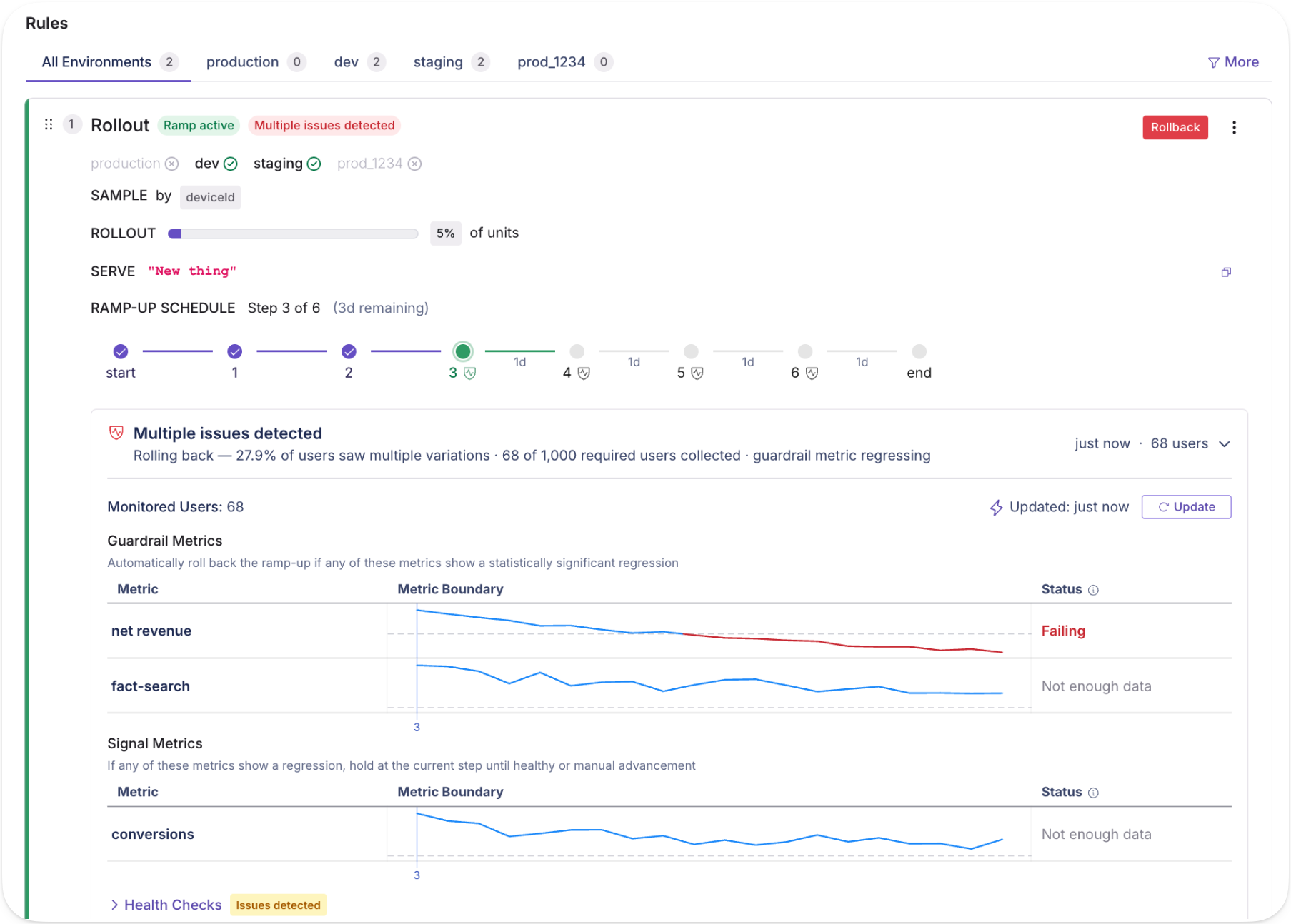
We made three big changes to Safe Rollouts to make them even safer:

  1. Traffic now gradually ramps up from 10% to 100%
  2. Results are checked more frequently at the start of a Safe Rollout (and less frequently the longer it’s running)
  3. There’s a new setting to automatically roll back if any guardrails are failing or the data looks unhealthy

When combined, these changes help make your rollouts even safer by minimizing the user impact when things go wrong. As always, you can learn more about this in our docs.

Custom Decision Criteria

GrowthBook Custom Decision Criteria UI showing Clear Signals, Do No Harm, and Custom experiment shipping logic options

You can now customize the logic that powers our Experiment Decision Framework on a per-experiment basis.

  • Clear Signals (the default) - Ship only with clear goal metric successes and no guardrail failures.
  • Do No Harm - Ship so long as no guardrails and no goal metrics are failing. Useful if shipping costs are very low.
  • Custom - Define your own fully custom decision criteria logic using our intuitive UI.

Check out our docs for more information.

Search Filters

GrowthBook Search Filters showing feature flags and metrics filtered by project, owner, tag, and type

We’ve revamped the search experience within GrowthBook to make it easier to find feature flags and metrics.  Easily filter by project, owner, tag, type, and more.  The best part is that all of your filters are encoded in the URL, so once you find a view you like, you can easily get back to it or share it with your team.  We’ll be rolling this out to other parts of the app soon.

Experiment Decision Framework for Automated Shipping Recommendations
Experiments
Analytics

Experiment Decision Framework for Automated Shipping Recommendations

May 23, 2025
x
min read

Experimenters often look at their experiment results and are unsure if there’s enough data to make a decision or what decision they should make. They’re often left asking: "Should I keep running my experiment?" and "Do my results meet my success criteria?”

The Experiment Decision Framework (EDF) solves this by automating both decisions. It’s a set of customizable settings that automatically determines when your experiment has collected sufficient data and recommends what to do based on your predefined business criteria.

How it works

Target Minimum Detectable Effects (MDEs): Set the smallest effect size worth detecting for each metric. If a 2% conversion improvement isn't meaningful for your business, set your target MDE to 5%. The framework only renders decisions when you have enough statistical precision to reliably detect your target effect.

Decision Criteria: Define shipping logic before you see results. Examples:

  • Ship if all goal metrics are statistically significant and positive
  • Ship unless any guardrail metrics are statistically significant and negative
  • Custom rules based on your business logic

Automated Status Updates: Your experiment shows exactly where it stands:

  • "~7 days left" - Need more data to reach target precision
  • "Ship now" - Results meet your shipping criteria
  • "Roll back now" - Results meet your rollback criteria
  • "Ready for review" - Mixed results requiring human judgment
Experiment Decision Statuses Overview
Overview of GrowthBook Experiment Decision Framework statuses including Ship Now, Roll Back, and Ready for Review

Real example

You're testing a checkout redesign with a 5% target MDE for conversion rate:

Day 10: Confidence interval of +3% to +11% for conversion rate Status: Ship now

Reasoning: Goal metric is statistically significant and beneficial under "Clear Signals" decision criteria

The framework determined you have sufficient precision (interval width corresponds to your 5% target MDE) and the result meets your predefined shipping criteria.

Examples of EDF Status
GrowthBook Experiment Decision Framework example showing Ship Now status for a checkout redesign with positive conversion rate results

What this fixes

False positives: Teams that ship as soon as an experiment reaches statistical significance, instead of waiting for a certain sample size, suffer from the peeking problem which results in too many false positives.

Inconsistent shipping decisions: Without predefined criteria, teams make different decisions on similar results depending on business pressure or personal bias. Setting criteria upfront eliminates this inconsistency.

Low-powered experiments: Many teams run experiments that can't reliably detect the effects they care about. Target MDEs force you to think about what's actually worth measuring

Setup

Available in Settings → General → Experiment Settings for Pro and Enterprise customers. Set organization defaults for target MDEs and decision criteria, then customize per experiment on the Experiment Overview tab.

The framework works best with 1-2 goal metrics. More metrics dramatically increase the time needed to reach target precision across all metrics.

Implementation notes

The decision framework uses your existing experiment data and statistical engine. It doesn't change how you run experiments—it just adds structured decision-making on top.

You can override target MDEs per metric and switch decision criteria per experiment. The framework respects your minimum experiment runtime setting and won't show decisions during early data collection periods.

The EDF is available now. Questions about implementation or edge cases? Reach out—we'd like to hear how you're using it.

📄 Check out the Experiment Decision Framework docs to learn more about how to set it up for your team.

Find Flags Faster with Search Filters
Feature Flags
4.0
Product Updates

Find Flags Faster with Search Filters

May 21, 2025
x
min read

You’re trying to find a flag but can’t for the life of you remember its name. You know it’s related to the new settings menu, but nothing’s coming up when you search your organization’s hundreds of flags created by different team members over the past few months.

You do remember that it’s a number flag, tied to an experiment, and currently on in production. With Search Filters, that’s all you need. Filter by type, rule, status, and more to narrow hundreds of flags down to just the 15 that match…

And there it is! You find the elusive new-config-menu flag.

Search Filters aren’t just for one-off hunts. They make it easy to find stale flags, live production toggles, and any flag with an experiment, force rule, or safe rollout. It’s a faster, cleaner way to wrangle flags across teams.

And if you’re a power user? When choosing different search filters, the search box updates in real time with the underlying syntax. That means you can learn the query format and skip the UI altogether for your next search. And once you start down that road, check our docs for even more syntax options and examples.

Search Filters are live now on Cloud and will be included in our next release.

Don’t Let Vibe Coding Become Vibe Shipping
Feature Flags
Experiments
AI

Don’t Let Vibe Coding Become Vibe Shipping

May 21, 2025
x
min read

It’s estimated that over 40% of all new code is now written by AI, and that trend is likely to accelerate, leading to an exponential increase in the total code being shipped to production. This is not necessarily a net benefit for companies, though—who’s to say the extra code is actually helping the business? In the early 2000s, Yahoo added exponentially more widgets to their homepage, while Google kept things simple and we all know how that turned out.

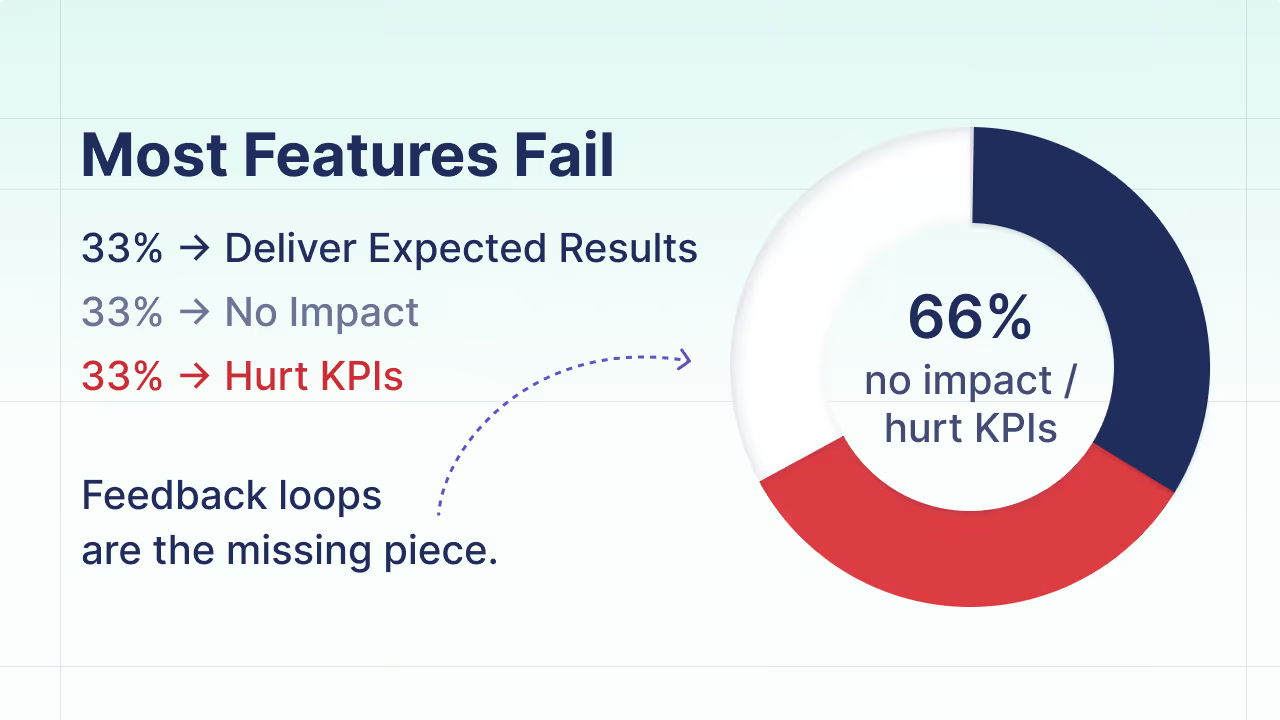
Industry-wide, only about a third of product changes actually have a positive impact on a company’s core business metrics. The rest either do nothing to move the needle or can even be unintentionally harmful. Without proper measurement and safeguards, you could be vibe coding your way to a product no one wants to use.

This is not a new problem, and there is already an established solution from the pre-AI days. Feature flags and experiments have been used by all of the top companies for years to measure code changes in production and ship the ones that work while reverting the ones that don’t.

In this new vibe coding paradigm, feature flags are still the right way to release code, and experimentation is still the right way to measure impact and make the ship/revert decision. The solution is the same, but the scale of the problem is increasing exponentially.

The good news is that GrowthBook, the most popular open-source feature flag and experimentation platform, just launched 2 products tailored specifically for this new reality.

First are Safe Rollouts, which are super lightweight experiments that require much less developer involvement to set up and manage. Safe Rollouts gradually ramp up traffic to a feature while monitoring key guardrail metrics for regressions.  If anything goes wrong, it can automatically revert the change and alert you. The goal is to make sure safety and experimentation don’t get in the way of increased velocity.

Second, we released the first-ever MCP Server for feature management and experimentation! Developers can now create feature flags, configure Safe Rollouts, monitor results, and more—all without ever leaving their IDE.  This makes it trivially easy for developers to incorporate GrowthBook into their AI-driven development workflow.

This is one of the first real glimpses of what AI + developer tools can look like when they actually work together. We’re just getting started.

Read more about the GrowthBook MCP Server.


Ready to ship faster?

No credit card required. Start with feature flags, experimentation, and product analytics—free.

Simplified white illustration of a right angle ruler or carpenter's square tool.White checkmark symbol with a scattered pixelated effect around its edges on a transparent background.