

How to Make Your Feature Flags SOC 2 compliant
If you have a fairly robust deployment pipeline, it’s probably tightly controlled. For instance, you have pull requests, CI checks, and production approvals. But it’s still possible that a change can reach production without going through any of these steps. It happens when you flip a feature flag.
Feature flags aren’t necessarily a problem because they help companies deploy faster without risk. But they can introduce new types of risk if your change management controls stop at deployment.
If an engineer can change a production control without the necessary governance controls, you have a serious gap, and that, in turn, becomes a SOC 2 problem.
In a Type II audit, you’re required to show that production changes were properly managed. An auditor will want to see concrete evidence. This doesn’t mean you can’t use feature flags, but you do need an approach or tool that closes this gap.
In this article, we’ll explain how feature flags tie in with SOC 2 requirements and how to document how you’re staying compliant.
What is SOC 2 compliance?
SOC 2 is an audit framework developed by the AICPA (American Institute of Certified Public Accountants). It’s how organizations prove to their customers that they handle data securely.
During the audit, a CPA firm or external auditor examines your organization’s internal controls. They look at things like how you manage access to systems, how you track changes, and how you respond if/when something goes wrong. In the end, you’ll get a detailed report, describing your controls and how they work. SOC II audits include two reports:
- Type I evaluates whether your controls are properly designed at a point in time.
- Type II evaluates whether they held up over an observation window, usually 12 months, and it’s the one relevant to feature flags.
It’s important to note that Type I and II apply to feature flags but Type II is the one that tests if your flag controls actually worked across every change in the window. This is the report engineering teams typically need. Type I just confirms whether your flag controls exist and that’s not enough to be compliant.
The SOC 2 framework covers five Trust Services Criteria:
- Security (mandatory): Covers logical access controls (who can access what), change management (how changes are authorized and tracked), and system monitoring (how you detect and respond to issues).
- Availability: Whether your systems are up and running as agreed in your SLAs.
- Processing integrity: Whether your system processes data accurately and completely, without unauthorized modification.
- Confidentiality: How you protect data that’s designated as confidential, like intellectual property or financial records.
- Privacy: How you collect, use, retain, and dispose of personal information.
Note: SOC 2 audits are conducted multiple times a year. In fact, a 2025 survey of more than 1,000 organizations found that 92% of them conduct two or more audits a year. So using a platform that’s compliant from the get-go helps you stay prepared at all times.
Why do feature flags matter for your SOC 2 audit?
Engineering teams spend a lot of time building controls around code changes. They’re always tinkering to optimize these controls by improving code reviews and automated testing while implementing approval gates. However, when they start using feature flags, it becomes easy to bypass these controls.
For example, somebody starts using simple Boolean toggles in the console. At first, these on/off toggles are meant to change production behavior, and your existing controls don’t see it.
In fact, DORA’s 2025 survey found that 37.9% of engineers reported a change failure rate above 16%. A flag toggle is one more change on top of an already high change failure rate and if you don’t have the necessary controls in place, it’ll only get worse with time.
As you keep using feature flags, your use cases get more complex, and flags control more complex branching and have more dependencies. That’s why you also need to document everything for review and make sure someone reviews the change before it goes live. If you do, you’re already compliant with one of SOC 2’s change management criteria (CC8.1). It requires your organization to authorize, document, test, approve, and track changes to your software and underlying infrastructure.
A 2025 study found that when you replace static deployments and plain on/off feature flags with a governed flag system, rolling back a bad change saw a 96% reduction in mean time to resolution (MTTR). These rollbacks are faster because companies no longer have to rebuild and deploy via CI/CD. They just have to flip the necessary flag. The structured logs generated also provide auditors with audit-grade traceability. Because every flag decision is logged at the session level, an auditor can reconstruct which user saw which version, when, and why.
Which SOC2 criteria apply to feature flags?
SOC 2’s security criteria break down further into a set of Common Criteria (CC controls). All of them don’t touch feature flags specifically, but they fall into three buckets:
- Who can change a flag
- Whether the change was authorized and recorded
- Whether you can detect and reverse the change
Here’s a list of the criteria that apply and how GrowthBook’s feature flagging platform solves for it:
10 capabilities your feature flagging platform should have for SOC 2
These are the capabilities your feature flagging platform should have built-in to be SOC 2 compliant:
1. An immutable audit log
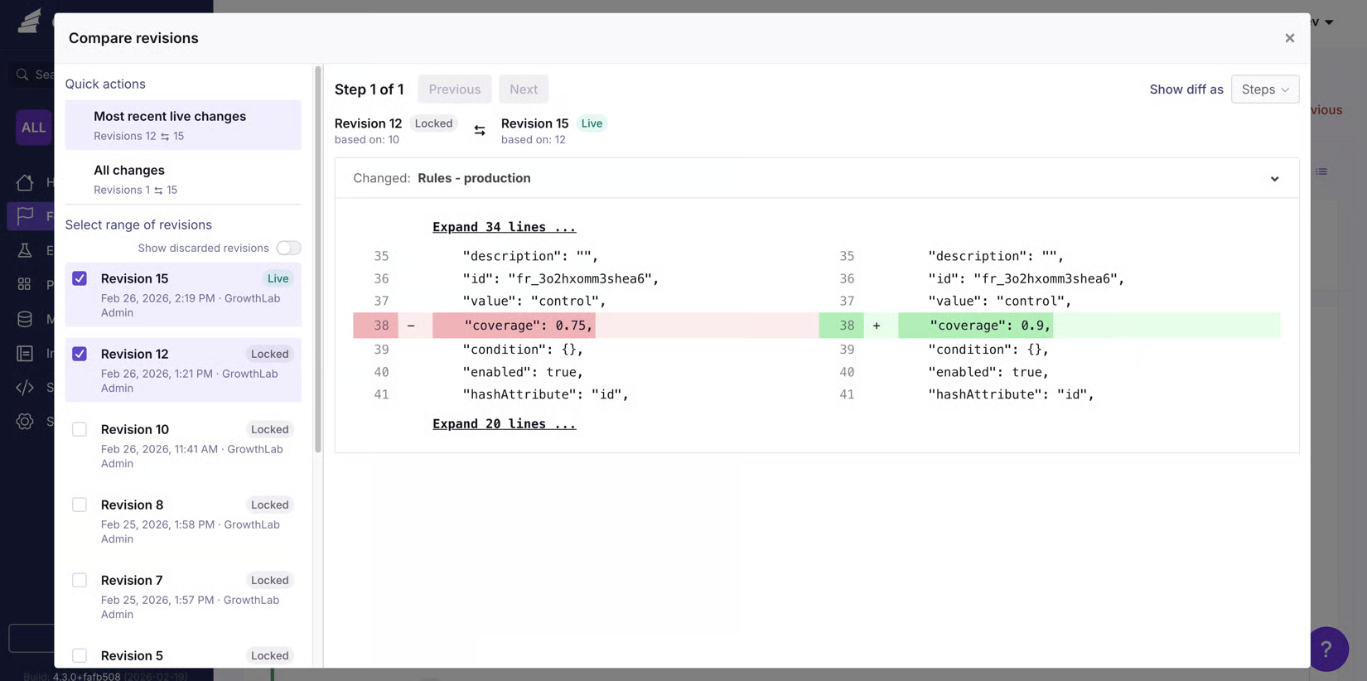
During the audit, the first question an auditor will have is who made a flag change and when. The second is what the value was before and after. If your log doesn’t answer both of these questions, it won’t hold up as evidence.
You need an audit log that captures:
- The actor (human or agent)
- The timestamp
- The environment
- The values (old and new)
- The flag name
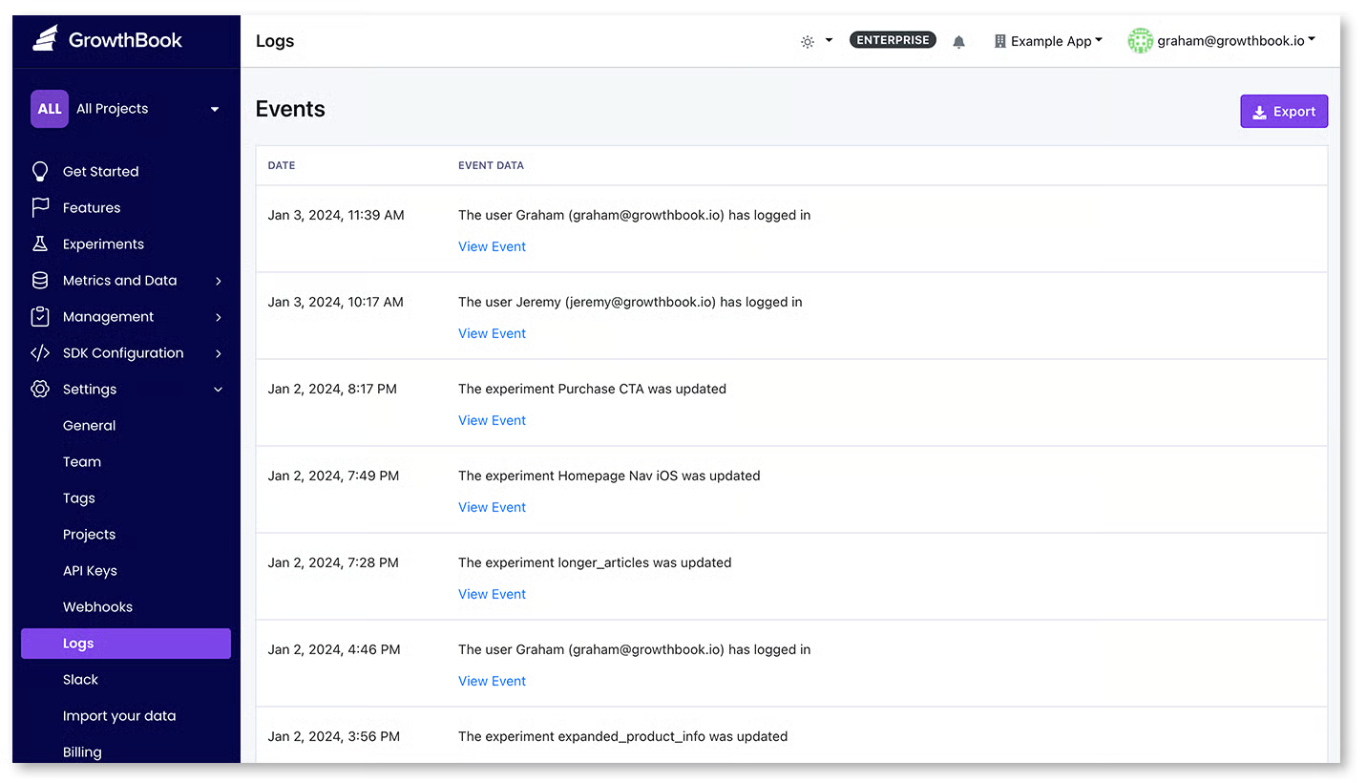
It has to be tamper-resistant, so you shouldn’t be able to edit it in any way and export it as-is. For instance, GrowthBook’s audit log records every flag-related event such as create, publish, revert, toggle, archive, and delete along with the approval/review chain.
You can even view before-and-after snapshots to pinpoint the exact changes you’ve made. It can even tell you whether a human or agent made a change so the auditor has all the information they need.
2. Environment-scoped RBAC with custom roles
Let’s say an engineer has full access to your flag console. They can flip flags in dev, staging, and production with the same permissions. That also means anyone who can change a dev flag can change a production flag. That’s why you need role-based access (RBAC) to scope permissions down to the environment and user level.
In GrowthBook, roles work across three tiers: global, project, and environment. It offers 7 permission types based on roles, ranging from no access to full admin access.
3. Approval workflows
Your pipeline should have an approval workflow so that no one authors a change, reviews it, and approves it. If they do, the review step is a pointless stopgap and won’t be considered actual evidence of compliance. Simply put, you need an approval workflow that enables the four-eyes principle.
In GrowthBook, every edit you make to a flag becomes a draft. You can submit it for review, and your senior or peer can review and approve or reject it. As a result, you always get two sets of eyes on a decision, reducing the chance of an incident.
You can configure these approval gates by environment and project to keep production moving. That said, for smaller changes, you can set the review process so the same person can review and accept the change.
4. SSO plus SCIM
If you don’t have proper security protocols in place, you may end up allowing access to members who no longer work with you or have left the organization. That’s a vulnerability, and bad actors can exploit it in the future.
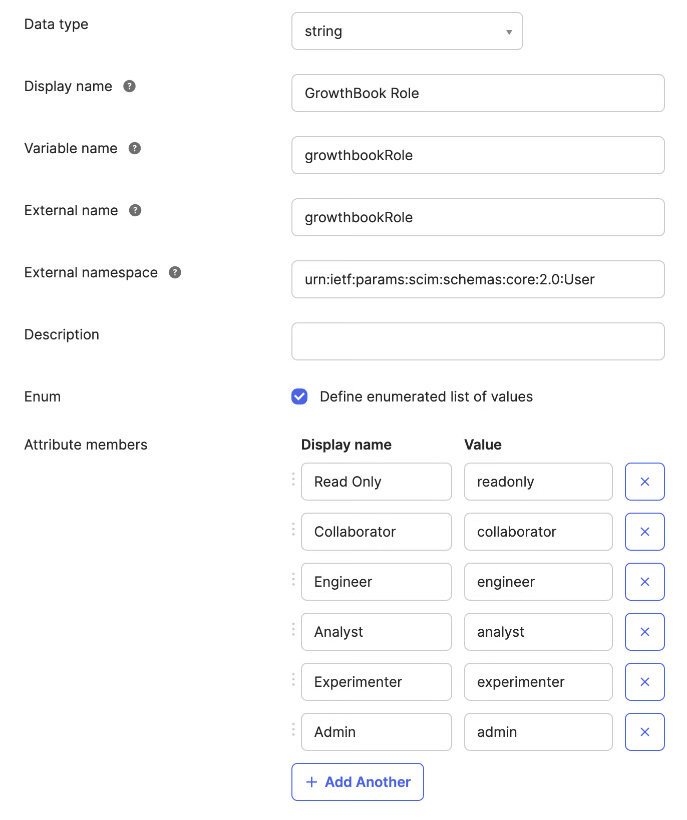
To avoid this, enable single sign-on routes through your identity provider. For example, GrowthBook supports SSO over OpenID Connect (OIDC) and System for Cross-Domain Identity Management (SCIM) provisioning through Okta and Entra ID. So if a user is provisioned through SCIM, only the identity provider can deprovision them.
Here’s what it looks like through Okta:
5. Scoped API keys with least privilege
Every part of your infrastructure that touches a feature flag needs credentials so that you know how and through what a change was made.
The admin API key should have its own role and access levels, but the records should remain immutable even if you remove the key. That’s why it’s best to use short-lived tokens for specific purposes that expire on their own so that it can’t be misused later on.
In GrowthBook, API keys have their own roles and can be limited to certain environments and projects. If it’s a personal access token, it inherits the permissions of the user who created it. The key gets deprovisioned if the user is deleted, or you can even disable it to prevent further use.
Every key’s actions are recorded in the audit log so that you can show that data to an auditor during an audit.
6. Log export to your SIEM or warehouse
Typically, your security team has their own tooling so they aren’t necessarily logging into your feature flagging platform. So your platform should be able to push those changes out into the monitoring tool, and they can decide how long to retain that data.
Since AICPA doesn’t require a specific retention period, you can maintain a 15-month window so you can present data for at least 12 months plus the audit fieldwork.
Note: GrowthBook offers a webhook capability to stream every change in the flag lifecycle to your SIEM or data warehouse.
7. Change context
Every change you make needs reasoning attached. Instead of reconstructing it from memory on the spot, make sure your feature flagging platform records this context.
Platforms like GrowthBook require a commit message to publish a revision. It lives in the revision record and the audit log. On the self-hosted version, you can also use Custom Hooks to validate that commit message before publishing the change.
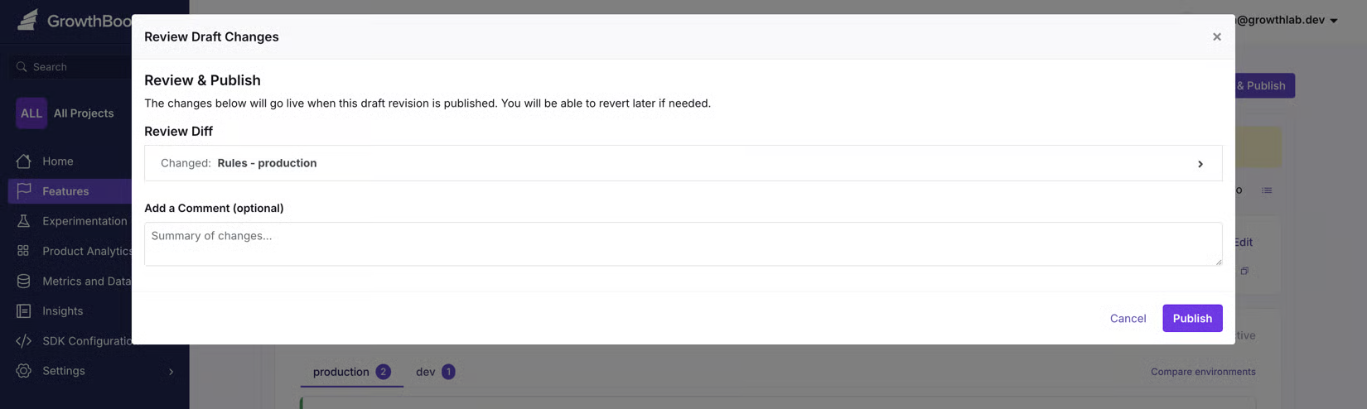
When you consider that 33% of feature toggles interact with each other, it’s even more important that all changes be documented.
8. Pre-deployment validation and guardrails
If a flag’s value is invalid, causes a merge conflict, or is about to break something in a rollout, it should be blocked before it reaches users. SOC 2’s CC8.1 clause requires you to test these changes before pushing them live.
You need two layers here:
- Validation should reject bad values before being saved.
- The guardrails monitor the rollout and pause or revert if it fails.
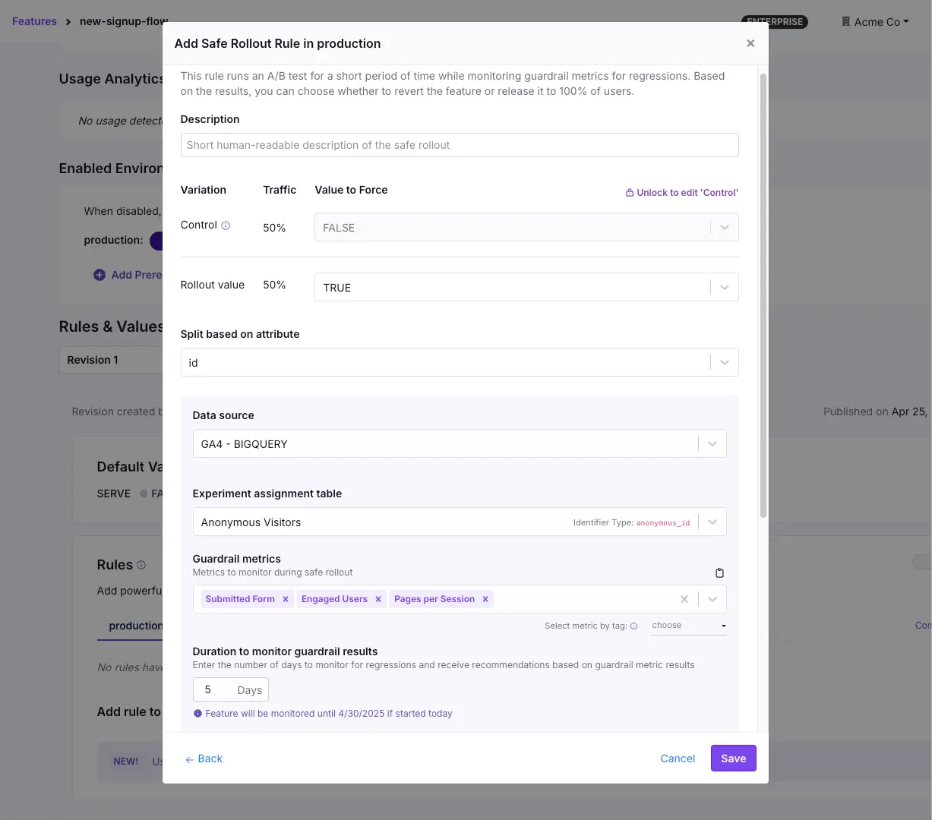
Within GrowthBook, you can do both. It offers schema validation checks, so it cross-checks JSON, string, and number flag values before saving. You can even create your own server-side validation rule using Custom Hooks and enforce your internal policies.
You can also use features like Safe Rollouts and percentage rollouts to test a flag’s behavior or a feature’s impact before rolling it out to 100% of your user base.
9. Infrastructure-as-code management of flags
If you’re working in git, it’s common to want your flag configuration to live alongside your application code. The goal is usually to make sure it goes through the same pull request review as any other changes, and that the evidence lives in the commit history.
It works well when your platform exposes a full API to run the full workflow. But the tradeoff is that git-based workflows are slower, and you need to configure them to ensure they go through the same review process. That’s because a git-based change has to go through a commit, a pull request, a review, a merge, and a CI run before it takes effect. It can work for planned changes but when you need to use a kill switch, it’s too slow and you’ll end up flipping the flag outside of git anyway.
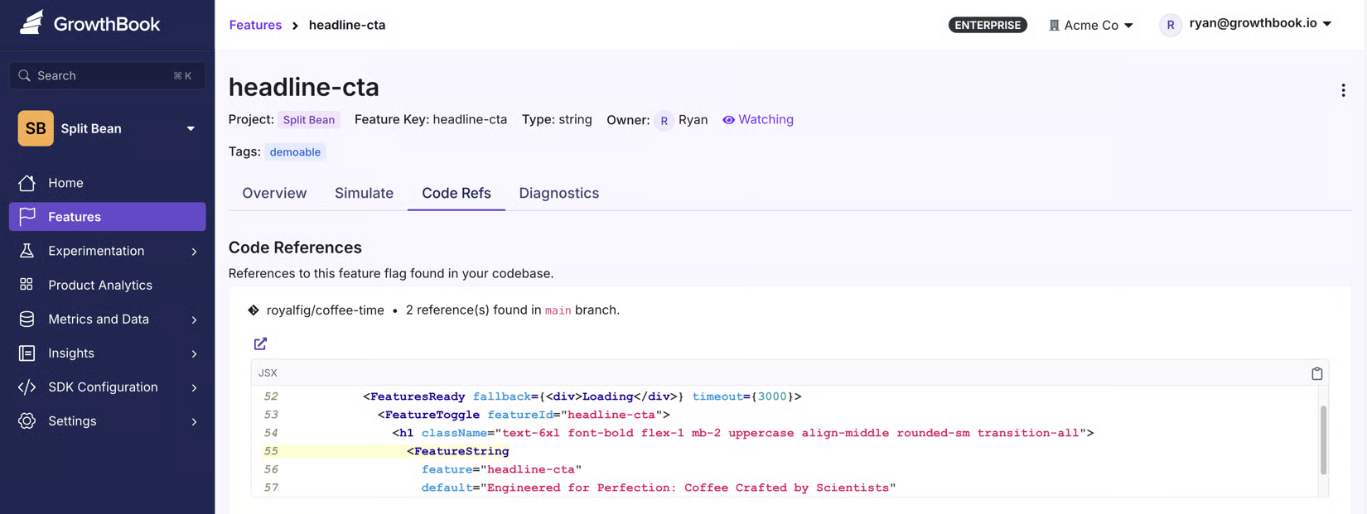
Instead, use a feature flagging platform that exposes a full REST API for feature management (just as GrowthBook does). You can configure it to make sure API changes require review and it follows the same process as it would in git. Planned changes can live in git while any emergency changes you make can go through the API and everything still gets logged in GrowthBook. And if you need to review or remove old flags, you can use GrowthBook Code References to show you where it’s referenced in the code.
10. Governed emergency changes
You also need to think about controls around emergency change.
For example, a kill switch doesn’t always require an approval process. But the auditor will need to see evidence that you allowed the change and logged it properly by documenting the reason for any exceptions you’ve made. It should include a retroactive approval process within a set window so it’s clear someone on your team reviewed it. If you fail to show this information, you could get fined.
In May 2025, BayCare, a Florida healthcare provider, was fined $800,000 by the HHS for a HIPAA violation. The main reasons were its failure to use proper access authorization protocols and review information activity logs.
Within platforms like GrowthBook, an admin can bypass the approval workflow, but the records will show which gates were skipped and who approved it.
What will your auditors ask for during a SOC 2 audit?
When an auditor reviews your controls, they usually start by pulling a sample of changes from the observation window and asking you to provide evidence for it. That’s where most of the preparation time goes.
A Thoropass report found that 72% of security and compliance professionals spend between 251 and 2,000+ hours a year on audits. And 76% dedicate six or more team members to this task. Yet 88% of completed SOC 2 examinations require at least one additional round of evidence, and 71% have at least one exception.
To avoid this hassle, here’s what you need to give your auditor:
- The full population of the flag changes in a strict observation window.
- A sample pulled from that population, with the approval record for each change.
- An access review showing who could publish to production, and evidence that someone reviewed that list.
- Deprovisioning proof for anyone who left during the window, including their API keys.
- The exception log, including changes that skipped the normal path and the reasons for doing so.
- Your data retention policy for all of the above.
Let’s say they pick one production flag change and you need to reconstruct it. Here’s how you can do it:
Does a vendor’s SOC 2 certification actually cover you?
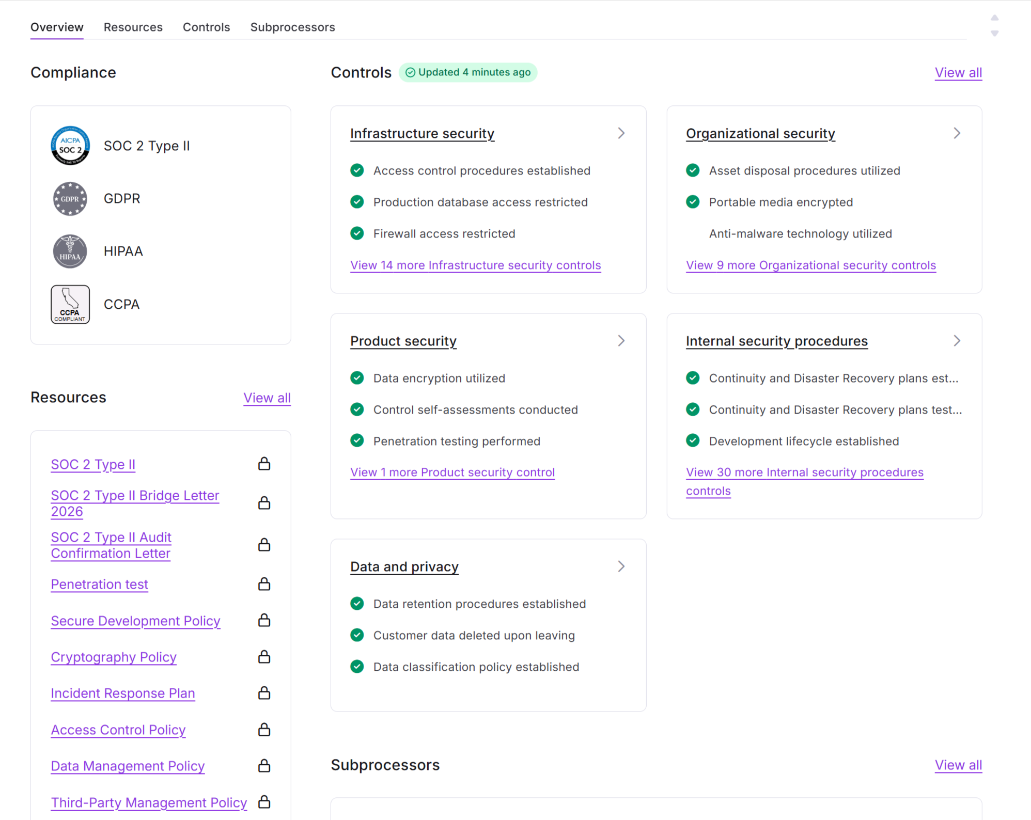
When you’re evaluating feature flag vendors, make sure they’re actually SOC 2 Type II certified. It covers their entire infrastructure and change-management access controls.
All of this information should be available before you sign up. Ideally, you should look for these three things in a vendor’s report:
- Complementary User Entity Controls (CUECs): The controls the vendor assumes you’ve implemented on your side. This is usually where the “customer is responsible for access administration” part of the agreement lives, so review it.
- Subservice organizations: This includes your vendor’s vendors. The report either carves them out for separate review or includes them in scope.
- Bridge letters: These letters cover the gap between when the vendor’s observation window ends and your audit date. Ask for one if the dates don’t line up.
Note: You can review GrowthBook’s trust and compliance information in its Trust Center. We’re SOC 2 Type II certified.
How GrowthBook supports SOC 2 for feature flags
Your change management controls stop at deployment, but a feature flag platform should extend them to the flag layer to keep you compliant. GrowthBook does that by treating every flag change the same way your pipeline treats every code change.
Each edit becomes a draft that requires approval, and only then can you publish it. Each change is locked in an audit log that can be reviewed and exported as needed. So the evidence packet gets built on the go.
For the SOC 2 controls an auditor will test, GrowthBook gives you:
- An audit log that records actor, timestamp, environment, and before/after values, and can’t be edited by any user.
- Approval workflows that block every contributor from approving their own change, so segregation of duties holds up under review.
- Three-tier RBAC with custom roles built from around 50 permissions, so publishing and editing are separate rights.
- SSO and SCIM through Okta and Entra ID, so deprovisioning happens in your identity provider and flows through automatically.
- Event webhooks that stream the full flag lifecycle into your SIEM with retention policies you control.
- Safe Rollouts that monitor guardrail metrics during a ramp-up and roll back automatically when they regress.
- Bypass records on every emergency change, so break-glass flips are logged as exceptions with the authority that approved them.
That’s why companies like Dropbox, Khan Academy, and Upstart use it despite operating in heavily regulated sectors.
GrowthBook is SOC 2 Type II attested and compliant with regulations like GDPR, COPPA, CCPA, and HIPAA (for self-hosted deployments). If you want to:
- Review the evidence packet, visit our Trust Center.
- See how the platform works, watch this 5-minute intro video or join a live demo.
Related articles
.avif)
.avif)
Ready to ship faster?
No credit card required. Start with feature flags, experimentation, and product analytics — free.

