

How engineering teams reduce feature flag technical debt

You already know that feature flags make shipping safer. You can decouple deployment from release and gate risky changes behind a toggle.
But that safety comes with a cost you may not see at first, especially when you’re implementing them at scale.
For example, the release flag you shipped last quarter is probably still sitting in your codebase, serving 100% of users with no targeting rules. And nobody on your team remembers what happens if you flip it off.
Add that across a hundred flags, and now you’re sitting on real technical debt that is a serious risk to every change you make. That’s why 50% of engineering leaders say a quarter of their IT budget goes toward managing and eliminating technical debt.
In this article, we’ll explain how you can realistically reduce and manage technical debt while reducing risk within your infrastructure.
What is feature flag technical debt?
Feature flag technical debt refers to the technical debt that accumulates in your codebase from stale flags from older deployments or experiments.
The best way to put this would be to compare feature flags to dead feature branches in your repo. If you create a feature branch for a sprint that ended months ago but never merged or deleted it, nobody knows what to do with it. It sits in your codebase, cluttering your repo.
Technical debt from feature flags works the same way. But the consequences are much worse.
A 2021 study found that 77% of developers say they intend to remove toggles once a system stabilizes. But when their codebases were audited, 75% of the toggle components were present for up to 49 weeks after introduction. It shows that it’s easy to introduce a flag into your infrastructure—and it’s just as easy to forget about.
Most of this debt comes from temporary flags, such as release toggles or experiment flags. The thing is, even 10 active flags in your codebase create 1,024 possible code paths. Bump it up to 20 flags, and it results in over a million code paths.
If you don’t tackle this before or during flag implementation, you can’t avoid creating more debt.
Why is it so easy for flag debt to accumulate in your infrastructure?
If you’ve ever looked at your flag management dashboard and wondered how things got this bad, you’re in good company. The 2024 Stack Overflow Developer Survey found that technical debt ranked as the number one work frustration for 63% of professional developers.
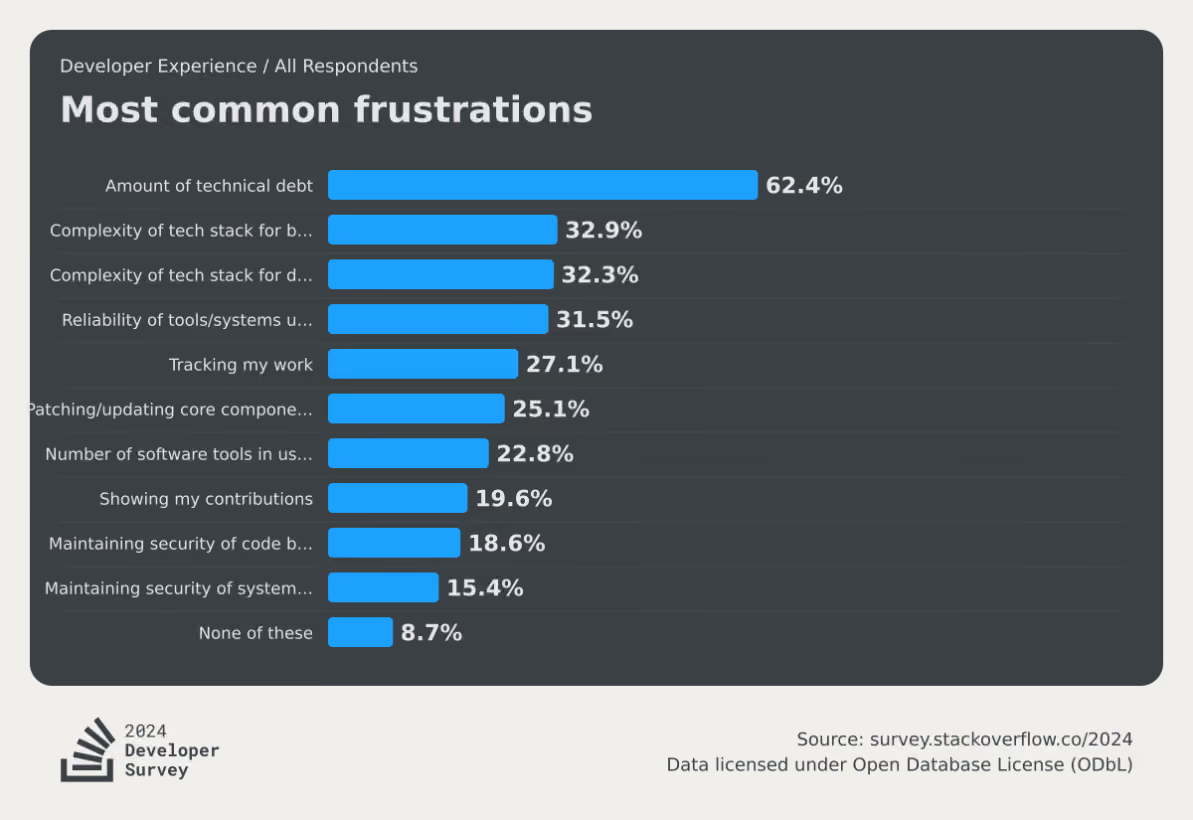
Flag debt is a specific, particularly stubborn strain of that broader problem. And it comes down to how teams ship software.
Issue #1: There’s no clear ownership model
It’s easy to create a flag. All it takes is a simple if/else wrapper around your code—or a quick “Create a flag for X feature” prompt in your MCP. But if nobody on your team owns the end-to-end lifecycle for that flag, it’ll continue to sit in your codebase forever.
In a recent podcast, Jonathan Schneider, CEO of Moderene, has seen this firsthand. When he was working at Netflix, its culture of “freedom and responsibility” meant central teams couldn’t force product engineers to clean up technical debt. When Schneider’s team tried surfacing reports and dashboards to show engineers where they needed to act, nobody did anything for two reasons:
- Nobody took ownership for feature flags
- They were under constant pressure to ship
When Schneider asked them how he could help, they said:
“Do the work for me, otherwise I’ve got something else to do.”
Unless you have a system in place to absorb this effort through ownership and tooling, flag cleanup will be an afterthought.
Issue #2: There’s a fear of removal
This is the psychological anchor of flag debt. You know a flag is probably stale, but you can’t see everywhere it’s referenced in the codebase. So you leave it because you don’t know what it’ll break in production.
For any individual flag, that risk outweighs the discomfort of carrying dead code. But, the cummulative risk of these stale flags just gets worse and worse over time.
Issue #3: There’s no flag lifecycle policy
Without clear expiration dates or cleanup commitments attached to the flag when it’s created, every flag enters your codebase with an open-ended lifespan.
A healthy engineering organization aims for a roughly 1:1 ratio per quarter of flags created to flags archived. The lower your ratio, the more debt and risk you are accumulating.
Issue #4: They’re missing from the definition of “done”
When engineering teams define a feature as complete, it’s usually based on whether it’s fully tested and shipped. But the underlying flags that control those rollouts and experiments are never accounted for in the first place.
Eventually, it becomes next quarter’s problem—or worse—something they’ll never deal with. That’s why you need to change how you define “shipped” or “completed rollout.”
What is the real cost of letting feature flags sprawl?
You might think that flag debt only results in one-off incidents like the 2012 Knight Capital incident or the 2020 Slack outage. But the risks are far worse for ongoing development work. Here are a few:
- Increased cognitive load: The more unretired flags you have in your codebase, the higher the number of flags your engineers have to track while reading or modifying code mentally. For someone onboarding to your team, stale flags look identical to active ones—they’ll spend hours tracing logic paths that haven’t mattered in months. The 2024 Deloitte Tech Trends report found that 78% of developers said spending too much time on legacy systems hurt their morale. Technical debt from stale flags directly contributes to this issue.
- Increased security exposure: A flag at 100% rollout for a year still leaves the old code path in place. Unfortunately, that retired logic could still be referenced in deprecated APIs or access patterns that your security team has in place. It’s dead code, but it doesn’t mean it can’t be reached and used as a vulnerability. A 2026 study found that stale flags tend to create persistent backdoors that allow unauthorized transactions in financial apps and create unnecessary data exposure.
- Higher operational risk: A flag that’s accidentally re-enabled on a stale configuration can cause production incidents for companies operating at scale. That’s why in 2020, Uber’s engineering team built Piranha to address this. Their Polyglot Piranha tool generated nearly 5,000 pull requests in a six-month evaluation period, removing stale flags across codebases totaling over 10 million lines of code.
- Increased tech debt due to AI: As more engineering teams use AI, they’re also finding that it only creates more debt with time. In fact, Sonar’s State of Code Developer Survey found that, even with AI coding tools boosting individual productivity by 35%, developers still spend 23–25% of their workweek on toil. AI creates more flags faster, but doesn’t auto-clean stale flags unless you have the tooling to do so.
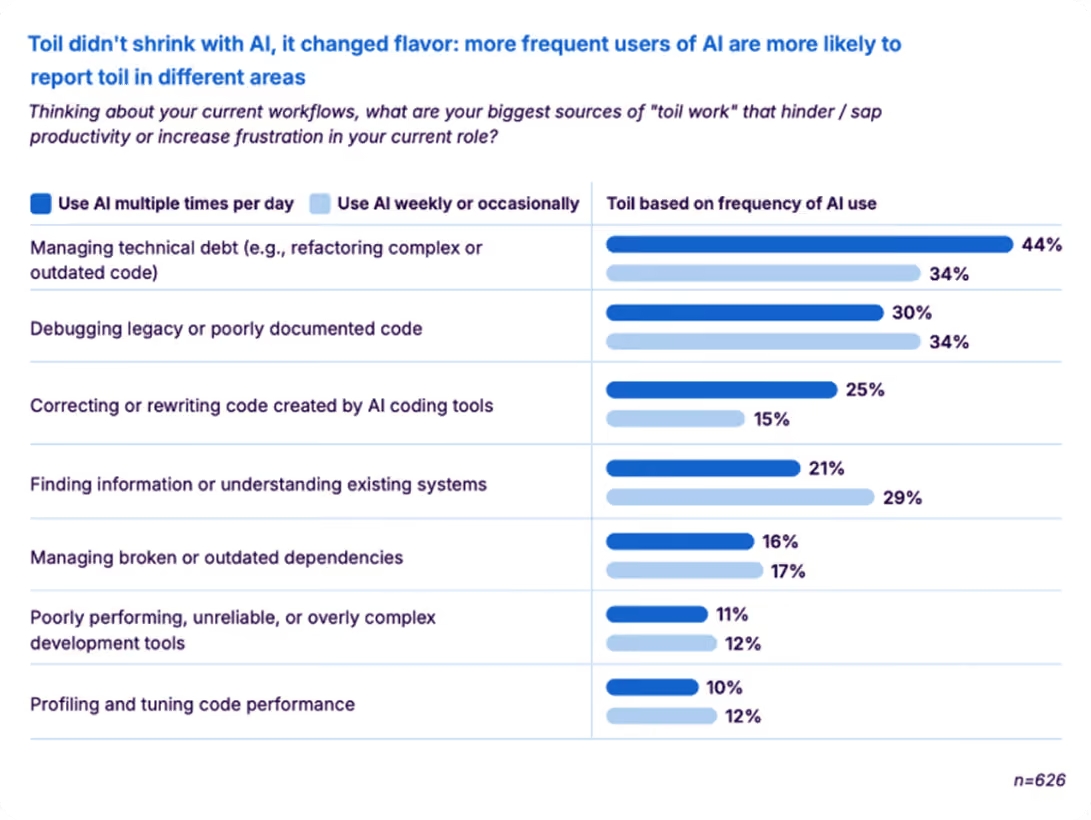
How to detect stale feature flags in your codebase
It’s a fact that you can’t clean up what you can’t see. That’s why stale feature flag detection is the first step. It determines whether a flag is actually a stale one that’s contributing to more debt.
Typically, you can decide that based on the type of flag it is. For example, an operational feature flag like a kill switch is not a debt because it’s there only for one-off incidents. But an experiment flag that’s there three months after the experiment is over needs to be removed.
Here are three ways you can find debt-creating flags:
1. Manual audits
Manual audits are the most common starting point. You pull up your flag inventory and evaluate each one against a few key signals:
- Serving state: Is the flag still serving multiple variations, or has it been rolled out to 100% of users? A flag pinned to a single variation for everyone is the clearest staleness signal.
- Code references: Is the flag still referenced anywhere in the codebase? Zero references means the toggle is dead weight regardless of age.
- Flag type: Was this a temporary release or experiment flag, or a permanent operational flag (kill switch, entitlement, config toggle)? Only temporary flags should be on the cleanup list.
- Last modified date: How long has it been since anyone touched this flag? For temporary flags, anything untouched past ~90 days deserves a closer look.
- Dependencies — Does anything else depend on this flag's state? Check for flags referenced in targeting rules, integrations, or other flags' prerequisites before removing.
If a temporary flag has been fully rolled out, has no remaining code references, and no downstream dependencies, it's ready for cleanup. That means two steps: archive the flag in your management platform and remove the conditional logic from your codebase. Skipping either one just moves the debt rather than eliminating it.
2. Automated stale detection
This is where you can add a layer of automation. Many feature flagging platforms let you automatically detect stale flags.
GrowthBook’s stale detection uses per-environment rule analysis combined with an inactivity window to surface flags that have outlived their purpose. It marks a flag as stale when it hasn’t been updated in two weeks and meets at least one condition: it’s disabled in all environments, or its rules send 100% of traffic to a single variation.
That said, you can override this per flag with a “Never Stale” designation for long-lived operational flags that are permanent by design. The stale indicator shows up directly in the Features view. You can remove it as and when you see it.
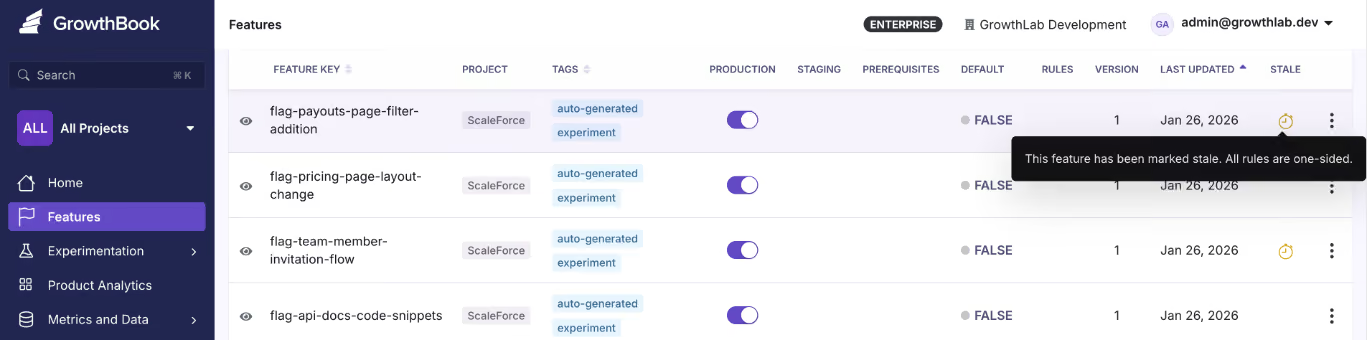
And because stale detection works through the REST API and GrowthBook’s MCP server, you can use AI tools like Cursor and Claude Code to check a flag’s state through chat.
3. Code References
Let’s say you know that there’s a flag in your codebase. But you don’t actually remember where it is or who owns it. That’s where tools like Code References come in.
Code References maps each flag to its exact location in the codebase, and it’s visible inside GrowthBook. When you combine it with stale detection, you can tell whether it’s stale and remove it immediately because you’ve pinpointed where it exists.
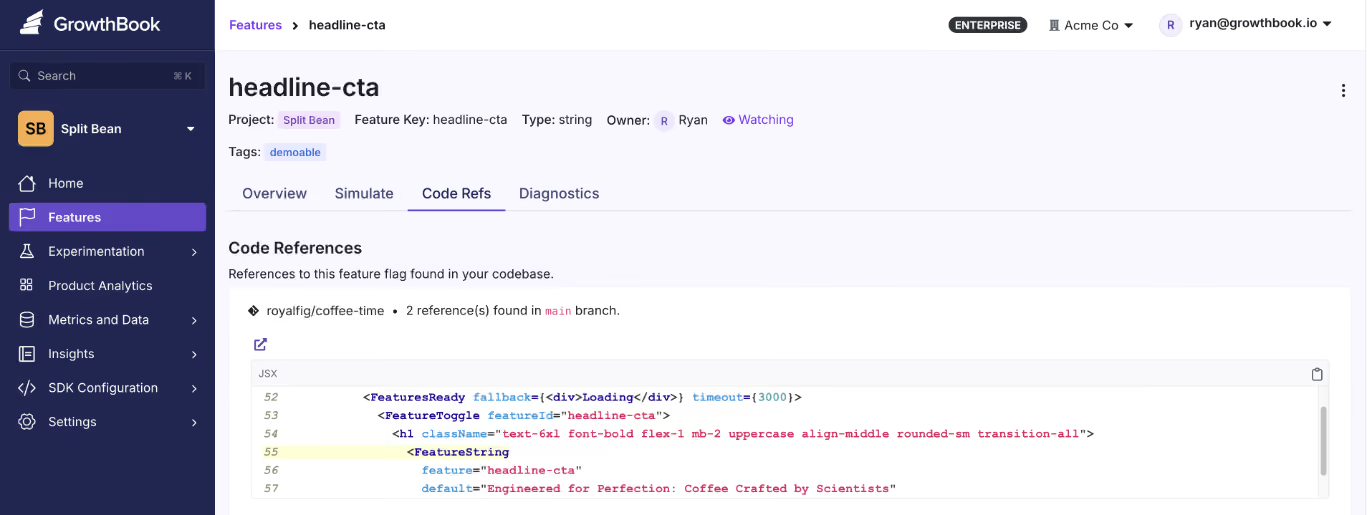
The best part is that you can also see whether these flags have dependencies. So you’re 100% sure that nothing will break if you remove them.
How to treat flag cleanup as an ongoing process
It’s a very common practice to treat flag cleanup as a “big-bang” event. Engineering teams run a sprint of sorts to find flags and remove them from the codebase. Some teams, like Uber, even go so far as to create their own tools to do it—but that’s not always necessary, because it wastes time and resources.

Ultimately, it’s a social engineering problem as much as it is a technical one. It comes down to your governance practices and engineering culture. Here’s a clear playbook you can follow to deal with this issue:
- Triage by flag type: Ideally, temporary flags (like release toggles and experiment flags) should be your first targets. Document them at creation and tag them with an expiration date. Also, create a cleanup PR that removes the flag and collapses the conditional logic to the correct permanent path.
- Verify before you remove: Use tools like Code References to trace every location where the flag is evaluated. If you’re doing it manually, just check that it doesn’t have any additional dependencies so that nothing goes wrong after removal.
- Remove flags in small batches: If you’re running a weekly sprint to remove them, don’t go all out at once. Start with maybe 10 flags and see how it’s affecting the rest of your services. Over time, you’ll learn the nuances and can bake them into your documentation and governance/lifecycle practices. Then you can include this in your existing release or experiment cycle rather than creating a separate backlog.
- Automate what you can: If you’re using GrowthBook’s MCP server, an AI agent can identify stale flags, pull their code references, and draft removal PRs. You still review and approve, but the discovery happens on its own or when prompted. But archive the flag instead of deleting them to preserve the audit trail.
- Build clear lifecycle rules: All of these practices only help when you have a governance layer in between to prevent debt from accumulating. Consider assigning an owner to each flag when it’s created, and add flag removal as a part of your definition of “Done.” When it’s archived, update your documentation.
A short checklist for each feature rollout or experiment goes a long way in managing technical debt.
How GrowthBook handles flag debt at scale
Right now, we’re sure you have a release flag from last quarter that’s just sitting in your codebase. But it really doesn’t have to be. With every passing week, you’re only adding more dependencies (and even more risk) to your development cycles.
That’s one of the reasons we built a feature flagging product with technical debt in mind. Here are a few ways GrowthBook can prevent technical debt accumulation:
- Stale detection automatically surfaces flags that have outlived their purpose.
- Code references show you exactly where each flag lives in your codebase.
- Approval workflows route those removals through the same review gates as any other production change.
- Its MCP server and REST API let AI agents like Claude Code and Cursor query lifecycle status and surface stale flags. And clean them up if needed.
- It's open-source so you can see the full detection and removal logic yourself.
You don’t have to let a quarter of your engineering capacity go toward managing debt that’s preventable.
If you’re interested in seeing how GrowthBook works to remove flag debt, sign up for free or book a demo with us today.
Related articles

.png)
.png)
Ready to ship faster?
No credit card required. Start with feature flags, experimentation, and product analytics — free.

