Version 1.6 of GrowthBook includes big UI improvements when installing and configuring the platform, plus lots of time-saving improvements for existing users.
New data source form and pre-built schemas!
We’ve added built-in support for tons of additional event sources, including Firebase, Matomo, Heap, Jitsu, and Freshpaint! When adding a new data source, you’ll be presented with the above screen, and based on your event source, we will pre-fill SQL queries and settings for you to help you get started quickly.
New Getting Started flow
New GrowthBook onboarding flow walking through SDK install, feature flag setup, data source connection, and metric definition
We added a brand new onboarding flow when first installing GrowthBook. We also added a persistent “Get Started” section to the left nav so you can easily get back to where you left off. This new setup process will walk you through installing our SDK, adding a feature flag, connecting to a data source, and defining metrics.
Always show user counts in experiment results
When dealing with new experiments or experiments with low traffic, it’s not uncommon to have 0 conversion events on your goal metrics.
This change allows you to see the total traffic exposed to the experiment even when the number of conversion events is zero.
Support optional experiment/variation name columns
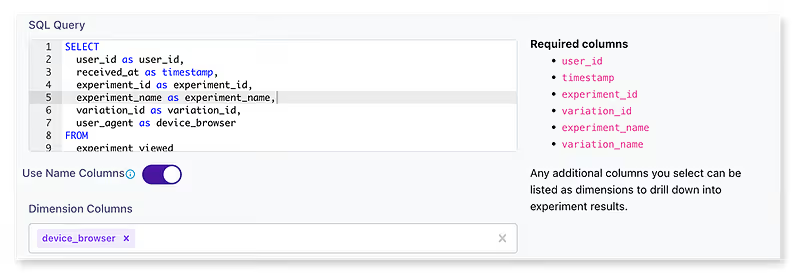
Experiment exposure query settings showing optional variation_name and experiment_name columns for more readable results
You can now select variation_name and experiment_name in the experiment exposure query to make the results more human-readable. This setting can be adjusted in the ‘edit data sources’ modal.
Miscellaneous other features and fixes
Added the ability to change roles on invites (thanks reecenil!)
Added dev containers support for easy developer setup