

Customize your experimentation workflow with custom fields and shareable experiments

Running a successful experimentation program isn’t just about analyzing results—it’s about seamlessly integrating experimentation into your team’s workflow, ensuring consistency, and making insights easy to share. GrowthBook’s latest features, Custom Fields and Shareable Experiments, are designed to help teams streamline their processes and scale experimentation more effectively.
Build your ideal experiment setup with pre-launch checklists and custom fields
Enterprise teams can now add structured metadata to experiments and feature flags, enabling clear ownership, compliance tracking, and alignment with engineering workflows. By incorporating custom fields into your pre-launch checklist, you can ensure experiments are properly structured and ready for success from the start.
With Custom Fields, teams can:
- Link experiments directly to project management tools (e.g., Jira, Linear)
- Assign ownership and approvals for streamlined accountability
- Track technical dependencies and platform constraints
- Standardize resource impact assessments
- Manage regulatory, privacy, and regional requirements
- Connect experiments to OKRs and broader business goals
Custom Fields are configurable at the organization level and can be marked as required or optional. This ensures that teams capture all necessary context while avoiding unnecessary complexity.
Learn more about Custom Fields and Pre-Launch Checklists to build the perfect experimentation workflow.
Custom Fields are available exclusively for Enterprise customers.
Share experiments, your way
Experiment results need to be accessible and actionable. That’s why GrowthBook now offers two flexible ways to share experiments—internally with your team or externally with public stakeholders.
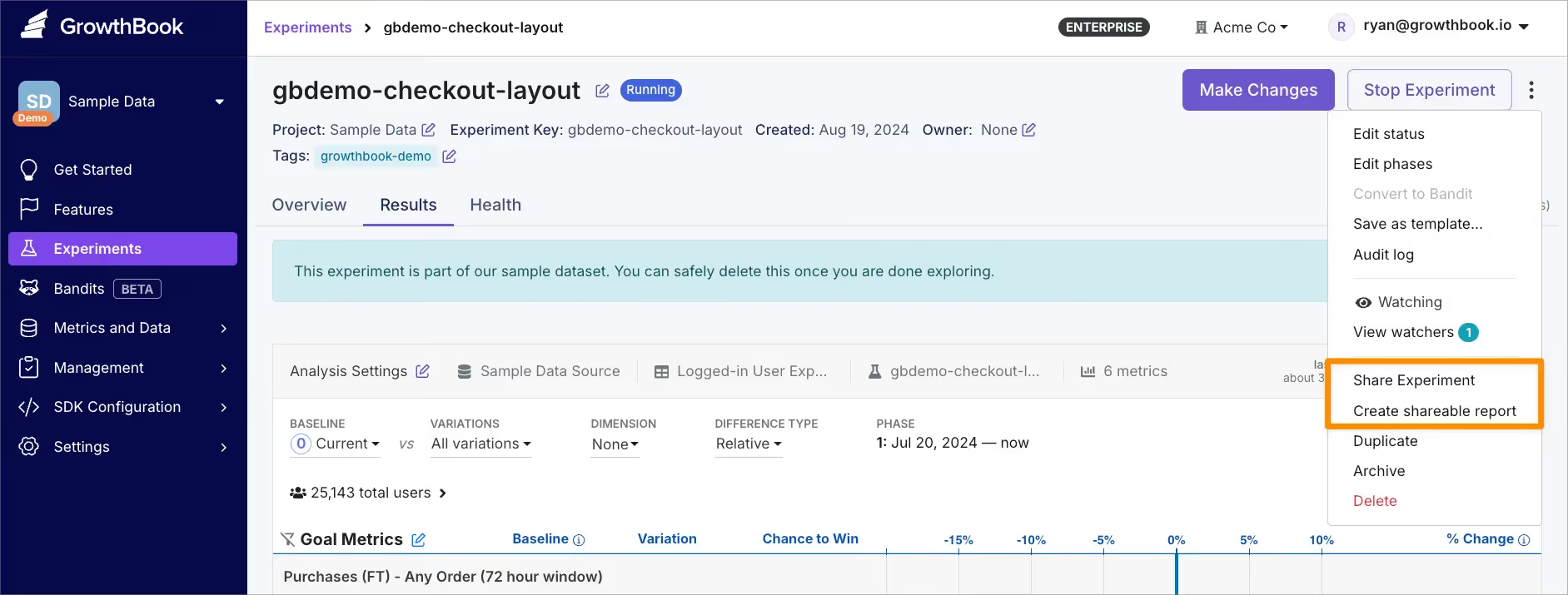
- Live Experiment Sharing
Share a real-time, always-updating view of experiment results with stakeholders who need the latest data. Share live updates during sprint reviews to keep teams aligned and make decisions more quickly. No manual updates are required, ensuring everyone has access to the most current insights.
See it in action: Explore this live experiment example to see how effortlessly you can share data in real-time. - Custom Reports
Save snapshots of experiment data for deeper analysis or documentation. Analysts and engineers can:- Select specific date ranges or user segments
- Adjust statistical parameters
- Add or remove metrics for targeted analysis
- Apply custom SQL filters to address outliers or unique use cases
- Create stakeholder-specific views tailored to their needs
Custom reports are saved for future reference, helping teams build institutional knowledge and better understand what worked, what didn’t, and why.
Learn more about sharing experiments to improve collaboration and streamline your team’s experimentation efforts.
By making experimentation workflows customizable and insights more accessible, GrowthBook empowers teams to streamline workflows, share insights effortlessly, and accelerate learning from experiments, driving smarter decisions.
Related articles

.avif)
Ready to ship faster?
No credit card required. Start with feature flags, experimentation, and product analytics — free.

