

GrowthBook 1.0.0 is here! 🎉 Feature Flagging, Chrome DevTools Extension, and more

We are thrilled to announce the release of version 1.0 of GrowthBook. We want to thank everyone who has provided feedback or made contributions over the past year and across the previous releases. We are excited for the future of GrowthBook in 2022 and beyond!
Release highlights
The major highlight of this release is the addition of feature flagging to our platform, which fits in naturally with experimentation. We are also releasing our Chrome DevTools extension, which is a huge productivity boost for engineers working with our front-end SDKs. Read about all the improvements below.
Feature Flagging 🔥
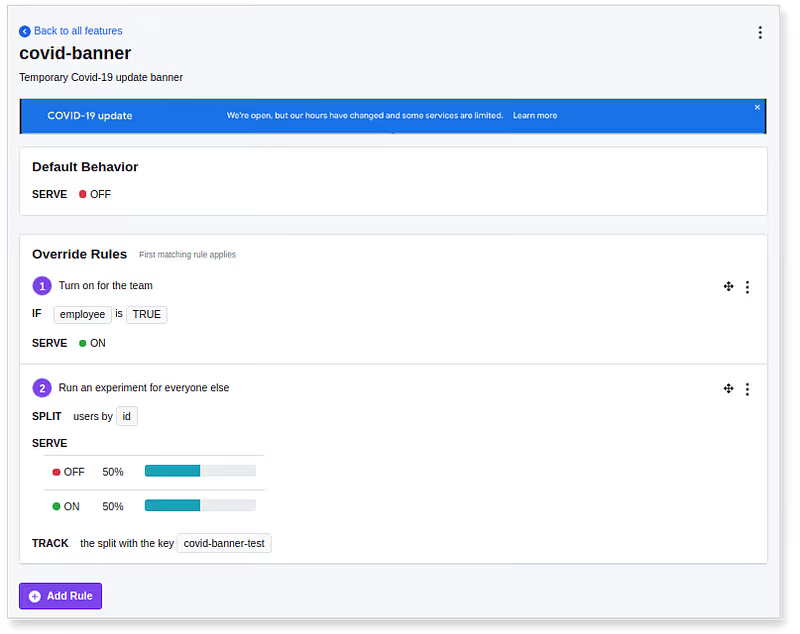
Feature flags are now a core part of the GrowthBook platform. Feature flags let engineers wrap their code with conditional checks that are remotely controlled. For example, turning a sales banner on or off, or rendering one of three different versions of a registration form. Instead of just setting the feature flag to the same value for everyone, GrowthBook lets you do advanced segmentation, gradual rollouts, and, of course, run A/B tests.
Feature flags are available today for our JavaScript and React SDKs, with the rest coming soon. Give it a try and let us know what you think!
Chrome DevTools extension 20

As part of our developer focus, we’ve published a Chrome DevTools extension. For those using our front-end SDKs (Javascript/React), this extension adds a new panel to Chrome’s DevTools that makes it easy to see what features and experiments are being used on the page and lets you toggle between states to test all the different variations of your site, all without leaving the browser. Install the GrowthBook Chrome extension here.
My reports page

Back in version 0.9.0, we launched Ad-hoc Reports, which let you dig into experiment results in a sandboxed environment. Now, we’re making those reports easier to find and manage. You’ll be able to see all reports for an experiment directly beneath the results. Plus, there’s a dedicated “My Reports” page, accessible from the user menu in the top nav, that shows all of your reports across all experiments
Import experiment improvements

You’ve been able to import experiments from your datasource to GrowthBook for a long time, but this action was hidden deep within the settings section. Now, you can import directly from the Experiments page. Just click the “Add Experiment” button, and you’ll see a list of tests to choose from.
Multiple variation detection
When analyzing experimental results, GrowthBook will now automatically detect and remove users who were exposed to more than one variation. This can happen for various reasons, such as someone logging in and out of multiple accounts. Usually, this affects only a tiny fraction of users, but if it’s happening more often than expected in an experiment, we will show a warning message above the results with more information.
Other improvements:
- Added custom SSL certificate support for Postgres/Redshift
- Support for custom delimiters for Google Analytics
Plus numerous other enhancements and bug fixes. You can read about the full list of changes here.
Related articles
Ready to ship faster?
No credit card required. Start with feature flags, experimentation, and product analytics — free.

