

Best 7 A/B Testing Tools for DevOps teams

Most A/B testing tools are built for marketers running headline tests on landing pages.
DevOps and engineering teams have a different set of requirements: SDK-first integrations, CI/CD-compatible rollouts, data residency controls, and pricing that doesn't punish you for shipping fast. The best A/B testing tools for DevOps teams solve a different problem than the ones that show up first in a Google search — and picking the wrong one means either paying for features you'll never use or hitting hard limits exactly when your experimentation program starts to matter.
This guide is written for engineers, platform teams, and DevOps practitioners who need to evaluate experimentation tools on technical merit — not marketing copy. Whether you're looking for a self-hosted open-source option like GrowthBook or Unleash, a managed platform with deep DevOps toolchain integrations like Statsig, or an enterprise feature flag management system like LaunchDarkly, the tradeoffs between these tools are real and worth understanding before you commit. Here's what this article covers:
- GrowthBook — open-source, warehouse-native, self-hostable, with a zero-network-call SDK
- PostHog — bundled analytics and experimentation for engineering-led product teams
- LaunchDarkly — enterprise feature flag management with experimentation as a paid add-on
- Statsig — managed experimentation with native Terraform, Cloudflare, and Datadog integrations
- Unleash — open-source FeatureOps control plane with limited built-in stats
- Optimizely — marketing-oriented experimentation with meaningful gaps for engineering workflows
- Eppo — warehouse-native analysis depth built for data teams, now part of the Datadog ecosystem
Each tool is evaluated on the dimensions that actually matter to DevOps teams: deployment model, data ownership, SDK architecture, statistical depth, pricing structure, and where each tool fits — and where it doesn't.
GrowthBook
Primarily geared towards: Engineering and DevOps teams that want full ownership of their experimentation infrastructure, from flag evaluation to statistical analysis.
GrowthBook is an open-source feature flagging and experimentation platform built for teams that don't want to hand over control of their data or pay per-event pricing that scales against them. The warehouse-native architecture means your experiment data never leaves your own infrastructure — GrowthBook connects directly to BigQuery, Snowflake, Redshift, Postgres, and others, running analysis on data you already own.
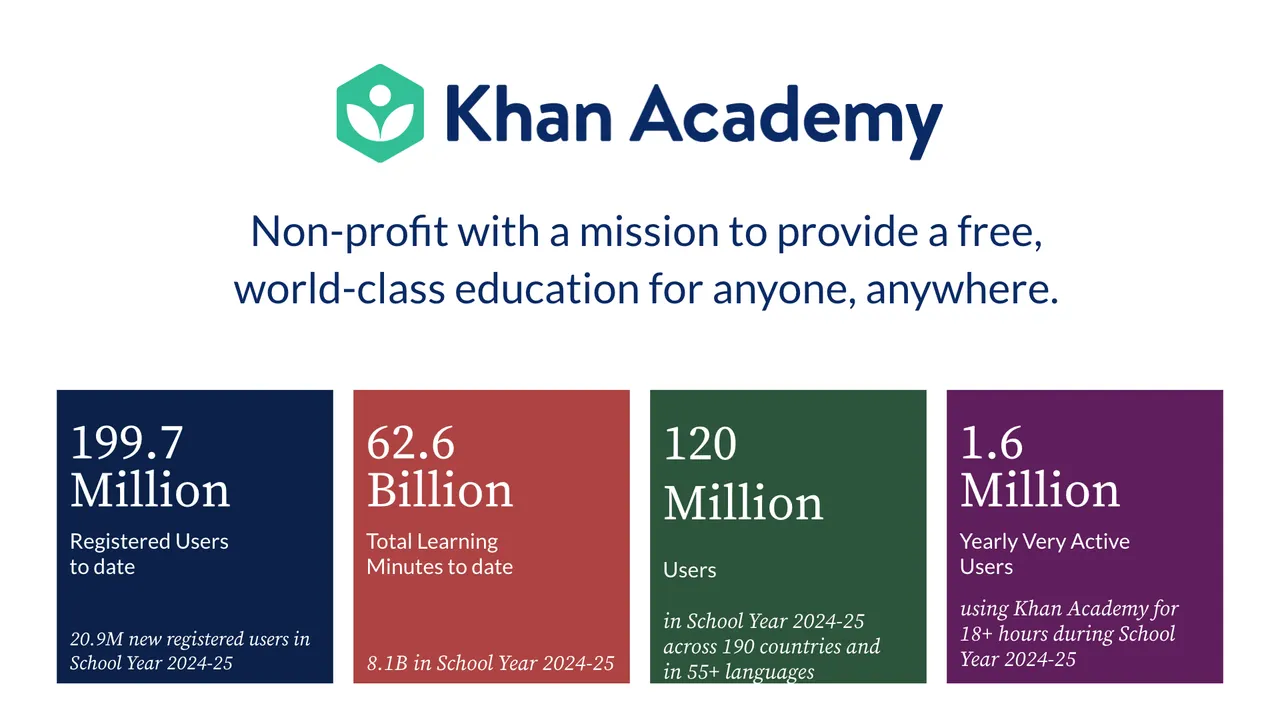
Teams like Khan Academy, Upstart, and Breeze Airways use GrowthBook to run experiments at scale without the overhead of a traditional SaaS experimentation vendor.
Notable features:
- Zero-network-call SDK architecture: Feature flags are evaluated locally from a cached JSON payload — no third-party calls in the critical path. The 24+ open-source SDKs cover JavaScript, TypeScript, React, Node.js, Python, Go, Ruby, Java, Swift, Kotlin, and more, supporting 100 billion+ flag evaluations per day.
- Linked feature flags and CI/CD-friendly rollouts: Any feature flag can be converted into an A/B test instantly. Controlled rollouts, gradual exposure ramps, and kill switches are built in — enabling the DevOps practice of separating deployment from release.
- Warehouse-native data layer: Metrics are defined in SQL against your own warehouse. No PII leaves your servers, no duplicate data hosting fees, and metrics can be added retroactively to past experiments without re-running them.
- Flexible statistical engine: Bayesian, frequentist, and sequential testing methods are all supported, plus CUPED variance reduction. Experiment types include A/B, multivariate, URL redirect, visual editor, holdouts, and multi-armed bandits.
- Self-hosting with air-gapped support: GrowthBook can be fully self-hosted, including in air-gapped environments for strict data residency requirements. The codebase is publicly available on GitHub for security review, and the platform is SOC 2 Type II certified with support for GDPR, HIPAA, and CCPA compliance requirements.
- Developer debugging tooling: A Chrome Extension lets engineers inspect which flag rules were evaluated and which variation is active for any user attribute set — reducing QA friction without requiring a staging environment toggle.
Pricing model: GrowthBook uses seat-based pricing — you're never charged based on traffic volume or experiment count, so high-throughput DevOps teams aren't penalized for running more tests or serving more users.
Starter tier: GrowthBook's Starter plan is free forever on both cloud and self-hosted deployments, with no credit card required. Check the GrowthBook pricing page for current seat and feature limits.
Key points:
- GrowthBook's unified platform scales with your team's maturity — teams can start with feature flag rollouts and progressively activate experimentation and warehouse-native analysis as their practice grows, without migrating to a different tool or vendor
- Because GrowthBook is open source, your security team can audit the codebase directly, and you're never dependent on a vendor's roadmap or pricing changes
- The warehouse-native model eliminates the "pay twice for your data" problem — if your metrics already live in Snowflake or BigQuery, GrowthBook queries them there rather than requiring you to re-pipe data to a vendor's servers
- Per-seat pricing means costs scale with your team size, not your experiment volume — a meaningful difference for high-traffic applications running continuous experimentation
- For high-throughput APIs and latency-sensitive services, local flag evaluation means you can run experiments without adding a synchronous vendor call to your request path — a meaningful architectural difference from cloud-dependent SDKs
PostHog
Primarily geared towards: Engineering-led product teams that want analytics, session replay, feature flags, and basic A/B testing in a single platform.
PostHog is an open-source product analytics platform that bundles A/B testing alongside session replay, feature flags, and product analytics — all in one self-hostable or cloud-hosted product. For DevOps teams that are already managing a product analytics stack and want to run occasional experiments without adding another vendor, PostHog is a genuinely compelling option.
The tradeoff is that you're adopting a full analytics platform to get experimentation, rather than a purpose-built experimentation tool.
Notable features:
- A/B and multivariate testing using both Bayesian and frequentist statistical methods, covering standard experiment use cases without requiring a separate tool
- Feature flags with targeting and controlled rollout support, useful for progressive delivery and canary release workflows common in DevOps environments
- Session replay included in the same platform, so teams can observe user behavior in context alongside experiment results
- Self-hosting option for teams with data residency or privacy requirements — though self-hosting PostHog means deploying the full analytics stack, not just the experimentation layer
- Open-source codebase that allows security review and community inspection, a meaningful consideration for DevOps teams evaluating vendor transparency
- Multi-platform SDK support covering JavaScript, Python, iOS, Android, React Native, and Flutter
Pricing model: PostHog uses usage-based pricing tied to event volume and feature flag request volume, meaning costs scale as your product grows. Specific tier names and price points should be verified on PostHog's current pricing page before making purchasing decisions.
Starter tier: PostHog offers a free tier for smaller event volumes; confirm current limits directly on their pricing page, as these change periodically.
Key points:
- PostHog is not warehouse-native — experiment metrics are calculated inside PostHog's own analytics platform, which means teams already using a data warehouse (Snowflake, BigQuery, Redshift) may end up maintaining parallel data pipelines and paying for data storage twice
- The statistical depth is more limited than dedicated experimentation platforms: PostHog covers standard Bayesian and frequentist testing but does not document support for sequential testing, CUPED variance reduction (a technique that reduces the sample size needed to reach statistical significance), or automated sample ratio mismatch (SRM) detection (which catches cases where users weren't assigned to variants in the expected proportions, indicating a broken experiment) — capabilities that matter for teams running high-velocity or statistically rigorous experiments
- Self-hosting PostHog requires deploying the entire analytics stack, which introduces meaningful infrastructure overhead for DevOps teams that only need the experimentation and feature flag layer
- PostHog's bundled approach is genuinely useful for smaller teams that want one platform covering multiple workflows, but teams running experimentation as a core discipline — rather than an occasional analytics add-on — may find the breadth-over-depth tradeoff limiting at scale
LaunchDarkly
Primarily geared towards: Large enterprise engineering and DevOps teams that need robust feature flag management and progressive delivery, with experimentation as a secondary capability.
LaunchDarkly is the widely recognized incumbent in enterprise feature flag management. It's built around release control, progressive delivery, and audit trails — and its A/B testing functionality is layered on top of that core flag infrastructure rather than designed as a standalone experimentation platform.
For DevOps teams already embedded in the LaunchDarkly ecosystem, this means experiments live where features already live, which reduces context-switching during release workflows. That said, experimentation is a paid add-on, not a first-class feature included in the base product.
Notable features:
- Flag-native experimentation: Experiments are built directly on existing feature flags, keeping release and test workflows in the same interface without requiring a separate tool
- Bayesian and frequentist statistical models: Supports both approaches, plus sequential testing with CUPED variance reduction — though percentile analysis is currently in beta and incompatible with CUPED
- Multi-armed bandit support: Traffic can be dynamically weighted toward winning variants without manual reallocation
- Real-time monitoring and traffic controls: Experiment health, metrics, and traffic are visible in real time, and winners can be shipped without a redeploy
- Segment slicing and data export: Results can be filtered by device, geography, cohort, or custom attributes, and exported to a data warehouse for deeper analysis
- Multiple environment support: Dev and production environments are supported, which fits naturally into staged rollout workflows
Pricing model: LaunchDarkly pricing is based on Monthly Active Users (MAU), seat count, and service connections — a structure that can become unpredictable as usage scales. Experimentation is a paid add-on on top of the base feature management tier.
Starter tier: LaunchDarkly offers a free trial, but no confirmed permanent free tier for production use — verify current availability at launchdarkly.com before making purchasing decisions.
Key points:
- Experimentation costs extra: Unlike platforms where A/B testing is included in the core product, LaunchDarkly requires a separate paid add-on for experimentation — a meaningful consideration when evaluating total cost of ownership for DevOps teams that want both flag management and testing in one budget line
- Cloud-only deployment: LaunchDarkly has no self-hosting option, which is a hard blocker for teams with strict data residency requirements or air-gapped environments
- Warehouse-native experimentation is limited to Snowflake: Teams with multi-warehouse architectures using BigQuery, Redshift, or Postgres cannot use LaunchDarkly's warehouse-native analysis without significant workarounds
- Vendor lock-in risk is real: MAU-based pricing combined with deep SDK integration creates high switching costs as usage grows — a Statsig comparison review captured the dynamic plainly: "They can literally charge any amount of money and your alternative is having your own SaaS product break"
- Stats engine is a black box: Experiment results cannot be independently audited or reproduced, which limits transparency for data teams that want to validate methodology
Statsig
Primarily geared towards: Growth-stage and enterprise engineering and product teams that want a fully managed, infrastructure-light experimentation platform with advanced statistics built in.
Statsig is a cloud-hosted feature flagging and experimentation platform built by former Meta engineers, combining A/B testing, feature flags, product analytics, and session replay in a single managed system. It's designed for teams that want serious statistical rigor — CUPED variance reduction and sequential testing are included as standard features, not premium add-ons — without the overhead of maintaining their own experimentation infrastructure.
Notable customers include OpenAI, Notion, Atlassian, and Brex.
Statsig reports processing over 1 trillion events daily with 99.99% uptime, which speaks to its infrastructure scale.
Notable features:
- Advanced stats engine out of the box: CUPED variance reduction and sequential testing are standard, enabling faster experiment conclusions and fewer false positives without requiring a dedicated data science team
- DevOps toolchain integrations: Statsig natively supports Terraform, Cloudflare, and Edge CDN, and integrates with Datadog for monitoring and rollout control — reducing the custom glue code typically needed to fit experimentation into a DevOps workflow
- Flag lifecycle management: Built-in tooling for archival, deletion, lifecycle filters, and automated nudges to clean up stale flags — a practical answer to the "zombie flag" problem that accumulates in shared codebases over time
- Low-latency SDK architecture: SDKs are designed to evaluate flags without blocking calls, supporting front-end, middleware, and back-end use cases at scale
- Warehouse-native deployment option: Teams with existing data infrastructure can run Statsig in a warehouse-native mode, keeping data in their own environment rather than routing it through Statsig's cloud
Pricing model: Statsig offers a free tier alongside paid plans, but specific tier names, event caps, and pricing details are not publicly confirmed in available sources — check statsig.com/pricing directly for current information.
Starter tier: Statsig offers a free tier with experimentation and feature flagging capabilities; specific limits on events or seats should be verified on their site.
Key points:
- Managed infrastructure vs. self-hosting: Statsig is a proprietary, closed-source SaaS platform. Teams with strict data residency requirements, compliance constraints, or a preference for self-hosting will find this a meaningful limitation — there is no open-source version or on-premises deployment option.
- Data ownership tradeoff: While Statsig offers a warehouse-native option, its default model routes data through Statsig's managed cloud. Teams that want experiment data to stay entirely within their own infrastructure by default will need to evaluate this carefully.
- Strong fit for DevOps toolchain users: The native Terraform, Cloudflare, and Datadog integrations are a genuine differentiator for DevOps teams already using those tools — this is one area where Statsig has made explicit, documented investments that are worth acknowledging.
- Vendor lock-in consideration: Because flag evaluation depends on Statsig's infrastructure, a Statsig outage means your flags stop evaluating — and if Statsig changes its pricing or deprecates a feature, you have limited options beyond migrating your entire flag implementation.
- No open-source transparency: Teams that want to audit the statistical methods, inspect SDK internals, or contribute to the platform cannot do so — the codebase is not publicly available.
Unleash
Primarily geared towards: DevOps and platform engineering teams at mid-to-large enterprises that need a self-hosted, compliance-friendly feature flag system.
Unleash is an open-source feature management platform built around feature flags (called "feature toggles"), with A/B testing layered on top of that core infrastructure. With over 13,000 GitHub stars and customers like Wayfair, Lloyds Banking Group, and Prudential, it has a substantial community and proven enterprise adoption.
The platform markets itself as a "FeatureOps control plane" — its primary strength is giving high-frequency deployment teams control over what ships to whom, not statistical experiment analysis.
Notable features:
- Flag-based A/B/n testing: Unleash enables A/B and multivariate experiments by using feature flags to assign users to variants without redeploying code, decoupling deployment from feature exposure
- Self-hosted deployment: Runs on-premises or in a private cloud, with Docker Compose support for GitOps-friendly infrastructure setups — a key reason regulated-industry customers like Lloyds Banking Group and Prudential chose it
- Kill switches and instant rollback: Feature flags double as kill switches, letting teams instantly revert a variant or feature if something goes wrong in production
- Enterprise access control: Fine-grained RBAC and SAML SSO integration for teams operating in regulated or large-enterprise environments
- High scalability: Wayfair reported Unleash cost one-third of their homegrown feature flag solution while improving reliability and scalability; Mercadona Tech uses it to ship to production 100+ times per day
Pricing model: Unleash offers a free open-source self-hosted tier alongside an enterprise cloud product. Specific pricing tiers and costs are not published transparently — check getunleash.io/pricing directly for current plans.
Starter tier: The open-source version is free to self-host; verify the exact license in the GitHub repo before relying on it for commercial use.
Key points:
- Unleash is a feature flag platform first — its A/B testing capability is real but limited. There is no built-in stats engine; Unleash's own documentation directs users to integrate an external analytics tool (such as Google Analytics) to track and analyze experiment results, which adds operational overhead.
- Teams using Unleash for experimentation often end up managing multiple tools: Unleash for flags, a separate analytics platform for metrics, and potentially another tool for statistical analysis — a fragmentation risk worth factoring into your tooling decision.
- Unleash is a strong fit if your primary need is deployment safety, controlled rollouts, and compliance in a self-hosted environment; it is less suited if statistical rigor and integrated experiment analysis are central requirements.
- A warehouse-native experimentation platform, by contrast, provides a built-in Bayesian, frequentist, and sequential stats engine alongside feature flags, and connects directly to your existing data warehouse (BigQuery, Snowflake, Redshift) for experiment analysis — no separate analytics integration required.
- Both Unleash and open-source experimentation platforms support self-hosted deployment, but a purpose-built experimentation platform offers greater depth for statistical analysis while Unleash is purpose-built for FeatureOps control.
Optimizely
Primarily geared towards: Marketing, CRO, and digital experience teams running front-end, visual experiments on websites and landing pages.
Optimizely is one of the original enterprise experimentation platforms, founded in 2010 and now part of a broader digital experience suite. Its core strength is a no-code visual editor that lets marketers and content teams launch A/B tests without writing a line of code.
That positioning — powerful for marketing-led experimentation — is also what makes it a less natural fit for DevOps and engineering teams who need server-side control, CI/CD integration, and SDK-first workflows.
Notable features:
- Visual editor for UI and content testing: Non-technical users can create and launch web experiments without developer involvement, which is useful for marketing teams but less relevant to engineering workflows
- AI-assisted experimentation: Includes AI-generated test variations and automated result summaries, plus multi-armed bandit traffic allocation to shift traffic toward winning variants
- Stats Engine (sequential testing): Uses a frequentist fixed-horizon approach with sequential testing and SRM checks; does not support Bayesian methods, CUPED, or Benjamini-Hochberg corrections
- Global CDN-powered delivery: Experiments can be served at the edge for reduced latency and flicker-free rendering via server-side execution
- Data warehouse connectivity: Offers a warehouse-native option for connecting experiment data, though the analytics model is largely closed with limited visibility into underlying calculations
- Enterprise compliance controls: Includes SOC 2 and GDPR compliance features, with configuration options to prevent PII/PHI transfer
Pricing model: Optimizely uses traffic-based (MAU) pricing with no free tier. Pricing is modular, meaning additional use cases — such as server-side experimentation or personalization — typically require purchasing separate add-on packages.
Starter tier: There is no free tier or self-serve trial; access requires engaging with Optimizely's sales team.
Key points:
- Cloud-only SaaS with no self-hosting option: For DevOps teams with data residency requirements, air-gapped environments, or a preference for infrastructure ownership, this is a hard constraint — there is no on-premises or self-hosted deployment path
- Separate systems for client-side and server-side experimentation: Optimizely's client-side and server-side tooling are distinct products, which adds operational overhead for engineering teams that need both; this contrasts with platforms that unify feature flags and experiments in a single SDK
- Setup time measured in weeks to months: Optimizely's enterprise onboarding typically requires dedicated team support and significant configuration before teams are running experiments — a meaningful friction point for DevOps teams that value fast iteration cycles
- Traffic-based pricing limits experimentation velocity at scale: Because costs scale with MAUs rather than seats or experiment count, high-traffic teams can find the pricing model constraining when trying to run many concurrent experiments across multiple services
- Closed analytics model: Experiment results and historical data live inside the platform — you can't write a SQL query against your raw experiment data, and you can't add a new metric to an experiment that already ran; if you realize you should have been tracking something, you have to re-run the test
Eppo
Primarily geared towards: Data-science-led product and engineering teams at larger organizations that want warehouse-native experiment analysis with rigorous statistical governance, and that are already embedded in or evaluating the Datadog ecosystem.
Eppo is a warehouse-native experimentation platform that was built specifically for teams running sophisticated, data-team-governed experimentation programs. It connects directly to your data warehouse for experiment analysis, supports advanced statistical methods, and is designed around centralized metric governance — meaning a data team defines and owns the metrics that experiments are evaluated against.
Eppo was acquired by Datadog, and its roadmap is increasingly oriented toward observability and analytics workflows within that ecosystem.
Notable features:
- Warehouse-native architecture: Eppo runs experiment analysis directly in your data warehouse (Snowflake, BigQuery, Redshift), keeping data in your own infrastructure rather than routing it through a vendor's servers
- Statistical rigor: Supports Bayesian, frequentist, and sequential testing, plus CUPED variance reduction — comparable statistical depth to other serious experimentation platforms
- Advanced experimentation methods: Includes contextual bandits and GeoLift for teams running geographically segmented or adaptive experiments
- Centralized metric governance: Metrics are defined and managed centrally by a data team, ensuring consistency across experiments — a strength for large organizations with multiple product teams running concurrent tests
- Feature flagging: Eppo includes feature flag functionality, though this is secondary to its core experiment analysis capability
- Mobile experimentation support: SDKs cover mobile platforms alongside web and server-side use cases
Pricing model: Eppo uses enterprise pricing with no free tier and no publicly transparent pricing page — contact Eppo's sales team for current pricing. Costs are usage-based and can become less predictable as experimentation scales.
Starter tier: There is no free tier or self-serve trial available.
Key points:
- Daily results cadence: Eppo updates experiment results on a daily cadence rather than in real time, which dramatically slows iteration for product teams that want to make fast decisions — this is a meaningful architectural tradeoff compared to platforms that surface results continuously
- SaaS-only deployment: Eppo is a vendor-managed SaaS platform with no self-hosting option, which is a hard constraint for teams with strict data residency requirements or air-gapped environments; this is a notable gap given that Eppo's warehouse-native positioning otherwise appeals to data-security-conscious teams
- Data team dependency: Eppo is designed around centralized data team governance — product and engineering teams typically cannot launch or modify experiments without data team involvement to define or change core metrics, which slows iteration for cross-functional teams that want self-service experimentation
- Setup time: Eppo typically requires days to weeks to implement, compared to hours for platforms with simpler SDK integration paths — a relevant consideration for DevOps teams evaluating time-to-first-experiment
- Datadog acquisition context: Since being acquired by Datadog, Eppo's roadmap is increasingly focused on observability workflows; teams evaluating Eppo for standalone product experimentation should assess whether the platform's direction aligns with their long-term needs
The constraints that actually narrow the field for DevOps teams
Not all evaluation criteria carry equal weight. For DevOps and engineering teams, a handful of hard constraints will eliminate most tools from consideration before you ever compare feature lists. Here is how to think through the decision systematically.
Non-negotiable constraints come first, feature lists come second
Start with the constraints that are binary — either a tool meets them or it doesn't:
Self-hosting requirement: If your organization requires on-premises or air-gapped deployment — common in financial services, healthcare, government, and regulated industries — your shortlist immediately narrows to GrowthBook and Unleash. LaunchDarkly, Statsig, Optimizely, and Eppo are all cloud-only or SaaS-only. PostHog offers self-hosting but requires deploying the full analytics stack.
Data residency and warehouse ownership: If your security or compliance posture requires that experiment data never leave your own infrastructure by default, warehouse-native platforms are the correct architectural choice. GrowthBook and Eppo are both warehouse-native by design. Statsig offers a warehouse-native mode but defaults to its managed cloud. LaunchDarkly's warehouse-native analysis is limited to Snowflake.
Open-source auditability: If your security team requires the ability to audit the codebase before approving a vendor, your options are GrowthBook, PostHog, and Unleash — all three publish their source code publicly. The remaining tools are proprietary.
Pricing model at scale: If you're running high-traffic applications or plan to run many concurrent experiments, pricing models that charge per MAU or per event will scale against you. GrowthBook's per-seat model and Unleash's self-hosted tier are the most predictable at high experiment volumes.
Once you've applied these filters, the remaining differentiation comes down to statistical depth and DevOps toolchain fit:
- If you need a built-in stats engine with Bayesian, frequentist, and sequential support — and you want it warehouse-native and self-hostable — GrowthBook is the strongest fit
- If you're already deeply embedded in the Datadog ecosystem and have a centralized data team governing metrics, Eppo is worth evaluating despite its SaaS-only constraint
- If your primary need is FeatureOps control and deployment safety, and you're willing to integrate a separate analytics tool for experiment analysis, Unleash is a proven choice
- If you want managed infrastructure with native Terraform and Datadog integrations and don't have a self-hosting requirement, Statsig's DevOps toolchain integrations are a genuine differentiator
- If you're a smaller engineering team that wants analytics, session replay, and basic experimentation in one open-source platform, PostHog covers the use case without requiring a dedicated experimentation tool
Our recommendation: when GrowthBook is the right choice for DevOps teams
For DevOps teams evaluating the best A/B testing tools, GrowthBook is the strongest default choice when two or more of the following are true:
- You need self-hosting or air-gapped deployment
- Your experiment data must stay in your own data warehouse
- You want open-source auditability for your security team
- You're running high-traffic applications where per-event or per-MAU pricing would become prohibitive
- You want feature flags and experimentation in a single unified platform without paying for two separate tools
The zero-network-call SDK means flag evaluation never touches a third-party server in your critical path. Your experiment metrics stay in the data infrastructure you already own and trust — that's what the warehouse-native architecture guarantees. And because GrowthBook is open source, your security team can audit the codebase rather than taking a vendor's word for it.
GrowthBook also handles the full experiment lifecycle — from hypothesis to implementation to statistical analysis to institutional knowledge capture — without requiring a separate analytics platform, a separate feature flag tool, or a dedicated data science team to interpret results. The Insights section surfaces cumulative experiment impact, win rates, and a learning library so your team builds on what it has already tested rather than repeating mistakes.
Teams like Khan Academy, Breeze Airways, and Character.AI use GrowthBook to run experiments at scale. John Resig, Chief Software Architect at Khan Academy, put it directly: "People are running more experiments with more confidence."
Where to start depending on where you are now
If you have no experimentation platform today: Start with GrowthBook's free Starter plan. Connect your existing data warehouse, install the SDK for your primary language, and run an A/A test to validate your implementation before launching your first real experiment. The entire setup typically takes hours, not days.
If you're currently using a marketing-oriented tool like Optimizely: The most common migration path is running GrowthBook in parallel for server-side and feature-flag-driven experiments while keeping the existing tool for front-end visual tests. Teams typically complete the full migration within one to two quarters.
If you're using Unleash for feature flags but need better experiment analysis: GrowthBook's modular architecture means you can use it purely for experiment analysis against your existing warehouse data, without replacing your flag infrastructure on day one. Connect your warehouse, define your metrics in SQL, and start analyzing experiments you're already running.
If you're evaluating enterprise options with a data team: Request a GrowthBook demo to walk through the warehouse-native architecture, statistical engine configuration, and enterprise self-hosting options. The ROI calculator at growthbook.io can help you model the cost difference against your current or prospective vendor.
The best A/B testing tools for DevOps teams are the ones that fit your infrastructure constraints, not the ones with the longest feature list. Start with your hard constraints, apply them as filters, and you'll find the shortlist is shorter than the market makes it appear.
Related reading
Related Articles
Ready to ship faster?
No credit card required. Start with feature flags, experimentation, and product analytics—free.

