

New GrowthBook version 2.7

Sticky bucketing, reusable targeting conditions, experiment health tab, fact table optimizations, and more!
Happy New Year, everyone! We’re back at it with the release of GrowthBook 2.7. This version features sticky bucketing, reusable targeting conditions, an experiment health page, and more. Full details are below.
Sticky bucketing
When running an experiment, you want to ensure users are not exposed to multiple variants (e.g., a single user seeing both A and B at different times). GrowthBook accomplishes this by using deterministic hashing, which works great most of the time. However, there are certain scenarios where this can break down. For example, if your experiment targets only German visitors, a user could switch from seeing variation B to A if they take a train to France.
Sticky Bucketing allows you to remember the first variation a user sees, so their experience remains consistent, even if something changes that would otherwise reassign them. This behavior is opt-in and is currently supported only in the latest versions of our JavaScript and React SDKs. Read more in our Sticky Bucketing Docs.
Reusable targeting conditions

We’ve expanded Saved Groups to support more advanced use cases. Instead of just a list of IDs, you can now create Condition Groups with arbitrarily complex targeting rules (e.g., UK Chrome users with a Pro subscription). Just like existing Saved Groups, these can be reused across multiple features and experiments, and updating the group will immediately update everywhere it is referenced. You can read more about this in our completely revamped Targeting Docs.
Fact table query optimization
It’s common for an experiment to have multiple metrics coming from the same underlying database table — for example, Revenue per User and Orders per User, both driven by a Purchases table. In this latest release, we’re leveraging this relationship to drastically reduce the number of queries we need to run. For data warehouses with usage-based billing, such as BigQuery or Snowflake, this can lead to significant cost savings.
This optimization is available only to Enterprise customers using the new Fact Tables to define their metrics. Read more about this on our Blog.
Experiment health tab
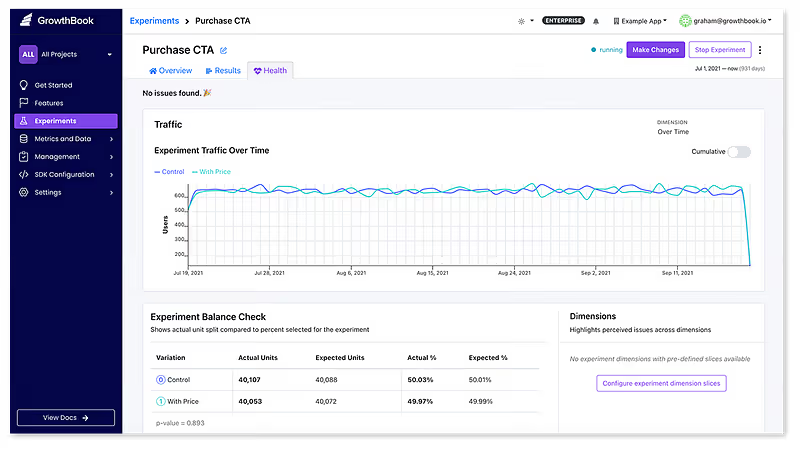
GrowthBook has always run data quality checks on your experiments to detect issues such as Sample Ratio Mismatch (SRM) and multiple exposures. In this latest release, these checks live under a new dedicated “Health” tab.
In addition, you can now pick a set of dimensions that will be checked automatically for every experiment you run. For example, if you pick a “browser” dimension, you will be able to easily detect SRM errors that only affect Safari. Read more on our Health Tab Docs.
Safely update live experiments

Changing a live experiment mid-flight is much more complicated than many people realize. If you aren’t careful, it can lead to carryover bias, SRM errors, or add significant noise to your results.
The safest approach is to basically start over — begin a new experiment phase, throw away the old data, and completely re-randomize all of your users. However, on lower-traffic sites, this can be prohibitively expensive.
Now, there’s a brand new “Make Changes” button at the top of running experiments. It will guide you through the process and recommend a safe release strategy that preserves past data whenever it’s safe to do so. If you choose a different release strategy, we will give you detailed warnings outlining the risks so you can make an informed decision.
This new flow is available to everyone, but Pro and Enterprise users also have access to additional release strategies powered by Sticky Bucketing (see above). Read more about this and see more examples on our Blog.
New best practices guide

There is a new section in our documentation that includes guides on experimentation in general, as well as chapters on how to get the most out of GrowthBook. Among other things, it covers how to organize your account with projects and tags, how to understand and interpret experimental results, and checklists to ensure your self-hosted GrowthBook deployment is secure. You can find the guide here.
Contextual AI bot

We’ve added an AI bot trained on GrowthBook's content and systems that can provide detailed answers to any questions you may have. You can try it out from the documentation site by clicking on the ‘ask AI’ box on the bottom right.
Other improvements
- Validate advanced targeting conditions before saving
- Okta SCIM Improvements
- More information on the compatibility of SDK versions
- Display helpful query stats for BigQuery (bytes scanned, execution time, etc.)
Plus many more changes and bug fixes, which you can read about here: https://github.com/growthbook/growthbook/releases
Related articles


Ready to ship faster?
No credit card required. Start with feature flags, experimentation, and product analytics — free.

